















What is Nano Banana? Features of Google’s New AI Image Editing Model
September 30, 2025

If you’re surfing the news feed and see lifelike 3D figurine images appearing everywhere, you may wonder whether it’s a long-hour product of a professional designer. But surprisingly, the true “creator” behind these trending 3D figurines is Nano Banana, the internal codename of the Gemini 2.5 Flash Image model that Google DeepMind just launched in 2025. So, what is Nano Banana exactly, and which capabilities does it truly have? This blog post will have answers for every of your questions about this model.
What is Google Nano Banana AI?
Nano Banana is an AI-powered tool for generating and editing images.
Initially, while Google was still testing the tool, they let users on the platform LMArea try it out. To hide its real identity and its true creator, Google used the code name “Nano Banana.”
This tool rose to fame because it can edit pictures very well and sparked a trend where people posted photos that look like tiny 3D figurines. With its incredible capabilities, its codename spread over the Internet.
It was not until August 26, 2025 that Google officially launched the model alongside other Gemini products under the name “Gemini 2.5 Flash Image.”
Highlight Features of Google Nano Banana AI
Since its launch in 2025, Nano Banana has stood out for its amazing features. Below is what this tool offers:
Natural language editing
Nano Banana understands natural language. So, you can send a prompt like, “Please brighten the sky and add more fluffy clouds,” and the model will instantly edit the photo. This will remove the need for manual masking or layers. With Nano Banana, those without professional editing skills can still make detailed edits on their photos by describing them.
Consistency across edits
Nano Banana still keeps the overall look of the image or picture intact, even when it makes many adjustments, such as background changes, color edits, or angle swaps. In other words, it preserves resolution and visual integrity, so repeated edits don’t degrade quality or produce obvious mismatches.
Real-time speed
Manual edits with traditional software may take hours, but Nano Banana shortens the editing time to minutes. By typing a single prompt, you can quickly adjust color tones, lighting, and even the season depicted in the image. This speed is essential for professionals working under tight deadlines and even non-specialists (e.g., marketing executives) who need to make professional edits.
Seamless image blending
You can combine various images in one scene without spending hours on manual adjustments. All you need to do is import the images and give detailed descriptions of how you want the model to blend them, like matching shadows or background lighting. Then, Nano Banana will create a unified, coherent result.
Advanced style editing
Nano Banana can transfer patterns, textures, or artistic styles from one photo to another. Further, it can instantly apply realistic textures or artistic filters to match the original lighting and combine various visual styles, but still keep a photorealistic finish. The AI can also change materials and moods, like transforming bick to marble or daylight to sunset.
Intuitive object manipulation
Do you want to add, alter, or remove objects instantly? These manipulations can be done easily with Nano Banana. By typing a prompt like “Place a white-fur Samoyed on a grass, the AI model will return a realistic, well-lit dog that is suitable for the scene’s perspective and shadows. With clear descriptions, you can easily change clothing color and hairstyle or remove unwanted items from the photos.
Generative expansion and inpainting
If you want to expand the photo to repair damaged areas or reveal more background, Nano Banana can handle it well. Additionally, when removing objects, it reconstructs the missing details so that the edited sections blend smoothly with the rest of the image.
How Nano Banana Works
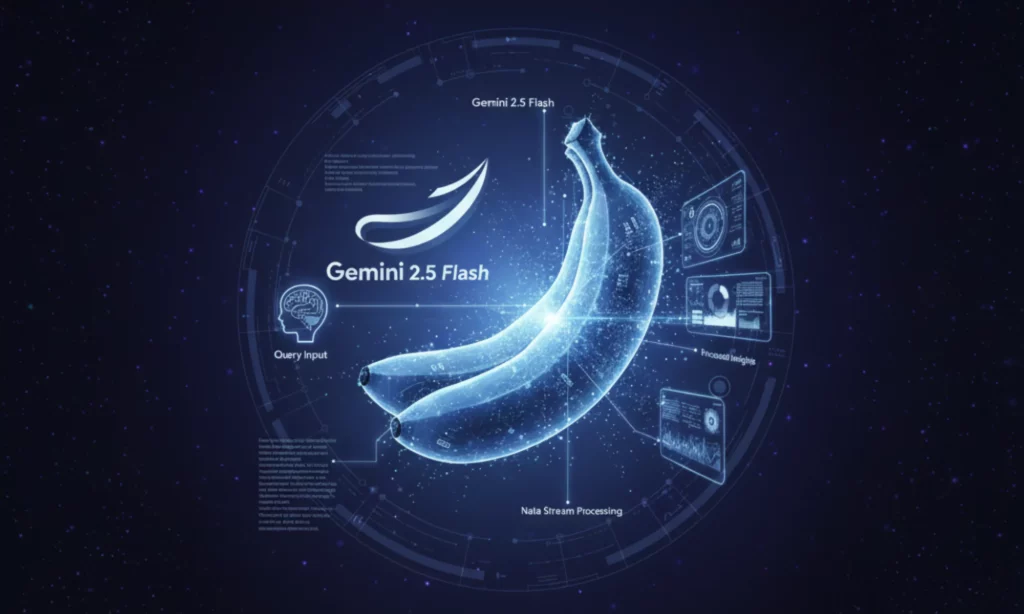
The way Nano Bana works is quite straightforward. You only need access the Gemini app or a connected Google AI service, and then send a detailed description of the image you want to create or edit.
The prompt is delivered to Google’s servers, where the model “reads” and interprets it and starts processing the image. As all the processing tasks take place on the cloud, you only need an Internet-connected device, like a mobile phone or laptop.
Within seconds, the newly generated or edited image will appear on your device. You then can send additional prompts through conversational chats with Nano Banana. The model accordingly updates the image until you get a satisfying result.
Benefits and Applications of Nano Banana
Despite very young age, Nano Banana brings a lot of transformative benefits to both professional editors and non-specialists. Let’s take a detailed look at its pros and applications:
Core Benefits
- Consistent Quality: Nano Banana maintains the overall look and character of your original image. While it still helps you adjust the image multiple times to get sharp, detailed results.
- Fast, Real-Time Results: The AI model responds to your prompts within seconds. You no longer need to wait for hours to create or edit an image. This tools save much time and effort you often spend on traditional software.
- Ease of Use: There’s no need to possess advanced editing and designing skills to create professional-looking images. Nano Banana understands your plain language prompts, so you only need to describe your design in everyday words rather than using complex designing techniques.
- Creative Flexibility: Whether you want to make subtle corrections or significant transformations (e.g., building 3D figurines), Nano Banana has the right capabilities for your creative options.
Practical Applications
- Rapid Prototyping for Professional Designers and Editors: Graphic designers, professional editors, or small creative teams can use Nano Banana to experiment with their concepts or mockups. With its editing capabilities and speed, you can test your idea in seconds.
- Personal Photo Enhancement: Individuals can leverage Nano Banana to edit personal photos. From adjusting lighting and refining details to removing objects, the tool can do these tasks well.
- Social Media Content: Nano Banana helps creators quickly generate eye-catching visuals for different social media platforms.
- Marketing and Branding: Businesses can create promotional images or refresh product photos quickly for their marketing campaigns. Nano Banana gives them power to keep campaigns visually consistent and current.
Nano Banana’s Place in the Google AI Ecosystem
Nano Banana was introduced under the name Gemini 2.5 Flash Image by Google in August 2025. The model is a key component of the Gemini family of AI products, which acts as Google’s umbrella brand for advanced generative AI.
Located in the Google AI ecosystem, Nano Banana is made available through the Gemini app and any related Google AI services. This means you can access the image editing tool in the same environment as Google’s other Gemini AI offerings. This gives you a unified, seamless experience across Google products.
While Gemini models excel at handling text-focused tasks, Nano Banana expands the AI ecosystem’s capability to image editing and visual creativity. Its focus on generating high-quality images makes the Google AI ecosystem more complete.
How to Access and Use Nano Banana
You can access and leverage Nano Banana to perform complex image generation and edits through the Gemini app and other services like Imogen. This section will give you a quick guide on how you can access these platforms to generate and edit images with Nano Banana.
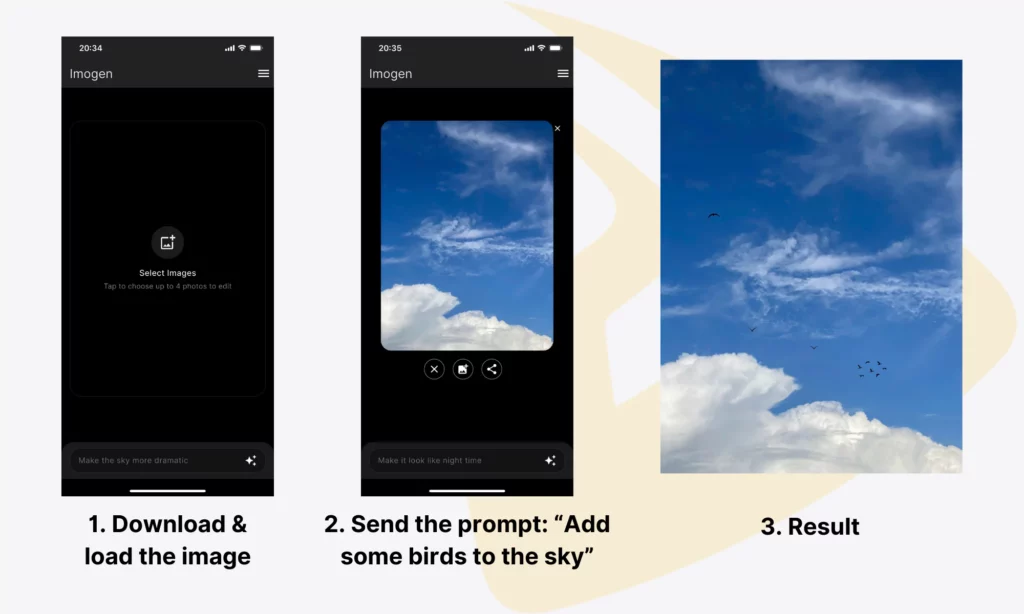
Editing with Nano Banana on Imogen
Imogen uses Google’s newly released Gemini 2.5 Flash Image (aka Nano Banana) to edit photos on Apple devices. On Imogen, you can:
- Remove backgrounds/persons from a photo
- Change styles (i.e., by adding accessories, changing outfits, or applying subtle retouching)
- Restore damaged or old photos
- Upscale images without losing quality
- Create professional headshots and profile pictures
- Adjust basic product images to generate high-end visuals
- Isolate products to create ecommerce-ready shots.
Following the instructions below to perform image generation and editing with Imogen:
- First, download the app to your iPhone, iPad, and MacBook
- Import a photo from your camera roll or send text-based prompts to create new images
- For image editing, describe changes you want (e.g., “remove the background” or “restore the photo”)
- Preview results, send additional prompts for adjustments (if needed), and export the edited photo without watermarks.
Editing with Nano Banana on Google Gemini
The main and simplest way to access Nano Banana is through the official Google Gemini. This model is already integrated within the Google AI chatbot. On Google Gemini, you can use Nano Banana to:
- Change an image’s background and style
- Blend a photo of an object (e.g., a metallic-blue texture) onto an object in another photo (e.g., a wooden countertop)
- Replace specific objects in a scene with new, detailed ones while keeping other components of the image intact.
- Restore old or damaged photos
- And more!
To edit and generate images with Nano Banana on Google Gemini, you should:
- Visit the Gemini web interface: gemini.google.com
- Log in with your Google account; if you don’t have an account, sign up for a new one
- Start a new chat and type a prompt that describes your preferred changes. Further, you can upload the image directly to the Gemini app and send detailed instructions to make edits.
- Preview results, make necessary adjustments, and download the generated or edited photo without watermarks.
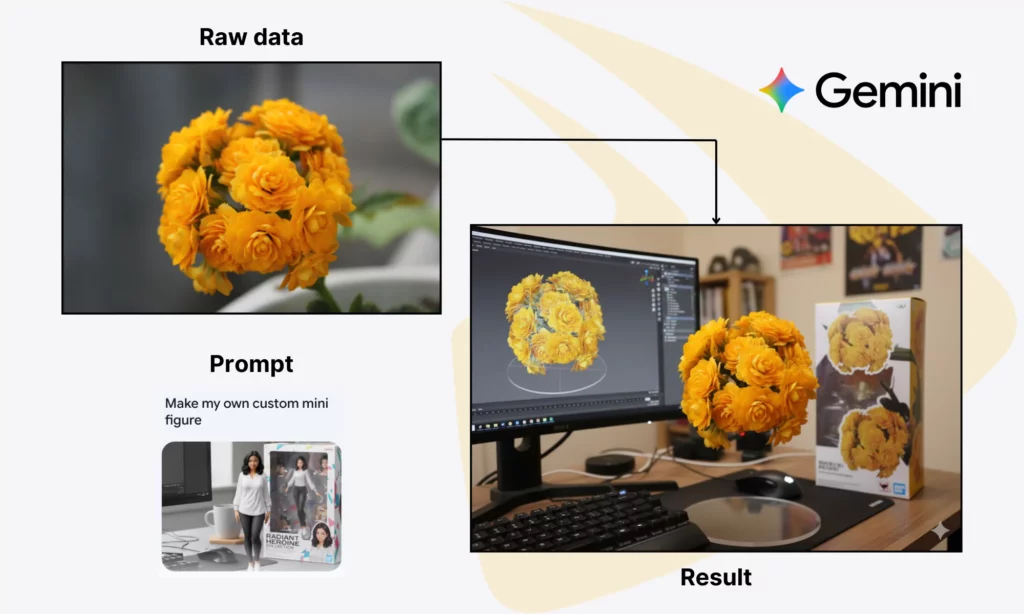
To get the best results, you should describe what you want in detail. Below are some formulas you can adopt for image generation and editing with Nano Banana.
- Generation: Create an image of [Subject] [Action] [Scene] in [Style] with [Specific Detail]. For example, “Create an image of a Shiba Inu dog wearing a tiny chef’s hat, baking a cake in a Japanese-style modern kitchen. Highly detailed, cinematic lighting.”
- Editing: [Action to perform] [on which object] [with what result]. For example, “Change the background to a picnic mat on a lawn under daylight. Keep the dog’s pose and appearance untouched.”
5 Trending Prompts for Using Google Nano Banana to Create Images
If you want to try out Nano Banana, use the trending prompts as follows to test its capabilities in image generation and editing:
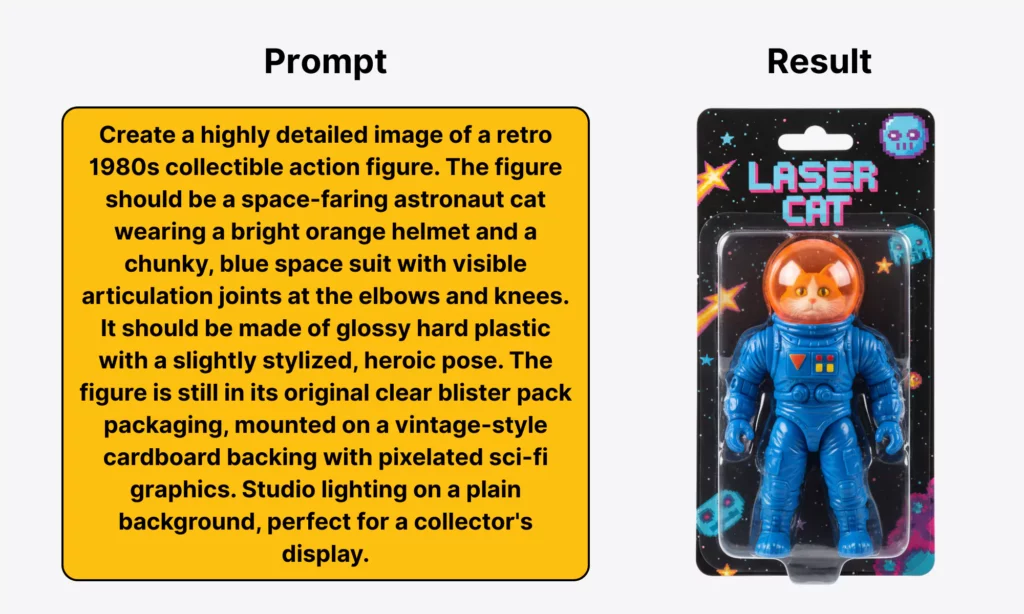
1. Retro collectible action figure
Creating a retro collectible action figure gives you nostalgia and a unique aesthetic. If you want to create such a figure, you should include the following key elements in a prompt:
- Subject: A specific character, animal, or object.
- Style/Era: “vintage toy,” “1980s action figure,” “He-Man style,” or “G.I. Joe style.”
- Materials: “Glossy finish,” “injection-molded,” or “hard plastic.”
- Details: “Simple paint application,” “cardboard backing,” “visible articulation joints,” etc.
- Lighting/Scene: “Studio lighting,” “display shelf,” “clean white background,” etc.
Below is an example prompt and its result:
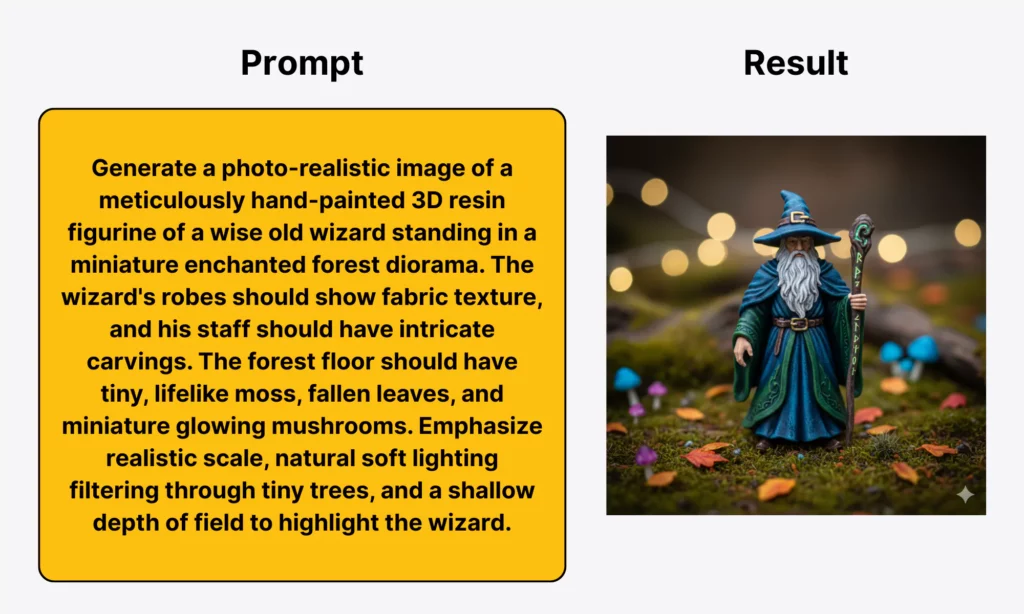
2. Lifelike 3D figurine in a scene
Do you want to build ultra-realistic 3D figurines that appear tangible and perfectly integrated into miniature dioramas? If yes, give Nano Banana detailed instructions that cover the following factors:
- Subject (or a Static Figurine): A character, animal, or object.
- Materials: “Matte finish,” “resin,” “hand-painted,” “polystone,” etc.
- Realism: “Lifelike,” “photo-realistic,” “texture details,” etc.
- Scene: “Miniature diorama,” “natural lighting,” “realistic environment,” etc.
- Perspective: “Close-up,” “shallow depth of field,” “eye-level shot,” etc.
Below is an example prompt and its result:
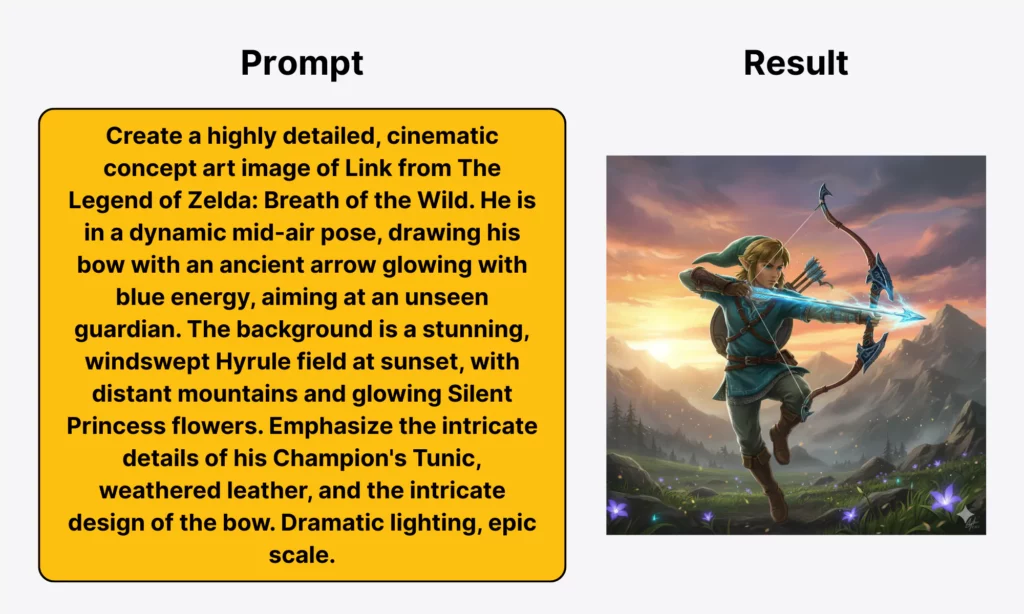
3. Iconic video game character
Nano Banana helps you generate your favorite or imaginative video game characters with detailed visuals. Below is some key information you should provide to the model in your prompt:
- Character: A specific, iconic video game character
- Game: Mention the game to identify the style
- Art Style: “Concept art,” “cinematic,” “realistic render,” etc.
- Pose/Action: “Dynamic pose,” “ready to attack,” “mid-action,” etc.
- Environment: A thematic background or a recognizable setting of the character from the game
- Details: “Signature weapons,” “character traits,” “armor textures,” etc.
Below is an example prompt and its result:
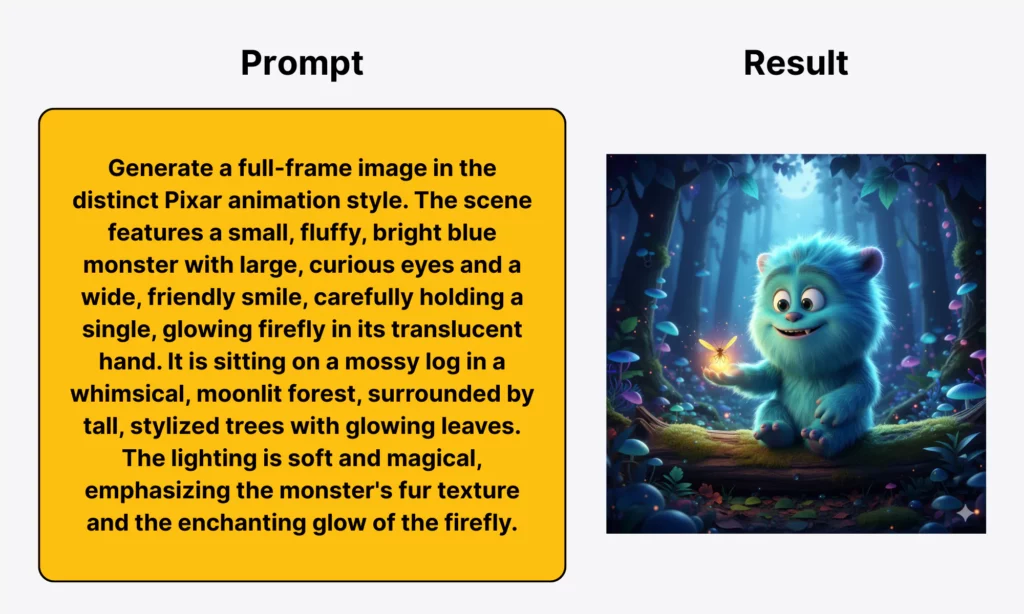
4. Pixar-style animation
If you want to build a character or background with highly distinctive animation styles featured by Pixar, ask Nano Banana to help. You should mention the following details in the prompt so that the model can understand your intent:
- Style: Pixar animation style
- Character: A character, animal, or object
- Environment: Detailed, colorful, but still stylized background
- Emotion/Story: Mention narrative or character emotion in the scene
- Details: “Vibrant colors,” “textured surfaces,” “depth of field,” etc.
- Lighting: “Cinematic,” “warm lighting,” “soft shadows,” etc.
Below is an example prompt and its result:
5. AI-generated motion graphic
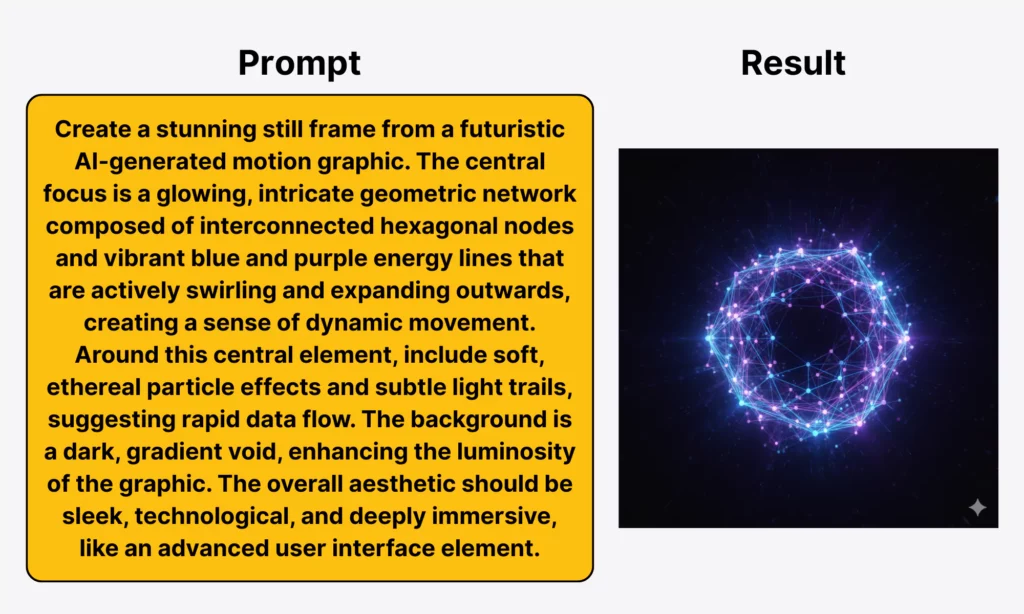
Nano Banana also helps you generate dynamic, unique motion graphics with aesthetic and dynamic energy. Although the model is incapable of creating actual animations, it still creates a sample frame for you to brainstorm the final motion graphics. Below are several factors to consider in the prompt for creating such graphics:
- Core Concept: An abstract idea, a logo/text element, a product, or anything that the motion graphic is illustrating
- Style/Visuals: “Abstract,” “geometric,” “futuristic,” “holographic,” etc.
- Elements of Motion: “Sense of speed/flow,” “particle effects,” “streaks of lights,” “dynamic composition,” etc.
- Lighting: “Vibrant,” “dark background with bright elements,” “neon,” “luminescent,” etc.
- Composition: “Complex,” “energetic,” “balanced,” etc.
Below is an example prompt and its result:
Is Nano Banana Free?
Yes, Nano Banana is free to use through the Google Gemini app, but with limited features. Through the Gemini web or mobile interface, you can access its powerful image generation and editing capabilities (e.g., image blending, outfit changes, or background changes). However, the number of images they can create or edit with Nano Banana per day is limited.
Conclusion
Nano Banana is an incredible image generation and editing tool. It can save hours and effort for professional designers and even non-specialists in creating sophisticated images.
Further, it supports various editing tasks, from background removal to outfit swaps and style changes. Only giving a detailed description or instruction to Nano Banana, you can generate or edit images in the way you want.
So, have you tried out this AI tool? What do you think about it? Share your ideas and experience with us on Facebook, X, and LinkedIn! And don’t forget to subscribe to our newsletter to stay updated about AI and the latest technologies!
Also published on

Share post on









Related Articles


Agentic AI Impact on Workforce: How It Reshapes Jobs & Organizations
Agentic AI Impact on Workforce: How It Reshapes Jobs & Organizations Published March 06, 2026
Agentic AI Single vs Multi-Agent Systems: Key Differences
Agentic AI Single vs Multi-Agent Systems: Key Differences Published March 04, 2026
Agentic AI Security: Risks, Core Architecture, Solutions
Agentic AI Security: Risks, Core Architecture, Solutions Published March 03, 2026Read more topics



AI Development
AI Development

Automation Technologies & Solutions
Automation Technologies & Solutions

Back-End Development
Back-End Development

Best Companies
Best Companies

Blockchain Technology and Applications
Blockchain Technology and Applications

Business Analyst Role & Skills
Business Analyst Role & Skills

Chatbot Development
Chatbot Development

Cloud Technology Revolution
Cloud Technology Revolution

CMS Platforms Development
CMS Platforms Development

Cyber Security
Cyber Security










