
















How To Use ChatGPT In 2026: Tips, Features, And Best Practices

KEY TAKEWAYS:
- Use ChatGPT for work that can be checked, then match the review effort to the risk of the decision or output.
- ChatGPT is most useful for low-risk, repeatable work such as drafts, summaries, checklists, study help, and first-pass analysis.
- Features like Projects, files, voice, and desktop workflows become more valuable when they support a specific workflow with clear review steps.
- For important work, always check data controls, review sensitive information carefully, and keep human judgment in charge of final decisions.
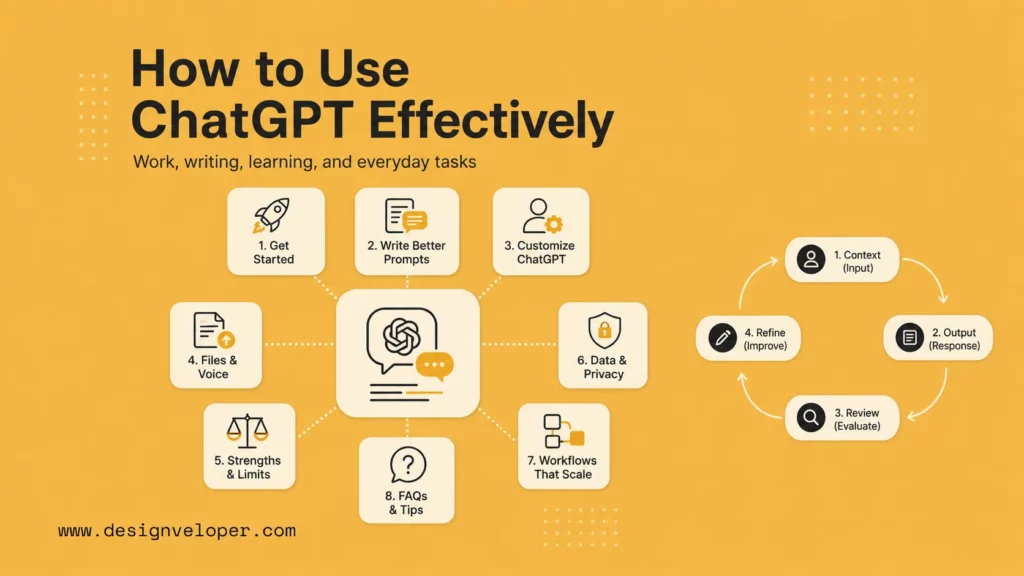
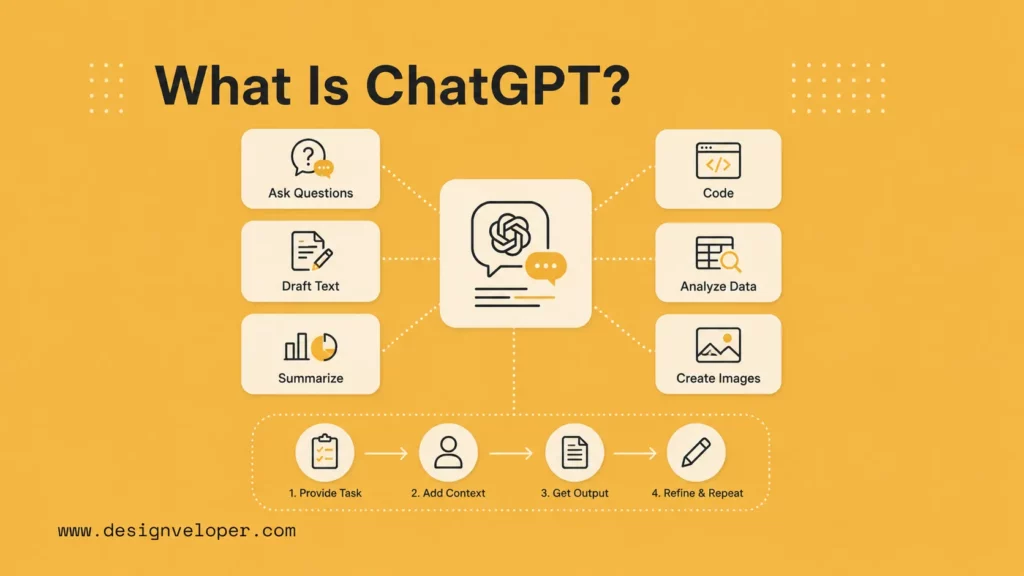
This guide explains how to use chatgpt effectively for work, writing, learning, and everyday tasks. The best results come from a simple habit: give ChatGPT a clear task, provide enough context, ask for a specific output, review the answer, and refine it with follow-up prompts.
If you are new to chatbot workflows, a chatbot vs ChatGPT comparison can clarify the difference. It also helps to think of ChatGPT as a drafting and reasoning assistant, not as an automatic decision-maker. The better your task definition and review habit, the more useful the output becomes.
Further reading:
- Can ChatGPT Really Build an App? What ChatGPT Can & Cannot Do
- Gemini Vs ChatGPT: Complete AI Assistant Comparison
- Claude Vs ChatGPT Vs Gemini For Coding: Which AI Fits Your Workflow?
What Is ChatGPT?
ChatGPT is OpenAI’s conversational AI product for asking questions, drafting text, summarizing files, writing code, analyzing data, creating images, practicing conversations, and planning work in natural language. You can use it through the web, mobile apps, desktop apps, and paid business workspaces, depending on your account and region.
ChatGPT changes quickly, so feature names, limits, and available models can move. The official ChatGPT release notes are the safest place to check recent product changes, while the ChatGPT plans page explains current plan tiers and feature availability. For business use, treat those official pages as the live source before training a team or documenting an internal workflow.
Quick summary: start with low-risk tasks such as outlines, summaries, checklists, drafts, and study help. Add source material when allowed. Use Projects, Memory, files, and voice only when they support a real workflow. For sensitive work, review data controls and avoid sharing information that your organization has not approved for AI tools.
Before using ChatGPT for real work, decide what the answer will influence. A birthday message, a study explanation, and a public legal claim do not need the same review process. Low-risk tasks can move quickly. High-risk tasks need source checks, expert review, and a clear decision owner.
It also helps to keep a short personal checklist: What is the task? What context can I safely share? What format do I need? What would make the answer wrong? What source or human should verify it? This small checklist prevents many beginner mistakes because it turns ChatGPT from a novelty into a controlled work assistant.
Recommended for you:
- Chatbot Vs. Conversational AI: Key Differences and Complete Guide
- AI Chatbot Development: A Step-By-Step Guide
- How To Build A Chatbot With LangChain Step-By-Step Guide
How To Start Using ChatGPT On The Web, Mobile, Or Desktop
Starting well is mostly about keeping the first workflow simple. Use one concrete task, one clear outcome, and one review step so you can see what ChatGPT actually helps with.
Current access check: OpenAI’s desktop app page lists desktop-specific actions such as screenshots, file uploads, web search, and voice. Plan availability can differ by region and account type, so the editor should check ChatGPT’s in-product plan page before publishing screenshots or exact limits.
Use ChatGPT In Your Browser Or Mobile App
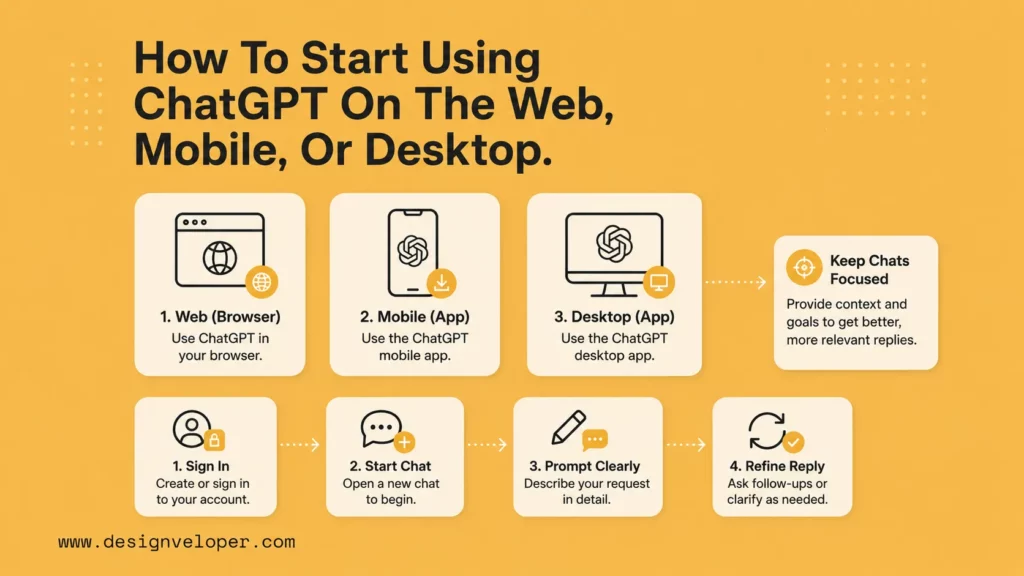
The easiest way to begin is to open ChatGPT, sign in, and start a new chat. Ask one concrete question rather than a broad command. For example, instead of saying “help with marketing,” say “turn these notes into a 5-bullet launch email for existing customers, using a friendly tone.” Specific requests make the first answer easier to judge.
On mobile, ChatGPT is useful for quick drafts, voice brainstorming, photo questions, reminders to yourself, and learning on the go. Keep sensitive details out of casual mobile prompts unless your organization has approved the account, plan, and data controls for that use.
Download And Use The Desktop App
The desktop app is helpful when ChatGPT becomes part of daily work. It can sit beside your documents, browser, code editor, or notes while you plan, rewrite, summarize, or debug. Use it for repeated workflows such as turning meeting notes into decisions, converting rough ideas into outlines, or asking for a second pass on a proposal.
The important habit is context control. Keep one chat or project per topic. If you mix a sales proposal, a code bug, and a personal travel plan in one conversation, the assistant has a harder time staying focused. Separate workstreams make the output cleaner and reduce accidental context leakage.
Start Your First Chat And Refine The Reply
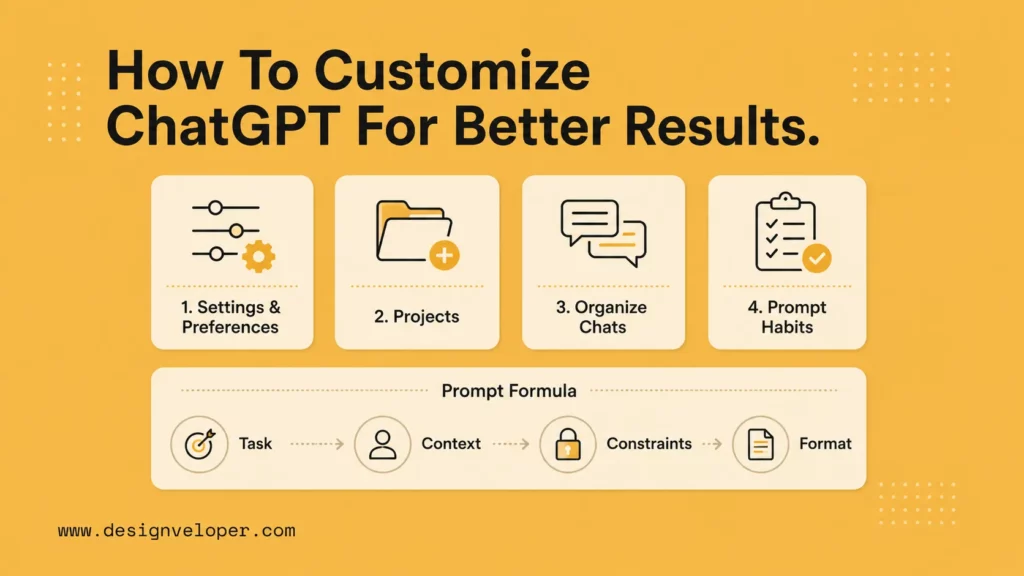
Your first prompt should include four parts: task, context, constraints, and output format. A strong beginner prompt might be: “Rewrite this email for a senior client. Keep it under 120 words, sound calm, and include three next steps.” That tells ChatGPT what success looks like.
Then refine the answer. Ask for a shorter version, a warmer tone, a table, risks, missing assumptions, or three alternatives. ChatGPT is most useful as an iterative drafting partner, not a one-shot answer machine.
| Weak prompt | Better prompt | Why it works |
|---|---|---|
| Write this better. | Rewrite this client email in 120 words. Keep it polite, direct, and action-oriented. | It defines audience, length, tone, and purpose. |
| Summarize this. | Summarize this proposal into scope, price, timeline, risks, and open questions. | It gives a review structure. |
| Help with code. | Explain why this function returns undefined and suggest a safer TypeScript version. | It gives a concrete debugging goal. |
How To Customize ChatGPT For Better Results
Customization matters because AI integration and personalization help ChatGPT understand your normal response style, task shape, and review expectations without needing the same setup every time.
Adjust Settings And Preferences
Settings help ChatGPT match your working style. If available in your plan, use custom instructions or personalization settings to explain how you prefer responses: concise paragraphs, tables for comparisons, source checks for claims, or a specific writing tone. Keep those preferences general. Do not store private credentials, customer records, or exact templates as personalization instructions.
The goal is not to make every answer sound identical. It is to remove repeated setup and make each AI chatbot integration or assistant workflow easier to review. If you always need short paragraphs and practical examples, tell ChatGPT once, then refine only when a specific task needs a different style.
Organize Chats And Keep Context Clear
Projects in ChatGPT can keep files, instructions, and conversations together for repeated work. Use a project for a long-running article, product launch, learning plan, or client proposal. This helps ChatGPT stay on topic because the relevant material lives in one place.
Use clear names. A project called “Q2 customer research summary” is more useful than “misc work.” Add only the files the task needs. Remove outdated materials when they no longer apply. Good organization improves both quality and review speed.
Use Better Prompt Habits From The Start
Good prompting is not magic wording. It is good delegation. Tell ChatGPT what role the output will play, who will read it, what source material matters, what constraints apply, and how you want the result formatted.
- For writing: provide audience, goal, tone, length, and must-include points.
- For research: ask for assumptions, source links, and uncertainty notes.
- For coding: include the error, expected behavior, relevant code, environment, and test goal.
- For planning: ask for phases, owners, risks, dependencies, and first actions.
This is how to use ChatGPT effectively: make the request easy to verify.
Continue reading:
- HR Workflow Automation: Benefits, Software, and AI Use Cases
- AI Automation Agency: Services, Pricing, Examples, and Business Model
- AI Agent Orchestration: How Multi-Agent Workflows Work In Practice
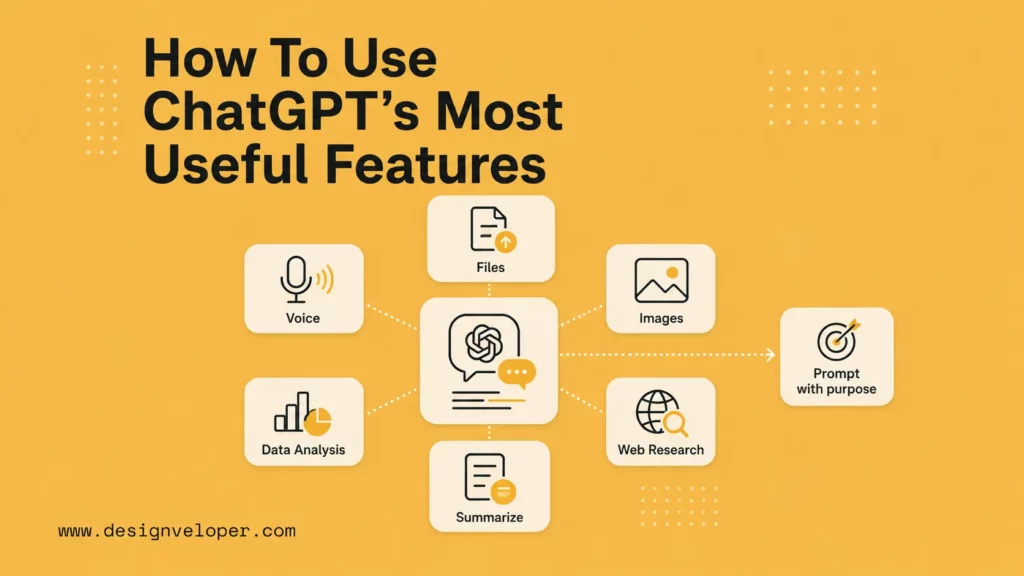
How To Use ChatGPT’s Most Useful Features
ChatGPT becomes more useful when features map to a real need instead of being used just because they are available.
Feature-specific note: OpenAI also publishes separate help pages for file uploads, voice mode, and research-style workflows. Those references are useful for editors checking details before publishing screenshots or plan-specific instructions, but they should be treated as supporting documentation rather than as the core takeaway from this guide.
How To Use ChatGPT Voice
Voice mode is useful when speaking is faster than typing. Use voice for brainstorming, language practice, interview rehearsal, sales call practice, or talking through a messy problem before turning it into written notes.
For work, end a voice session by asking for a structured summary: decisions, open questions, risks, and next steps. That turns an informal conversation into something you can review.
How To Upload Images And Files
Files make ChatGPT more useful because they give it source material. OpenAI’s help documentation explains supported document workflows and how uploaded or created files may be saved and reused in supported plans and regions.
When uploading a file, do not just say “analyze this.” Tell ChatGPT what you need from it. Ask it to extract risks from a contract, compare two proposals, find missing fields in a spreadsheet, or summarize a PDF for a non-technical stakeholder. The file gives context; the prompt gives purpose.
A practical file prompt should name the file type and the review goal. For a PDF, ask for a section-by-section summary and missing evidence. For a spreadsheet, ask for outliers, columns that need cleaning, and charts that would help. For a presentation, ask whether the storyline is clear and where the audience may need more context. This keeps the answer tied to the material instead of producing a generic summary.
How To Use Non-Chat Features More Effectively
ChatGPT can support image generation, data analysis, custom assistants, projects, web-style research features, and other tools depending on plan availability. Use each feature only when it helps the workflow. A spreadsheet task should end with checked assumptions and formulas. An image task should end with a usable creative direction. A research task should include sources to verify.
For repeated work, turn a good prompt into a reusable process with the help of AI workflow automation tools when the task is stable enough to automate. Save the input format, review checklist, and expected output. A strong workflow is more valuable than a clever one-time prompt.
Explore more:
- AI Agent Vs. AI Assistant: Which Is Right For Your Business?
- AI Agent Vs. Chatbot: Key Differences & Which One Do You Need?
- Enterprise AI Agents: Use Cases, Tools, And Implementation Guide
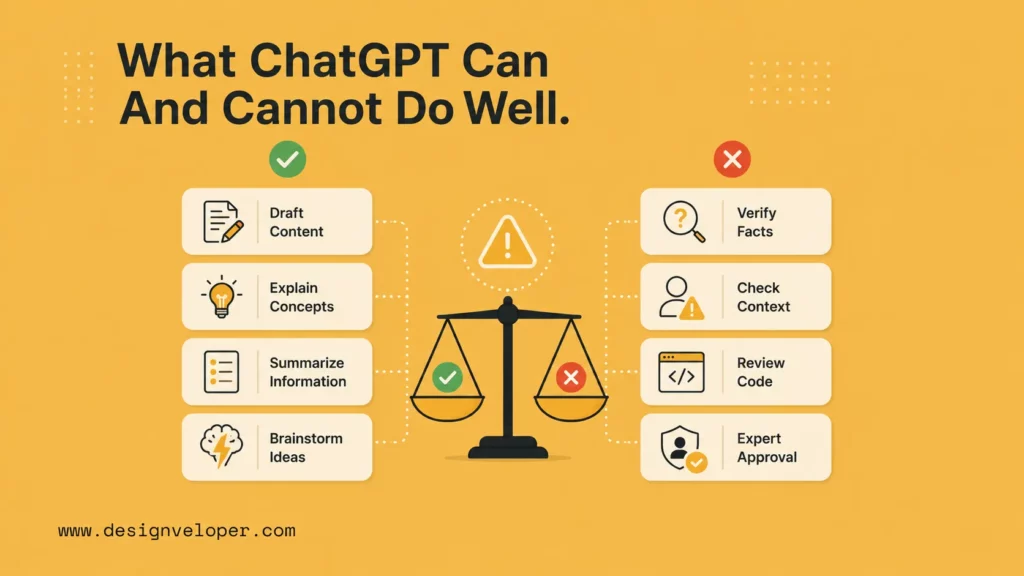
What ChatGPT Can And Cannot Do Well
Understanding strengths and limits is what makes ChatGPT consistently useful instead of unpredictably helpful.
What It Handles Best
ChatGPT is strong at language-heavy and structure-heavy tasks: drafting, rewriting, summarizing, explaining, outlining, classifying, brainstorming, comparing options, and turning messy notes into organized outputs. It is also useful for coding help, data exploration, and learning when the user reviews the result.
It works best when the answer can be checked. A summary can be compared to the source. A code suggestion can be tested. A plan can be reviewed by a team. A public claim can be verified with a primary source.
Can ChatGPT Refuse To Answer Your Prompts?
Yes. ChatGPT can refuse unsafe requests or ask for clarification when the prompt is unclear or risky. If a harmless request is misunderstood, rewrite it with more context and a clear legitimate purpose. For example, ask for “a security awareness explanation for employees” instead of a vague request that sounds like misuse.
Refusals are also useful reminders. A tool that can generate text quickly still needs boundaries when requests involve safety, privacy, legal, medical, financial, or security risk.
Why Important Outputs Still Need Review
Important outputs need review because ChatGPT can misunderstand context, miss a constraint, overgeneralize, or produce a confident answer that needs verification. OpenAI’s release notes often mention improvements, but no model removes the need for human judgment.
For public content, verify facts with primary sources. For code, run tests. For business decisions, ask a domain expert. For sensitive data, check policy before sharing anything. The safest habit is to apply AI agent governance principles and treat ChatGPT as a capable drafter and analyst, not as the final approver.
How To Manage Your Data In ChatGPT
Data habits matter because the value of AI help can disappear quickly if the wrong information is shared or retained in the wrong context.

Chat History And Saved Conversations
Saved chats are useful because they let you return to a project, reuse context, and build on earlier work. They also create records. Use clear chat titles, archive stale work, and avoid mixing sensitive client or employee details into general chats unless your organization has approved the account and controls.
Privacy Settings And Data Controls
The OpenAI Data Controls FAQ explains choices around conversations and data use. The Memory FAQ explains saved memories, chat history reference, temporary chats, and how users can manage what ChatGPT remembers. These settings can vary by plan and region, so check the official page before writing team guidance.
For businesses, create a plain policy: which account type to use, what data employees may share, what data they must not share, and when human review is required. That policy matters more than any single prompt tip.
Teams should also separate personal learning from company workflows. A personal account can be fine for experimenting with harmless prompts. A business workflow may need workspace administration, access policies, retention settings, and training. That distinction protects both the user and the organization.
Free Vs Paid Plan Differences That Matter
Free access is useful for learning basics. Paid plans matter when users need higher limits, stronger models, file tools, voice features, project workflows, team controls, or business administration. The official plan page is still the safest current source because feature access changes over time.
Do not upgrade only because a plan sounds powerful. Upgrade when a real workflow needs the limit, tool, security control, or collaboration feature that the plan provides.
How To Get More Real Value From ChatGPT
Real value usually comes from combining good prompts with repeatable workflows, clear review, and useful product context. That is also the practical starting point for AI automation.

Start With Repetitive, Low-Risk Tasks
The best early use cases are repeated tasks where errors are easy to catch. Examples include meeting summaries, first-draft emails, learning explanations, outline creation, FAQ drafts, spreadsheet exploration, and internal checklists. These tasks save time without handing final judgment to the model.
Measure whether the workflow actually helps. Track time saved, output quality, review effort, and error patterns. If review takes longer than doing the task manually, narrow the prompt or change the use case.
Turn Better Prompting Into Better Workflows
A good prompt becomes much stronger when it becomes a repeatable workflow. Define the input, output, review checklist, and escalation rule. For example, a support team might use ChatGPT to draft replies, but require a human to approve anything involving refunds, security, account access, or legal language.
This workflow mindset is the difference between casual AI use and reliable productivity. It also helps teams train new users because they can follow a process instead of inventing prompts from scratch.
Use ChatGPT Inside Real Product And Document Flows
ChatGPT-style capabilities become more valuable when they connect to real product and document workflows through AI business process automation. A document platform can summarize long files. A finance tool can explain transactions. An HR assistant can answer policy questions. A SaaS product can turn user feedback into themes and tasks. This is where AI business process automation starts to feel practical instead of theoretical.
At Designveloper, we help companies move from casual AI use to custom AI-powered software. As an AI-first software and automation partner, we design systems around workflow, data, permissions, user experience, and maintenance. That can include LLM integration, RAG, document intelligence, AI assistants, and workflow automation inside real products.
For managers, a useful rollout pattern is pilot, measure, document, and expand. Start with one team and one workflow, collect examples of good and bad outputs, turn the best examples into a playbook, and only then invite more users. This keeps adoption grounded in actual work instead of vague enthusiasm. When a company needs to turn those experiments into software with durable workflows and controlled permissions, a practical next step is often custom AI development services.
Learn more in:
- AI Agent Pricing Framework: Cost Models, Hidden Fees, And ROI Tips
- How To Build An AI Chatbot With Long-Term Memory? (Guide)
- How To Train A Chatbot With Your Own Data For Better Business Support
FAQs About Using ChatGPT
Can You Use ChatGPT For Free?
Yes. ChatGPT usually offers free access, but limits and model availability can change. Check the official plan page for current details before recommending it to a team.
Is ChatGPT Plus Worth It?
ChatGPT Plus can be worth it if you use ChatGPT often and need higher limits or stronger features. It may not be necessary for occasional tasks such as simple rewrites or quick explanations.
Can ChatGPT Refuse To Answer Certain Prompts?
Yes. It can refuse unsafe requests, ask for clarification, or avoid content that violates policy. Rewrite legitimate requests with clearer context when the first response does not fit.
How Accurate Is ChatGPT?
Accuracy depends on the task, model, prompt, source material, and review process. Treat important answers as drafts. Verify facts with primary sources and test code before relying on it.
How To Use ChatGPT Plus For Free?
You cannot normally use a paid plan for free unless OpenAI or a trusted partner offers an official trial, promotion, education program, or workplace license. Avoid unofficial offers that ask for your login.
What Models Does ChatGPT Use?
ChatGPT uses OpenAI models, and available models change over time. The official release notes and plan page are the best places to confirm current model access.
How To Use ChatGPT Ghibli Art?
Use image tools responsibly. Ask for a general cozy animation-inspired look instead of copying a protected studio style or a living artist. Review copyright, brand, and platform rules before publishing generated images.
Can ChatGPT Do Data Analysis?
Yes, when data analysis features are available. It can inspect spreadsheets, summarize patterns, create charts, and explain findings. Still, review source data, assumptions, formulas, and decisions before sharing results.
To conclude, how to use ChatGPT effectively comes down to one practical loop: give context, ask for a specific output, review the result, and refine the workflow. Used this way, ChatGPT can support writing, learning, analysis, coding, documents, and everyday work while keeping human judgment in charge.
Also published on

Share post on










Related Articles



AI Chatbot Development: Types, Process, Costs In 2026
AI Chatbot Development: Types, Process, Costs In 2026 Published September 14, 2026
Rust Vs Python: Performance, Safety, And Project Fit For Teams
Rust Vs Python: Performance, Safety, And Project Fit For Teams Published September 14, 2026
Python Best Practices For Writing Clean, Maintainable Code
Python Best Practices For Writing Clean, Maintainable Code Published September 14, 2026



















