
















How To Choose A Web Hosting Provider: Key Factors To Consider

KEY TAKEWAYS:
- Choosing web hosting starts with website requirements: traffic, CMS, runtime, storage, email, security, compliance, support, backups, and growth plans should come before price comparisons.
- Shared hosting, VPS, cloud hosting, managed WordPress hosting, dedicated servers, and platform hosting fit different levels of control, responsibility, scalability, and operating risk.
- A strong provider should offer reliable uptime, clear resource limits, fast support, SSL, backups, CDN options, malware protection, staging, monitoring, and transparent renewal pricing.
- Hosting affects SEO and conversion through speed, availability, security, and user experience, but it cannot fix poor website architecture, weak content, or unmaintained application code.
- The safest choice is hosting that can scale with the website, support the technology stack, and give the team enough operational control without adding unnecessary complexity.
Knowing how to choose web hosting means matching a provider’s service to the website’s platform, traffic, data, security, support, and growth needs. Start by defining what the site must run and who will operate it. Then compare hosting types, resource limits, real renewal cost, reliability terms, performance evidence, backup restoration, migration help, and upgrade options with the same checklist.
A low introductory price or a long feature list cannot prove that a hosting plan fits. A small business site may need simple managed hosting, while an ecommerce store or ecommerce website, SaaS platform, marketplace, or custom web application may need isolated resources, deployment control, observability, and a tested scaling path. The best choice is the simplest hosting model that can keep the actual website reliable and maintainable.
Quick decision guide: Choose shared or managed website hosting for a small, predictable site when easy administration matters most. Choose VPS or cloud hosting when the site needs more control, isolation, variable capacity, or custom services. Choose dedicated hosting only when a hardware, compliance, performance, or licensing requirement justifies its cost and operating burden. Test support and restoration before committing.
| Website Situation | Good Starting Direction | First Check |
|---|---|---|
| Personal blog or small brochure site | Shared or managed website hosting | Renewal price, SSL, backups, email, and support |
| WordPress business website | Managed WordPress hosting | Current runtime support, staging, updates, caching, restore, and migration |
| Ecommerce website | Managed VPS or cloud hosting with isolated resources | Peak-load performance, database limits, recovery, and urgent support |
| SaaS, marketplace, or custom web app | VPS, cloud, or application platform | Deployment access, architecture fit, monitoring, scaling, and data services |
| High-control or specialist workload | Dedicated or configurable cloud infrastructure | Administration skill, security ownership, capacity planning, and exit path |
Further reading:
- Web App vs Website: Similarities, Differences and Misconceptions
- Web Development Cost: How Much to Build a Website?
- Web Development Timeline: How Long to Build a Website?
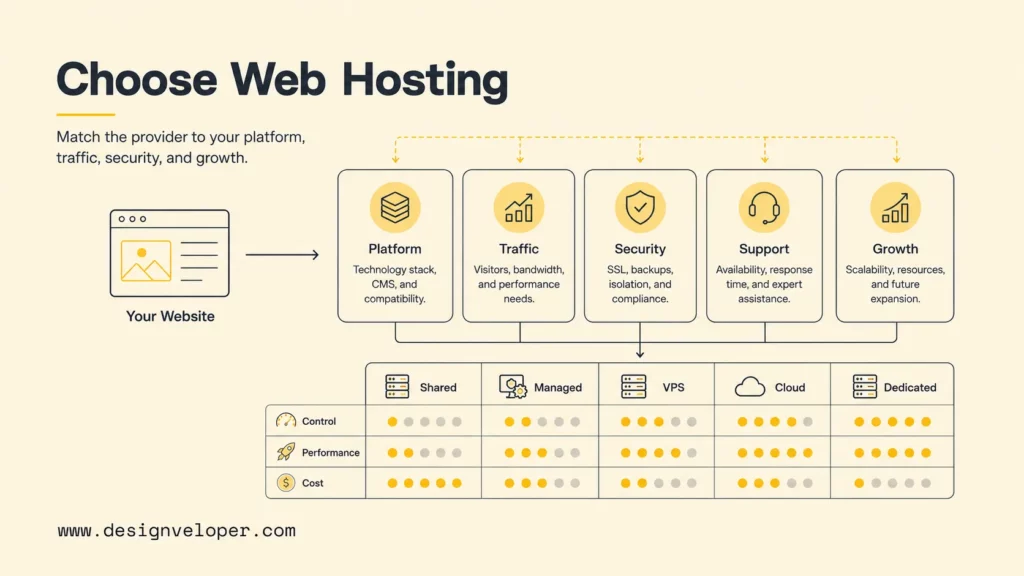
What Does A Web Hosting Provider Do?
A web hosting provider supplies the server resources and connected services that make a website available on the internet. At minimum, hosting stores the website’s files and runs the server software that responds to browser requests. Depending on the plan, the provider may also supply databases, email, DNS, SSL/TLS certificates, backups, malware controls, a content delivery network, monitoring, migration, and technical support.
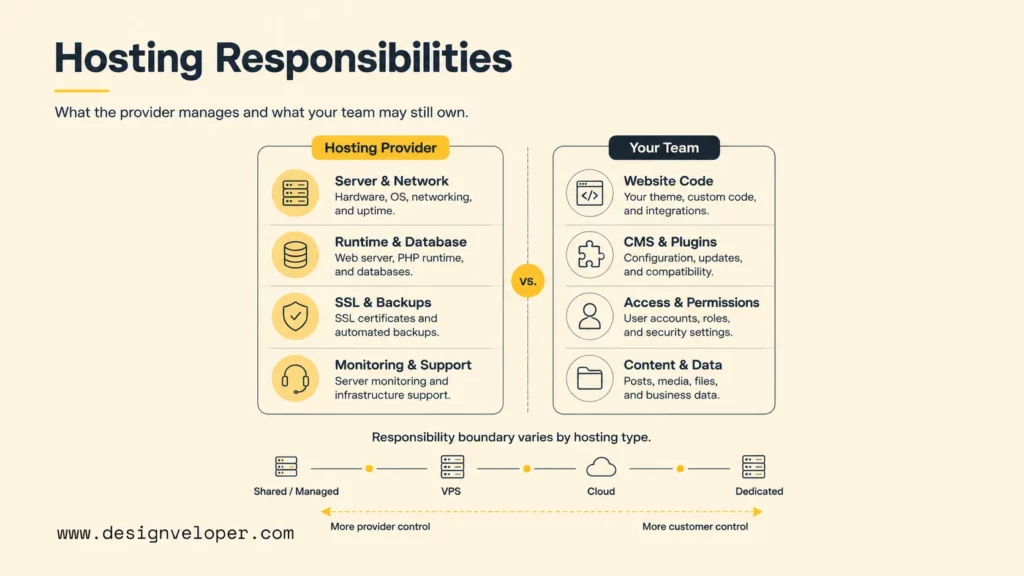
The provider’s responsibility changes with the hosting model. Shared and managed plans abstract much of the server administration. A virtual private server gives the customer more control but may require the customer to patch the operating system, configure the firewall, manage the runtime, monitor failures, and secure administrative access. Cloud and dedicated infrastructure can offer even more control while increasing operational responsibility.
A hosting plan should therefore be read as an operating boundary, not only a resource bundle. Ask who owns each of the following:
- Server hardware, network, virtualization, and data-center access.
- Operating-system installation, patching, hardening, and monitoring.
- PHP, Node.js, Python, Java, database, web server, and other runtime updates.
- Website code, CMS core, themes, plugins, dependencies, and content.
- Identity, administrative access, passwords, keys, firewall rules, and user permissions.
- SSL/TLS issuance, renewal, HTTPS redirects, and certificate incident handling.
- Backup creation, retention, encryption, off-site copies, restoration, and recovery testing.
- Performance investigation, malware response, migration, and incident escalation.
The right hosting plan is the one whose responsibility boundary matches the team’s ability to operate the website.
The word “managed” is not a universal scope. One provider may manage only infrastructure, while another supports CMS updates, caching, malware cleanup, and application recovery. Request a written support boundary and examples of incidents the provider will investigate. A feature marked “included” should also be checked for retention periods, usage limits, response times, and paid add-ons.
Know Your Website Requirements Before Comparing Providers
A hosting comparison becomes useful only after the website has a clear requirement profile. Record launch needs separately from possible future needs so the project does not overbuy capacity for an unverified growth forecast. The profile should describe the product, technology, workload, risk, operations, and budget in measurable terms.
Recommended for you:
- Everything About Managing Website Projects
- Building User Trust through Secure Software Development
- The Role of PCI-Compliant Hosting in E-Commerce Security
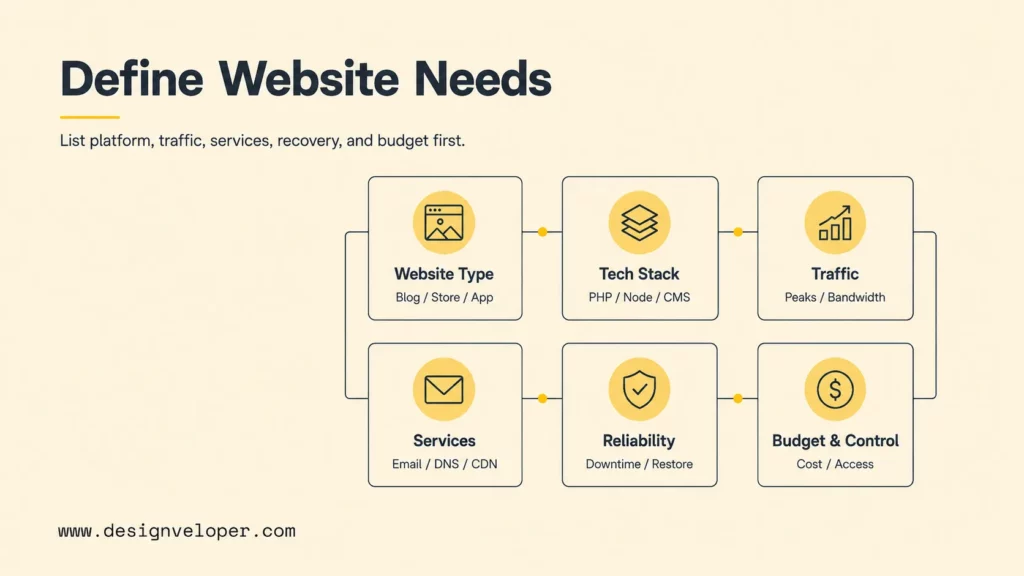
Website type. A blog mainly serves content. A business website may add forms, CRM integration, marketing analytics, and editorial workflows. Ecommerce adds catalog search, inventory, payment, orders, accounts, and transaction peaks. SaaS, marketplaces, and custom web applications introduce roles, APIs, background jobs, databases, real-time events, and external services. Hosting must support the complete request path rather than the visible pages alone.
Platform and runtime. Identify WordPress, Joomla, Drupal, a website builder, a headless CMS, static files, or custom code. Record the exact PHP, Node.js, Python, Java, database, and extension requirements. WordPress.org currently recommends WordPress requirements list PHP 8.3 or later, MariaDB 10.11 or MySQL 8.0, and HTTPS. A host that supports only an obsolete runtime can block updates or increase security risk.
Traffic and resource behavior. Estimate normal visits, peak concurrent users, page views, API calls, geographic distribution, file downloads, search activity, scheduled jobs, and campaign spikes. Measure CPU, memory, database connections, storage, input/output operations, and outbound bandwidth when an existing site is being migrated. “Unlimited traffic” should be translated into fair-use, CPU, process, and concurrency limits.
Website services. List databases, transactional email, mailboxes, DNS, SSL, staging, backups, cron jobs, SSH or SFTP, Git deployment, object storage, CDN, cache, log access, analytics, malware controls, and monitoring. Confirm whether each service is included, optional, or external. The total operating design may involve several providers even when one company sells the hosting plan.
Reliability and recovery. Define business hours, acceptable downtime, acceptable data loss, and desired restoration time. A marketing blog and a checkout system do not carry the same consequence of failure. Identify who receives alerts, who can restore data, and who communicates during an incident.
Budget, control, and growth. Set an expected monthly range and a stress scenario. Include renewal, domain, certificates, email, backups, security, CDN, migration, support, licenses, and developer labor. Decide whether the team needs a control panel, shell access, root access, application APIs, infrastructure automation, or a fully managed workflow.
For teams defining the broader product stack, Designveloper’s introduction to website development fundamentals connects hosting with domains, DNS, databases, CMS platforms, APIs, and application frameworks. Those dependencies belong in the hosting inventory before providers are compared.
Choose The Right Hosting Type For Your Website
The right hosting type provides enough performance, control, and recovery without creating unnecessary administration. Shared, managed, VPS, cloud, and dedicated hosting are operating models rather than quality grades. A well-managed shared plan can outperform a poorly configured VPS for a simple website, while a custom application can quickly outgrow a restrictive managed plan.
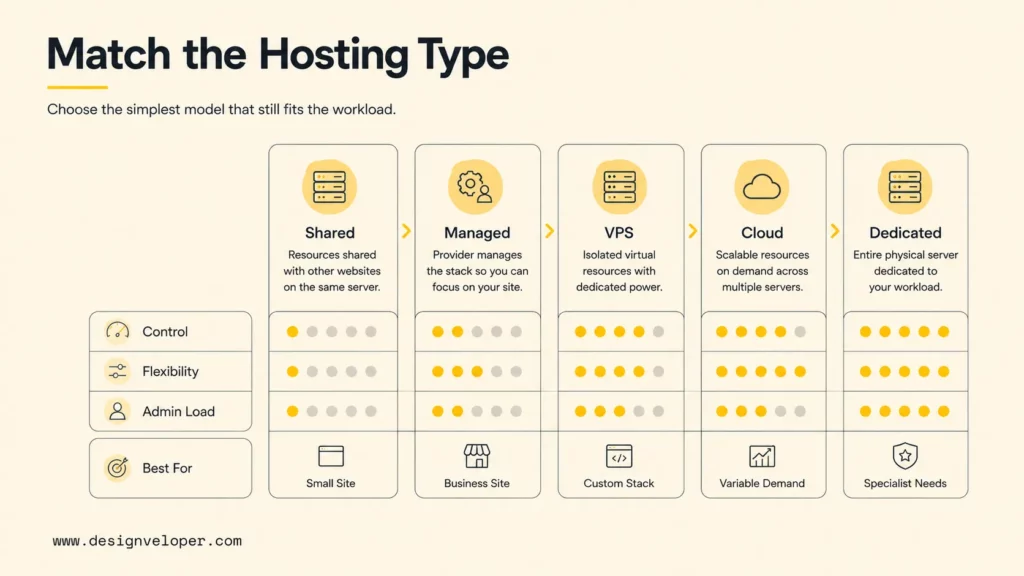
| Hosting Type | Best For | Main Tradeoff |
|---|---|---|
| Shared hosting | Small blogs and informational sites with predictable demand | Low cost and simple operation, but resources and control are limited |
| Managed or WordPress hosting | Business sites that value provider-managed updates, caching, backup, and support | Operational help is convenient, but scope, platform rules, and price vary |
| VPS hosting | Sites needing isolated capacity, custom runtime configuration, or server access | More control and predictable resources, but administration may fall on the customer |
| Cloud hosting | Variable traffic, custom applications, elastic capacity, and managed cloud services | Flexible architecture and scaling, but billing and operations can become complex |
| Dedicated hosting | Special isolation, hardware, licensing, compliance, or performance requirements | Exclusive resources and control, but higher cost and slower capacity changes |
Shared hosting is appropriate when the website is low risk, the technology stack is standard, and occasional resource contention is acceptable. Check process, memory, inode, database, email, and fair-use limits rather than relying on storage and bandwidth headlines. Confirm whether another account’s abuse can affect server performance or reputation.
Managed WordPress hosting is useful when an organization wants WordPress-specific operations without maintaining a server. WordPress documentation notes that specialist hosts may add backups, updates, and developer tools. Verify which updates are automatic, whether changes can be staged first, how plugin conflicts are handled, and whether support extends beyond the hosting layer.
A VPS is a practical middle ground for teams that need operating-system or runtime control. Unmanaged VPS hosting requires patching, firewall configuration, monitoring, backups, and incident response. A managed VPS reduces that burden, but the contract must still identify whether application code, databases, performance tuning, and security cleanup are covered.
Cloud hosting fits variable demand and applications that benefit from automated deployment, elastic resources, managed databases, object storage, queues, or global delivery. Designveloper’s guide to choose the right cloud hosting package explains how to compare service models, cost behavior, support boundaries, scaling, and migration options.
Dedicated hosting should be driven by a clear technical or business requirement. Exclusive hardware can support specialized performance, data isolation, legacy licensing, or compliance needs. It also creates capacity, maintenance, replacement, and recovery questions that elastic services may handle differently.
Key Factors To Check In A Web Hosting Provider
A provider should be evaluated with documents and tests, not slogans. Use the same website, region, traffic scenario, and support questions for each finalist. The comparison should reveal both normal operation and the response when something fails.
Related reading:
- How to Buy Domains for Multiple Websites
- Web App Ideas: Practical Concepts For Startups And Businesses
- Web Application Development Cost: Key Factors And Estimates
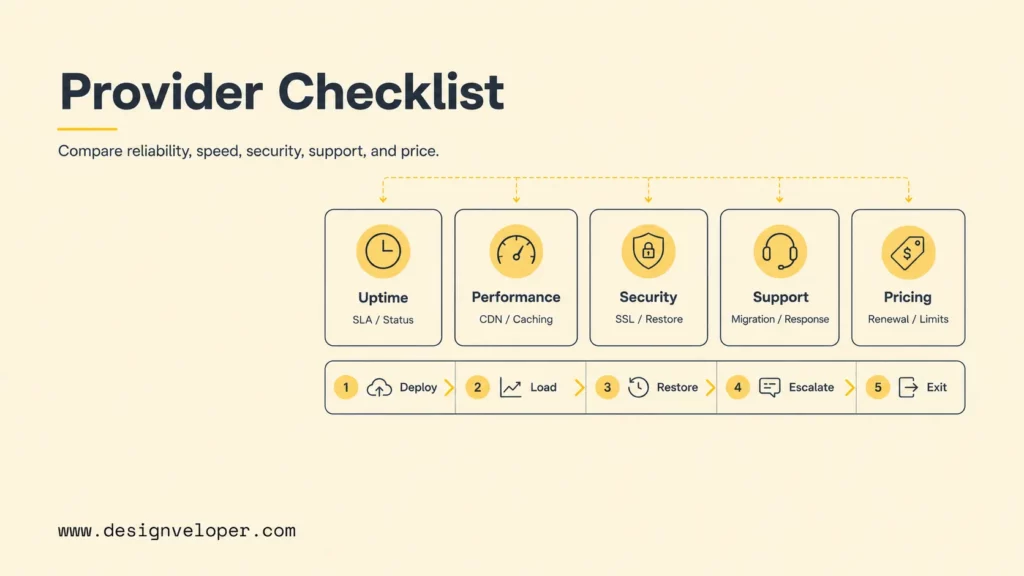
| Factor | What To Check | Why It Matters |
|---|---|---|
| Uptime and reliability | SLA definitions, exclusions, maintenance, service credits, architecture, status history, monitoring, and incident communication | A headline percentage does not describe the whole website or its dependencies |
| Speed, CDN, caching, and server location | Origin region, network, storage, CPU, cache controls, CDN coverage, database latency, and test results | Real user performance depends on the complete delivery path |
| Security, SSL, backups, and restore | Isolation, patch scope, malware controls, HTTPS, access, backup frequency, retention, off-site copies, and recovery tests | A certificate or backup checkbox does not prove secure operation or recoverability |
| Customer support and migration help | Hours, channels, first-response target, expertise, covered layers, escalation, migration scope, and rollback help | Fast access to the right operator can limit downtime and migration risk |
| Pricing, renewal rates, resource limits, and upgrade paths | Introductory and normal price, contract, add-ons, CPU, memory, processes, storage, bandwidth, email, backups, and scaling steps | The true cost and capacity may differ from the advertised tier |
Uptime and reliability: Read how downtime is measured, which services are covered, which configurations are required, what is excluded, and how credits are claimed. Microsoft’s current guide to Microsoft Azure explains service-level agreements explains that an SLA is a conditional provider commitment, not the website’s own reliability target. Application code, DNS, plugins, databases, payment services, and operational processes also affect availability.
Speed and delivery: Test the actual site from primary user locations under normal and peak load. Measure server response, full-page loading, interactivity, and visual stability with field data when possible. Google’s web.dev Core Web Vitals guidance currently recommends LCP within 2.5 seconds, INP at 200 milliseconds or less, and CLS at 0.1 or less at the 75th percentile. Hosting affects these metrics, but frontend code, images, fonts, third-party scripts, caching, and database queries matter too.
A CDN can cache content close to users, reducing the distance to frequently requested assets. Cloudflare’s Cloudflare CDN explanation also emphasizes that a CDN does not replace the origin host. Verify cache coverage, purge controls, dynamic-page behavior, image processing, bandwidth pricing, and what happens when the origin is slow or unavailable.
Security and recovery: HTTPS should be standard, but it only protects data in transit. Review isolation, administrative access, multifactor authentication, patching, malware response, logging, and dependency updates. Backups should have a defined schedule, retention, location, encryption, and restore owner. CISA’s ransomware guidance recommends regularly testing backup procedures; a provider’s “daily backup” claim is incomplete until restoration has been demonstrated.
Support and migration: Open a pre-sales ticket with a technical question and note the quality, not only speed. Ask who responds during an outage, whether urgent channels differ, and which layers are supported. For migration, inventory files, databases, DNS, email, cron jobs, certificates, redirects, environment settings, integrations, and rollback. A free migration may cover only one simple site.
Price and limits: Compare the price after the introductory term and model all required add-ons. Translate “unlimited” into measurable CPU, RAM, process, connection, inode, storage, bandwidth, database, and email policies. Ask what happens at a limit: throttling, temporary suspension, automatic overage, or forced upgrade. Document whether a downgrade is possible later.
The Five-Proof Hosting Trial
1. Deploy
Install the real stack and confirm every required runtime and access method.
2. Load
Test uncached pages, admin tasks, database work, and a realistic traffic peak.
3. Restore
Recover a backup into a clean environment and record the time and missing steps.
4. Escalate
Contact support with a technical scenario and verify the covered responsibility.
5. Exit
Export files, data, settings, DNS records, and logs, then calculate switching cost.
The five-proof trial turns promises into evidence. A provider that performs well only on a cached homepage has not proven database, recovery, support, or migration quality. Score every finalist with the same pass criteria and keep the results beside the contract.
Red Flags Before You Buy A Hosting Plan
A hosting red flag is any missing term or untestable promise that could change cost, availability, security, or control after purchase. The most important warning signs are usually found in renewal tables, acceptable-use policies, backup terms, support boundaries, and migration restrictions rather than the main pricing page.
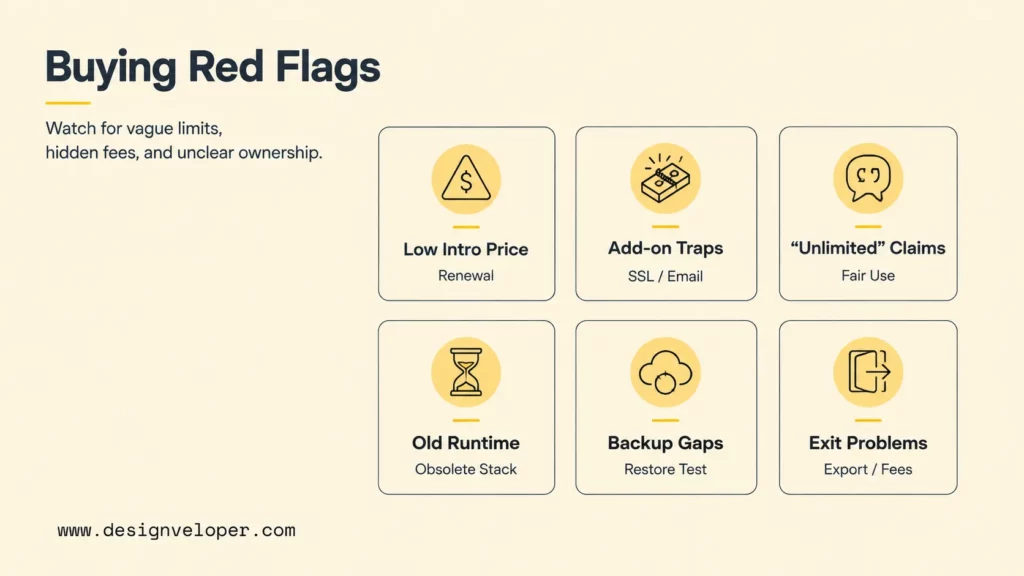
- A very low first-year price with no prominent renewal total. Calculate the cost across the intended contract period and include nonoptional add-ons.
- Basic security, backup, email, or SSL behind unclear add-ons. Confirm what is included at checkout and whether automatic renewal changes the total.
- “Unlimited” bandwidth or storage with vague fair-use terms. Ask for CPU, process, memory, inode, database, connection, file-size, and traffic policies in writing.
- No current runtime information. An obsolete PHP, database, TLS, or control-panel stack can block updates and increase risk.
- Support cannot explain the responsibility boundary. If pre-sales teams cannot say who patches, restores, investigates, or cleans malware, post-sale escalation may be worse.
- No clear backup and restore process. Retention without a tested restore workflow is not a recovery plan.
- No migration or rollback plan. A provider should explain data transfer, DNS change, email, certificate, downtime, verification, and fallback.
- Account ownership is ambiguous. The business should control the domain registration, billing contact, recovery email, DNS access, website data, and administrator credentials.
- Cancellation blocks exports or creates surprise fees. Check notice periods, data retention after cancellation, proprietary backups, outbound transfer, and assisted migration charges.
If a hosting promise cannot be measured, tested, or located in the terms, it should not carry the decision.
Reviews can reveal support patterns, but they should not replace direct testing. Separate reviews by plan type, location, website stack, and date because a provider may run several infrastructures and support tiers. Look for repeated details about incidents, restoration, billing, cancellation, and migrations rather than generic star ratings.
Domain bundling also deserves caution. ICANN explains that a domain name is part of the DNS addressing system, while hosting and email are separate services required to make an internet presence functional. Keeping clear organizational ownership of the domain reduces risk when a host is changed, an agency relationship ends, or billing access is lost.
Pick Hosting That Can Grow With Your Website
Growth-ready hosting offers a clear path to add resources or change architecture without forcing an emergency migration. The path should cover compute, memory, storage, database capacity, bandwidth, caching, CDN, background work, email, monitoring, backups, security, and support. An upgrade label is useful only when the team understands the downtime, price, limits, and rollback.
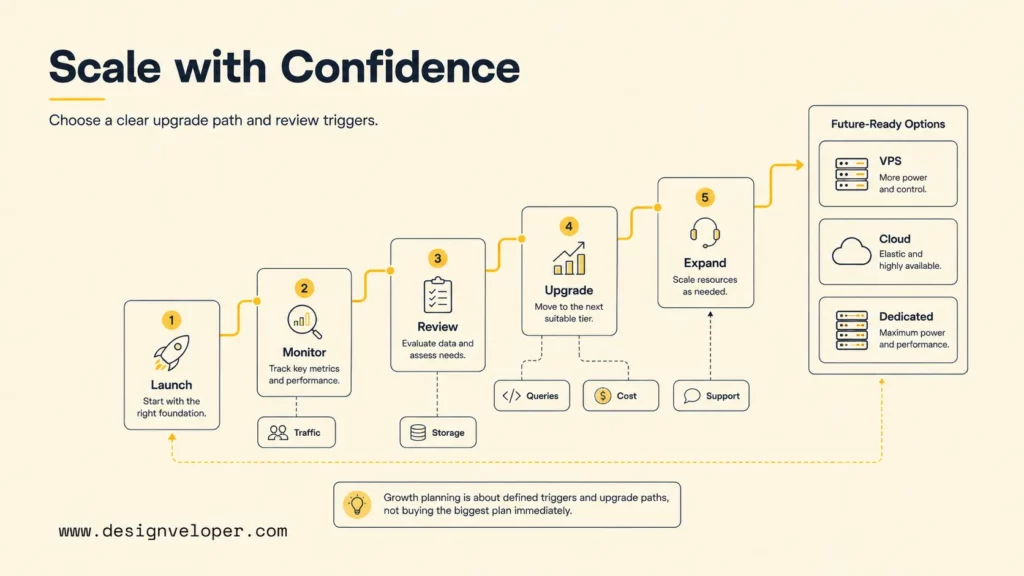
A business site may grow by adding content, campaigns, languages, forms, and integrations. Ecommerce growth changes catalog size, search load, transactions, inventory, payment events, and support traffic. SaaS and custom web applications add users, tenants, APIs, background jobs, data volume, permissions, and deployment frequency. AI-enabled products can add model latency, inference cost, vector search, accelerated compute, evaluation, and data-governance requirements.
Set review triggers rather than buying the largest plan on day one. Triggers might include sustained resource pressure, slow database queries, repeated throttling, storage growth, approaching traffic limits, missed reliability targets, rising support needs, or monthly cost exceeding a unit-economics threshold. A scheduled quarterly review can catch capacity trends before they become incidents.
For a custom product, hosting should follow application architecture and deployment practice. Designveloper’s guide to cloud application development connects infrastructure with CI/CD, identity, data, observability, reliability, cost, and testing. A hosting plan that fits launch pages but blocks those operating needs can become an early product constraint.
Hosting recommendations become useful only after the workload and ownership boundaries are documented. In our software development services, the decision brief records expected traffic, availability target, data location, deployment frequency, backup and recovery objectives, monitoring owner, and the team’s ability to manage infrastructure. That evidence makes it possible to compare providers on operational fit instead of headline storage and bandwidth.
The practical answer to how to choose web hosting is to define the real website, compare the correct hosting type, and demand evidence for performance, reliability, security, support, cost, and recoverability. Buy enough capacity for launch plus a credible buffer, document the next upgrade step, and retain a tested way to move.
FAQs About Choosing A Web Hosting Provider
What Is The Difference Between A Domain And Web Hosting?
A domain is the human-readable internet name that users enter, such as example.com. DNS connects that name to online services. Web hosting stores and serves the website’s files and application. A domain registrar and hosting provider can be the same company, but the services are separate and can be changed independently.
Is Shared Hosting Enough For A Small Business Website?
Shared hosting can be enough for a small informational website with standard technology, predictable traffic, limited transactions, and low operational risk. Verify current runtime support, SSL, backups, restoration, email, resource limits, renewal price, and support. A store, membership site, or heavily integrated website may need more isolated capacity.
Should I Choose Managed Hosting Or Unmanaged Hosting?
Choose managed hosting when the organization lacks time or expertise to operate the server and the provider’s written scope covers the required tasks. Choose unmanaged hosting when the technical team needs control and can own patching, security, monitoring, backup, recovery, and incidents. Compare the complete labor and risk cost, not only the subscription.
Can I Switch Web Hosting Providers Later?
Yes, but migration difficulty depends on platform portability, data size, email, DNS, integrations, proprietary tools, and access. Keep current exports of files, databases, configurations, DNS records, redirects, and certificates. Plan verification, DNS cutover, rollback, and the cancellation window before moving production traffic.
What Should I Check Before Buying A Hosting Plan?
Check platform compatibility, resource limits, server location, performance, CDN and caching, SSL, security ownership, backup retention, restore testing, support scope, migration, introductory and renewal price, add-ons, scaling, contract terms, exports, and cancellation. Run a trial with the real stack and test load, restoration, support, and exit before a long commitment.
Also published on

Share post on










Related Articles



How To Choose The Right Cloud Hosting Provider For Your Website
How To Choose The Right Cloud Hosting Provider For Your Website Published August 05, 2026
How To Choose A Web Hosting Provider: Key Factors To Consider
How To Choose A Web Hosting Provider: Key Factors To Consider Published August 05, 2026
Cloud Application Development: From Architecture To Launch
Cloud Application Development: From Architecture To Launch Published July 22, 2026



















