
















Flutter vs React Native: Which Fits Your Mobile App?

In a Flutter vs React Native decision, Flutter is usually the better fit when your product needs a highly controlled, consistent custom interface across iOS and Android. React Native is often the better fit when your team already works in JavaScript or TypeScript and wants close access to native platform UI and behavior. Neither framework is a universal winner: product requirements, team skills, native integration needs, and long-term maintenance should decide the choice.
Both frameworks can support production mobile apps in 2026, but they make different architectural trade-offs. Flutter draws the interface through its own rendering stack, while React Native uses React components that map to native platform UI. That difference affects how you design screens, integrate device features, hire developers, test releases, and handle future platform changes.
Flutter And React Native Compared For Mobile App Decisions
In cross-platform mobile development, compare Flutter vs React Native by asking what each choice changes for the product. Do not decide by asking which mobile app framework wins a generic benchmark. If you need broader context on platform strategy before choosing a framework, our guide to mobile app development explains how native and cross-platform approaches fit into the full product lifecycle.
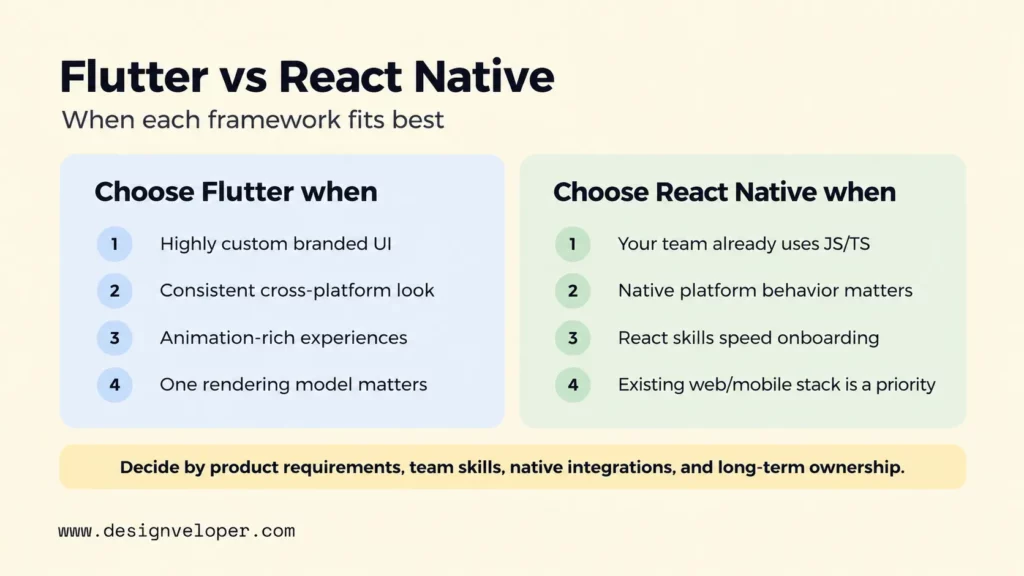
| Dimension | Flutter | React Native | What It Means For The Product |
|---|---|---|---|
| Programming language | Dart | JavaScript or TypeScript | React-heavy teams may onboard faster with React Native. Flutter teams need Dart skills, but get one focused language and framework stack. |
| Rendering approach | Flutter renders its widget tree through its own engine. Impeller is the only supported renderer on iOS and is enabled by default on Android API 29+; older Android devices can fall back to the legacy OpenGL renderer. | React components render to native platform UI through React Native’s current architecture. | Flutter gives tighter cross-platform visual control. React Native starts closer to each platform’s native UI model. |
| UI consistency | High control over a consistent branded UI across platforms. | Shared component logic with room for platform-specific styling and behavior. | Choose based on whether brand consistency or platform-specific conventions matter more. |
| Native API access | Plugins and platform channels can connect Dart code to Swift, Objective-C, Kotlin, Java, and other host code. | Libraries, Turbo Native Modules, and Fabric Native Components can connect JavaScript or TypeScript to native code and views. | Both can reach device features, but uncommon integrations may require native engineering in either stack. |
| Ecosystem | A cohesive Flutter and Dart ecosystem with packages on pub.dev. | React Native libraries plus the wider JavaScript ecosystem; Expo can simplify many workflows. | Check the exact libraries your app needs rather than assuming ecosystem size guarantees compatibility. |
| Hiring | Requires Flutter and Dart capability or onboarding into Dart. | Can draw from JavaScript, TypeScript, and React experience. | Existing team skills can outweigh small framework-level advantages. |
| Testing | Flutter provides unit, widget, and integration testing tools. | Teams commonly combine JavaScript tests, component tests, native tests, and device-level end-to-end tests. | The framework does not remove the need for real-device, OS-version, permission, and store-release testing. |
| Best-fit products | Custom branded interfaces, animation-rich experiences, and products that value consistent rendering. | Products built by React teams, apps that benefit from platform-native UI behavior, and teams using Expo workflows. | The best fit depends on product constraints and team ownership, not a universal ranking. |
The table points to the core decision. Flutter gives the product team more direct control over one visual system, while React Native makes it easier to work in the React and native-platform worlds at the same time. The next sections explain where those differences become important.
How Flutter And React Native Render The Interface
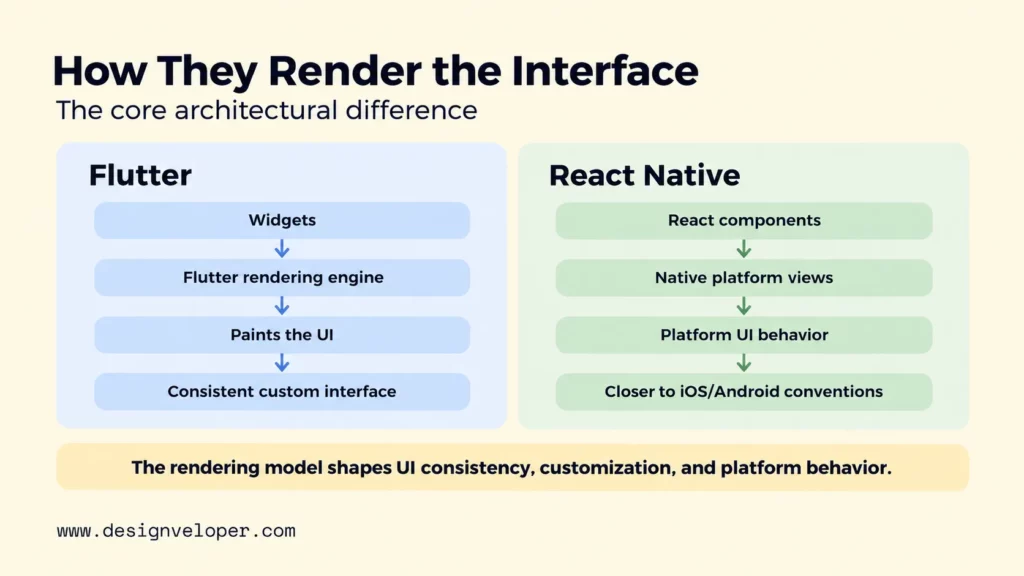
Rendering is the clearest architectural difference because it shapes both interface consistency and the way the app meets native platform behavior. A shared shopping product screen makes the contrast easier to see. Both apps may show the same image gallery, price, variant selector, and checkout button. The frameworks still build that screen through different UI pipelines.
Flutter Widgets And Its Rendering Approach
Flutter describes the interface as a tree of widgets, then uses its rendering system to lay out and paint the result. The official Flutter architectural overview explains how the framework, engine, and platform embedder work together. Current Flutter documentation states that Impeller is the only supported renderer on iOS. It is enabled by default on Android API 29+, while lower Android versions can fall back to the legacy OpenGL renderer.
For the shopping screen, this means Flutter can use one widget composition and one design system to produce the product gallery, selector, price block, and call-to-action on both platforms. That helps when the brand requires precise spacing, custom controls, or motion that should look consistent across devices. It does not mean every pixel should always be identical. A good Flutter app can still adapt navigation, typography, gestures, and system behavior when iOS and Android users expect different conventions.
React Native Components And Native Platform Views
React Native uses React to describe the interface, then renders through native platform UI. Its documentation describes core components such as View, Text, Image, and TextInput as components that map to native platform building blocks. The current React Native New Architecture uses JSI for direct JavaScript and native interoperability, with Fabric and TurboModules supporting rendering and native modules.
On the same shopping screen, a React Native team can share most component logic while still letting iOS and Android use platform-backed controls and platform-specific adjustments. That is useful when the product should feel familiar on each operating system. The trade-off is that a heavily branded interface may need more deliberate styling and testing to keep visual details aligned across both platforms.
Performance, Platform UX, And Native Device Features
Performance should be judged against the app’s workload, target devices, and interaction patterns. It is not accurate to say that Flutter or React Native is always faster. A simple content app, a chart-heavy finance dashboard, and a camera app put very different pressure on rendering, JavaScript or Dart execution, memory, and native APIs.
Animation, Graphics, And UI Consistency
Flutter performance can be easier to tune for animation and custom graphics because the framework controls its rendering pipeline. That can make it easier to build one visual system with consistent motion across iOS and Android. The practical benefit is predictability: the team can design and tune one set of custom components instead of reconciling two separate platform widgets for every visual detail.
React Native can also support fluid animation and demanding interfaces, especially with its current architecture and modern animation tooling. React Native 0.85 introduced a shared animation backend in core, and React Native 0.87 was announced on August 11, 2026. Still, performance depends on the component tree, state updates, animation strategy, native modules, and the devices you support. Test the real screens that matter rather than choosing from framework reputation.
The product question is therefore about control. Choose Flutter when a custom interface is part of the product’s identity and you want one rendering model to govern it. Choose React Native when platform-native behavior is valuable and your team is comfortable tuning platform differences where needed.
Camera, Location, Payments, And Platform APIs
Both frameworks can access common device features through packages or native integrations. Flutter supports platform channels that connect Dart to platform-specific code such as Swift, Objective-C, Kotlin, and Java. React Native supports native modules and native components for capabilities that are not available through the core framework or an existing library.
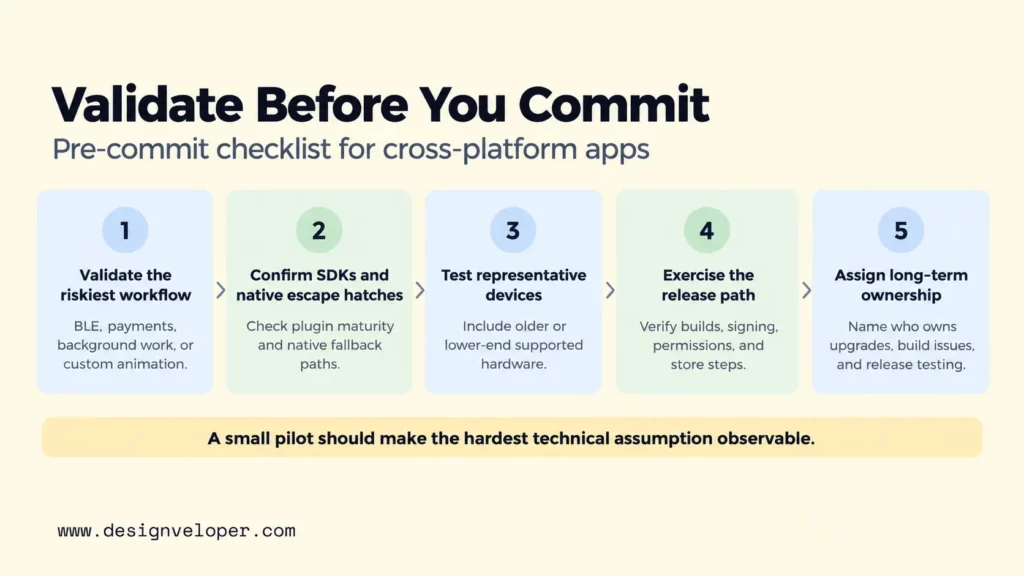
The risk appears when your app depends on a narrow or fast-changing platform API. A payment SDK, Bluetooth device, background service, camera pipeline, or new OS capability may not have a mature cross-platform package when you need it. In that case, the framework choice becomes partly a native engineering decision. Your team should confirm the vendor SDKs, plugin maintenance, permissions model, and native fallback path before committing to either stack.
If the product depends on deep platform behavior across many features, native app development may be the safer baseline. Cross-platform code reuse is valuable, but it should not force an extra abstraction layer onto features where direct platform control is the main requirement.
Developer Experience, Libraries, And Team Fit
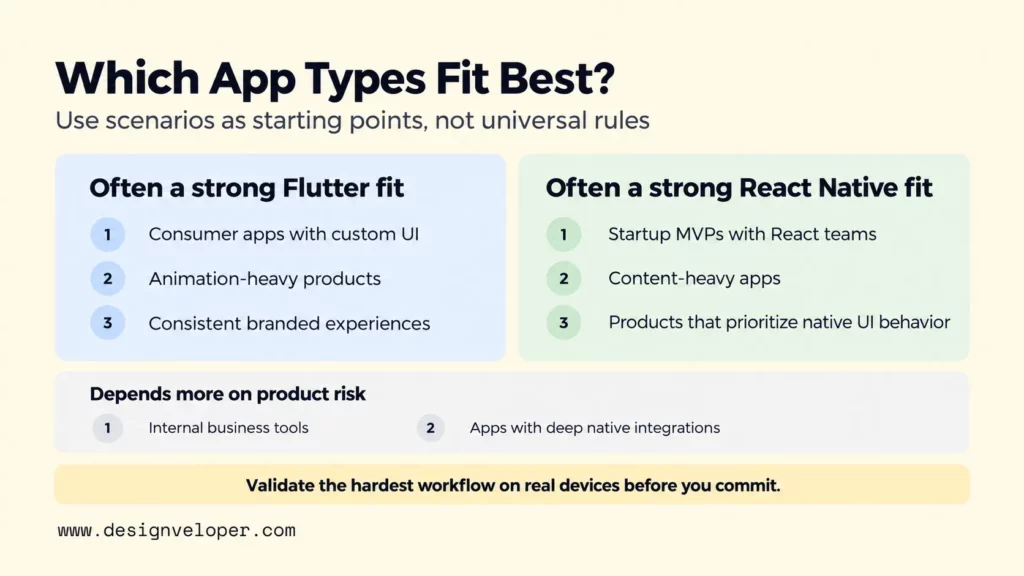
Team fit often has more impact on delivery than small technical differences between frameworks. A framework that matches your engineers’ language, debugging habits, and deployment ownership can reduce onboarding time and make future maintenance easier.
Dart Compared With JavaScript And TypeScript
Flutter uses Dart, so a team that has not used Dart needs to learn its syntax, type system, package conventions, and Flutter’s widget model together. That is a real onboarding cost, but it also creates a focused development environment. The language, framework, layout model, and common tooling are designed to work as one stack.
React Native development uses JavaScript or TypeScript and React concepts. That can be a major advantage for a company with React web engineers because component composition, state management ideas, and much of the language knowledge transfer directly. React Native 0.87 also makes its Strict TypeScript API the default. This strengthens the typed API contract. It can also create migration work for projects or libraries that relied on older deep imports.
Do not choose only by language popularity. Look at who will own the app in two or three years. Consider how quickly you can replace or expand the team. Also check whether the same engineers maintain web or backend products. Our guide to app development language choices covers the wider trade-off between language, platform, hiring, and maintenance.
Debugging, Testing, Expo, Plugins, And Hiring
Flutter provides a structured testing model with unit, widget, and integration tests. Its official testing documentation recommends many fast unit and widget tests plus enough integration tests to cover important user flows. This model is useful for teams that want strong UI-level testing without needing to boot a full device for every check.
React Native teams usually combine several layers: TypeScript checks, JavaScript tests, component tests, native tests where needed, and end-to-end tests on devices or emulators. Expo can reduce setup and release friction for many React Native projects. Its development workflow supports React Native apps that use Expo tools. Expo also documents how development builds can include custom native code and dependencies when the project needs them.
Libraries deserve their own review before the framework decision. Check the exact authentication, analytics, payment, map, notification, media, and device SDKs your app needs. Confirm that each library supports the framework version you plan to use and that native escape hatches are documented. A large package directory does not help if the one integration your product depends on is stale.
Hiring should be treated the same way. React Native may shorten onboarding for React and TypeScript teams, while Flutter may be easier to standardize around when you are building a dedicated mobile team from scratch. The right question is not which community is larger in the abstract. It is whether you can staff and retain the skills your roadmap will require.
Which Framework Fits Common App Types?
The Flutter vs React Native choice becomes more useful when it is tied to product scenarios. These are starting points, not universal rules, because the same app category can have very different design, hardware, security, and team requirements.
- Startup MVPs: React Native is attractive when the founding team already uses React or TypeScript and wants to move quickly with Expo. Flutter is equally reasonable when the MVP depends on a distinctive interface and the team is comfortable with Dart. Keep the first release narrow enough that either stack can be tested on real devices early.
- Consumer apps with custom UI: Flutter often has the cleaner fit when visual consistency, custom motion, and branded components are central. React Native still works, but the team should budget for platform-specific polish where native controls behave differently.
- Internal business tools: Either framework can work well. Team skills, forms, authentication, offline needs, and integration with company systems are more important than rendering philosophy.
- Content-heavy apps: React Native can fit naturally when a team already works in React and the product uses familiar native lists, navigation, and text-heavy screens. Flutter remains a strong option when consistent cross-platform presentation matters more.
- Animation-heavy products: Flutter is often the first option to evaluate because its rendering model gives direct control over custom graphics and motion. Still, prototype the hardest animation on the lowest-end supported devices before deciding.
- Apps with deep native integrations: Both can call native code, but the integration burden can dominate the project. If many core workflows depend on new OS APIs, hardware SDKs, background services, or platform-specific UI, native iOS and Android development may reduce long-term friction.
An existing native app does not force an all-or-nothing rewrite either. Flutter supports an add-to-app model, and React Native documents integration with existing Android and iOS apps for selected views or flows. A gradual adoption strategy can be safer when you want to test a framework inside a mature product before moving more of the interface.
Cost, Testing, Release, And Long-Term Maintenance
A shared codebase can reduce duplicate implementation work, but it does not turn two mobile platforms into one release target. You still need to test iOS and Android, handle platform permissions, meet store requirements, support device and OS variation, and maintain any native modules your product depends on.
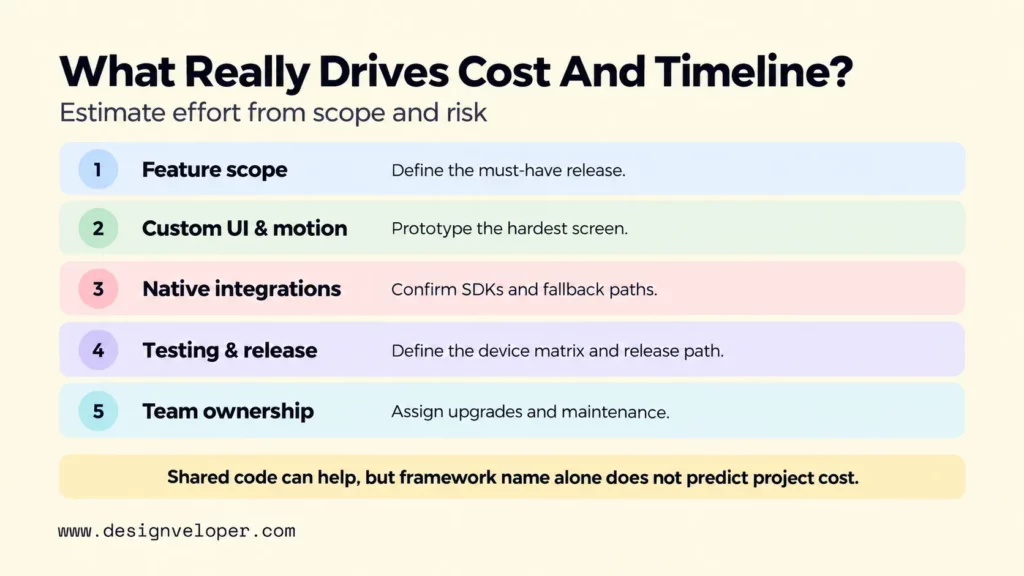
Product scope is the first cost driver. A focused app with standard authentication, content, forms, and APIs usually gains more from shared code. A product with heavy camera processing, Bluetooth devices, custom graphics, and many native SDKs gains less. The more platform-specific work you add, the smaller the practical code-sharing advantage becomes.
Custom UI can shift cost in the other direction. Flutter may reduce duplicated styling work when both platforms must follow one branded design system. React Native may reduce adaptation work when the product intentionally follows native platform controls and interaction patterns. The cheaper framework is therefore the one that matches the interface you actually plan to maintain.
Testing remains a platform obligation. Automated unit and component tests are valuable, but they cannot fully represent permission prompts, keyboards, notifications, payment sheets, accessibility services, camera behavior, app lifecycle events, or manufacturer-specific Android behavior. Plan a device and OS test matrix around your audience rather than assuming shared code produces identical runtime behavior.
Release work also remains platform-specific. Flutter’s official guides cover separate iOS release work and Android release work, including signing, versioning, and store submission. Expo can automate parts of React Native build and release workflows through EAS Workflows, but teams still produce platform-specific builds and comply with each store’s rules.
Long-term maintenance includes framework upgrades, OS changes, dependency updates, privacy requirements, accessibility fixes, and native SDK changes. This is where team availability matters. A framework that is easy to launch but hard for your company to staff later can become more expensive than a slower initial choice.
The maintenance decision should therefore include ownership. Identify who upgrades the framework, who fixes native build failures, who reviews plugin health, and who tests releases after major iOS and Android updates. Shared code reduces some duplication, but it does not remove platform engineering responsibility.
Production Readiness Beyond Framework Choice
A production-ready app needs more than a sound framework choice. Product discovery should define the core user problem and release scope before the team optimizes the technology stack. UX and UI work should validate flows before they harden into code, and our mobile app design process guide explains how research, design, testing, and iteration connect.
Engineering then has to connect the mobile client to reliable APIs, authentication, data storage, analytics, notifications, and any third-party systems. QA must cover function, usability, compatibility, accessibility, and performance. Security work must include permissions, sensitive data handling, secure API behavior, and dependency review. Release management must account for certificates, signing, store assets, review requirements, staged rollout, crash monitoring, and rollback plans.
That broader delivery system is also where a development partner should add value. In our mobile app development services, we publicly cover iOS, Android, Flutter, and React Native alongside UX/UI, end-to-end testing, and post-launch maintenance. For a team choosing between Flutter and React Native, the useful first step is to map the hardest product requirements, integrations, and release risks before locking the framework. That makes the technical choice serve the product instead of becoming the product strategy.
FAQs About Flutter Vs React Native
Is Flutter Easier Than React Native?
Flutter is not inherently easier than React Native. It can feel simpler once a team adopts Dart and Flutter’s integrated widget model. React Native usually has a shorter learning path for developers who already know React, JavaScript, or TypeScript. The easier framework is the one that matches the team’s existing skills and the app’s native integration needs.
Is Flutter Still Relevant In 2026?
Yes. Flutter is actively maintained in 2026, and its current documentation reflects the 3.44.7 release line. Its supported-platform documentation covers iOS, Android, web, and desktop targets. Impeller is the only supported renderer on iOS and is enabled by default on Android API 29+. Relevance, however, does not make it the right choice for every product; team skills and platform needs still matter.
Which Framework Is Better For A Highly Custom UI?
Flutter is usually the stronger starting point for a highly custom UI because it controls its widget and rendering pipeline across platforms. That makes one branded design system easier to reproduce consistently. React Native can also support custom interfaces, especially with specialized animation libraries and native components, but the team may do more platform-specific tuning.
How Much Native Code Can A Cross-Platform App Need?
There is no reliable percentage because native-code needs depend on the product. A standard app may use mature packages for most device features, while a hardware-heavy or platform-specific product may need substantial Swift, Objective-C, Kotlin, Java, or C++ integration. Review the hardest native dependencies before estimating how much code can remain shared.
Can An Existing Native App Adopt Flutter Or React Native Gradually?
Yes. Flutter’s official add-to-app support lets teams embed Flutter modules into existing applications, and React Native documents integration into existing Android and iOS apps for selected screens or flows. Gradual adoption can reduce rewrite risk because the team can validate tooling, performance, and maintenance on a limited surface before expanding.
Also published on

Share post on










Related Articles


How To Learn Rust? A Practical Roadmap For Beginners & Developers
How To Learn Rust? A Practical Roadmap For Beginners & Developers Published October 03, 2026
Rust Vs Java: Performance, Memory, And Project Fit For Teams
Rust Vs Java: Performance, Memory, And Project Fit For Teams Published September 30, 2026
vLLM Tutorial: Install, Run Inference, and Serve an API
vLLM Tutorial: Install, Run Inference, and Serve an API Published September 29, 2026



















