
















10 Best No-Code App Builders In 2026 For Different App Needs

KEY TAKEAWAYS:
- There is no universal winner. Bubble, FlutterFlow, Glide, Softr, Adalo, AppSheet, WeWeb, Thunkable, Lovable, and Base44 serve different app types and levels of control.
- Choose by the app’s hardest requirement. Start with its users, data, permissions, integrations, and publishing needs, not the builder with the most templates.
- Test a real workflow before paying. Build one end-to-end task with sample data and check access rules, errors, export, and ongoing plan limits.
- No-code still needs ownership. Someone must review privacy, security, backups, app-store rules, support, and the cost of running the app.
A builder that suits a spreadsheet-backed team portal may not fit a subscription web product or an app headed to mobile stores. Those projects place different demands on data, access, design, and release work. This comparison matches the best no-code app builder options to the jobs they support. It also shows where each platform gives up control and what to test before real data or workflows depend on it.
What To Check Before Choosing A No-Code App Builder
No-code builders use visual controls, templates, and configured workflows to create software without requiring users to write its main code. Low-code tools may add custom code for special behavior. Prompt-led “vibe coding” products can generate code from instructions, so they may need a developer to review and maintain the output. These labels can overlap; assess what the finished app lets your team control and operate.
Use these questions to narrow the field before comparing individual products:
- What will users open? A responsive web app, a native iOS or Android app, a client portal, and an internal dashboard have different publishing and device requirements. If store release is central and the team needs engineering beyond the builder, compare its limits with mobile app development services as another delivery path.
- Where does the data live? Check whether the builder includes a database or connects to spreadsheets, business systems, or an external backend. Confirm how records can be exported and whether the data model fits the real workflow.
- How specific are the roles and rules? A public directory needs different access controls from an employee portal with private records, approval steps, or separate customer accounts.
- What can the team change later? Review code export, API access, custom logic, hosting options, backup and recovery, and the path to hand the app to developers. These capabilities differ by product and plan.
- What triggers the bill? Compare user seats, published apps, records, automation runs, storage, AI credits, and app-store publishing. A low entry price may not describe the cost of the workflow at normal usage.
For an early SaaS application or internal tool, the best first test is one complete user task. A builder should make that task easier to launch without hiding the ownership, access, and maintenance work that follows.
10 Best No-Code App Builders For Different App Types
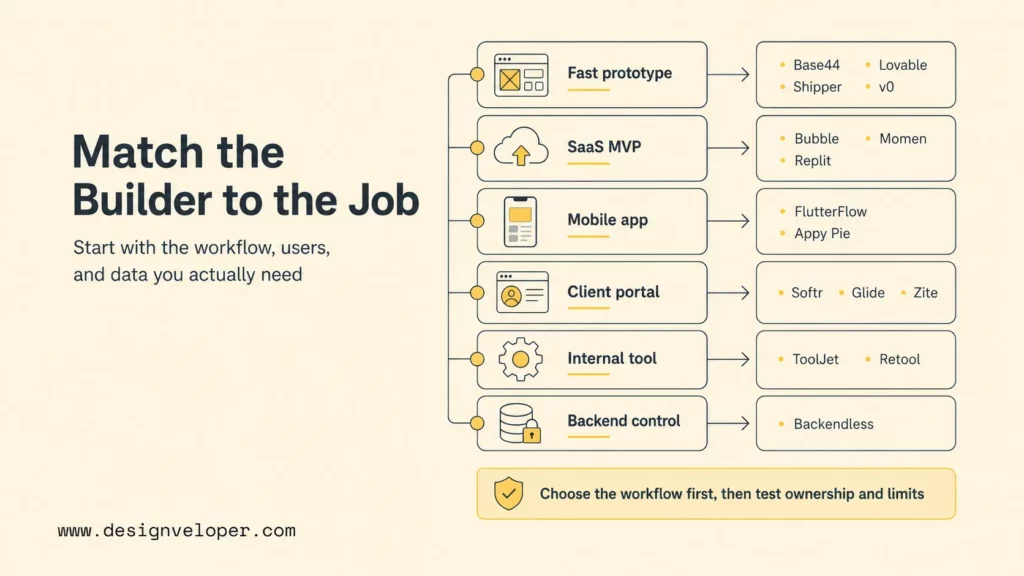
The options below are grouped by their strongest use case, not by a claim that one platform wins every test. These recommendations use each vendor’s public product and plan information; they are not a hands-on benchmark. AI-first builders appear near the end because prompt-generated apps can shorten setup, but they do not work exactly like traditional visual no-code platforms.
Use the table to form a shortlist, then read the matching profile for the practical trade-off. Check current plan limits on the linked official pricing page before you choose; names, quotas, and publishing terms can change.
| Builder | Best Fit | Main Trade-Off |
|---|---|---|
| Bubble | Workflow-heavy web apps and SaaS | More setup and platform-specific logic to learn |
| FlutterFlow | Mobile-first apps with a code handoff path | Release and generated-code work still need review |
| Glide | Data-driven internal and field apps | App shape follows its supported data patterns |
| Softr | Client portals and lightweight business apps | Less suited to unusual product behavior |
| Adalo | Simple native mobile products | Complex workflows and integrations need careful testing |
| AppSheet | Google-centered forms and work processes | Best fit depends on data and Google Workspace setup |
| WeWeb | Custom web front ends connected to a backend | More control means more integration decisions |
| Thunkable | Native mobile apps and interactive prototypes | Mobile release and plan limits still need checking |
| Lovable | Prompt-led web prototypes with code access | Generated code and data flows need technical review |
| Base44 | Prompt-to-app experiments and simple workflows | Verify platform controls and exit options before scaling |
1. Bubble For Workflow-Heavy Web Apps
Bubble fits when a web product needs more than static screens. A team could model a membership service with user accounts, a searchable catalog, subscriptions, and an admin review flow. Its visual editor brings interface, data, and workflow setup together. That can help a small team shape an MVP without starting from a conventional codebase.
The trade-off is that visual logic still has architecture. Teams need to plan data types, privacy rules, reusable elements, and workflow ownership before a large app becomes hard to understand. Bubble’s hosting and runtime model also matter if the product later needs another deployment path. Shortlist Bubble when the workflow fits its visual model. Look elsewhere when source portability or an unusual backend is a firm requirement. Review current Bubble pricing and plan limits against expected users and workload.
2. FlutterFlow For Mobile-First Apps
FlutterFlow suits teams whose product starts on a phone and may also need web or tablet access. A field-service prototype, appointment app, or customer-facing booking flow can be laid out visually, connected to data and APIs, and prepared for a developer handoff. Its mobile focus makes it a different choice from a portal builder that mainly turns a data source into browser screens.
Visual construction does not remove mobile release work. Test navigation, device sizes, offline states, permissions, notifications, accessibility, and the app-store review process. If your team plans to export or maintain code, verify the current plan and make sure someone can review the output. FlutterFlow is a better fit when mobile behavior and a future engineering path both matter than when the requirement is a simple spreadsheet view. Check the current FlutterFlow pricing and export details before estimating the handoff cost.
3. Glide For Data-Driven Business Apps
Glide is useful when the data already describes most of the app. An operations team, for example, could turn an inventory or site-visit dataset into a phone-friendly tool. Staff find a record, update its status, and attach the details needed for the next step. This can replace forms and shared sheets when the app follows a clear data workflow.
That data-first approach is also the boundary to test. Confirm that the source, relationships, permissions, and update behavior match the team’s actual process. A custom consumer product with complex navigation, unusual interactions, or a separate data architecture may not fit as naturally. Before migrating a live spreadsheet, test edits, concurrent users, role access, and export behavior using copies of realistic records. Compare the current Glide plans with the expected user and data volume.
4. Softr For Client Portals And Lightweight Business Apps
Softr is a practical option for a client portal, partner directory, employee intranet, or request dashboard built around structured records. A service company, for instance, could let each client see its own project updates and submit a new request, while staff review all incoming work from an internal view. This portal pattern is a good fit for small business applications when permissions and data matter more than unusual interactions.
Before launch, test the role boundaries with separate accounts and records. A portal that looks correct in an administrator preview can still expose information if user filters or access rules are wrong. Softr is less suitable when the app depends on complex real-time behavior, detailed custom logic, or a product-specific interface that does not fit its building blocks. Review Softr’s current plans for the users, data sources, and permissions you need.
5. Adalo For Straightforward Native Mobile Products
Adalo can suit a small mobile product whose core experience is a manageable set of screens, forms, and records. A local class-booking app, for example, might let a user browse sessions, reserve a place, and view upcoming bookings. The visual approach gives a nontechnical team a way to shape the flow and see whether users understand it before investing in a more custom build.
Keep the first release narrow. Payment behavior, notifications, account recovery, app-store requirements, and data privacy add work beyond arranging screens. Test each important action on real devices and confirm how the app handles slow connections, invalid entries, and duplicate submissions. Adalo is a better shortlist choice for a contained mobile workflow than for a high-complexity product that needs custom backend behavior. Check the Adalo plan and publishing terms for the intended release channel.
6. AppSheet For Google-Centered Workflows
AppSheet is worth considering when a team already works with Google Sheets or related business data and needs a mobile or web interface for a defined process. A site team could receive a maintenance request, assign an owner, record a status, and capture a completion note from a phone. That is a concrete workflow rather than a general-purpose consumer app, which is where a business-oriented builder can be easier to evaluate.
Check the data source, user access, automation behavior, and administrative controls against the organization’s Google Workspace setup. A polished consumer interface or an app with a highly bespoke interaction model may need another platform. Test what happens when a record is changed outside the app and when a user has the wrong role. Review AppSheet pricing and licensing with the accounts and deployment context your team already uses.
7. WeWeb For Custom Web Front Ends
WeWeb is a candidate when the product needs a more tailored browser interface and the team is prepared to connect it to a backend. Consider a customer dashboard that must present account data, filters, and role-specific actions while using a separate service for storage and business rules. A visual front-end builder can speed interface work without forcing every part of the stack into one all-in-one platform.
This flexibility creates integration work. The team must understand the backend, authentication, API behavior, error states, and who maintains each component. WeWeb is less suitable for a beginner who expects one prompt to supply a complete product with no technical decisions. Confirm the current hosting, collaboration, and export model, then try a real API flow before committing. See WeWeb’s current pricing for plan-specific limits.
8. Thunkable For Native Mobile Apps
Thunkable focuses on building native iOS and Android apps through a visual workflow. A school team, for example, could prototype a lesson companion where learners move through short activities, submit answers, and see the next screen based on their input. A phone-first prototype makes it easier to review the flow on a device before deciding whether the product needs a larger engineering investment.
Test the app on real devices and confirm the current build, publishing, collaboration, and export options before choosing a plan. A visual prototype still needs app-store accounts, release checks, privacy disclosures, and ongoing support. Thunkable fits when native mobile behavior is the main requirement; a data portal or complex subscription product may fit another builder better. Compare the Thunkable plans with the publishing path your team needs.
9. Lovable For Prompt-Led Web Prototypes
Lovable is useful when a person can describe a web product more easily than assemble its first interface. A founder might prompt a sign-up flow or an early dashboard, then review the concept with potential users. It can speed up early work on AI apps. Generated output remains a starting point, not approved production software.
Lovable is more accurately viewed as AI-assisted building than as a traditional visual no-code editor. Teams should inspect generated code, authentication, data access, dependencies, and changes before real customer information is involved. A developer who can review the project makes the platform more useful; a nontechnical owner still needs a safe operating plan. Check Lovable pricing and usage limits before a prompt-heavy build becomes a recurring workflow.
10. Base44 For Prompt-To-App Experiments
Base44 fits a user who wants to describe an application and quickly explore a working version. A team could prototype an approval request or a lightweight department tool, then check whether the screens and workflow make sense to the people who will use them. Its prompt-first approach is attractive when speed of exploration matters more than precise control over every implementation choice.
Before using a generated app for a business-critical process, verify how accounts, roles, data export, backups, integrations, and app ownership work on the selected plan. Those details determine whether a useful demo can safely become a service employees or customers rely on. Treat the result as a prototype until it passes functional, privacy, security, and recovery checks. Confirm current Base44 pricing and platform limits and do not assume that prompt-generated logic has been independently reviewed.
For a deeper dive, read:
- Which Programming Language Is Best for App Development?
- Guide about Web Application Development for Beginners
- SaaS Application Development: Process, Cost, And Architecture
How To Test A Builder Before You Commit
A short proof of concept reveals more than a tour of sample templates. Use one realistic workflow and a small set of safe, representative data. For a client portal, the test might start when a customer submits a request and end when the right staff member reviews it and the customer sees the correct status.
- Write the user task. Name who starts it, what information they provide, and what useful outcome they expect. If the concept is still broad, narrow it using relevant app ideas and a defined user problem.
- Set up two roles. Use a customer and an administrator, or another pair that should see different records. Check that each can take only the intended actions.
- Test an exception. Try missing information, an unavailable integration, a duplicate action, and a slow or interrupted connection.
- Check the operating path. Find the owner for updates, support, backups, exports, and access changes. Review the process for business automation if the app triggers actions outside its own screens.
- Price the working version. Estimate normal users, records, storage, automations, and AI usage. Recheck the plan after the test instead of relying on the entry tier.
This test is not a substitute for a security review. It is a way to find platform mismatches while the app is still small and the data is still safe to discard.
For practical examples, check out:
- 7 Stages of Mobile App Development Process
- How Cross Platform App Development Can Reduce Costs?
- What Is Software Development and the Software Development Process?
Limits To Check Before A No-Code App Goes Live
A no-code prototype becomes a product when people rely on its data and outcomes. Before launch, test the parts that a clean demo may not expose:
- Access and privacy: Confirm what each role can view, edit, export, or delete. Test with separate accounts and records, not only an administrator login. Use an app security review when the app stores personal or business-sensitive data.
- Integration failure: Check what users see when an API, spreadsheet, payment service, or notification fails. Decide whether the action retries, stops, or needs a person to review it.
- Data portability: Find the export format, included records, and any limits before a migration becomes urgent. A backup that cannot be restored into a usable system is not an exit plan.
- Performance under ordinary use: Test realistic record counts and concurrent users. Do not treat a fast demo with sample data as proof that the production workload will behave the same way.
- Recurring cost: Model the likely bill as adoption grows. Seats, published apps, storage, transactions, automations, support, and AI usage may be counted differently by each vendor.
- Maintenance ownership: Assign a person to approve changes, review permissions, handle user requests, and recover from mistakes. A visual builder does not operate itself after launch.
For AI-generated apps, review the output as software: verify the code or configured logic, data handling, authentication, and every external action. A natural-language prompt describes intent; it does not prove that the result meets the team’s security or acceptance requirements.
Risk also depends on the workflow. A public event directory can tolerate a different failure than an app that manages payments, health records, or employee decisions. Increase review and human approval as the impact of an error rises.
Related reading:
- What Is App Security and How to Make It Right?
- Software Development Life Cycle (SDLC): Guide for Business
- How To Build And Use AI Business Process Automation Effectively
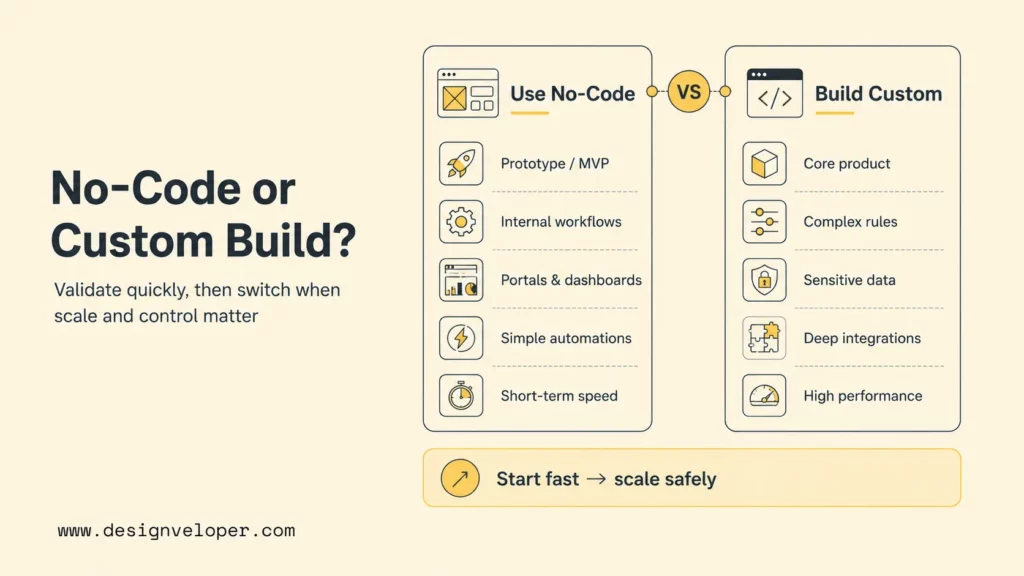
When To Keep No-Code And When To Build Custom
No-code is a sensible fit when a team needs to validate a workflow, serve a bounded user group, or replace manual work with a clear digital process. A builder can shorten early delivery when its data model, permissions, integrations, and release model match the product.
Consider a custom build or a planned hybrid when one or more of these conditions changes the business decision:
- The app’s core value depends on logic or interaction the builder cannot support cleanly.
- Data access, auditability, retention, or compliance requirements exceed the platform’s verified controls.
- The team needs a specific backend, deployment environment, integration, or performance profile.
- Vendor pricing, export limits, or hosting dependence creates unacceptable long-term risk.
- The product has become part of a critical customer or operating workflow and needs a clear engineering owner.
A no-code-to-custom transition can happen in stages. Keep the current version while it meets safety and workflow needs. Document its users, rules, and data. Then rebuild only the parts whose limits block the product.
Plan what users must keep doing, which data must move, and who will support both versions during the change. Do not leave no-code on a schedule. Change platforms when the current one no longer fits the app’s risks or product needs.
FAQs About The Best No-Code App Builder
Can I Publish A No-Code App To The App Store Or Google Play?
Some builders support native mobile builds or app-store publishing, while others produce web apps or progressive web apps. Confirm the exact output, account requirements, signing process, review rules, and plan limits for the platform you select.
Can I Build An App For Free With A No-Code Builder?
Some platforms offer a free tier or trial, but it may limit publishing, users, records, integrations, branding, or AI usage. Treat free access as a way to test a workflow; verify the paid plan needed to run the app as intended.
Can I Export My App Or Move It To Another Platform?
Portability varies. Some tools offer code export or developer handoff, while others rely on their hosted runtime and proprietary configuration. Before building, check what can be exported, whether data can be backed up in a usable format, and which parts would need to be rebuilt.
A focused technical review can show whether to extend the builder, connect a custom backend, or replace one part. If the current workflow no longer fits, Designveloper’s software development services team can assess the options. A full rebuild is not always needed.
Also published on

Share post on










Related Articles


AI Agent Architecture Diagrams: Components, Patterns, and Design Steps
AI Agent Architecture Diagrams: Components, Patterns, and Design Steps Published September 29, 2026
Best Open-Source Vector Database In 2026: 10 Options Compared
Best Open-Source Vector Database In 2026: 10 Options Compared Published September 29, 2026
vLLM Tutorial: Install, Run Inference, and Serve an API
vLLM Tutorial: Install, Run Inference, and Serve an API Published September 29, 2026



















