














Codex Vs Claude Code: Which Tool Fits Your Development Team?

Choose Codex if your team wants to delegate repository tasks through its existing ChatGPT workflow. Choose Claude Code if Anthropic’s model selection, repository instructions and permission system fit your development environment better. Both can work locally and in the cloud, so neither is inherently the better choice for every team.
In a Codex vs Claude Code comparison, measure how much work reaches a verified, reviewable state. Before buying seats for everyone, check which environments your security policy allows and test both agents on the same real tasks.
Codex Vs Claude Code At A Glance
Both products are coding agents: they can inspect a codebase, modify files and run commands within their available permissions. Unlike a simple autocomplete tool, an agent can carry out several steps toward a requested change. Our guide to AI in software development explains where that work fits in the wider development lifecycle.
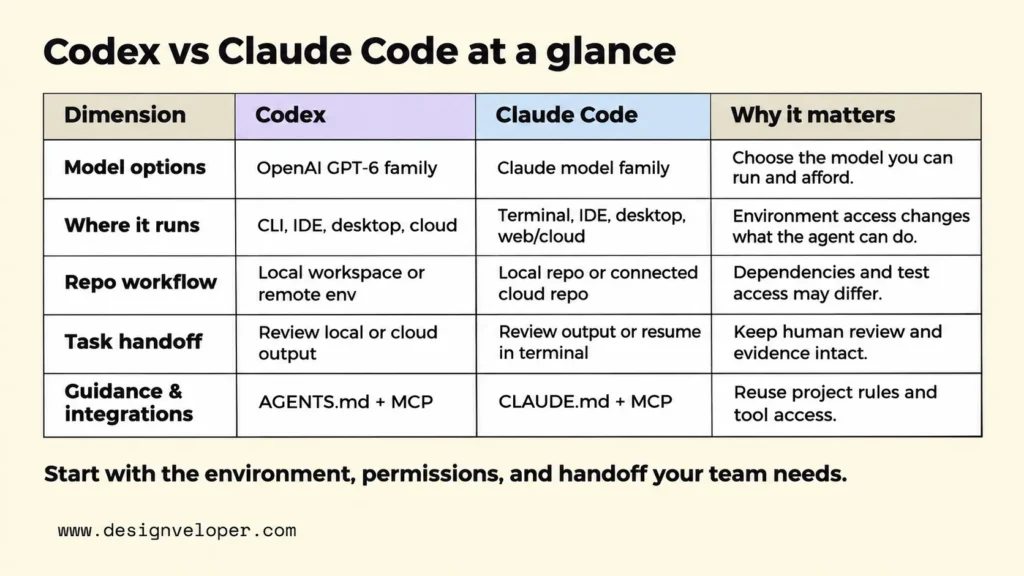
The following Codex vs Claude Code features reflect vendor documentation checked on November 25, 2026. The available models and capabilities depend on your client, account and administrator settings.
| Dimension | Codex | Claude Code | Why It Matters |
|---|---|---|---|
| Model options | OpenAI GPT-6 family, including GPT-6.2 Astra and Sol on supported plans and clients. | Claude models, including Sonnet, Opus, Haiku and eligible Fable models. | Select the model you can actually run and afford. |
| Where it runs | Command-line interface (CLI), IDE extension, ChatGPT desktop app and eligible cloud sessions. | Terminal CLI, IDE extensions, Claude desktop app and web-based cloud sessions. | Check whether the agent can reach your development environment. |
| Repository workflow | Local workspace or configured remote repository environment. | Local project directory or connected cloud repository. | Dependencies and test access can differ between environments. |
| Task handoff | Inspect local changes or review cloud task output and prepare a pull request. | Inspect local changes, review cloud output or move supported cloud sessions to the terminal. | Choose a handoff that preserves review and test evidence. |
| Instructions and integrations | AGENTS.md project guidance and Model Context Protocol (MCP) integrations. | CLAUDE.md project guidance and MCP integrations. | Reuse team conventions and control external tool access. |
Neither product’s instructions replace access controls. MCP is a standard way to connect an agent to external tools and information. For example, a connection to an issue tracker can give the agent the context for a bug fix. It may also give the agent permission to perform actions, depending on the configured tool.
Which Agent Fits Your Coding Workflow?
Start with the environment where developers already work and the way they hand changes to reviewers. A team that can run its tests remotely has different needs from one that relies on a private local service.
Codex For Delegated Repository Work Across Its Supported Surfaces
Codex is worth testing when your team wants to assign well-defined changes and return to review the results. OpenAI’s Codex access guide describes the available clients and plan requirements. The CLI works in a terminal, while the IDE extension keeps the agent close to the editor. The desktop app also supports local work.
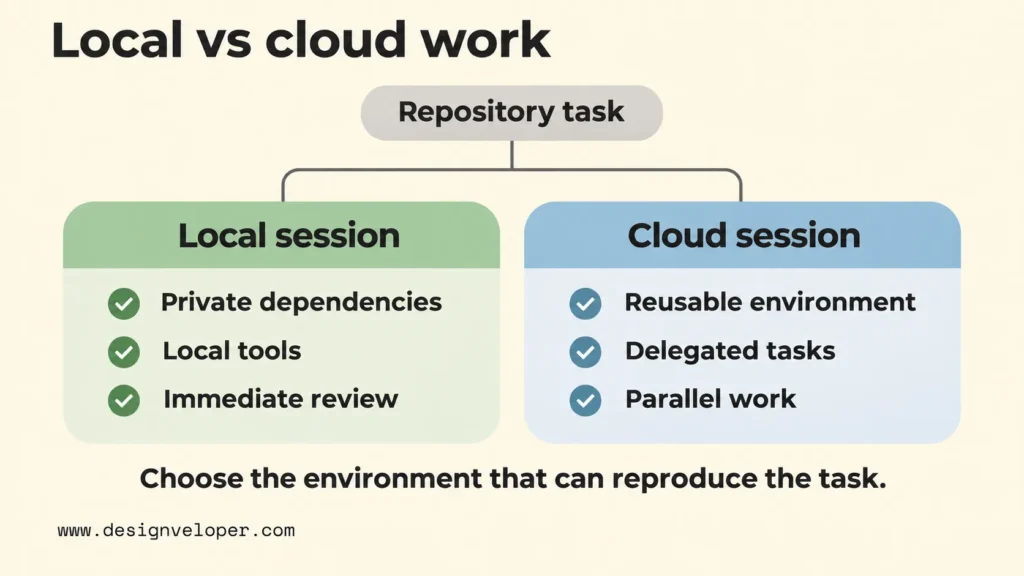
Codex Cloud is useful when tasks can run away from a developer’s machine. Its environment setup lets teams prepare repositories, dependencies and tools for reuse. Each task gets its own working state. A developer can assign a repair while continuing other work, then inspect the resulting changes rather than waiting in the same terminal session.
Imagine a team with a failing unit test in a shared library. If the cloud environment can reproduce the failure, the developer can delegate the repair and review the proposed patch later. If the test requires a private database that the cloud environment cannot reach, a local session may be the better fit. Confirm workspace access before deciding that remote delegation will save time.
Free and Go include limited Codex access but not Codex Cloud. Eligible paid plans provide broader access, subject to rollout and workspace settings. A team should also check how much included usage its tasks consume before depending on several simultaneous agent sessions.
Claude Code For Teams That Prefer Its Repository And Permission Workflow
Claude Code is worth testing when developers want to guide an agent inside their repository and manage its model and tool permissions. Anthropic’s getting-started documentation covers the terminal, IDE, desktop and web clients. Most require a paid Claude subscription or a Console account. Supported terminal and IDE clients also offer third-party cloud provider routes.
The model configuration supports aliases such as sonnet and opus, as well as explicit model selections. An alias can resolve to a newer model later. Record the actual model used in a trial so that a future change does not silently alter the comparison.
A local session makes sense when a developer needs to discuss an unfamiliar service, examine the relevant files and approve a focused edit. The team can store coding conventions and test commands in CLAUDE.md. Permission settings determine which tools the agent may use; the instruction file alone does not enforce those limits.
Claude Code also supports cloud work. Its web documentation describes repository connections and moving eligible cloud sessions to a local terminal. Check the connection method and the requirements for resuming work before building a process around that feature. In either tool, our AI coding agent workflow guide recommends a bounded task and a human-reviewed pull request (PR) as the end point.
Check Repository Access, Permissions, And Data Handling
Rule out any configuration that cannot meet your company’s security requirements before comparing speed or price. A local agent still sends model requests to a provider; running commands on your laptop does not mean the entire service runs offline.
Compare What Each Agent Can Read, Change, And Run
The main security question is whether the agent can act beyond the task it was assigned. A sandbox restricts the resources that a process can access. An approval rule determines when an action needs authorization. These are related but distinct controls.
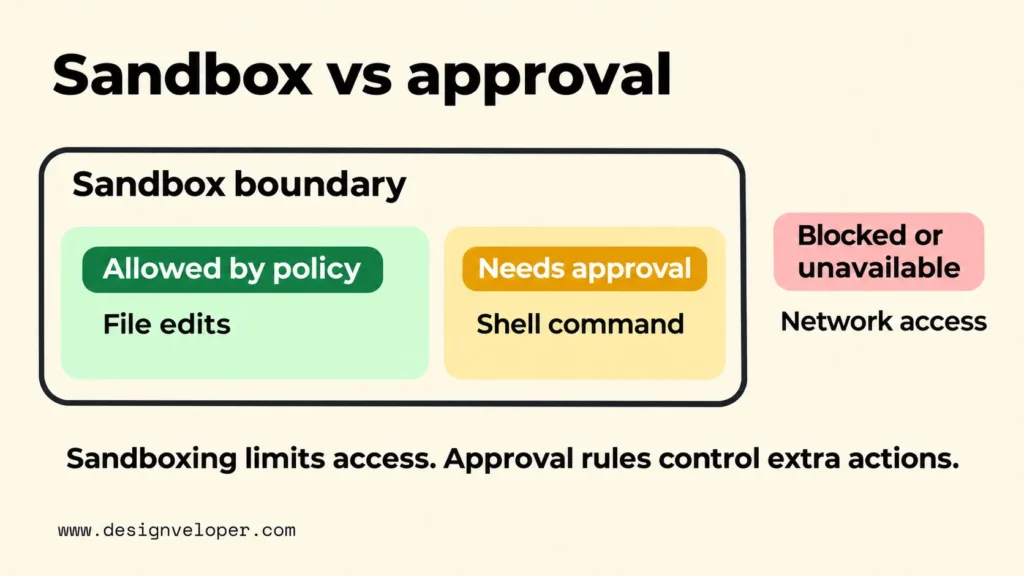
Codex documents local sandbox modes, including read-only and workspace editing. Its newer permission profiles can describe file and network restrictions together. Approval policies control requests for additional authority. Cloud environments and connected tools have separate settings, so do not assume a local sandbox policy follows every task.
Claude Code supports allow, ask and deny rules for tools. Its Bash sandbox can restrict filesystem and network access. Review both the tool rules and sandbox settings because a permission to run a command does not necessarily mean it can reach every file or network destination.
Test the effective controls with harmless files and a disposable repository. Ask the agent to edit an approved file and run a local test. Then check that an out-of-scope file, a prohibited command and an unapproved network destination remain inaccessible. Record whether the action was blocked or required approval. An approval prompt is not the same as an enforced prohibition.
Keep recovery independent of the agent. Start with a clean Git branch or a separate worktree, which is an additional checkout of the repository. Review the diff before committing. Claude Code’s checkpoint feature can rewind tracked edits, but some shell changes and external actions are not covered. Neither Git nor an edit history can undo a leaked secret or a change to a remote database.
Review Data, Secrets, And Team Policies
Check the data terms for the exact account that will process the code. OpenAI states that ChatGPT training settings apply to Codex content, and Business workspace data is not used for training. Anthropic’s Claude Code data documentation distinguishes consumer privacy settings from commercial terms. It lists a standard 30-day retention period for commercial accounts, with exceptions and separately approved zero-retention arrangements.
Training and retention are different issues. An organization may prohibit training on its code but also require a specific retention period or storage region. Ask the vendor to confirm those conditions for the chosen surface and any connected provider before sharing restricted code.
Keep production keys and customer data out of pilot environments. Supply temporary test credentials only when a task needs them. Limit their permissions and lifetime. For remote tasks, examine how the environment stores secrets and restricts outgoing requests.
Administrators should also confirm who can change the settings. OpenAI’s managed workspace access and Claude Code’s managed settings provide controls that depend on account and configuration. Check Codex audit and monitoring options and Claude Code monitoring options against your incident response needs. Decide who can view session records and how long the team keeps them. Logs may contain sensitive code or command output, so unrestricted logging is not a safe default.
Compare Usage Costs For Your Team’s Workflow
Compare the cost of a verified change, not just the advertised monthly price. Both vendors offer subscriptions and usage-based routes. Codex API-key sessions do not include Codex Cloud features. A subscription may be economical for predictable work, while metered billing makes it easier to attribute model charges to a specific task.
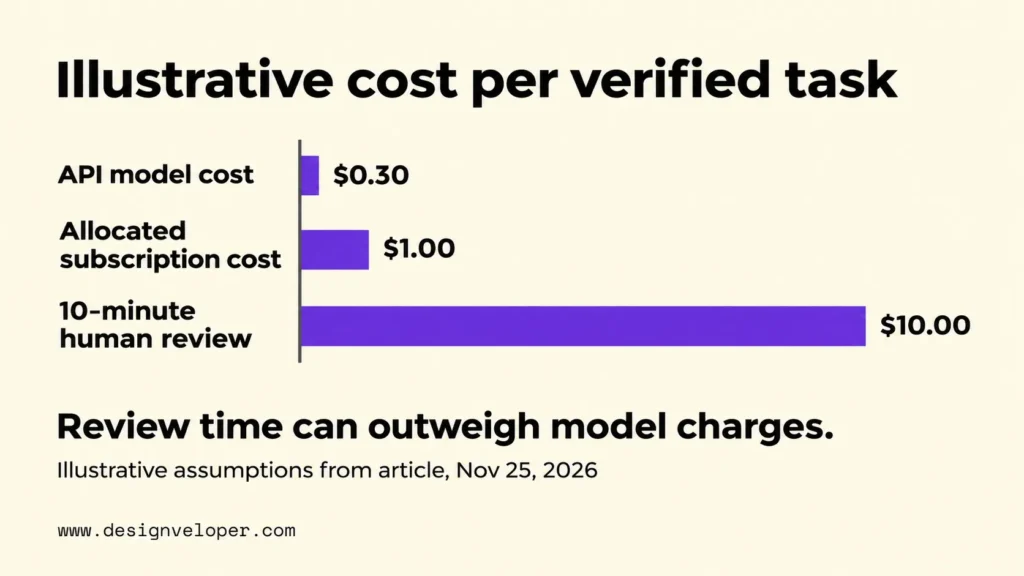
The Codex vs Claude Code pricing table below uses US dollar list prices checked on November 25, 2026. These prices and usage terms can change. It illustrates one bounded bug fix rather than reporting a real test. Assume a single developer completes 20 accepted fixes in a month on a $20 plan with no extra charges. For the API example, assume one fix consumes 100,000 uncached input tokens and 10,000 output tokens at standard rates, with no cache writes or separately billed tools. Tokens are the units of text and other model input or output used for billing.
| Product | Billing Route | Usage Basis | Factors That Change Cost | Cost For A Representative Task |
|---|---|---|---|---|
| Codex | ChatGPT Plus, $20/month | Included allowance; eligible credits for extra usage | Model, task length, retries and other eligible usage | $1 allocated per fix under the subscription assumption. |
| Claude Code | Claude Pro, $20/month billed monthly | Shared Claude usage allowance; eligible extra usage | Model, context size, retries and Claude chat usage | $1 allocated per fix under the subscription assumption. |
| Codex | OpenAI API key | Model token charges; GPT-6.1 Sol at $2 input and $10 output per million tokens at standard rates | Actual tokens, cache activity and speed tier | $0.30 in assumed model charges. |
| Claude Code | Anthropic Console API | Model token charges; Sonnet 5.5 at $2 input and $10 output per million tokens at standard rates | Actual tokens, cache activity and provider options | $0.30 in assumed model charges. |
The subscription figure is an accounting allocation, not a vendor’s price per fix or a guaranteed task allowance. The API figure is equally conditional. Identical token prices do not imply identical consumption. A second attempt adds usage, and the two agents may need very different amounts of context to complete the same repair.
For team purchasing, OpenAI also lists Business at $25 per user monthly or $20 per user monthly with annual billing and a two-user minimum. Anthropic lists the same monthly and annual rates for its standard Team seat. Premium seats and Enterprise use different pricing. Verify seat entitlements, credit rates and spending controls in the current plan documentation rather than extrapolating from individual subscriptions.
Include human time in the comparison. At an assumed engineering rate of $60 per hour, ten minutes of review costs $10. If an agent needs repeated corrections, human effort can outweigh a small difference in model charges. Our guide to AI agent cost per task explains how to include unsuccessful attempts when calculating cost per verified outcome.
How To Test Codex And Claude Code On The Same Repository
Run a small controlled pilot on tasks from your own backlog. The aim is to find which configuration delivers acceptable changes with the least total effort, not to prove that one model is universally stronger.
Set The Same Task And Starting Conditions
Give both agents the same starting commit and written request. Define acceptance criteria before either starts. Use identical test fixtures, dependency versions and permitted tools where possible. Reset the workspace between runs so that neither agent inherits the other’s fixes.
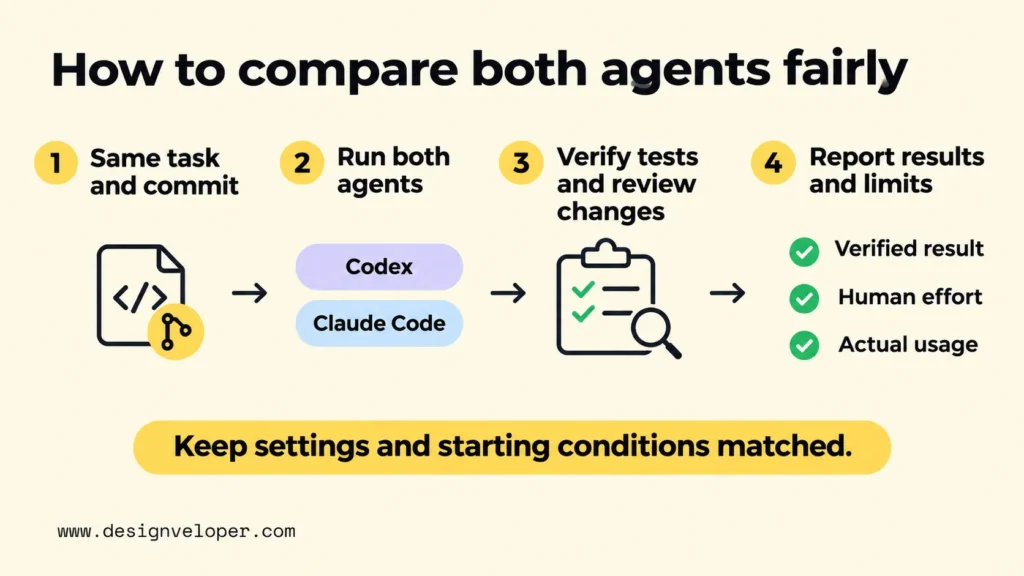
Record the date, client, client version, model ID, reasoning or effort setting, account plan and permission settings for every attempt. Capture the instructions each agent receives, including repository guidance. If an equivalent model or tool setting does not exist, note the difference. You are comparing usable product configurations, not isolating model intelligence.
Score The Verified Result And Human Effort
Use tasks that expose different parts of your normal development work. The following are illustrative examples, not completed experiments.
- Fix a validation bug. Require the original failing test and a new boundary-case test to pass without weakening assertions.
- Add a filter to an existing API and interface. Check that it works across files and preserves access restrictions.
- Refactor a shared helper. Require unchanged public behavior, passing regression tests and no unrelated dependency updates.
Treat passing the agreed tests and respecting the access limits as mandatory. Run the checks independently of the agent’s final summary. A reviewer should inspect whether the change stays within scope and whether it introduces unnecessary complexity. Record new defects and any edits that a human must make before acceptance.
Measure time from task assignment to verified acceptance, including setup, approval delays and manual corrections. Separately record developer minutes spent steering or reviewing the agent. An unattended run that takes longer may still be valuable if it frees developer time. Record actual billed usage or the available plan meter; do not invent token counts for a subscription session.
Report The Test’s Limits
Report how many distinct tasks and independent attempts you ran, along with the prompts, settings and acceptance checks. A practical starting pilot might use three task types and three independent attempts per type for each agent. That is a proposed sample, not a statistically representative benchmark.
Report failed attempts as well as successes. A tool that passes two easy fixes but fails a feature task should not receive credit for delivering the feature. Our AI agent evaluation guide explains why outcome checks and permission checks belong together. Repeat the trial when a model or major client update changes the configuration you intend to deploy.
FAQs About Codex Vs Claude Code
Can You Use Codex And Claude Code Together?
Yes. A team can use one agent to propose a patch and the other to review it, subject to both products’ access and data policies. Keep each agent’s edits in a separate branch or worktree to avoid conflicting changes. A human remains responsible for approving the final result, even if both agents agree.
Can Claude Code Use GPT Models Or Codex Use Claude Models?
Not as standard first-party model options. Claude Code’s documented model settings select Claude models, including those available through supported third-party providers. Codex’s official model catalog focuses on OpenAI models. Custom routing or unofficial adapters may behave differently, but do not assume they offer the same support, privacy terms or feature coverage as the native products.
Can You Use Codex Or Claude Code For Free?
Yes for limited Codex access, but not for Claude Code under Claude’s standard Free plan. OpenAI lists Codex on ChatGPT Free, with limited desktop access subject to rollout and no Codex Cloud. Anthropic lists Claude Code from Pro upward or through metered API access. Start with the least expensive eligible configuration that meets your company’s data policy, then upgrade only when your pilot shows a real need.
Also published on

Share post on










Related Articles


Codex Vs Claude Code: Which Tool Fits Your Development Team?
Codex Vs Claude Code: Which Tool Fits Your Development Team? Published November 27, 2026
AI Chatbots In Banking: Use Cases, Risks, And How To Deploy Them
AI Chatbots In Banking: Use Cases, Risks, And How To Deploy Them Published November 27, 2026
TOP AI Voice Agents For Business Automation Workflows In 2026
TOP AI Voice Agents For Business Automation Workflows In 2026 Published November 26, 2026