
















Best Accounting Software For 2026 By Business Type And Needs

The best accounting software in 2026 depends on how your business gets paid, tracks costs, and closes its books. For general bookkeeping, start with QuickBooks Online; Xero is strong for accountant collaboration. FreshBooks suits services, Zoho Books fits a connected suite, and Wave keeps basic bookkeeping free. Sage 50 belongs on the shortlist when inventory controls matter.
None is the best choice for every country or business. Start with the work you need to complete each month, check whether the product supports your local requirements, and compare the cost of the plan that actually handles that work. Prices below use public US offers checked on October 22, 2026, with regular rates shown instead of temporary discounts.
Best Accounting Software At A Glance
Use this shortlist to match each platform to its strongest practical fit. The prices are starting points, not the cost of a complete accounting setup. For the wider choice of tools around your finance system, our guide to small business applications explains how to avoid buying overlapping software.
| Platform | Best fit | Standout capability | US starting price or free plan |
|---|---|---|---|
| QuickBooks Online | Small businesses with varied bookkeeping needs | Invoicing, expenses, reports; accountant access on paid plans | Free: $0 (two invoices/month, one bank account); Simple Start: $38/month |
| Xero | Growing teams sharing books with an accountant | Bank reconciliation and broad user access | Early: $27/month |
| FreshBooks | Freelancers and client-service businesses | Client invoices, estimates, and service workflows | Lite: $23/month |
| Zoho Books | Small teams using the Zoho ecosystem | Connected invoicing and business workflows | Free plan; Standard: $20/month |
| Wave | US or Canadian solo businesses with simple books | Free invoicing and manual bookkeeping | Starter: free; Pro: $19/month in the US |
| Sage 50 | Product businesses needing stronger inventory controls | Inventory, purchasing, and job costing | Pro Accounting: $132.17/month; one-year commitment |
These are regular advertised prices in US dollars, not introductory promotions, unless a vendor specifies a different billing condition. Sage’s displayed monthly amount carries a minimum one-year commitment. QuickBooks Free normally limits invoices to two per month, although eligible users who enable QuickBooks Payments may send more. Each vendor can change prices or availability, and tax and add-on charges may apply. Check the plan in your own country before subscribing.
Best Small Business Accounting Software By Use Case
For the best small business accounting software, look beyond the number of features. A good fit lets the owner record transactions correctly and lets the bookkeeper review them without a separate spreadsheet process. The six options below solve that problem in different ways.
QuickBooks Online For Broad Small-Business Accounting
QuickBooks Online is a sensible starting point for a company that needs invoices, expense tracking, bank transactions, and standard financial reports in one place. Its US Simple Start plan supports one business user and access for accountants. That can work for an owner who handles daily entries while a professional reviews the books.
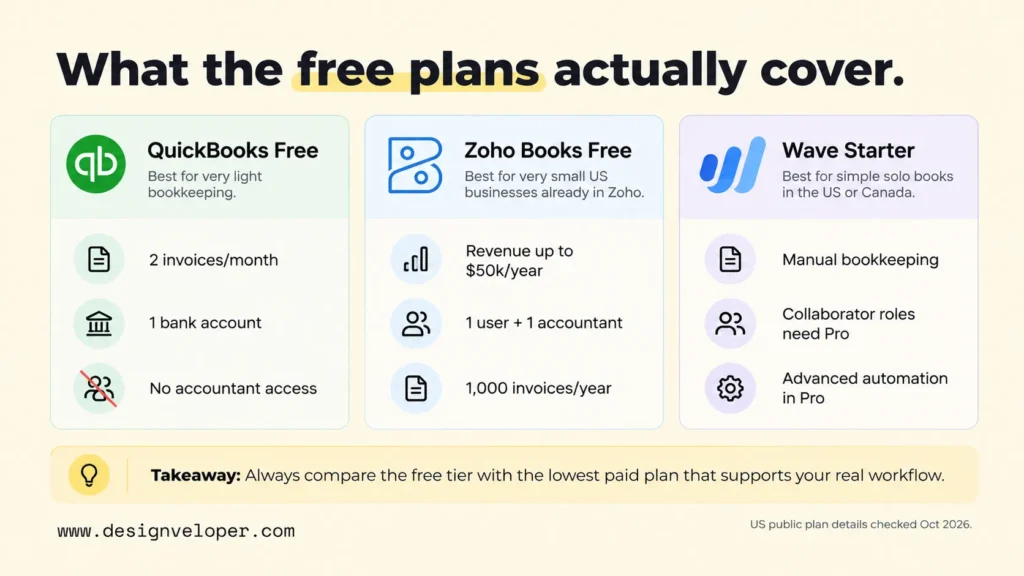
The free plan is much narrower than Simple Start. The US offer allows one linked bank account and normally two invoices per month, with an exception for eligible users who enable QuickBooks Payments. It also excludes accountant access. These limits make it difficult to use for routine billing or shared bookkeeping. The official QuickBooks US pricing comparison lists Free at $0 and Simple Start at a regular $38 per month.
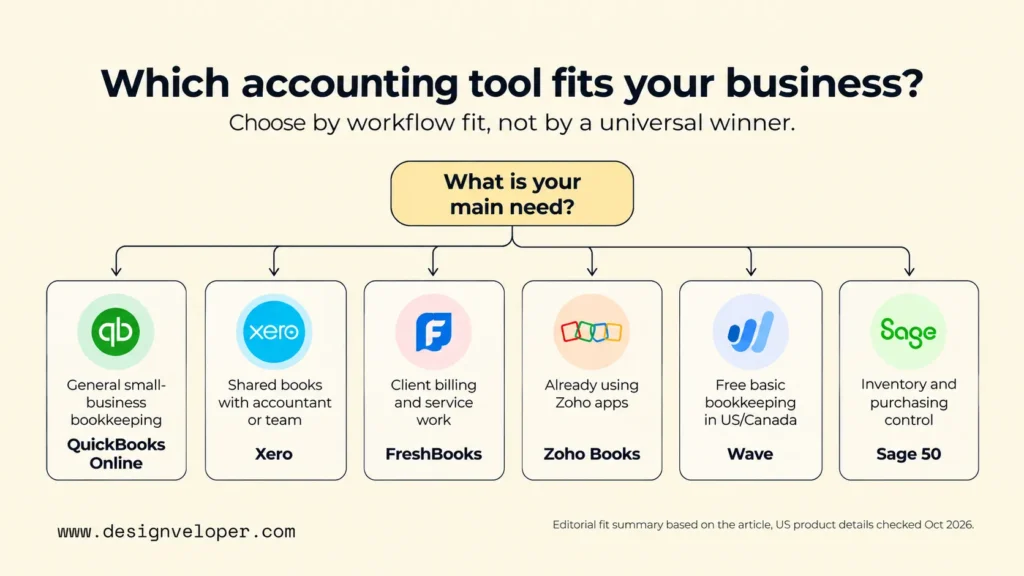
Paid tiers also need careful selection. A shop may need a higher tier for inventory or project profitability, and a growing team may need more user seats. If QuickBooks is not a fit, other tools may suit specific tasks. Consider Xero for shared books, FreshBooks for client billing, Zoho Books for an existing Zoho setup, or Wave for basic free bookkeeping where available. These are alternatives by use case, not a universal replacement ranking. Before switching, confirm that your accountant supports the new system and that you can export and reconcile your existing books.
Xero For Growing Teams And Accountant Collaboration
Xero fits a business whose owner, staff, and accountant need shared access to cloud accounting records. Its US plans do not charge per-user licence fees. Invoicing, bill entry, bank reconciliation, and reporting support a monthly review process without passing files between separate copies of the books.
The entry plan still has workload limits. Xero Early permits 20 invoices and five bills, which may be too restrictive for a company sending regular customer invoices. Growing removes those basic limits and adds wider bill-processing and reporting tools. Established adds functions such as multiple currencies and project cost tracking. The Xero US plan comparison lists regular rates of $27, $59, and $97 a month after an October 1, 2026 price increase.
Xero is worth testing when several people contribute to the books or your accountant already uses its practice tools. Check the bank connections and any payroll service for your location. An accounting app can be cloud-based without offering the same integrations in every country.
FreshBooks For Freelancers And Service Businesses
FreshBooks is especially relevant to people who bill customers for time or project work. A consultant can create an estimate, send an invoice, collect payment, and check related expenses without starting with a complex inventory workflow. That makes it appealing accounting software for freelancers and smaller agencies.
The key limit is the number of billable clients on cheaper plans. Lite supports invoicing up to five clients, while Plus raises that to 50 and adds broader accounting reports and accountant access. Premium allows unlimited billable clients. The FreshBooks pricing page shows regular US monthly prices of $23 for Lite, $43 for Plus, and $70 for Premium, before temporary discounts.
For a service business, count active and likely new clients before choosing Lite. Also check paid team seats and payroll. FreshBooks may be a better fit than a product-focused system when billing clients is the hard part, but its low entry price is less useful if you must immediately upgrade.
Zoho Books For A Connected Business Suite
Zoho Books suits businesses that want accounting to work alongside other Zoho applications. It handles estimates, invoices, expenses, and financial reports. The appeal grows when customer and operating information already lives in the same software ecosystem.
The free plan has real boundaries. In the US, Zoho says it remains free while annual revenue is no more than $50,000. It includes one user plus one accountant and allows up to 1,000 invoices a year. Standard costs $20 per month on monthly billing, adds bank feeds and API access, and permits three users. Professional adds inventory and purchase-order workflows at $50 per month. These limits appear in Zoho Books’ US pricing and plan details.
Zoho can be cost-effective when you already use related Zoho products, but test the actual connection you need. A shared vendor brand does not guarantee that every field will sync automatically. Check which app owns customer details, invoice status, and tax data before making the connection central to your workflow.
Wave For Free Accounting Software And Basic Bookkeeping
Wave Starter is a genuine free accounting software option for a solo business that can enter transactions manually. It includes unlimited invoices, estimates, bills, and basic bookkeeping records. That may be enough for a freelancer with a small number of monthly transactions and no complicated inventory.
Free does not mean that every useful workflow is free. Automatic bank imports, receipt capture, and additional automation are Pro features. The Wave plan comparison lists Starter at $0 and US Pro at $19 per month on monthly billing. Accepting customer payments also carries processing fees. Wave’s own help center says the service is available to US and Canadian businesses, so it is not a general recommendation for companies elsewhere.
Choose Wave when cost matters more than automation and you can keep the books yourself. Wave Starter does not allow you to invite an ordinary accountant or bookkeeper as an Admin, Editor, or Viewer; those roles require Pro. Wave’s collaborator permissions guide also says only the owner or an Admin can export account data. Before subscribing, ask your bookkeeper what access they need, and test an export of transactions and reports. If manual entry takes too much time, compare Pro with other paid products.
Sage 50 For Inventory And Desktop Accounting
Sage 50 is better suited to businesses that need deeper purchasing, inventory, or job-cost records than to a freelancer sending a few invoices. The product now has both a cloud-first Sage 50 Cloud offering and a separate locally installed Sage 50 Desktop option. Buyers should check which deployment they are reviewing rather than assume the product is desktop-only.
The trade-off is price and setup commitment. Sage’s US Sage 50 pricing page lists Pro Accounting at $132.17 per month with a minimum one-year commitment and one user. Premium adds advanced inventory, budgeting, and multiple-company functions. Sage’s product pages have shown different entry amounts, so request a dated quote before treating the displayed price as final.
Sage 50 makes more sense when those controls save meaningful manual work. For example, a parts supplier may need serialized stock records and detailed purchasing reports. A small design studio with only a handful of expenses may pay for complexity it does not use.
How To Choose Accounting Software For Your Business
Choose by testing one complete accounting month, not by counting features in a sales presentation. The trial should show how money enters the business, how costs are recorded, and whether someone can review the final figures. Use this sequence to narrow the options.
- List your routine work. Count invoices, supplier bills, bank accounts, payments, and stock movements in a typical month. A freelancer’s needs will differ from those of a store holding hundreds of products.
- Check local rules first. Confirm your country, currency, sales-tax or VAT treatment, payroll support, and required records. US prices and tax features do not establish compliance in another market.
- Confirm access and responsibilities. Identify who issues invoices, approves spending, reconciles the bank, and signs off the reports. Make sure your accountant can use the system without sharing the owner’s password.
- Review connections and exports. Test links to your bank, ecommerce store, point-of-sale system, or CRM. Check whether you can export transactions, customer balances, and reports in a usable format if you leave.
- Compare support and full cost. Identify who helps with setup, migration, errors, and year-end questions. Then price the lowest tier that meets all five checks, rather than the cheapest plan on the page.
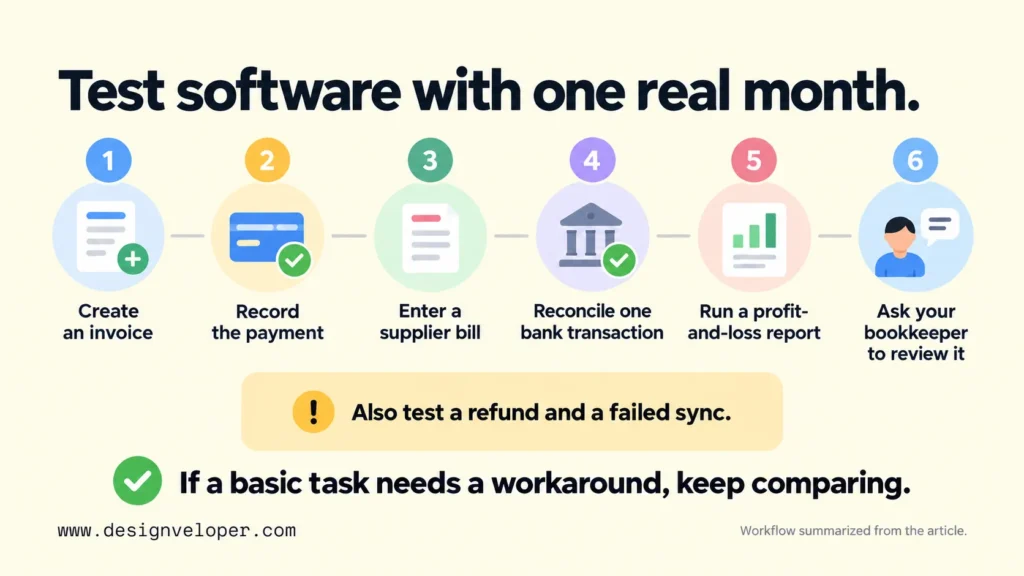
Test the final two products using the same sample records. Create an invoice, record the payment, enter a supplier bill, and reconcile one bank transaction. Then run a profit-and-loss report and check that its totals match your source records. Ask your bookkeeper to repeat or review the process. If they need an awkward workaround for a basic task, investigate it before moving your real books.
Connections deserve a separate test because a listed integration may sync only selected fields or run at fixed intervals. Our guide to API integration architecture and data flows explains how to check which system owns a record, what triggers an update, and what happens when a connection fails. For accounting, those questions help prevent duplicate invoices and missing payments.
For example, an online shop may send each order from its storefront to accounting. If refunds or shipping charges never reach the books, sales can look correct while profit is wrong. Ask the vendor to demonstrate an original order, a refund, and a failed sync before trusting the connection.
Accounting Software Pricing And Add-On Costs
Compare the price of the plan you will actually use for a full year. A low first-month payment can hide higher renewal fees, the cost of more users, or charges for essential tasks. Promotions also make two tools look closer in price than their normal subscriptions are.
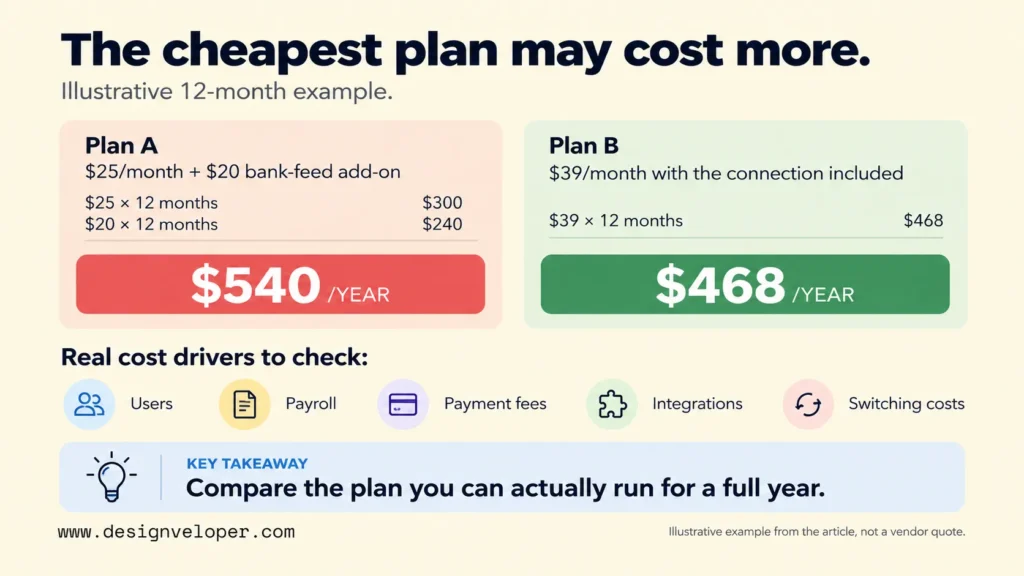
Begin with the regular subscription for the correct plan and billing term. Then add the expenses your workflow creates:
- User access: additional staff accounts, permissions, or higher tiers needed to let people approve and review entries.
- Payroll: base payroll subscriptions, per-employee charges, and local filing support where offered.
- Payment collection: card or bank-transfer processing fees, refunds, and international transaction costs.
- Connections and support: paid integrations, advanced support, receipt processing, or higher document limits.
- Switching costs: importing historical data, checking opening balances, training users, and running both systems during a controlled changeover.
An illustrative comparison shows why this matters. Suppose Plan A costs $25 monthly but needs a $20 bank-feed add-on. Plan B costs $39 with the required connection included. Before fees or tax, Plan A would cost $540 over twelve months and Plan B $468. The cheaper advertised subscription would be the more expensive working setup. These figures are hypothetical, not vendor quotes.
Also consider the cost of changing tools later. Ask how to export a general ledger, outstanding invoices, contacts, and attachments. Arrange a final reconciliation before closing the old account. Keep the historical records that your local retention rules require. A lower annual fee is not attractive if it creates recurring errors or traps important data.
When Your Business Needs More Than Basic Accounting Software
Consider a broader finance platform or enterprise resource planning (ERP) system when the main problem extends beyond bookkeeping. Signs include repeated manual consolidation across legal entities, complex approvals, or inventory and purchasing decisions that finance cannot track reliably. ERP can connect those operating activities with financial records; it is not a necessary upgrade for every small business.
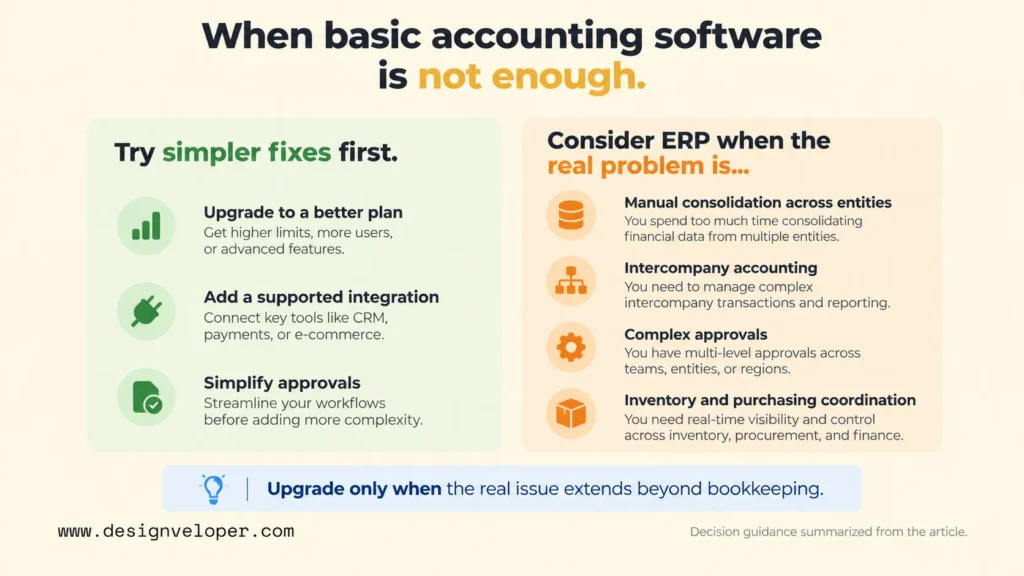
A group running several subsidiaries may need consolidated reports, intercompany accounting, and separate local tax settings. Oracle’s NetSuite OneWorld documentation describes these multi-subsidiary functions. That is a different problem from a single studio tracking invoices and bank deposits.
Before replacing your accounting software, check whether a better plan, a supported integration, or a simpler approval process would solve the gap. A move to ERP usually means more configuration, training, data cleanup, and controls to maintain. Our overview of enterprise applications and ERP systems helps distinguish software that records financial activity from systems that coordinate wider operations.
At Designveloper, we recommend defining one broken handoff before deciding to build or connect additional software. For example, document where orders start, who confirms stock, when an invoice is created, and how errors are corrected. That gives a business a concrete test for whether an integration or broader platform will help. It does not assume a custom system is automatically better than the accounting product already in place.
FAQs About Best Accounting Software
Do I Need Accounting Software If I Hire A Bookkeeper?
Usually, yes. The business still needs reliable records, while the bookkeeper needs a consistent place to review and reconcile them. You may not need to operate the system yourself each day, but you should be able to view reports and understand who owns the account. Ask the bookkeeper which products they support, what access they require, and how they will return your data if the working relationship ends.
What Accounting Software Do Accountants Use?
Accountants use different platforms, including QuickBooks Online and Xero, depending on the client and country. There is no single application that every accountant uses. Claims about the most-used accounting software need independent data with a defined market, period, and measure of usage; vendor claims and roundups cannot establish a global leader. Ask your accountant which plans, reports, and export formats they support. Their ability to review your books matters more than a popularity label.
Can Accounting Software File Taxes For My Business?
Some accounting products calculate or prepare specific tax information, but that does not mean the software can file every business return. Filing depends on the tax type, location, connected service, and approved filing method. In the US, the IRS maintains an approved business e-file provider list. Confirm the exact forms your business must submit with a qualified tax professional, and check whether your selected tool files them or only prepares supporting reports.
Also published on

Share post on










Related Articles


Best Accounting Software For 2026 By Business Type And Needs
Best Accounting Software For 2026 By Business Type And Needs Published October 27, 2026
Best ERP Software For 2026 By Business Size And Industry Fit
Best ERP Software For 2026 By Business Size And Industry Fit Published October 27, 2026
On-Device AI For Mobile Apps And When A Hybrid Setup Fits Best
On-Device AI For Mobile Apps And When A Hybrid Setup Fits Best Published October 23, 2026


















