
















Best ERP Software For 2026 By Business Size And Industry Fit

The best ERP software in 2026 is the system that fits your business processes, industry, and ability to implement it – not the product with the longest feature list. Microsoft Dynamics 365 Business Central and SAP Business One suit many smaller firms, while NetSuite and Acumatica address growing operational needs. Larger or specialized organizations should also compare SAP Cloud ERP, Oracle Fusion Cloud ERP, Epicor, Infor, and IFS.
Start with the work your teams must complete, then compare the products that can handle it without excessive customization. The options below are grouped by fit, not ranked by an unverified overall score. Prices and available editions can vary by region, contract, and implementation partner.
What Is ERP System Software?
Enterprise resource planning (ERP) software connects core business operations through shared records and coordinated workflows. Instead of entering a purchase in one tool and retyping it in accounting, an ERP can connect the order, inventory receipt, supplier invoice, and payment. Oracle’s ERP definition covers functions such as accounting, procurement, projects, and supply chains.
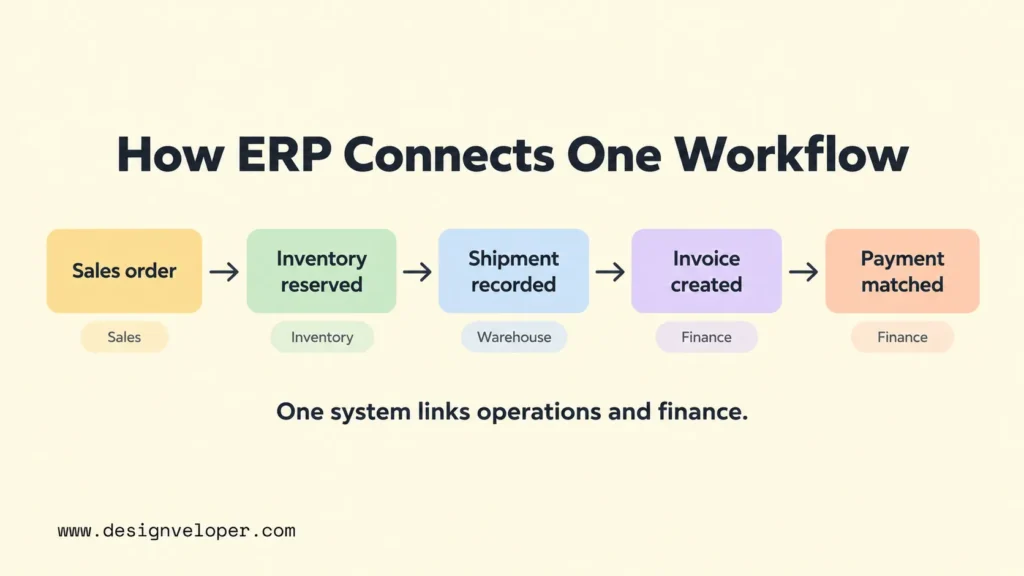
ERP is not one fixed package of modules. A distributor may need purchasing and stock control; a manufacturer may need material requirements planning (MRP), which calculates materials needed for production. A service company may care more about projects and finance. Our guide to enterprise applications and their roles provides more context on how ERP fits alongside other business systems.
That scope separates a full ERP suite from a standalone tool. Accounting software mainly records financial activity. An MRP application focuses on production materials. Project software organizes tasks or delivery. Each can connect to an ERP, but none becomes a complete ERP merely because it has an integration or reporting feature.
What To Look For In The Best ERP Software
Judge ERP products by how well they complete your most important workflows, not by how many modules appear in a brochure. Write down what must happen between an event and its financial result. For example, a wholesaler may need a sales order to reserve stock, trigger picking, record shipment, and produce a correct invoice.
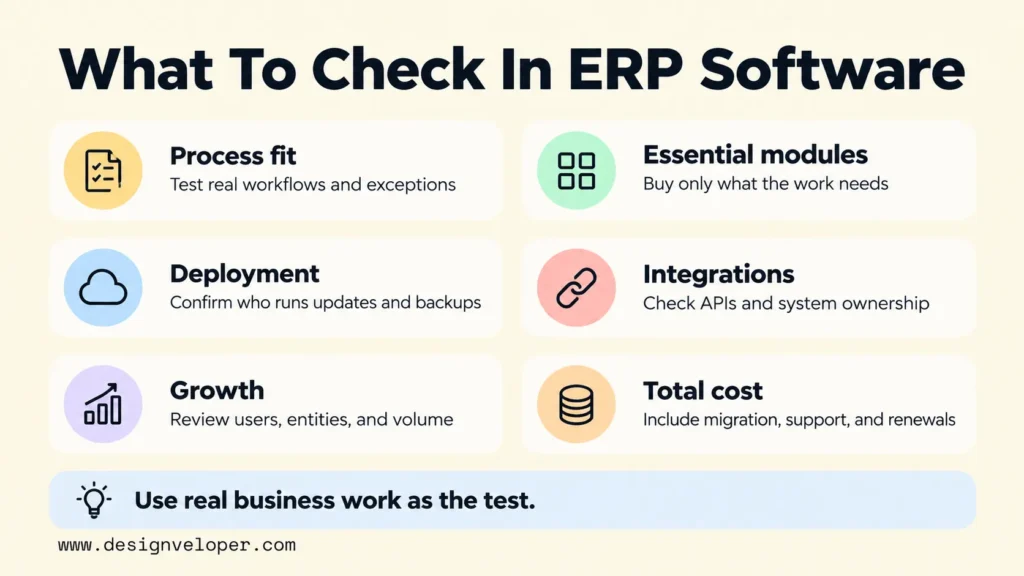
- Process and industry fit: Test the exceptions that make your business different, such as partial shipments, batch traceability, or project-based billing.
- Essential modules: Require only what the workflow needs. Finance may be mandatory, while manufacturing, human resources, and advanced procurement may be optional.
- Deployment and control: Compare vendor-hosted cloud software with private-cloud or on-premises choices. Confirm who operates updates, backups, and security controls.
- Integration and data: Check supported APIs, connectors, data export, and how the ERP exchanges information with CRM, ecommerce, payroll, and older systems.
- Usability and growth: Watch actual users perform their tasks. Test additional warehouses, legal entities, transaction volumes, and permission roles.
- Support and full cost: Compare partner experience, regional coverage, migration work, training, add-ons, ongoing support, and renewal terms.
Security belongs inside each workflow test. Ask whether a buyer can approve their own supplier payment, who can change bank details, and what evidence remains after an edit. An ERP may offer access controls, but the buyer must still configure permissions and approval rules for its own business.
Best ERP Systems By Business Size And Use Case
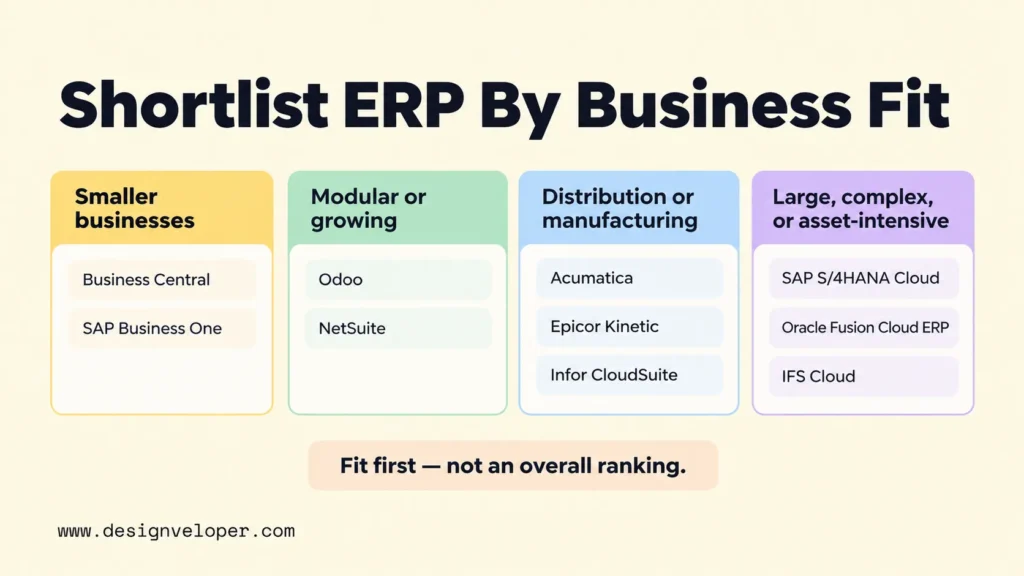
| ERP System | Best For | Standout Capability | Main Trade-Off |
|---|---|---|---|
| Microsoft Dynamics 365 Business Central | Microsoft-centered SMBs | Connected finance and operations | Complex production can need Premium or extensions |
| SAP Business One | Small and midsize businesses | Integrated purchasing, stock, and finance | Partner and add-on choices need careful review |
| Odoo | Businesses wanting modular adoption | Broad connected app catalog | Custom features and integrations change the plan |
| Oracle NetSuite | Growing, multi-entity businesses | Cloud finance and subsidiary management | Configuration and subscription scope can grow |
| Acumatica Cloud ERP | Mid-market distribution and manufacturing | Industry workflows without per-seat pricing | Resource use and implementation determine cost |
| SAP S/4HANA Cloud | Large or global operations | Enterprise-wide process integration | Edition selection and rollout are demanding |
| Oracle Fusion Cloud ERP | Complex finance and procurement | Financial controls and source-to-pay processes | Broad programs need strong governance |
| Epicor Kinetic | Discrete and make-to-order manufacturers | Production and shop-floor workflows | Cloud direction matters to on-premises buyers |
| Infor CloudSuite | Industry-specific manufacturing | Sector-focused ERP and adjacent apps | Capabilities vary by CloudSuite edition |
| IFS Cloud | Asset-intensive and service-led operations | ERP linked to asset and field service work | May exceed simpler finance-only needs |
These are ten genuine ERP offerings, but they are not interchangeable. Treat each fit as a starting hypothesis. A product moves onto your shortlist only after its exact edition, modules, location support, and price are confirmed for your workflows.
No ERP is better than SAP for every company. A smaller business may prefer to test Business Central against SAP Business One. A company with several subsidiaries may compare NetSuite with SAP’s larger ERP offerings. Manufacturers can also evaluate Epicor, Acumatica, or an Infor CloudSuite, while asset-intensive operators should consider IFS. The better choice is the product that passes the same workflow and cost tests for your business.
Microsoft Dynamics 365 Business Central For Microsoft-Centered SMBs
Business Central suits a smaller organization that wants finance, purchasing, inventory, and sales in one system and already works with Microsoft tools. Consider a distributor that needs to turn a sales order into warehouse fulfillment and then reconcile its accounts. That is a stronger test than checking whether its staff recognize the Microsoft interface.
Microsoft offers a cloud subscription. Its US pricing page lists Essentials at $80 and Premium at $110 per user per month, paid yearly; regional taxes and terms vary. Premium adds manufacturing and service management. Choose Business Central when its standard processes and available extensions cover your needs. Skip it if critical factory workflows require a large collection of custom add-ons.
SAP Business One For Small And Midsize Businesses
SAP Business One is built for small and midsize companies that need tighter links between purchasing, stock, sales, and accounting. An importer can receive goods against purchase orders, track quantities, and review the financial effect without maintaining separate department spreadsheets. SAP also identifies subsidiaries as a suitable use case.
SAP’s Business One learning page confirms cloud and on-premises deployment. SAP requests a quote rather than showing a universal public list price; licensing and partner services need to be scoped together. Choose it when an experienced local partner can demonstrate your exact process. Skip it if your plans demand enterprise-scale functionality that would require extensive additions or an early platform change.
Odoo For Modular ERP Needs
Odoo works well for businesses that want to introduce connected apps in stages. A growing retailer might start with sales, stock, and accounting, then add manufacturing or ecommerce when those operations become important. Its modular approach is helpful only if teams agree which application owns each record.
Odoo offers an online One App Free plan plus paid Standard and Custom subscriptions. The official pricing page shows per-user rates that vary with billing choice and introductory discounts. The free one-app plan alone is not a full multi-module ERP. Standard uses Odoo Online; Custom also supports Odoo.sh or on-premises deployment and includes external API access. Choose Odoo for manageable, connected workflows. Skip a low-priced configuration if your project depends on extensive custom code without a maintenance budget.
Oracle NetSuite For Growing And Multi-Entity Businesses
NetSuite is a cloud ERP candidate when a company needs to manage several subsidiaries without rebuilding its finance process for each one. Imagine a business that sells in two countries and needs separate books with group reporting. NetSuite’s ERP product page describes management across subsidiaries and legal entities.
NetSuite is delivered as cloud software with customer-specific subscription pricing; a buyer needs a proposal for users, modules, subsidiaries, and implementation. Its main risk is assuming every desired function belongs to the base package. Choose it when multi-entity financial work is a central requirement. Skip it when a simpler operation would pay for complexity it cannot use.
Acumatica Cloud ERP For Mid-Market Distribution And Manufacturing
Acumatica deserves a shortlist place when inventory movement and production affect the same financial decisions. A manufacturer can compare planned materials with actual consumption and job costs. A distributor can connect replenishment with warehouse orders. These are documented in Acumatica’s manufacturing solution and distribution offering.
Acumatica offers software as a service (SaaS) and private-cloud subscription options. Its pricing model is tailored to applications, expected usage and resources, and deployment, rather than named-user seats. Request a workload-based quote, especially for transaction peaks. Choose it when manufacturing or distribution workflows fit the relevant edition. Skip it if projected usage or specialist customization makes the full cost unattractive.
SAP S/4HANA Cloud For Large And Global Organizations
SAP S/4HANA Cloud fits complex organizations that need consistent finance and operational processes across many locations. For example, a multinational manufacturer may need standardized purchasing controls while still meeting local reporting requirements. This calls for a detailed process design, not a simple software trial.
Edition names matter in 2026: SAP’s deployment guide maps SAP Cloud ERP to S/4HANA Cloud Public Edition and SAP Cloud ERP Private to Private Edition. Both are commercial cloud offerings. Public Edition favors standard processes, while Private Edition permits more process variation but needs careful upgrade planning. SAP provides package and quote-based pricing. Choose the edition that meets process and change requirements; skip a large transformation if a narrower ERP can do the job.
Oracle Fusion Cloud ERP For Complex Finance And Procurement
Oracle Fusion Cloud ERP is a strong candidate when financial control and procurement run across a large organization. Consider a company that needs purchasing approvals and supplier agreements to follow common rules. Oracle’s ERP suite overview describes the cloud platform. Its Fusion Cloud Procurement approval documentation explains how businesses can configure approval rules for purchasing and supplier decisions.
This is a separate product line from NetSuite. Deployment is vendor-managed cloud SaaS. Commercial scope and prices are established through an Oracle proposal rather than a single comparable public checkout rate. The trade-off is the work needed to define roles, policies, and related applications. Choose it if controlled finance and procurement justify that effort. Skip it when the main requirement is a lightweight inventory ledger.
Epicor Kinetic For Manufacturing Operations
Epicor Kinetic targets manufacturers, particularly those with discrete or make-to-order production. A factory can evaluate how a customer order drives materials, shop-floor activity, and production costing. Its official product page describes a cloud ERP built for manufacturing, rather than a generic accounting package with a production add-on.
Epicor sells through consultations and proposals rather than a universal public Kinetic price. Cloud is the strategic deployment direction. Importantly, Epicor states that version 2028.1 is planned as the final on-premises feature release. Choose Kinetic when manufacturing depth is decisive. If long-term on-premises feature development is a requirement, discuss that roadmap before contracting.
Infor CloudSuite For Industry-Specific Manufacturing
Infor CloudSuite is a family of industry-focused cloud suites, not one identical ERP bundle for every buyer. A machinery manufacturer might need engineer-to-order work, while a food producer may focus on batch operations and traceability. Infor’s industrial manufacturing overview distinguishes its enterprise and SMB offerings and describes optional related applications.
CloudSuites are offered as cloud services, generally on a subscription and proposal basis. Confirm the named edition, included modules, integrations, and partner scope in the quote. Choose Infor when its industry workflow reduces the need to redesign production processes. Skip it when the specialized suite adds more operational complexity than your business has.
IFS Cloud For Asset-Intensive Operations
IFS Cloud fits organizations where operating assets and servicing them are part of the financial picture. A field service business that maintains industrial equipment may need maintenance plans, work orders, spare parts, and project costs to stay connected. IFS describes its platform as spanning ERP, enterprise asset management, and field service management.
IFS Cloud supports a vendor-managed cloud model, and its 26R2 remote deployment documentation describes an on-premises operating model. Confirm which model and related services are offered under your specific agreement. Pricing requires a quote that reflects the chosen scope. Choose IFS when asset lifecycles and service delivery are central to operations. Skip it when finance and basic purchasing are your only essential jobs.
How To Choose The Right ERP System For Your Business
Choose an ERP by testing two or three plausible products against the same real business work. A structured evaluation exposes gaps that feature checklists hide. Use a named business owner to approve each requirement before vendors demonstrate solutions.
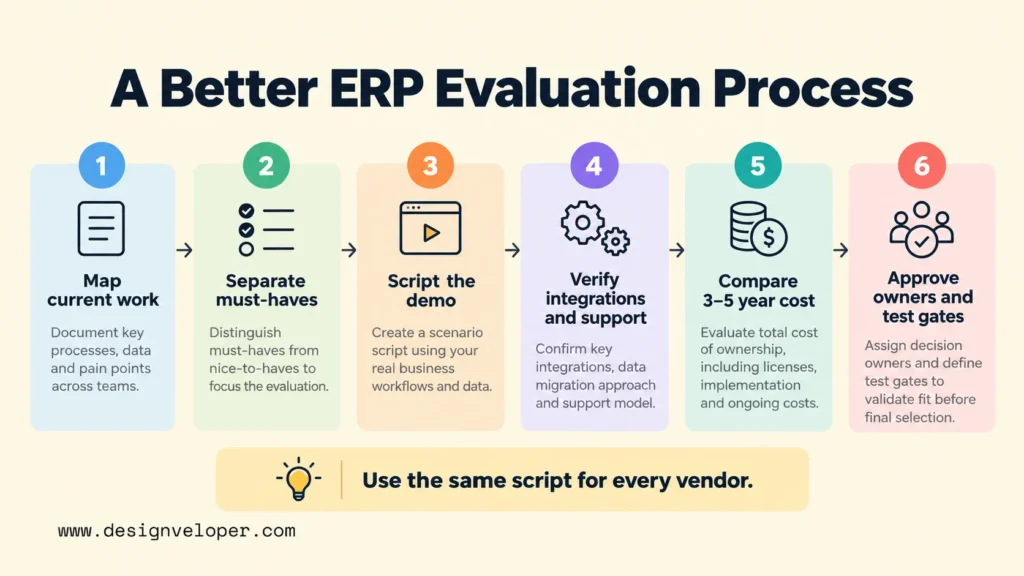
- Map existing work. Document how orders, purchases, inventory, invoices, and exceptions move between people and systems. Note the records that must stay accurate.
- Separate requirements. Mark legal or operational necessities as must-haves. Keep preferences and future features separate so they cannot overwhelm the decision.
- Ask for scripted demonstrations. Give each vendor sample products, transactions, user roles, and exceptions. Ask them to show the full workflow in the proposed edition.
- Verify the surrounding system. Request integration specifications, local accounting support, data export terms, partner references, and security responsibilities.
- Compare the total cost. Use a three-to-five-year view of subscriptions or licenses, implementation, data migration, integrations, training, upgrades, and support.
- Approve the delivery plan. Name internal process owners, implementation partners, test gates, and a recovery option if a rollout step fails.
Use the same script to judge competing proposals. For example, ask each vendor to process a partial delivery, issue the correct invoice, and show the remaining stock. A system that completes the normal sale but fails the exception is not yet proven fit. Our software development cost guide also explains why integrations and migration increase project expense.
Prepare For ERP Implementation, Data Migration, And User Adoption
The best ERP software still needs reliable data, tested connections, and prepared users before it can handle live transactions safely. Begin by deciding which records to migrate. Clean duplicate customers, inactive items, and inconsistent units of measure before loading them, then reconcile opening balances and stock totals.
Test integrations before switching off older workflows. For an ecommerce-to-ERP connection, verify not just that an order arrives but also what happens when it is changed, canceled, or sent twice. Define which system owns the sale, stock balance, and invoice. Our guide to API integration and error handling explains why retries, permissions, and records of successful transfers matter.
Roll out in manageable stages where the business can tolerate them. Train users with their normal tasks and exceptions, appoint an owner for each process, and keep post-launch support available for reconciliation issues. A staged approach does not remove migration risk, but it creates smaller points at which teams can check results before expanding.
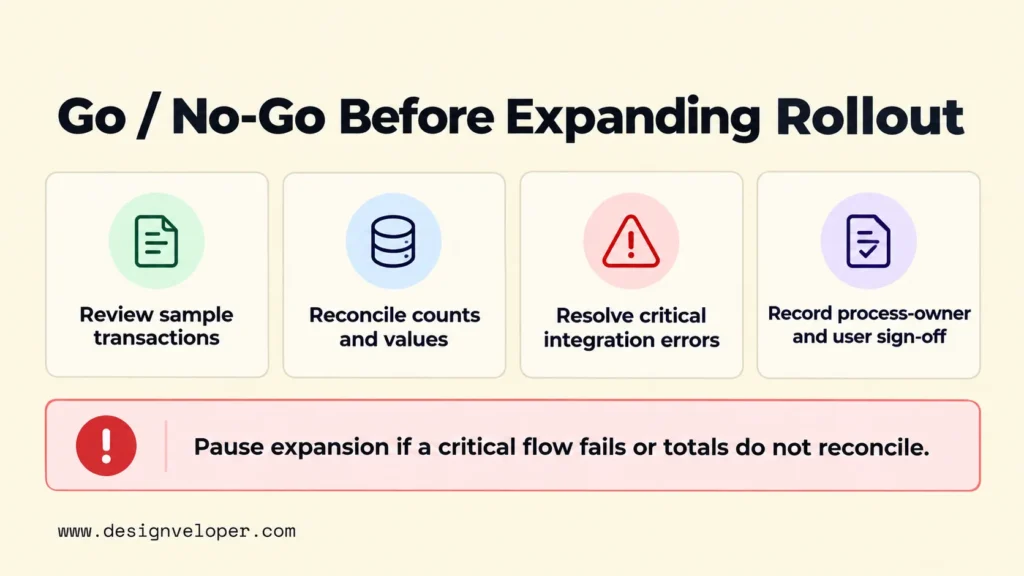
Before expanding a rollout, the process owner should approve a clear go/no-go decision. Review a representative sample of orders and invoices, reconcile record counts and financial values, and check that critical integration errors are resolved. Record user sign-off for the workflows being released. Pause expansion when a critical transaction fails or totals do not reconcile. Choose the sample size and acceptance limits before testing; no single threshold fits every ERP rollout.
If the selected ERP must connect with existing apps, we can support custom software and integration work around that choice; we do not sell an ERP product. Our overview of API development and integration services identifies ERP-to-CRM and related business connections as relevant work. Before commissioning a connector, ask for a field ownership map, failed-message recovery rules, and a test using real transaction exceptions. Those deliverables help prevent a technically successful connection from creating incorrect business records.
FAQs About Best ERP Software
What Is The Difference Between ERP And CRM Software?
ERP manages internal operations and their financial records; customer relationship management (CRM) software manages sales relationships and customer interactions. A CRM may own a sales opportunity while the ERP owns the confirmed order, stock movement, and invoice. When connecting them, define which tool can change each record. Our CRM integration guide explains this ownership decision in more detail.
Is Cloud ERP Better Than On-Premises ERP?
Cloud ERP is often easier to operate for teams that do not want to manage their own infrastructure. On-premises deployment may fit organizations with specific technical or operating constraints, where the vendor still supports that option. Neither is automatically more secure. Compare access controls, update duties, data location, uptime needs, integration paths, and the vendor’s roadmap before deciding.
How Can ERP Software Support Financial Reporting And Audit Readiness?
ERP can support financial reporting and audit preparation by connecting transactions to related operational records and approvals. Microsoft’s Business Central change-log documentation explains how an administrator can choose which tables and fields to track. For example, a finance reviewer could trace a changed vendor address to the user and time when that field is configured for logging. This requires the relevant logging settings; it does not mean every ERP records every change automatically.
Change logs alone do not guarantee audit readiness or compliance. Finance teams must still reconcile balances, test access and approval controls, and set appropriate record-retention rules. They also need to confirm which transactions and changes their chosen ERP actually captures.
Also published on

Share post on










Related Articles


Best Accounting Software For 2026 By Business Type And Needs
Best Accounting Software For 2026 By Business Type And Needs Published October 27, 2026
Best ERP Software For 2026 By Business Size And Industry Fit
Best ERP Software For 2026 By Business Size And Industry Fit Published October 27, 2026
On-Device AI For Mobile Apps And When A Hybrid Setup Fits Best
On-Device AI For Mobile Apps And When A Hybrid Setup Fits Best Published October 23, 2026


















