
















10 Best CRM Software Options For Small Businesses In 2026

The best CRM software for small business teams is not one universal product. The right choice depends on your sales workflow, team size, integrations, budget, and whether people will actually use the system every day.
This list is organized by use case rather than an absolute ranking. A simple CRM can be the better choice for a small team if it keeps records complete and follow-up consistent. A more powerful platform makes sense when you genuinely need deeper automation, reporting, permissions, or connections to other systems.
Best CRM Software For Small Businesses By Use Case
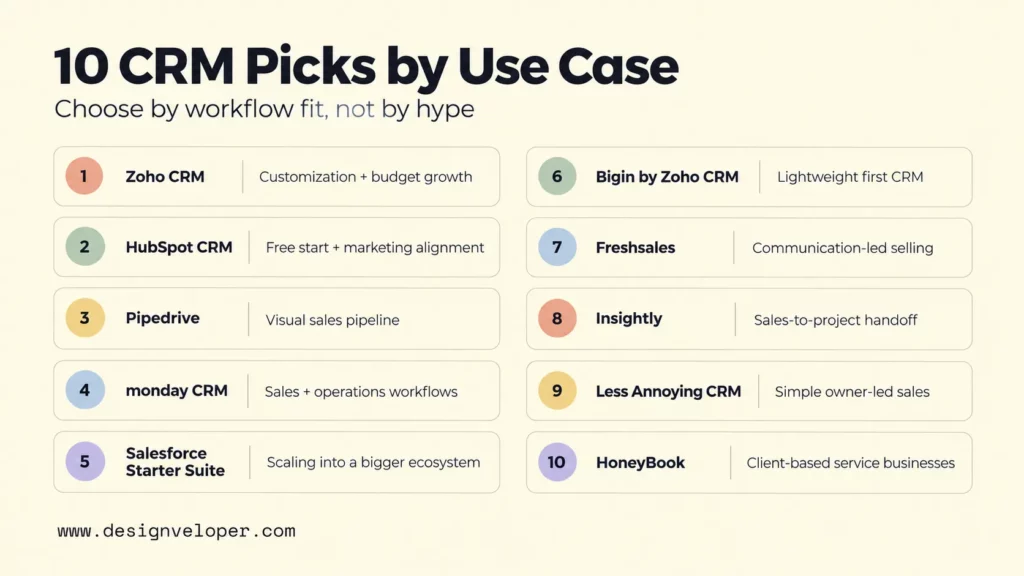
| CRM | Best For | Main Strength | Main Limitation | Free Plan Or Trial | Pricing Model |
|---|---|---|---|---|---|
| Zoho CRM | Customization and budget-conscious growth | Broad automation, reporting, and customization options | More setup and administration than lightweight CRMs | Free plan for up to 3 users; 15-day paid-edition trial | Per user; Standard starts at $14/user/month billed annually |
| HubSpot CRM | A free starting point and marketing alignment | Sales and marketing tools share one customer record | Free tier is limited to 2 users; advanced sales automation and forecasting require paid plans | Free tools for up to 2 users | Per seat; Starter pricing is promotion-, package-, and billing-term-sensitive |
| Pipedrive | A clear sales pipeline | Visual deal stages make next actions easy to see | Email sync and automations start above the Lite plan | 14-day free trial | Per seat; Lite starts at $14/seat/month billed annually |
| monday CRM | Sales and operations workflows | Flexible boards, fields, automations, and cross-team workflows | Plans start from 3 users and automation limits vary by tier | 14-day free trial | Per seat; Basic starts at $12/seat/month billed annually |
| Salesforce Starter Suite | Teams planning to scale | Entry point into a broad sales, service, marketing, and commerce ecosystem | More advanced customization, automation, and AppExchange access sit in Pro | Free Suite supports up to 2 users; Starter Suite offers a 30-day trial | Starter Suite starts at $25/user/month on monthly or annual billing; transaction fees can apply |
| Bigin by Zoho CRM | A lightweight first CRM | Simple pipeline-centric workflow with a low entry price | Less suitable for forecasting, lead scoring, and complex sales operations | Free plan for 1 user; 15-day premium-feature trial | Per user; Express starts at $7/user/month billed annually or $9 monthly |
| Freshsales | Sales communication and lead management | Email, phone, chat, and lead workflows in one sales workspace | Contact scoring, sequences, and territory management require Pro or higher | Free plan for up to 3 users; 21-day trial | Per user; Growth starts at $9/user/month billed annually |
| Insightly | Sales and project handoffs | Can convert won opportunities into delivery projects | Workflow automation starts on the Professional tier | 14-day free trial | Per user; Plus starts at $29/user/month billed annually |
| Less Annoying CRM | Simple owner-led sales | One straightforward plan with contacts, pipelines, tasks, permissions, and support | Less depth for teams that need a broad marketing or enterprise platform | 30-day unrestricted trial | $15/user/month with one plan and no long-term contract |
| HoneyBook | Client-based service businesses | Combines client inquiries with proposals, contracts, invoices, payments, and a client portal | Not designed as a general-purpose CRM for product retail or large sales organizations | 30-day free trial | Account plans; Starter starts at $29/month billed yearly |
Each CRM is included for a specific small-business use case based on workflow coverage, adoption effort, integrations, pricing limits, and total-cost considerations. This is a criteria-led shortlist based on current vendor information, not an independently tested universal ranking.
The prices below use vendor-listed U.S. starting points checked on September 16-17, 2026, where a U.S. price was available. Billing cycles, team size, taxes, promotions, add-ons, usage limits, and regional pricing can change the effective cost, so verify the final quote before buying.
If you need the category basics before comparing products, our guide to what CRM is explains how customer records, pipelines, reporting, mobile access, and customization fit together.
Zoho CRM For Customization And Budget-Conscious Growth
Zoho CRM fits a small business that wants room to customize fields, workflows, reports, and sales processes without starting at enterprise-level pricing. Its free edition supports up to three users, while Standard starts at $14 per user per month on annual billing. Zoho also offers a 15-day trial of paid editions.
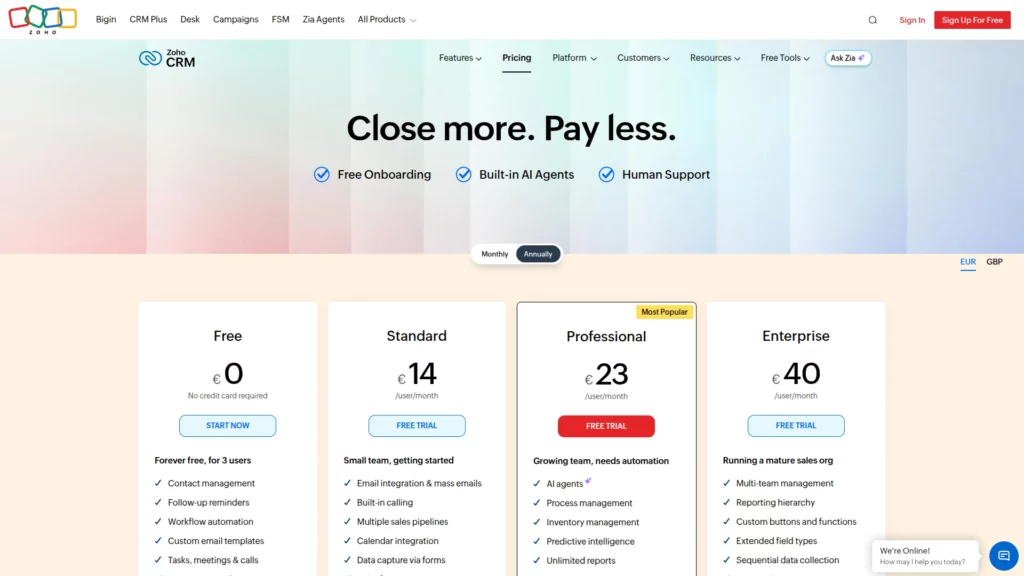
The workflow benefit is depth: a team can add forecasting, scoring, reports, and more automation as its sales process becomes more sophisticated. Relevant integrations include Gmail, Outlook, Slack, Zoom, and Microsoft Teams. Zoho’s CRM pricing page details the editions and billing options. The trade-off is administration, so a team that only needs a simple pipeline and basic follow-up should choose a lighter CRM instead.
HubSpot CRM For A Free Starting Point And Marketing Alignment
HubSpot CRM is a practical starting point when a very small team wants contact, deal, task, email, and meeting tools without paying for seats immediately. Its current Sales Hub pricing page lists the free tier at $0 for up to two users. First-party HubSpot pages show different Starter figures because package and promotional pricing varies, so treat the paid starting price as checkout-sensitive rather than a fixed universal number.
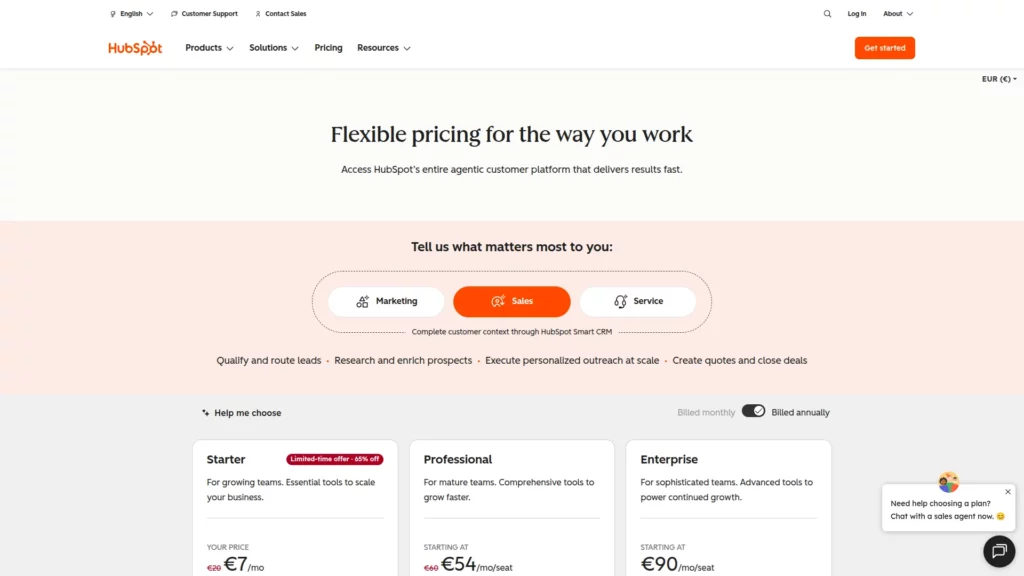
The workflow benefit is alignment: sales can share the same customer record with HubSpot’s marketing, service, content, and data tools. Relevant integrations include Gmail, Outlook, Google Calendar, Outlook Calendar, Slack, Zoom, and Microsoft Teams. HubSpot’s U.S. Sales Hub pricing page shows the current offer for the selected billing term. The limitation is that advanced sales automation, sequences, forecasting, and deeper reporting require paid tiers. A growing sales team should not choose the free tier as a long-term plan without checking upgrade costs.
Pipedrive For A Clear Sales Pipeline
Pipedrive works best when the main problem is keeping deals moving through a defined sales pipeline. Its visual stages make ownership, next activities, and stalled opportunities easy to see, so a small sales team can focus on follow-up rather than configuring a broad business suite.
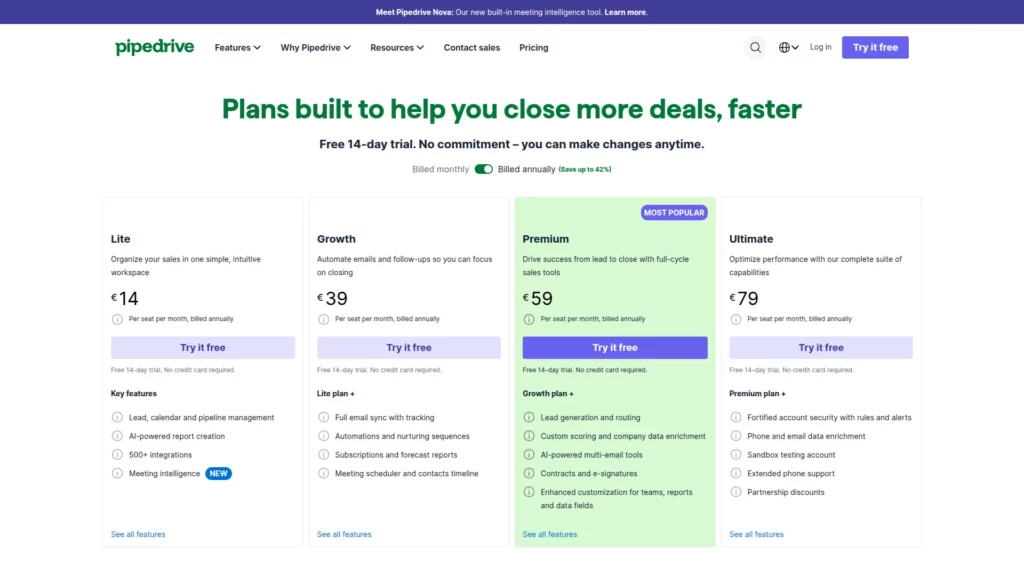
Pipedrive’s pricing page lists a 14-day trial and Lite at $14 per seat per month when billed annually. It also lists 500+ integrations, including Zapier and Zoom, while Growth adds Gmail or Outlook email sync and workflow automation. The limitation is breadth outside sales. Choose Pipedrive for a sales-led process with clear stages; do not choose it if your priority is one native platform for marketing, service, and wider operations.
monday CRM For Sales And Operations Workflows
monday CRM is useful when sales work needs to connect closely with operations. Teams can adapt boards, fields, dashboards, automations, quotes, and post-sale workflows instead of treating the CRM as an isolated contact database. That flexibility helps different departments work from the same underlying records.
monday CRM’s pricing page lists a 14-day trial, Basic at $12 per seat per month on annual billing, and plans that start from three users. Relevant integrations include Outlook, Gmail, Slack, Zoom, QuickBooks, Google Workspace, and DocuSign. Higher tiers add more automation and integration capacity. The trade-off is configuration overhead, so a small team that only needs contact and deal tracking should not choose monday CRM for flexibility it will not use.
Salesforce Starter For Teams Planning To Scale
Salesforce Starter Suite fits a small team that expects its CRM requirements to become more complex over time. It combines account, contact, lead, and opportunity management with service, marketing, commerce, and Slack capabilities, giving the team a path into the wider Salesforce ecosystem.
Salesforce’s small-business pricing page lists Starter Suite at $25 per user per month on monthly or annual billing and notes that transaction fees can apply. Starter supports Gmail or Outlook email integration and connected Slack channels, while Pro adds AppExchange access, deeper customization, and process automation. Salesforce also offers a Free Suite for up to two users and a 30-day Starter Suite trial. The limitation is expansion cost and complexity, so a team that expects to remain on a lightweight pipeline should not choose Starter only for future ecosystem headroom.
Bigin By Zoho CRM For A Lightweight First CRM
Bigin is the lighter choice in Zoho’s CRM family. It is a good fit for a lightweight pipeline, especially when a solo operator or small team wants to move from spreadsheets without adopting a broad CRM suite. The Free plan supports one user, Express starts at $7 per user per month on annual billing or $9 monthly, and the premium-feature trial lasts 15 days.
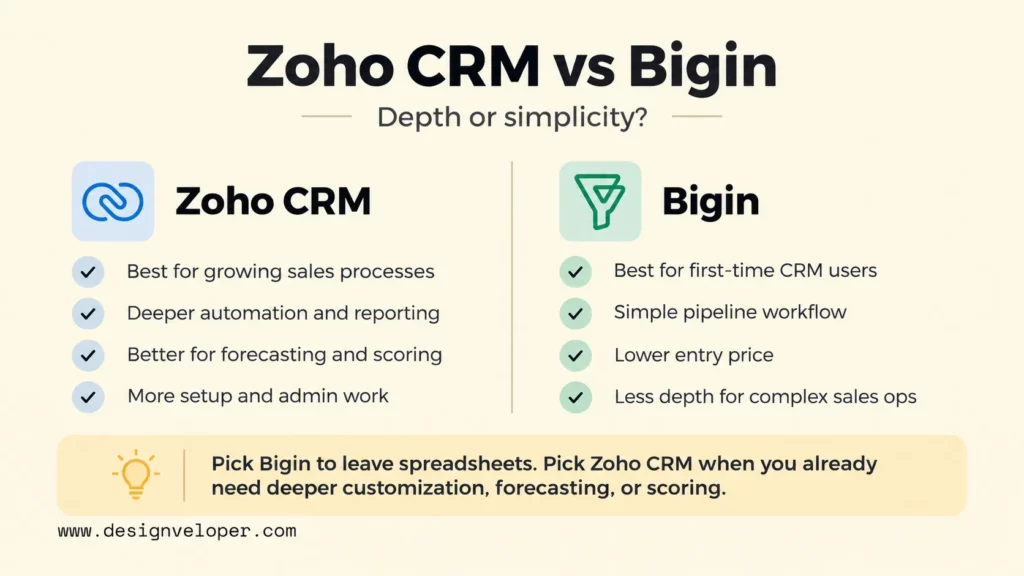
The difference from Zoho CRM is depth. Bigin focuses on straightforward pipeline work, while Zoho CRM adds sales forecasting, lead scoring, and deeper sales controls. Bigin can connect with Gmail, Outlook, Google Workspace, Microsoft 365, Microsoft Teams, Mailchimp, QuickBooks, and Zapier, although many native integrations require Express or higher. Zoho’s Bigin and Zoho CRM edition comparison shows the boundary directly. Do not choose Bigin if the team already needs forecasting, scoring, territory-style controls, or heavily customized sales operations; Zoho CRM is the stronger fit for those needs.
Freshsales For Sales Communication And Lead Management
Freshsales fits teams that want customer communication close to lead and deal management. Its sales workspace brings chat, email, and phone into the CRM, so reps can keep more conversation history beside each contact instead of switching between disconnected tools.
Freshsales’ pricing page lists Growth at $9 per user per month on annual billing and a 21-day trial; Freshworks also documents a free plan for up to three users. Relevant connections include Gmail, Google Calendar and Contacts, Outlook, Zoom, Microsoft Teams, QuickBooks, and Xero. Contact scoring, sales sequences, and territory management sit on Pro or higher. A team that only needs basic contacts and a simple pipeline should not choose Freshsales for communication features it will not use.
Insightly For Sales And Project Handoffs
Insightly stands out when winning the deal is only the first half of the workflow. A closed opportunity can become a project, with linked details, emails, notes, files, and delivery work carried forward. That reduces the manual handoff between sales and project execution.
Insightly’s pricing page lists a 14-day trial and Plus at $29 per user per month on annual billing, while Professional starts at $49. Relevant integrations include QuickBooks, Slack, Jira, Gmail, DocuSign, and many others through AppConnect. The trade-off is that broader workflow automation and integration work can require higher plans or AppConnect. A team that only needs contact and deal tracking, with delivery managed elsewhere, should not choose Insightly mainly for its project handoff.
Less Annoying CRM For Simple Owner-Led Sales
Less Annoying CRM is built for a small team that values simplicity more than a long feature list. Its single plan covers contacts, companies, pipelines, tasks, calendar and email logging, permissions, custom fields, exports, mobile access, and support without forcing buyers to compare several editions.
Less Annoying CRM’s pricing page lists one $15-per-user monthly plan and a 30-day unrestricted trial with no credit card required. It integrates directly with Google and Outlook calendars and Mailchimp, while Zapier can connect it to additional apps. The limitation is platform breadth. Choose it for owner-led selling where consistent use matters most; do not choose it if you need a broad native marketing suite, deep forecasting, or enterprise-grade workflow controls.
HoneyBook For Client-Based Service Businesses
HoneyBook is closer to a client-business operating system than a traditional B2B sales CRM. It suits consultants, photographers, designers, event businesses, and other service providers. These businesses can move a client from inquiry through proposals, contracts, scheduling, invoices, payments, and a client portal in one flow.
HoneyBook’s pricing page lists a 30-day free trial and Starter at $29 per month billed yearly. It connects with Gmail and Google Calendar, while higher-plan or connected workflows can use tools such as QuickBooks, Zapier, Zoom, and Calendly. The limitation is category fit: HoneyBook is built around independent service businesses rather than a general sales organization. Do not choose it if you need account-based selling, complex sales territories, or a large B2B sales team.
What To Compare Before Choosing A Small Business CRM
Compare a CRM against the way your team sells, not against the longest feature list. The useful question is whether the system removes friction from the few workflows people repeat every day while preserving the controls you will need later.
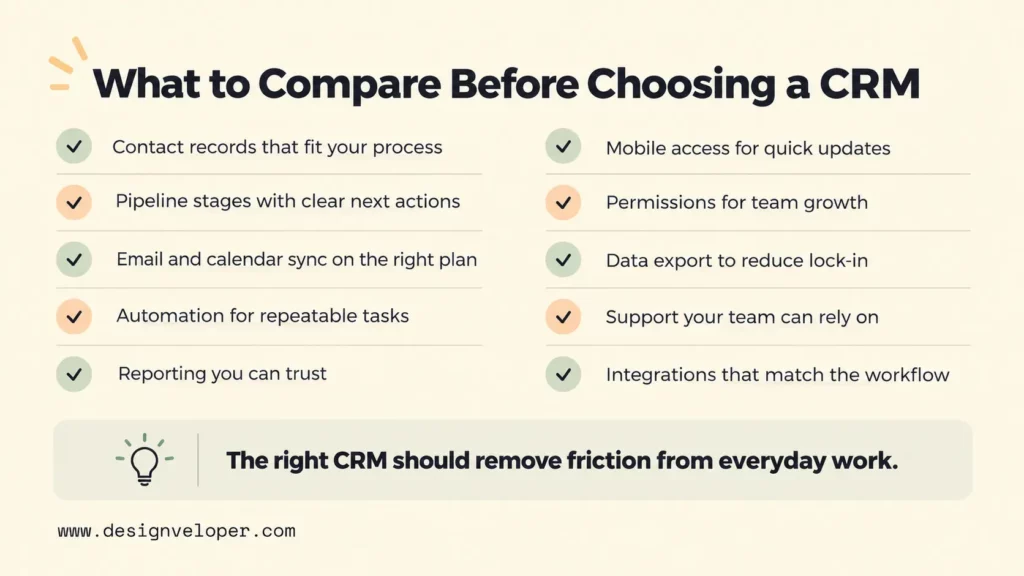
- Contact and company records: Check whether the CRM can represent the people, companies, relationships, custom fields, notes, and history your team actually needs. Too many mandatory fields can hurt adoption just as much as missing data.
- Pipeline and task management: Make sure stages match real decisions in your sales process. Reps should be able to see the next action, owner, due date, and stalled deals without building a report first.
- Email and calendar connections: Confirm which inbox and calendar providers are supported and whether synchronization is two-way. Also check whether the feature is included in the plan you intend to buy.
- Automation: Identify the repetitive action you want to automate before comparing automation counts. A useful rule might create a task after a stage change or route a qualified lead; automation with unclear ownership only makes mistakes faster.
- Reporting: Decide which decisions a report must support, such as pipeline coverage, conversion by stage, follow-up activity, or revenue forecast. Then verify that the required fields are captured consistently enough to make the report trustworthy.
- Mobile access: If sales happens away from a desk, test the mobile app with a real update. Staff should be able to change records, tasks, notes, and deal stages quickly instead of only viewing data.
- Permissions: Check whether managers can limit access to sensitive contacts, deals, reports, or administrative settings as the team grows.
- Data export: Confirm that you can export the core customer and activity data in usable formats. This matters for backups, analytics, migrations, and reducing lock-in.
- Support: Compare the support channel and response level available on your chosen tier. A cheaper plan can become costly if a small team has no internal CRM administrator and cannot get timely help.
- Integrations: Test the few systems that matter to the workflow, such as accounting, marketing, support, forms, calling, or project management. A marketplace with thousands of apps is not useful if the specific connection you need is weak or one-way.
For a broader small-business software stack, our guide to small business applications uses the same practical lens. Workflow fit, integrations, permissions, data ownership, reporting, and upgrade limits matter more than feature count alone.
AI features deserve the same discipline. Lead scoring, summaries, recommendations, and automated follow-up are only useful when the underlying records are reliable and permissions are clear. Our guide to AI CRM explains why clean data, explicit rules, and human review should come before relying on AI-generated actions.
CRM Pricing And Total Cost Of Ownership
CRM pricing is more than the advertised per-user subscription. Calculate total cost of ownership from three parts: the plan you need today, the work required to launch it, and the cost of operating it as the business grows.
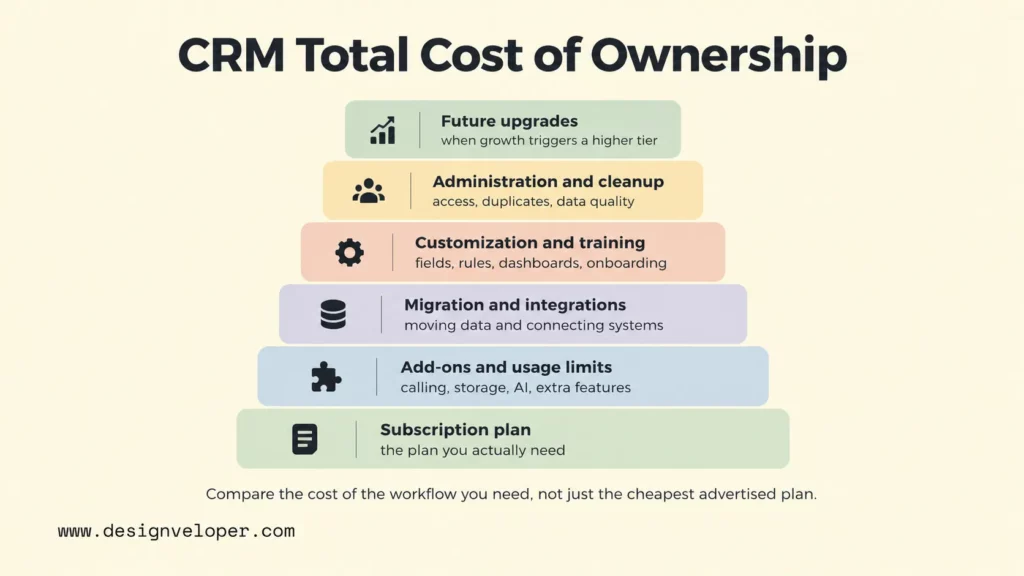
- Per-user subscription fees: Multiply the actual seat count by the billing cycle you will use. Check whether occasional users, managers, or contractors need paid seats.
- Free-plan limits: Look beyond the $0 price. User caps, contact limits, automation restrictions, reporting limits, storage, branding, and support can determine how soon a free CRM stops fitting.
- Add-ons and automation charges: Some products separate calling, advanced reporting, extra storage, AI, additional pipelines, or higher automation usage from the base plan.
- Migration and integration work: Moving contacts is easy compared with mapping historical activities, custom fields, ownership, duplicate rules, and connected systems. Budget for the work, not just the software license.
- Customization and training: A configurable CRM may need field design, workflow rules, dashboards, permission models, documentation, and role-based training before the team gets value from it.
- Administration and data cleanup: Someone must maintain stages, user access, duplicate records, required fields, and automation rules. That operating effort is part of the CRM’s real cost.
- Future plan upgrades: Model the next tier before committing. The feature that triggers an upgrade may be automation, reporting, permissions, integrations, or a user cap rather than a dramatic increase in sales volume.
A free plan can be an excellent way to validate the workflow, but it should not be assumed to be a permanent solution. The relevant comparison is the cost of the plan that supports your required process over the next stage of growth, plus migration, administration, and change costs.
How To Choose And Launch A CRM
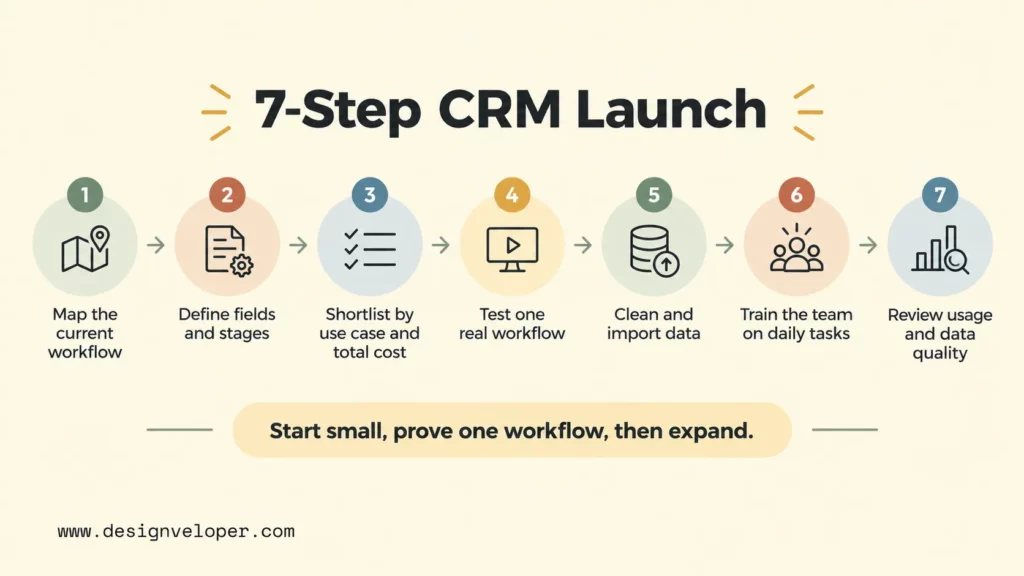
Choose and launch a CRM by proving one real workflow before migrating everything. This keeps the selection tied to daily work. It also exposes missing fields, awkward stages, and adoption problems while the cost of changing course is still low.
- Map the current sales and customer workflow. Write down how a lead enters, who qualifies it, what stages it passes through, when follow-up happens, and where a successful sale hands off. Include the spreadsheets, inboxes, forms, and manual approvals people use today.
- Define required fields and pipeline stages. Keep only the data needed for a decision, handoff, report, or customer interaction. Give each stage a clear entry or exit condition so two people do not interpret the pipeline differently.
- Shortlist tools by use case and total cost. Remove products that fail a required integration, permission, export, or workflow need. Then compare the plan you would actually run, not the cheapest advertised tier.
- Test one real workflow with sample data. Create representative contacts and deals, connect a test inbox, run a follow-up task, trigger any required automation, and produce the report a manager expects to use. A polished demo is less useful than this end-to-end test.
- Clean and import spreadsheet records. Standardize company names, remove obvious duplicates, define ownership, and decide which historical fields are worth keeping before import. Moving bad data into a CRM only makes the bad data easier to share.
- Train the team around daily tasks. Teach the few actions that keep the system accurate: creating or updating a record, moving a deal, logging an important interaction, setting the next task, and resolving duplicates. Training should match roles rather than tour every feature.
- Review usage and data quality after launch. Check incomplete records, stale deals, missed activities, duplicate creation, and reports that users do not trust. Fix the process or configuration behind those problems before adding more automation.
Adoption is the control point for the whole project. A simple CRM with complete, current records is more useful than an advanced platform that people work around. When you later automate repeatable steps, our guide to workflow automation tools explains why process design comes first. Define triggers, system connections, human approvals, and error handling before automating the work.
When A Small Business Needs More Than A Standard CRM
A standard CRM stops being enough when the main problem is no longer contact and pipeline management. The warning sign is repeated manual work between systems. Staff may copy the same data, reconcile conflicting records, or build side processes because the CRM cannot represent the real workflow.
- Repeated spreadsheet workarounds: Teams export data, manipulate it elsewhere, and re-enter results because the CRM cannot support an important rule or calculation.
- Disconnected sales and delivery data: Sales promises, implementation details, support history, or project status live in separate tools with no reliable handoff.
- Manual approvals across systems: Pricing exceptions, contracts, onboarding, or service decisions require people to copy information between email, forms, chat, and business systems.
- Complex permissions: Different roles, clients, partners, or business units need access rules that exceed the CRM’s native model.
- Unreliable reporting: Leaders cannot answer basic operational questions because records are duplicated, definitions differ between systems, or key events are never written back to the CRM.
- Customer portals or unsupported workflows: The business needs clients to submit, review, approve, schedule, pay, or track work in a way the CRM cannot provide cleanly.
At that point, replacing the CRM is only one option. An integration, API connection, workflow service, or small custom application can extend a CRM that still works well for customer records and sales. The better architecture depends on which system should remain the source of truth and where the unsupported workflow begins.
If those gaps are blocking operations, we can help design the custom software layer around the CRM you keep rather than forcing every process into one product. Our custom software development services cover web applications and custom software for workflow-specific requirements. Treat CRM integration, API connections, and workflow automation as explicit requirements during scoping. Start by documenting the broken handoff, the systems involved, the data owner, and the exception cases. Then decide whether the gap calls for configuration, integration, or a custom build.
FAQs About Best CRM Software For Small Business
Which CRM Is Best For Beginners?
Bigin and Less Annoying CRM are strong beginner options when simplicity is the priority, while HubSpot is attractive for a two-person team that wants a capable free starting point. The better choice is the one whose pipeline, fields, and daily follow-up steps match the team’s current process without requiring heavy setup.
What Is The Best CRM App For Small Businesses?
There is no single best CRM app for every small business. Pipedrive is strong for a visual sales pipeline, Zoho CRM for deeper customization, monday CRM for sales and operations workflows, Freshsales for communication-led selling, and HoneyBook for client-service businesses. Test the mobile app with a real task if staff work on the road.
Can I Build A CRM In Excel?
Yes. Excel can act as a basic CRM for a very small team if you need a shared list of contacts, deal stages, owners, dates, and notes. It becomes risky when several people update the same records, reminders depend on manual work, permissions matter, or reporting requires reliable history. Those are signs to move to a real CRM rather than keep adding spreadsheet workarounds.
What Are The Top Three CRM Systems For Small Businesses?
A useful three-product shortlist is Zoho CRM for customization, HubSpot CRM for a free starting point with marketing alignment, and Pipedrive for focused pipeline management. That is not a universal top-three ranking. A service business may be better served by HoneyBook, while a team connecting sales with operations may prefer monday CRM. Use the shortlist to start testing, then choose on workflow fit, adoption, integrations, and total cost.
Also published on

Share post on










Related Articles


The 5 Advantages of CRM in the Banking Sector
The 5 Advantages of CRM in the Banking Sector Published October 19, 2026
What Are Enterprise Applications? How They Support Business Operations
What Are Enterprise Applications? How They Support Business Operations Published September 21, 2026
10 Best CRM Software Options For Small Businesses In 2026
10 Best CRM Software Options For Small Businesses In 2026 Published September 18, 2026


















