
















What Is An AI Harness & Build A Minimal One Yourself

An ai harness is the control layer that turns a language model into a useful agent. It gives the model instructions, tools, state, memory, guardrails, feedback, retries, logs, and human review points. Without a harness, an agent is mostly a model responding to prompts. With a harness, the agent can act inside a workflow with clearer boundaries and better reliability.
The concept matters because AI agents now do more than chat. They can call APIs, edit files, read documents, query databases, prepare tickets, or trigger internal workflows. That makes harness engineering ai work practical and necessary: the value comes from connecting the model to real systems while keeping its actions limited, observable, and reviewable.
This guide explains what an AI harness is, why harness engineering matters for AI agents, and how to build a minimal version yourself before scaling toward production-grade automation. A practical next step is to start with one narrow workflow, then add controls as the agent earns trust.
See more:
- What Is Agentic AI? Benefits, Architecture And How It Works
- AI Agent Vs. AI Assistant: Which Is Right For Your Business?
- Types of AI Agents: Key Categories and When to Use Each
What Is An AI Harness?
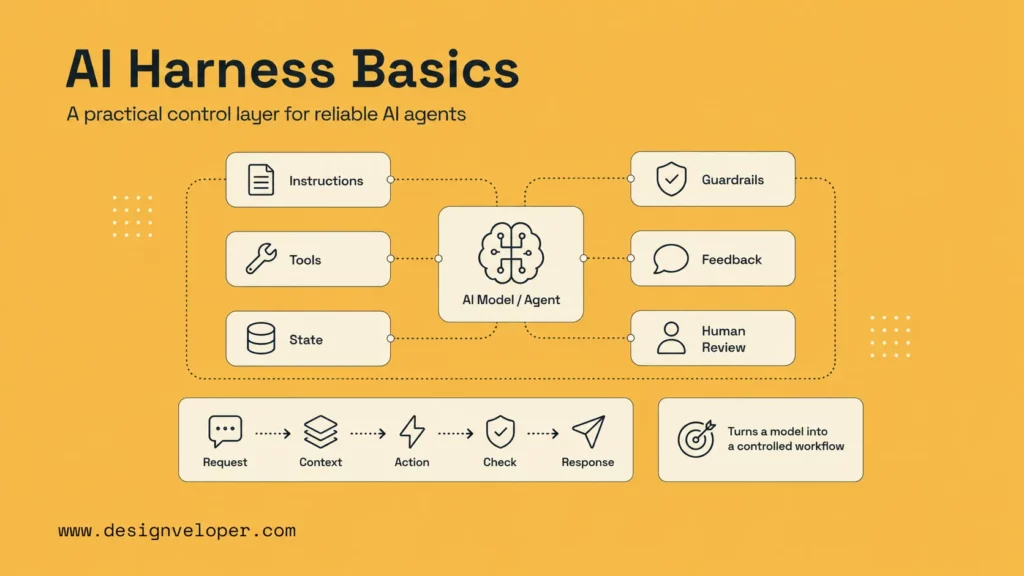
An AI harness is the engineered wrapper around an AI agent. It defines what the agent is supposed to do, what information it can use, what tools it may call, what state it should remember, how failures are handled, and when a human needs to approve the next step.
A helpful way to think about it is “model plus operating environment.” Martin Fowler’s article on harness engineering uses this framing for coding agents, where the model becomes useful only when surrounded by repository context, tests, feedback, and review. The same idea applies to customer support, document automation, DevOps, and internal operations. If your team is still mapping the bigger category first, Designveloper’s guide to what AI agents are gives a useful baseline before diving into harness design.
A minimal harness can be simple. It may start with one model call, one tool, a few rules, a small state object, and a retry loop. A mature harness may include permissions, observability, evaluation sets, prompt versioning, tool routing, approval workflows, and incident review. The shape depends on risk and workflow complexity.
Why Harness Engineering Matters For AI Agents
Harness engineering matters because agents are valuable only when they can act safely. A model can generate a good answer. An agent can take steps. A harness decides which steps are allowed, how those steps are checked, and what happens when the model is uncertain or wrong.
This becomes more important as agents receive access to tools. Tool access can turn a bad response into a bad action: a deleted record, a wrong refund, an exposed document, or a broken code change. The harness is the place where the team narrows the agent’s scope and builds review into the workflow. This is also why comparisons like AI agent vs chatbot matter in practice, because the jump from answer generation to action is exactly where control requirements rise.
Further reading:
- Enterprise AI Agents: Use Cases, Tools, And Implementation Guide
- AI Agent Orchestration: How Multi-Agent Workflows Work In Practice
- Agentic AI Architecture: Components, Workflow, Design Patterns
The Trust Problem Behind Autonomous AI
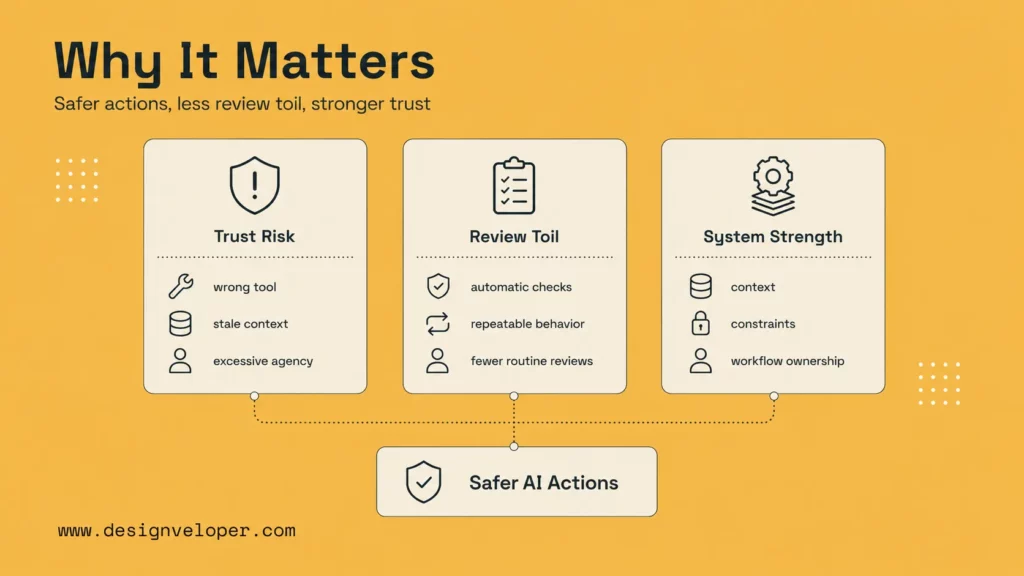
The trust problem behind autonomous AI is not only hallucination. It is agency. An agent may misunderstand the goal, choose the wrong tool, use stale context, skip a policy, or keep acting after it should stop. These failures can look reasonable in the final answer, which makes them hard to catch if the system lacks logs and checks.
Security guidance reflects this risk. The OWASP Top 10 for Large Language Model Applications calls out issues such as prompt injection, sensitive information disclosure, and excessive agency. Those risks are exactly why AI agent harness design needs tool permissions, output validation, audit logs, and human approval for high-impact actions.
How A Harness Reduces Review Toil And Failure Risk
A harness reduces review toil by catching routine issues automatically. It can verify required fields, validate JSON output, block unsafe tool calls, run tests, retry transient failures, or flag high-risk actions for human approval. Reviewers then spend less time checking every detail and more time judging the decisions that matter.
It also reduces failure risk by making agent behavior repeatable. If every workflow uses the same instructions, tool schema, logging, and escalation rules, the team can improve the system over time. Without a harness, every prompt session becomes a one-off event that is difficult to debug or reproduce.
Why Strong AI Systems Depend On More Than Model Quality
Model quality matters, but it is not enough. A stronger model can reason better, follow instructions more consistently, and handle more context. Yet it still needs the right data, safe tools, clear boundaries, and user experience design.
This is why strong AI systems depend on product engineering. The model is one component. The harness turns it into a system by adding context, constraints, feedback, and workflow ownership. A well-designed harness can make a smaller model useful in a narrow task, while a weak harness can make even a powerful model unsafe.
The Core Parts Of An AI Harness
An AI harness is made of a few practical parts. The exact implementation changes by team and platform, but the core pattern is stable: instructions, tools, state, orchestration, feedback, and guardrails.
| Part | Role in the harness | Minimal example |
|---|---|---|
| Instructions | Tell the agent what to do and what not to do. | A system prompt and task-specific rules. |
| Tools | Let the agent act outside the model. | Search one knowledge base or create one ticket. |
| State | Carry context across steps. | Current user, task status, selected record, last tool result. |
| Orchestration | Control steps, retries, and stop conditions. | Plan, call tool, validate result, answer or escalate. |
| Guardrails | Block unsafe input, output, or actions. | Permission check, JSON schema, human approval gate. |
Instructions, Rules, And Guardrails
Instructions define the agent’s role. Rules define the limits. Guardrails enforce those limits before, during, or after the agent acts. For example, an instruction may say “help support agents draft refund replies,” while a rule may say “never issue a refund directly.” A guardrail can then block any tool call that attempts to process the refund without approval.
The broader lesson applies across stacks: do not rely only on a prompt. Add programmatic checks where failure would matter. Teams evaluating related implementation patterns often run into the same control questions explored in how to build agentic AI, because capability alone is rarely enough without operational boundaries.
Tool Execution And External System Access
Tool execution is what lets an agent do work. A tool can search a knowledge base, retrieve an order, write a draft, update a ticket, run a test command, or call an internal API. The harness decides which tools are available and what arguments they accept.
Good tool design uses narrow permissions. A support agent that only needs to read order status should not have write access to refunds. A coding agent that should edit one module should not be free to rewrite unrelated files. Tool limits turn business policy into software behavior.
State, Memory, And Context Management
State tells the agent what is happening now. Memory tells it what may matter across steps or sessions. A minimal harness may keep state in a simple object, such as user ID, task ID, last tool result, and current step. A more advanced harness may use short-term checkpoints, long-term memory, or a retrieval layer.
Whatever tool a team uses, the product decision is the same: decide what the agent may remember, who can change it, and when it should be cleared. That question becomes even more important once the harness starts touching document, support, or workflow data across several systems.
Orchestration, Retry Logic, And Feedback Loops
Orchestration controls the order of work. It decides when the agent should call a tool, ask a clarifying question, retry an operation, hand off to another workflow, or stop. Retry logic keeps transient failures from breaking the experience, but it must be bounded so the agent does not repeat unsafe actions.
Feedback loops help the harness improve reliability. A failed validation, a user correction, a test failure, or a human rejection can become a signal for the next step. Visibility like that is essential when an agent makes multiple decisions before the user sees the final output.
Build A Minimal AI Harness Yourself
A minimal AI harness does not need to be a full platform. It needs one narrow task, clear instructions, one or two safe tools, a small state object, and a basic feedback loop. The goal is to learn the control pattern before adding more autonomy.
For a first version, choose a task where a mistake is recoverable. Good examples include drafting a support reply, classifying an inbound request, summarizing a document for review, or preparing a checklist. Avoid starting with payments, account deletion, legal decisions, medical advice, or production infrastructure changes. If you want a closer follow-up after the basic pattern is clear, Designveloper’s roundup of AI agent frameworks helps teams compare the stacks that often support harness-style builds.
Continue reading:
- How To Build AI Agents with LangChain: The Complete Guideline
- AI Agent Governance: How To Manage Agents In Production
- Agentic AI Security: Risks, Core Architecture, Solutions
Step 1: Start With One Narrow Task
Pick one task that has a clear input, a clear output, and a clear definition of success. “Help with customer support” is too broad. “Draft a response to a refund request using the approved refund policy and mark cases above $100 for human review” is much better.
A narrow task makes the harness easier to test. It also forces the team to define what the agent should not do. That negative scope is often more important than the positive prompt because it protects the system from accidental autonomy.
Step 2: Add Clear Instructions And Boundaries
Write instructions that describe the agent’s role, source priorities, output format, allowed actions, and escalation rules. Then convert the most important boundaries into code checks. If the agent must return JSON, validate JSON. And if it must cite approved sources, check citations. If it must avoid final decisions, block final-action tools.
For example, a refund-drafting agent might be told to use only the policy document, ask for missing order information, and never promise a refund. The harness can enforce this by giving the agent only read access to the order record and no refund-execution tool.
Step 3: Connect One Or Two Tools
Start with one or two tools. A tool might retrieve a policy, search a knowledge base, read an order, or create a draft ticket. Each tool should have a narrow schema and predictable output. Avoid broad tools that let the agent do anything inside a system.
A minimal tool definition should answer four questions: what can the tool do, who is allowed to use it, what input is valid, and what happens when it fails? Those answers become the first safety layer in the harness.
Step 4: Add Basic Memory Or State Tracking
Add only the state the task needs. For a support workflow, this may include the customer ID, order ID, issue type, policy version, and current step. For a coding workflow, it may include the target file, test command, failing error, and changed files.
Keep state explicit. When state is hidden inside a long conversation, it becomes hard to debug. A small state object lets the harness show what the agent knew at each step and helps humans understand why the final answer was produced.
Step 5: Add A Simple Feedback And Retry Loop
Add one or two feedback checks before the agent returns a final answer. A support draft might be checked for policy citation, tone, and refund promises. A coding agent might run a test command and ask the model to fix the error once if the test fails.
Keep retries limited. A safe first pattern is one retry after a validation failure, then escalation. That prevents the agent from looping indefinitely or making repeated tool calls after the task has become ambiguous.
How A Minimal AI Harness Works In Practice
A minimal harness works by moving a task through controlled stages: receive the request, attach context, call a safe tool, validate output, retry or escalate, and return a reviewed response. The user may experience it as a normal assistant, but the reliability comes from the structure behind the interaction.
Imagine an internal HR assistant that drafts answers to leave-policy questions. The harness receives the employee’s question, retrieves the current policy, checks whether the question involves a sensitive exception, drafts an answer with a source citation, and escalates unclear cases to HR.
Turning A Request Into A Multi-Step Action Flow
The first step is classification. The harness decides whether the request fits the supported task. If it does not, the agent should ask a clarifying question or hand off. If it does, the harness attaches context and chooses the next tool.
Then the agent performs the work in small steps. It may retrieve a policy, summarize relevant rules, draft an answer, check the draft, and return it. Each step creates a record that helps the team debug behavior later.
Passing Context Between The Model And Tools
Context should move through the harness deliberately. The model does not need every document, every customer field, or every internal note. It needs the minimum context required for the task. This reduces cost, latency, and data exposure.
Tool outputs should also be shaped before they return to the model. Instead of passing a full database row, the harness might pass only order status, delivery date, refund eligibility, and policy reference. This keeps the agent focused and limits accidental disclosure.
Using Feedback Signals To Improve Reliability
Feedback signals show whether the harness is working. Useful signals include validation failures, retry count, user corrections, human rejection rate, tool errors, average latency, and escalation rate. These metrics help the team decide where to improve instructions, tools, or workflow rules.
Signals should be reviewed regularly. If the same validation fails often, the prompt may be unclear or the tool schema may be wrong. If humans reject many outputs, the agent may need better retrieval context or stricter boundaries.
What Makes An AI Harness More Reliable Over Time
A harness becomes more reliable when it is treated as a product system. The team improves permissions, logs, tests, evaluations, fallback paths, and human review rules. Each improvement makes the agent easier to trust in a wider set of situations.
Reliability does not mean the agent never fails. It means failures are bounded, visible, recoverable, and useful for learning. That is the difference between a demo agent and a product-ready agent.
Better Tool Permissions And Safer Execution
Safer execution starts with least privilege. Give the agent read-only access when it only needs to read. Add write access only when the workflow truly requires it. Require human approval for actions that affect money, user accounts, legal obligations, production systems, or sensitive data.
Tool schemas should also be narrow. A generic “run command” tool is dangerous. A specific “run test suite for this repository” tool is safer. The harness should make the safe path easier than the risky path.
Stronger Logging, Evaluation, And Error Handling
Logging helps teams understand what happened. A useful trace includes the user request, selected tools, tool inputs, tool outputs, validations, retries, and final response. It should not expose unnecessary sensitive data, but it should be detailed enough for debugging and review.
Evaluation helps teams measure quality before and after changes. A small test set of typical requests, edge cases, and unsafe requests can catch regressions. Error handling keeps the agent honest when context is missing, a tool fails, or confidence is low.
Human Review For Higher-Risk Actions
Human review is not a weakness in an AI harness. It is a design choice. The harness should route high-risk actions to a person and make the review fast by showing context, evidence, tool history, and the proposed action.
Over time, the team may automate more cases. But automation should follow evidence. If humans consistently approve a low-risk action and logs show stable behavior, the team can reduce review. If a case is ambiguous or high impact, human judgment should remain in the loop.
Where AI Harnesses Create The Most Value
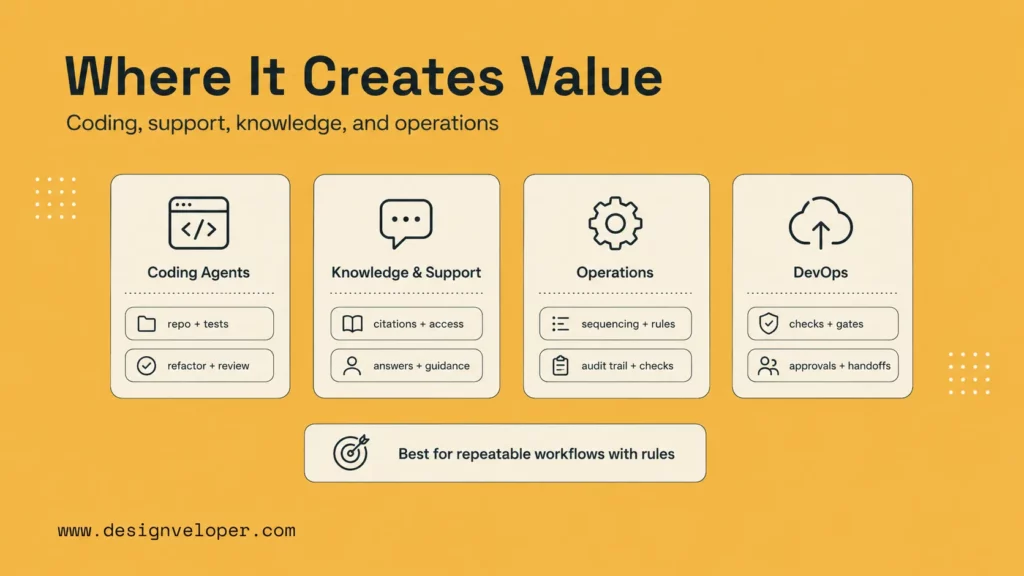
AI harnesses create the most value in workflows that need both autonomy and control. They are especially useful when tasks have multiple steps, private data, external tools, business rules, or review requirements. In those cases, the harness is what makes agent behavior usable in real work.
The highest-value use cases are usually repeatable. If a team performs the same analysis, triage, draft, or operational step every day, a harness can make the process faster while keeping it governed.
Recommended for you:
- AI Chatbot Integration: How To Connect Chatbots With Business Systems
- What Is AI Automation? How It Works, Benefits, Tools, and Use Cases
- How To Build An AI Chatbot With Long-Term Memory? (Guide)
Coding And Developer Agents
Coding agents benefit from harnesses because software work has many hidden constraints. A useful ai agent harness can give the agent repository instructions, target files, test commands, lint rules, security checks, and code review signals.
For a harness ai devops agent pattern, the harness can connect investigation, logs, tests, pull request creation, and deployment checks. The agent can help engineers move faster, but CI/CD, branch protection, and human review still protect production.
Document, Knowledge, And Support Workflows
Document and knowledge workflows need source control. An agent answering policy questions should know which document is authoritative, which version applies, and whether the user has access. A support agent should know when to draft, when to retrieve, and when to escalate.
A harness can add retrieval, citations, access checks, and uncertainty handling. That makes the answer more useful because the user can see where it came from and why the agent is allowed to provide it.
Multi-Step Operational Automation
Operational automation often needs several systems. A workflow may read a request, classify it, check records, update a ticket, notify a person, and log the result. Each step can fail or require approval.
A harness makes that workflow manageable. It controls sequencing, retries, permissions, and handoffs. It also creates the audit trail needed when teams want to know why an action happened. This is closely related to the broader shift toward AI business process automation, where the system has to stay useful without becoming opaque or risky.
What Changes When An AI Harness Meets Real Workflows
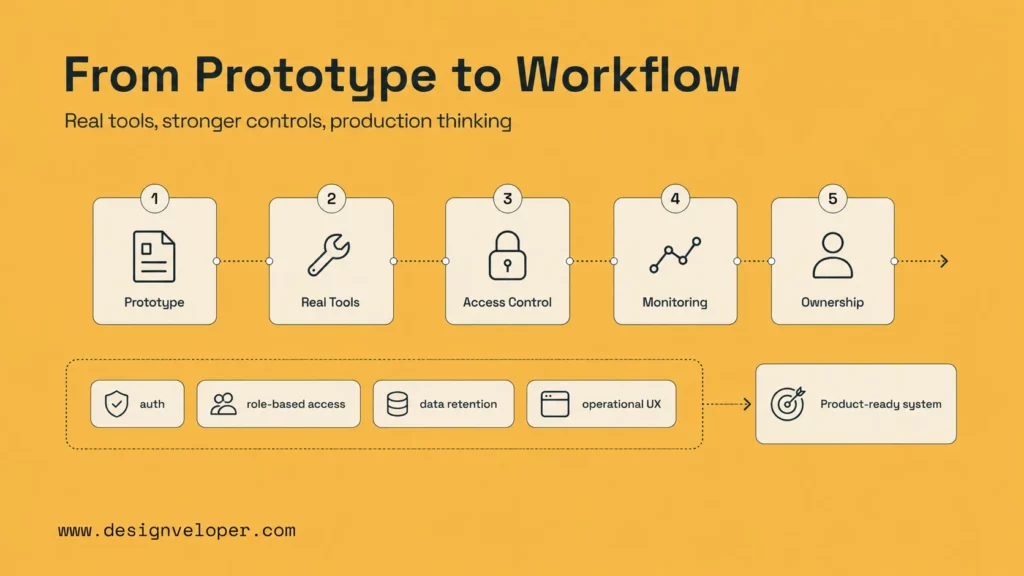
A minimal harness becomes more valuable when it connects to real tools, stronger guardrails, and structured workflow logic. That is also when the engineering challenge becomes more serious. The team must think about authentication, role-based access, data retention, logging, monitoring, product UX, and operational ownership.
This is where many prototypes need product engineering. The first harness proves that an agent can perform a narrow task. A production-ready harness proves that the agent can perform that task repeatedly, safely, and transparently inside a business process.
Explore more:
- Top 13 Agentic AI Tools You Should Know
- What Is The Model Context Protocol (MCP)? How Does It Work?
- What Is An LLM Agent? How It Works, Architecture, And Examples
Designveloper helps teams make that transition. As an AI-first software and automation partner, we build AI-powered product experiences that connect models to real workflows through AI development services, web applications, workflow automation, and maintainable software architecture. For teams exploring harness engineering ai agents, the next step is to choose one workflow, define risk boundaries, and build a minimal harness that can mature into a reliable product system.
FAQs About AI Harnesses
What Is An AI Coding Agent Harness?
An AI coding agent harness is the control layer around a coding agent. It gives the agent repository context, tools, test commands, coding rules, review signals, and permission limits. It helps the agent make useful changes without ignoring the engineering process around the codebase.
Is An AI Harness The Same As An Agent Framework?
No. An agent framework helps developers build agents with tools, memory, planning, and orchestration. An AI harness is broader. It includes the framework if one is used, but also includes product rules, security controls, evaluations, logs, permissions, and human review.
Can You Build A Minimal AI Harness Without A Full Framework?
Yes. A minimal harness can be built with one model call, one or two functions, a small state object, validation checks, and a retry or escalation rule. A framework can help as complexity grows, but it is not required for the first controlled workflow.
What Does An AI Harness Need To Handle In Production?
In production, an AI harness needs authentication, authorization, tool permissions, input and output validation, logging, monitoring, evaluation, error handling, human review, and rollback or escalation paths. It also needs a clear owner who can improve the system as users and workflows change.
An ai harness is the practical bridge between a capable model and a reliable AI product. Start narrow, add only the tools and memory the task needs, enforce guardrails in code, and use feedback signals to improve the system over time.
Also published on

Share post on










Related Articles


How To Build A RAG System: Step-By-Step (New Guide)
How To Build A RAG System: Step-By-Step (New Guide) Published October 19, 2026
8 Best AI Onboarding Tools For Faster Employee Ramp-Up In 2026
8 Best AI Onboarding Tools For Faster Employee Ramp-Up In 2026 Published October 19, 2026
Is Vibe Coding Legal? Ownership, Copyright, and Release Risks
Is Vibe Coding Legal? Ownership, Copyright, and Release Risks Published October 16, 2026


















