
















AI Agent Vs AI Assistant: Differences, Use Cases, And Choice

Many businesses still mix up AI agents and AI assistants. Although they sound similar on the surface, they behave very differently once deployed. So, what are the key differences between an AI agent vs AI assistant, and which one fits your business demands?
This article helps you answer these questions by digging into their exact definitions and how they differ in capability and control. Besides, we’ll also walk through practical use cases so you can picture how they work in action and where each fits best in real business workflows. Importantly, you’ll learn the risks and limitations of each to find whether they align with your business context. At the end, you’ll get all the knowledge to pick the right tool.
What Is An AI Assistant?
An AI assistant is a software tool that uses artificial intelligence to understand user prompts and perform tasks (e.g., generating text, answering questions, or retrieving information).
It’s often powered by a large language model (LLM) underneath and acts as a highly capable collaborator. Accordingly, it supports human decision-making rather than replacing it, operating only when a person initiates an action based on prompts. For this reason, AI assistants are highly applicable in everyday business tasks.
How AI Assistants Work
An AI assistant follows a simple loop: a user submits a prompt, the model processes it, and a response comes back. More particularly, the tool first parses the input by classifying the text and identifying its intent. It then uses patterns from its training data to build the output. Its underlying engine (LLM) is a system trained on vast amounts of text to understand and generate natural language.
In business deployments, AI assistants are often connected to external tools (like CRMs, document management systems, or internal APIs) so that the model can pull in relevant data before generating a response. Besides, humans also get involved in the loop to issue an instruction, review the result, and refine the prompt to make responses better. That sets an AI assistant apart from an AI agent.
For example, a customer support agent pastes an incoming complaint into an AI assistant and receives a suggested reply. The human reviews it, edits if needed, and sends it. That division of labor is exactly how AI assistants are designed to function.
What AI Assistants Are Best For
AI assistants are most effective when a human defines the task, reviews the output, and retains final authority over the decision. They accelerate execution, but they do not replace judgment. Enterprise users report saving 40 to 60 minutes per day by offloading routine cognitive tasks to AI tools, and the gains compound when assistants are applied consistently across the right use cases.
- Content & Communication
Writing is where AI assistants deliver the most immediate value. According to EMARKETER, most content teams (51%) are using AI to speed up creation, tagging, and organization. From drafting emails and generating first-cut marketing copy to summarizing meeting transcripts, these tasks are time-consuming for humans but well within the capability of today’s models.
- Customer Support (Human-Augmented)
AI assistants help human agents handle common inquiries and FAQs 24/7. But they don’t handle customer interactions alone. They may route complex tickets to the right person, suggest response drafts, pull relevant knowledge base articles, or generate FAQ content from past tickets. All of these keep humans in the conversation while cutting average handling time.
- Productivity & Internal Workflows
Research assistance, basic data interpretation, summarizing reports, and drafting internal communications are high-frequency tasks that consume knowledge worker time. AI assistants absorb that repetitive workload, and they free teams to focus on analysis and strategy rather than production.
- Coding & Technical Support
For technical teams, AI assistants offer code suggestions, explain error messages, and help debug logic. AI coding assistants can accelerate developer tasks by over 55%. This makes them a high-value addition to any engineering workflow.
Common AI Assistant Examples
Below are common AI assistants that serve different purposes:
- General-Purpose Assistants
These are chat-based tools designed to handle a wide range of tasks. The tasks involve drafting content, answering questions, summarizing documents, brainstorming, and basic data interpretation.
They require no deep integration with existing systems. Accordingly, you can open an interface, type a prompt, and get a response.
If you need a capable, flexible writing and thinking partner without a formal enterprise deployment, consider:
– ChatGPT (OpenAI) is the most widely adopted example, used across industries from legal to marketing to HR.
– Claude (Anthropic) operates in the same category, with a strong focus on long-form reasoning and document analysis.
- Workplace Assistants
These tools are embedded directly into the platforms teams already use. This makes AI assistants the most immediately practical category for business adoption. For example:
– Microsoft Copilot sits inside the Microsoft ecosystem (Word, Excel, Outlook, etc.). It drafts emails, summarizes meetings, and generates slide content from within familiar interfaces.
– Google Gemini integrates across Workspace. It works best for organizations already operating in Google’s ecosystem.
– Salesforce Einstein Copilot is purpose-built for CRM workflows. It helps sales and service teams draft outreach, summarize account activity, and generate recommended responses without leaving Salesforce.
- Voice Assistants
Voice assistants occupy a lighter role in business contexts. They handle quick commands rather than complex tasks.
Siri, Amazon Alexa, and Google Assistant are most commonly used for setting reminders, pulling fast answers, and initiating calls. This makes them useful in consumer settings and light operational workflows, but less suitable for document-heavy, judgment-intensive work.
AI Assistant Limitations
While useful, AI assistants come with real constraints. And understanding them is as important as understanding their capabilities.
- Lack of autonomy
An AI assistant cannot act without a prompt. This means it doesn’t monitor inboxes, initiate tasks, or manage multi-step workflows independently. Every output requires a human to start the process. For businesses looking to automate end-to-end processes, this is the best choice.
- Context dependency
Output quality depends heavily on input quality. A vague or incomplete prompt produces a vague or incomplete response. This may require teams to refine the prompt and iterate several times to get a usable result.
- Inconsistent accuracy
AI assistants can produce incorrect, outdated, or confidently stated fabrications. According to Forbes, reasons behind this mainly come from their probability-based approach and queries asked outside of the data AI models know. Therefore, human beings are still crucial in the loop to review the output.
- Limited integration depth
Not every AI assistant connects deeply with business systems. A general-purpose assistant may generate a response. But it cannot update a CRM record, trigger a workflow, or write to a database unless it has been explicitly integrated with those systems.
- Struggle with complex, multi-step processes
AI assistants handle individual requests well. But they struggle to manage multi-step processes that span systems, time, or teams without constant human intervention. So, scaling them beyond single-task execution requires significant process redesign.
These limitations are precisely why many businesses begin exploring AI agents once they reach the ceiling of what an assistant can do.
What Is An AI Agent?
An AI agent is an autonomous software system that perceives its environment, reasons through a problem, and takes action to achieve a goal.
Unlike AI assistants, AI agents work with minimal human input at each step. While an AI assistant waits for a prompt and stops when the task is done, an agent operates proactively. Accordingly, it receives an objective, plans how to reach it, executes across systems, and adapts when something changes.
How AI Agents Work
An AI agent does not wait for a prompt. It receives a goal, then decides what to do next, executes actions across integrated enterprise systems, evaluates outcomes, and adapts its approach based on results. This saves businesses much time, especially for repetitive, low-level tasks with high volumes. This trait also makes AI agents thrive at a surprising rate of 49.6% annually during the forecast period (2026-2033).
AI agents work around the three core components as follows:
- LLM (reasoning layer): The language model handles planning, interpretation, and decision-making at each step.
- Tool integrations (action layer): The agent connects to external systems (APIs, databases, CRMs, communication tools, etc.) to take real-world action.
- Memory (continuity layer): The agent tracks progress across steps, so it can reference earlier outputs when making subsequent decisions.
For example, an agent is tasked with generating a weekly sales report. With this goal, it pulls data from the CRM, analyzes trends against prior periods, drafts a summary, and sends it to the relevant team. All of these happen without a human touching the process at any intermediate step. The human accordingly sets the goal at the start and reviews the output at the end.
What AI Agents Are Best For
AI agents are most effective when tasks require multiple steps, decisions, and system interactions. Besides, businesses can consider using AI agents for repetitive, low-level tasks where reducing human involvement in execution is needed.
Below are some common cases of AI agents:
- Workflow Automation
AI agents excel at handling end-to-end processes, like employee onboarding sequences, recurring reporting cycles, or data syncing across platforms. These workflows are rule-governed and require multiple steps, but they consume significant human time. Unlike traditional automation that follows rigid predefined rules, agentic automation can adapt, make decisions, and respond to dynamic environments.
- Data Processing & Decision Support
Agents can monitor live data streams, detect anomalies, trigger alerts, and execute predefined responses automatically. Rather than waiting for a human to notice a drop in conversion or an inventory shortfall, the agent identifies it and acts.
- Multi-System Orchestration
Many enterprise processes span several platforms like CRM, ERP, marketing automation, finance systems, etc. Agents can connect these without manual handoffs. They then pass data and trigger actions across systems in a coordinated sequence.
Common AI Agent Examples

Below are several common AI agents in practice:
- Autonomous Customer Support Agents
These agents manage support interactions end-to-end. Accordingly, they read incoming tickets, query knowledge bases, resolve common issues, update CRM records, and escalate to a human only when the situation requires judgment. For example:
– Salesforce Agentforce uses the Atlas reasoning engine to analyze and break complex requests into actionable steps for execution. It also connects with Salesforce Data Cloud to extract real-time data.
– Zendesk AI can handle high-volume, multi-turn conversations to address up to 80% of support cases without human intervention.
- AI Workflow & Automation Agents
Tools embedded within enterprise automation platforms (like those built inside Microsoft Copilot Studio, Zapier Agents, or ServiceNow) can orchestrate business processes across departments. For example, Salesforce’s Einstein Copilot can proactively recommend workflow steps, summarize CRM data, and initiate actions. It works without waiting for a sales rep to trigger it.
- Developer & DevOps Agents
An AI agent can detect a failed deployment, roll back the service, update the team, and open a ticket. For example:
– GitHub Copilot operates autonomously by moving a GitHub issue to a pull request (PR) through a structured, multi-stage pipeline. It can execute a Plan (a list of coordinated file changes made by developers), iterate on its own code, detect syntax errors, and fix them.
– Claude Code follows a cycle of gathering context, taking actions, and verifying results. It also supports MCP integrations with external tools (like PostgreSQL or Sentry) to retrieve real-world data for its reasoning loop. Furthermore, through Routines (saved configurations), it can trigger actions based on a schedule, API calls, or GitHub events.
- Personal Productivity Agents (Emerging)
Tools like OpenAI’s Operator and Google’s Project Mariner represent an emerging category. Accordingly, they can browse the web, fill forms, schedule meetings, and complete multi-app tasks on a user’s behalf.
AI Agent Limitations
Despite their power, AI agents still have limitations. Let’s see:
- Complexity to Build and Maintain
According to MIT Sloan researchers, a real-world agentic deployment requires 80% of the effort for tasks like data engineering, stakeholder alignment, governance, and workflow integration to ensure the AI agent itself works as expected. However, having a proper setup across integrations, memory management, error handling, and orchestration logic is quite complex.
- Reliability Concerns
Multi-step reasoning introduces compounding risk. An error at step two influences step three, four, and five. This error becomes more serious for organizations in regulated industries where the cost of a failed agent can include regulatory breaches or significant financial loss.
- Control and Predictability
Agents operating autonomously are harder to audit than assistants responding to single prompts. Outcomes can drift from intent, especially when tasks involve ambiguous inputs or unexpected system states.
- Security and Permissions Risks
Access to live systems raises the stakes significantly. Each integration, whether via API, plugin, database, or cloud service, can act as a potential entry point for attackers. And each connector introduces its own security assumptions and risks.
- Cost and Infrastructure
Agent deployments require more infrastructure than assistant setups: monitoring, logging, testing, and ongoing governance. So, the cost is much higher.
What Is The Difference Between AI Assistant And AI Agent?
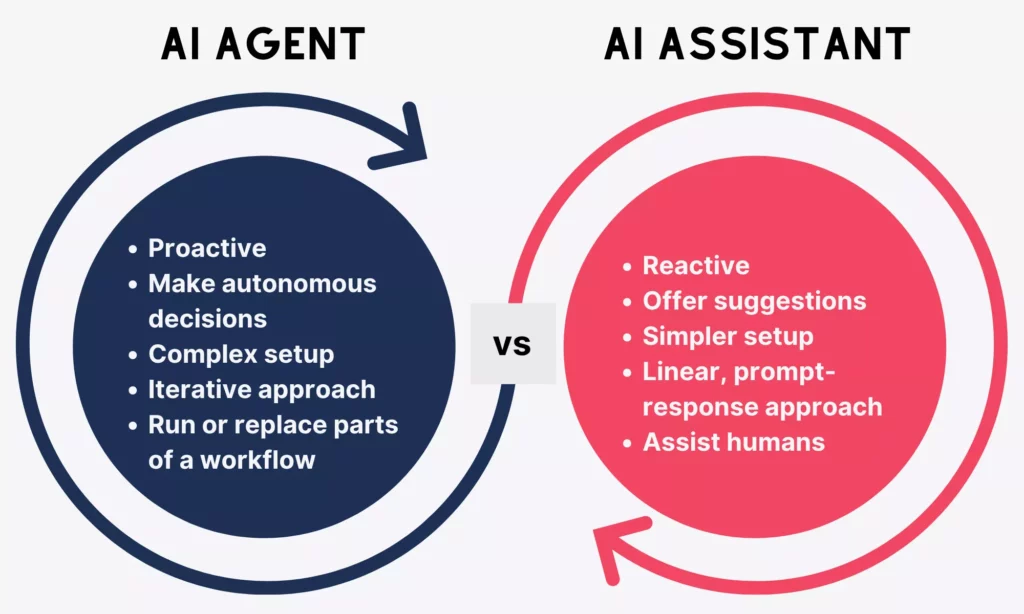
AI assistants and AI agents work differently to get tasks done. Simply put, an AI assistant supports tasks, while an AI agent executes outcomes. In this section, let’s break down the key differences between them:
Autonomy
Autonomy is the most fundamental difference between the two systems. It determines how much human involvement the process requires at every step.
AI assistants are reactive and dependent on user input. This means they wait for a prompt, complete the requested task, and stop. The assistants do nothing without being asked, and the human drives the interaction from start to finish.
AI agents, by contrast, are conditionally autonomous. After an initial kickoff prompt, the agent operates independently within guardrails to evaluate assigned goals, break them into subtasks, and plan their own workflows to achieve the goals.
For example, an AI assistant drafts a reply when a support agent asks it to. Meanwhile, an AI agent reads the incoming ticket, queries the relevant system, applies a resolution, updates the CRM, and closes the ticket. The agent triggers human review only if escalation is needed.
Decision-making
The second key difference lies in the possibility of each system in decision-making.
AI assistants offer suggestions and leave every decision to the human. For example, they can generate marketing campaign ideas, outline the pros of each, and stop there. What happens next is entirely up to the person reading the output.
AI agents go beyond simple execution to perform operational decision-making. They evaluate alternatives in real time, assess likely outcomes, and select actions aligned with policy. Presented with the same marketing brief, an agent chooses the most suitable campaign based on defined criteria, executes it across the relevant channels, monitors performance, and adjusts spend or messaging based on what the data shows.
Note: Agents make decisions within rules, not with full human-level judgment. They accordingly operate inside defined boundaries (like policy guardrails, permission scopes, or escalation triggers). So, they should not be treated as substitutes for human accountability. The agent selects and executes, while the human is still responsible for the outcome.
Complexity
In comparison, AI assistants are much simpler to set up than AI agents.
AI assistants are built for relatively fast adoption. Most are plug-and-play. This means a team signs up, connects a tool, and starts using it quickly. The infrastructure requirements are minimal, and the risk of a misconfigured deployment is low.
AI agents require significantly more setup. To deploy agentic automation, a team needs to connect APIs, define permissions, configure memory systems, set up monitoring tools, and complete many other tasks before the agent can run reliably.
You cannot build a reliable AI agent on top of bad data. If enterprise data is siloed, poorly categorized, or full of duplicates, an autonomous system will make bad decisions. That’s why data engineering is crucial to ensure AI agents can perform as intended.
Approach
An AI assistant and an AI agent follow fundamentally different approaches to completing work.
Accordingly, AI assistants follow a linear, prompt-response model. When you provide an input, the assistant produces an output. It does nothing further on that output unless you send another prompt or instruction.
An AI agent operates on a different logic entirely. Accordingly, it receives a goal, decomposes it into a multi-step plan, executes actions across integrated systems, evaluates outcomes, and adapts its approach based on results. The loop is iterative, not linear. If step three produces an unexpected result, the agent adjusts step four before continuing.
For example, an AI assistant writes a quarterly performance report only when asked. Meanwhile, an AI agent pulls the relevant data from the analytics platform, compares it against prior periods, identifies the key trends, drafts the report, and sends it to the distribution list.
Workflow
One clear way to see the difference between AI assistants and AI agents is to look at where each one sits inside a real business workflow.
Particularly, AI assistants fit into an existing workflow. In other words, it enhances what a human is already doing and accelerates the work. Meanwhile, the human remains central by initiating a prompt, reviewing the output, and completing the task.
AI agents can run or replace parts of a workflow entirely. While AI assistants require constant user input to function, agents operate independently within defined boundaries. Besides, the human shifts from executor to supervisor who needs to create guidelines, identify which tasks to assign, and review the output quality.
To better understand, let’s see how each system works in a sales workflow:
- An AI assistant helps a sales rep draft outreach emails faster, summarize call notes, and pull account data on request. The rep still manages every interaction and decision.
- An AI agent automatically qualifies inbound leads against defined criteria, sends personalized outreach, and updates the CRM after each interaction. Besides, it schedules follow-ups and escalates high-value opportunities to the rep.
To summarize all these differences, let’s glance at the following side-by-side comparison:
| Dimension | AI Assistant | AI Agent |
| Autonomy | Reactive; requires a prompt for every action | Proactive; acts independently after a goal is set |
| Decision-Making | Advisory; presents options for humans to approve | Operational; selects and executes within defined rules |
| Complexity | Low setup; plug-and-play in most cases | High setup; requires integrations, data, and governance |
| Approach | Linear: prompt → response | Iterative: goal → plan → act → evaluate → adapt |
| Workflow Role | Enhances human-led processes | Can run or replace parts of a workflow |
| Best for | Augmenting individual tasks and decisions | Automating multi-step, multi-system processes |
| Human role | Driver of every interaction | Supervisor of the overall system |
Chatbots Vs. AI Assistants Vs. AI Agents: What’s The Difference?
Chatbots are often mixed up with AI assistants and AI agents. But each is built for a different level of task complexity, autonomy, and business impact. The table below explains how they differ in various aspects.
| Aspects | Chatbots | AI Assistants | AI Agents |
| Core Purpose | Handle predefined conversations and FAQs | Support users in completing tasks | Achieve goals autonomously with minimal human input |
| Level of Intelligence | Rule-based; follows decision trees | Context-aware; understands natural language | Reasoning-driven; plans, adapts, and evaluates outcomes |
| Autonomy | None (fully dependent on user input and scripted paths) | Low (reactive and wait for a prompt at every step) | High (act independently once a goal is defined) |
| Interaction Style | Scripted, menu-driven responses | Conversational, prompt-based exchange | Goal-driven execution across systems and steps |
| Decision-Making | Lack independent decision-making | Suggest options and leave decisions to humans) | Make decisions within defined guardrails |
| Task Complexity | Simple, repetitive queries (FAQs, routing) | Multi-step assistance within a single session | End-to-end workflows spanning multiple tools and systems |
| Workflow Integration | Limited system connection | Standalone or can be integrated into apps (docs, email, CRM) | Cross-system orchestrator |
| Human Involvement | Required at every turn | Required to initiate and review each task | Mostly supervisory; human sets goal and reviews outcome |
| Setup | Fast to deploy, minimal setup | Require tool integration and prompting discipline | Need APIs, data infrastructure, governance, and monitoring |
| Scalability & Automation Potential | Limited (constrained by predefined scripts) | Moderate (scale individual productivity) | High (can automate entire operational workflows end-to-end) |
| Common Use Cases | Website FAQs, basic customer support, appointment booking | Content drafting, research, meeting summaries, email replies | Lead qualification, onboarding automation, data reporting, ticket resolution |
| Risks & Limitations | Rigid UX; breaks on unexpected inputs; frustrates users | Prompt-dependent; quality varies with user skill; no follow-through | AI hallucinations; compounding errors; security risks if misconfigured |
AI Agent Vs. AI Assistant Use Cases

The difference between AI assistants and AI agents becomes clearer when you apply both to a real workflow. In every industry, the two systems can operate in the same domain, but they play fundamentally different roles. Let’s see:
Customer Experience And Support
Customer support is often the first function where businesses deploy AI.
An AI assistant works alongside the human support rep. It surfaces relevant knowledge base articles during a live ticket, suggests a draft reply based on the customer’s history, and summarizes the conversation after it closes. The rep reviews, edits, and sends the outputs.
An AI agent works differently, though. It autonomously handles customer inquiries, learns from past interactions, and takes action across back-end systems. According to Gartner, agentic AI will handle 80% of common customer service issues without human intervention by 2029.
Let’s take this real-world example to understand how the two systems work. Suppose your business receives a customer email about a billing error. With an AI assistant, a support rep opens the ticket, the assistant drafts a response, and the rep sends it. But an AI agent reads the ticket, queries the account, identifies the error, and triggers a correction. And finally, the customer receives a resolution.
Banking And Financial Services
Financial services demand precision, auditability, and compliance at every step. This defines how both systems are deployed.
An AI assistant helps summarize client portfolios before meetings, draft credit memos, pull relevant transaction data, and structure reports. These outputs must go through a human before they reach a decision or a client.
Meanwhile, AI agents in banking are often used to detect fraud, provide customized financial advice, and automate loan approvals and compliance processes. For example, a compliance agent monitors transaction streams in real time, flags anomalies against regulatory thresholds, and triggers alerts or holds.
Human Resources And Internal Operations
HR is one of the highest-volume, most process-heavy functions in any organization.
Accordingly, AI assistants are used to reduce the workload for HR teams and employees alike. They draft job descriptions, answer employee questions about benefits and policies, summarize performance review notes, and help managers prepare for feedback conversations.
For example, HRM, a Mattermost-based assistant developed by Designveloper, supports booking, leave requests, approvals, and policy lookup. This hence improves employee self-services and automates internal workflows.
Meanwhile, AI agents automate the full employee lifecycle. They can generate contracts, collect e-signatures, trigger system provisioning, send training reminders, pre-screen candidates, assess resumes, and coordinate interview logistics. All of these can be done autonomously with minimal human intervention.
Healthcare And Service Workflows
Healthcare applies different rules to AI deployment than most industries due to its strict regulations. Accordingly, clinical decisions require human judgment, and that constraint shapes exactly where each system belongs.
An AI assistant supports the clinician directly. It summarizes patient history before appointments, pulls relevant documentation from the EHR, helps draft clinical notes, and surfaces treatment protocol references. In other words, the assistant works when the physician asks.
AI agents streamline the operational and administrative layer that surrounds patient care. Accordingly, they schedule follow-up appointments, coordinate referrals between departments, send pre-visit reminders, process insurance checks, and manage waitlists while ensuring compliance.
Developer Tools And Engineering Operations
Engineering teams have been among the fastest adopters of AI tools.
Accordingly, they consider an AI assistant as their coding companion. It suggests the next line of code, explains an error message, generates a unit test for a function, and summarizes what a legacy module does. Meanwhile, developers still stay in control of every commit.
Meanwhile, AI agents can handle low-to-medium complexity tasks in well-tested codebases with minimal supervision. For example, when assigned a GitHub issue, GitHub Copilot can analyze the task, create a branch, spin up a virtual environment, execute and test code iteratively, author commits, and deliver a PR for human review.
Why Businesses Use AI Agents And AI Assistants

Businesses adopt AI to solve real operational problems. The most common drivers are consistent across industries:
- Too much time spent on repetitive manual work
- Response times that can’t keep pace with demand
- Operations that are difficult to scale without a proportional increase in headcount.
AI assistants improve how employees work inside those constraints. Meanwhile, AI agents change how the work itself gets done. Despite different purposes, they both help:
- Automate repetitive and time-consuming workflows. AI could automate tasks that currently take up 60 to 70% of employees’ time. Accordingly, AI assistants accelerate the tasks humans still own, while agents help automate high volumes of repetitive, low-level tasks.
- Scale operations without linear hiring. AI helps businesses scale operations by automating tasks and serving more customers without expanding human teams. Both AI agents and assistants accordingly prove helpful when handling growing volumes across support, operations, and data processing.
- Improve speed and productivity. AI assistants reduce the time a human spends on each task. Meanwhile, agents compress or eliminate the handoffs between steps. According to PwC, the majority of organizations (66%) reported increased productivity, and 55% cited faster decision-making when adopting AI agents.
- Reduce human errors and increase consistency. Manual processes can contain errors or perform inconsistently at times, possibly due to human fatigue, missed steps, or inconsistent judgment. But both AI assistants and agents can hanle this problem by applying the same logic at the same standard, regardless of time of day, ticket number, or team capacity.
Risks Of AI Agents And AI Assistants

AI tools deliver measurable business value, but they are not risk-free. And the risks grow when the tools are misunderstood or deployed without clear boundaries.
In comparison, AI assistants carry lower stakes because a human reviews the output before anything happens. Meanwhile, AI agents have higher potential impact, as they act without that review at every step. Understanding where each system can fail is not a reason to avoid them, but the prerequisite for using them well.
- Accuracy and reliability
AI assistants can generate incorrect, outdated, or confidently stated information. Besides, output quality depends heavily on the quality of the prompt. With agents, the risk compounds: an error in step two shapes step three, four, and five. Without active monitoring, these failures can go undetected until the damage reaches the end of the workflow.
- Control and predictability
Assistants are easier to oversee because a human is present at every output. But agents operating across multi-step workflows are harder to audit in real time, and their behavior in edge cases (e.g., inputs the system wasn’t designed for) can be difficult to predict. Over-reliance on either system reduces human visibility into processes that may still need judgment at key moments.
- Security and data privacy
One IBM survey found that 13% of organizations reported breaches of AI systems, and 97% of these didn’t have proper AI access controls. Why does this case happen? AI assistants can connect to internal systems (like CRMs or databases), while AI agents gain permissions to perform tasks autonomously across those systems. Without proper configurations, these AI systems can work on sensitive or proprietary data and lead to operational disruption.
When To Use An AI Assistant Vs. An AI Agent For Your Business

Instead of blindly choosing more advanced technology, you should consider what your workflow actually needs. Briefly, AI assistants support the people doing the work, while an AI agent executes the work itself. Besides, the right choice also depends on task complexity, risk tolerance, and available infrastructure.
Choosing the wrong approach in either direction creates a problem. Accordingly, an assistant where an agent is needed caps efficiency, while an agent where an assistant would suffice introduces complexity, cost, and risk.
For that reason, use an AI assistant when:
- The task is single-step or short-lived (e.g., writing a draft, summarizing a document, answering an internal question, suggesting code)
- Human judgment remains central at every stage and output requires review before action
- The goal is to improve team productivity without restructuring existing workflows
- Speed of adoption matters because assistants require minimal setup, little technical integration, and low onboarding time
Pro tip: Use an AI assistant to augment what your team already does, not to replace the execution of a process.
Besides, use an AI agent when:
- The task spans multiple steps, requires decisions, and touches more than one system
- The goal is to reduce manual handoffs or automate a workflow end-to-end
- The process is repetitive, rule-based, and does not require human judgment on every iteration
- You have the infrastructure to support API integrations, monitoring, and governance
Pro tip: Use an AI agent to execute outcomes with minimal human input, not to assist a person, but to run a process.
Furthermore, you can combine both when complexity demands it. Many mature deployments use the assistant to handle judgment-heavy tasks (e.g., drafting strategy or generating creative options) and the agent to handle the downstream execution (e.g., distributing and triggering next steps).
Pro tip: Start with AI assistants to build confidence and demonstrate value, then expand into agents where workflows are well-defined and the integration foundation is solid.
FAQs About AI Agent Vs. AI Assistant
What Is The Role Of Prompts In AI Assistants And AI Agents?
Prompts play a central role in AI assistants and a more limited one in AI agents. An AI assistant is entirely prompt-driven, so the quality of responses depends on the quality of inputs. That’s why prompt skill matters significantly for teams relying on assistants day-to-day.
An AI agent still requires a prompt or instruction to initiate, but only at the start. Once given a goal, the agent generates its own internal reasoning steps, selects tools, and determines what to do next without requiring a new prompt at each stage.
Is ChatGPT An AI Assistant Or An AI Agent?
ChatGPT is primarily an AI assistant. In its standard form, it responds to user prompts, generates content, answers questions, and supports tasks. It stops when the conversation ends and takes no action beyond the response window. It is reactive, prompt-dependent, and does not interact with external systems unless explicitly connected to tools.
That said, ChatGPT can operate in an agent-like mode when configured with tool access (e.g., browsing the web, running code, or calling external APIs). In other words, the underlying model is the same, but the architecture and permissions determine which role it plays.
Can An AI Assistant Become An AI Agent?
Yes. And this is increasingly how organizations evolve their AI deployments. An AI assistant transitions into agent-like behavior when it gains three key capabilities: access to external tools and systems, the ability to take actions rather than just generate text, and the ability to chain multiple steps without human prompting at each one.
Practically, this means connecting an assistant to APIs, databases, or workflow platforms and configuring it to act on outputs rather than just produce them. Many enterprise platforms like Microsoft Copilot Studio or Salesforce Agentforce are designed specifically to facilitate this transition. The underlying model does not change but the architecture around it does.
Which Is Better For Business Automation: AI Assistant Or AI Agent?
Neither is universally better. The right answer depends on what you are automating. For tasks where human judgment, creativity, or approval is required at each step, an AI assistant is the stronger choice. It improves speed and quality without removing the human from the process.
For repetitive, multi-step workflows that span multiple systems (e.g., ticket resolution or onboarding sequences), an AI agent delivers greater automation value. It removes the need for human involvement at each stage, allowing teams to supervise rather than execute.
Conclusion
In short, AI assistants and AI agents are complementary tools with distinct roles. Accordingly, assistants support the people doing the work by responding to prompts, accelerating tasks, and keeping humans firmly in control of every output. Meanwhile, Agents execute the work itself by planning actions, “talking” with systems, reviewing outputs, and iterating. The real difference between them lies in autonomy, task complexity, and workflow impact.
There is no universally correct choice. The right approach depends on your current workflows, task complexity, automation levels, and technical infrastructure.
If you are ready to move from understanding to implementation, Designveloper builds the systems that make both possible. As an AI-first development and automation partner, we help businesses integrate AI directly into their existing workflows without disrupting the systems and processes already in place. From LLM integrations and internal productivity tools to multi-system workflow automation and agentic pipelines, every solution is built for production, not experimentation.
Whether you struggle with slow AI adoption, poor tool integration, or automation that doesn’t scale, Designveloper has the right expertise to get you covered. Our approach combines AI expertise with product engineering to design solutions around real workflows, real constraints, and real business outcomes.
If you want a partner who builds to production standards, reach out to our team to start the conversation.
Also published on

Share post on










Related Articles


How To Build A RAG System: Step-By-Step (New Guide)
How To Build A RAG System: Step-By-Step (New Guide) Published October 19, 2026
8 Best AI Onboarding Tools For Faster Employee Ramp-Up In 2026
8 Best AI Onboarding Tools For Faster Employee Ramp-Up In 2026 Published October 19, 2026
Is Vibe Coding Legal? Ownership, Copyright, and Release Risks
Is Vibe Coding Legal? Ownership, Copyright, and Release Risks Published October 16, 2026


















