
















Ollama vs vLLM: Which Is Better for Your Work Projects?

The growing popularity of large language models (LLMs) leads to the emergence of various tools and frameworks supporting them. Two prominent names among them are Ollama and vLLM. Their main goal is to facilitate local or large-scale cloud/server deployments for LLM inference and serving.
In this blog post, we will make a detailed comparison between Ollama vs vLLM in different aspects (e.g., ease of use, hardware requirements, or performance). Read this post and you’ll find the answer to choose the right tool for your project!
Introduction to LLM Serving Tools
But wait! Don’t rush to the comparison! Let’s take some time to understand the basics of Ollama and vLLM first:
What is Ollama?
Ollama is an open-source tool that allows you to download, install, customize, and run open-source large language models (LLMs) like gpt-oss, Llama 3.2, LlaVA, or Mistral locally. Think of it like a library where you can set up and store LLMs to handle specific tasks, from text generation and machine translation to coding and research support.
According to the 2025 StackOverflow Survey, 15.4% of developers have used Ollama in the past year, while nearly 60% plan to work with this tool in the future.
How does Ollama work?
Ollama works by creating a separate environment on your system – whether it’s Linux, MacOS, or Windows – to operate LLMs and avoid possible conflicts with other software already installed on your device. This environment covers everything an LLM needs to perform a task, like pre-trained data, customizable configurations (that tell how the LLM should behave), and other essential dependencies (that support the model’s performance).
Features of Ollama
- Local Model Management: Ollama reduces your complete reliance on cloud services by giving you full control over LLM deployments on local devices. With Ollama, you can download, update, customize, and delete models easily on your system without worrying about data privacy and security.
- Beyond basic management, Ollama helps you track and switch between different model versions to test their performance on specific tasks.
- Offline Functionality: Running LLMs locally means you can use them offline. This is very useful if your LLM projects are set in limited connection environments or require strict control over data flow due to data sensitivity.
- Command-Line and GUI Options:
- Ollama primarily runs on a command-line interface, which allows you to run, train, and manage language models. Operating Ollama on the CLI helps generate text, perform data analytics, integrate with third-party tools for data retrieval, automate repetitive tasks with scripts, and build custom models.
- You can use external GUI tools like Open WebUI to run Ollama if you don’t have much command-line expertise and need an interface for team-based workflows. These tools allow you to interact with models visually and prove extremely useful if you want to run multimodal models for image-related tasks.
- Multi-Platform Support: You can download and run Ollama on different systems, including Linux, macOS, and Windows. Ollama requires at least macOS 12 Monterey and Windows 10. Meanwhile, you can install Ollama on Linux systems with the following command line:
curl -fsSL <https://ollama.com/install.sh> | sh.
- Multi-Model Support: Ollama integrates a variety of third-party models for embedding, multimodal, and thinking to serve different purposes. Some popular options include gpt-oss, EmbeddingGemma, Qwen3, and Llama 3.2.
What is vLLM?
vLLM, short for “very Large Language Model,” is an open-source library developed by the Sky Computing Lab at UC Berkeley. The tool acts as a high-performance backend for efficient LLM inference and serving on GPUs.
How does vLLM work?
Developed on PyTorch (commonly used to train and operate large neural networks), vLLM can take advantage of a mature, well-tested environment to run LLMs locally. Further, by using CUDA, vLLM can run model inference faster and handle more requests at once efficiently on GPUs.
It also applies advanced optimization methods like continuous batching or memory-saving PagedAttention to increase speed while ensuring memory efficiency. This makes vLLM ideal for production-ready applications rather than just research experiments.
Features of vLLM
- Continuous Batching: vLLM supports fast token generation by implementing continuous batching automatically.
- Instead of waiting for all requests in the same batch to hit their end-of-sequence tokens (as in “static batching”), vLLM allows new prompts to join the batch when some requests finish early and free their GPU “slots.” This keeps GPUs fully utilized and maintains high-speed token generation.
- According to Anyscale, vLLM’s continuous batching delivers 23x throughput in LLM inference while reducing p50 latency.
- PagedAttention: This attention algorithm helps manage memory for attention keys and values more efficiently. It does this by breaking the cache into small fixed-size pages (like a computer’s virtual memory pages), which can be flexibly reused, distributed, and swapped. Equipped with PagedAttention, vLLM achieves 24x higher throughput than HuggingFace Transformers.
- Decoding Algorithms: vLLM supports various decoding algorithms to help LLMs choose the next word or token. These algorithms let you trade off between speed, accuracy, and creativity depending on your specific use cases. For example, parallel sampling creates various possible outputs at the same time for diversity.
- OpenAI-Compatible API: vLLM’s API endpoint imitates the OpenAI API. If your app already calls
openai.ChatCompletion.create(...), you only need to change the URL to point to your own vLLM server. This helps you easily migrate from a cloud-hosted model to your own local/private setup.
- Distributed Inference: LLMs can be so large that a single GPU’s memory can’t handle. vLLM addresses this problem by supporting tensor, pipeline, data, and expert parallelism for distributed inference. These methods allow huge LLMs to work across multiple GPUs. For example, tensor parallelism can divide layers of the LLM to various GPUs, so each GPU keeps the distributed layer part and makes corresponding computations.
vLLM vs Ollama Performance Comparison
Now that you’ve understood the fundamentals of each tool, let’s learn about the key differences between vLLM and Ollama. In this section, we’ll make a detailed comparison of these two LLM serving tools in various aspects, like ease of use, performance, hardware flexibility, and more.
Key innovation
The Sky Computing Lab at UC Berkeley originally created vLLM in the form of a custom memory-management algorithm called PagedAttention.
LLMs often need to store the attention key-value cache in GPU memory while creating text, and require one large shared block of GPU memory for that cache. However, this consumes a lot of space (up to 60-80%) because chunks can’t always fit well. That’s why PagedAttention was introduced to fix this problem.
Considering GPU memory like a computer’s virtual memory, this algorithm divides the cache into various small pages (“fixed-size blocks”). The computer can reuse or move these blocks around, significantly reducing memory usage.
This innovation now becomes an underlying system for vLLM. With that smart memory management, vLLM can now use GPU memory more efficiently to:
- Handle many requests at once
- Process longer inputs or outputs without running out of memory
- Generate numerous tokens concurrently, boosting performance speed.
Ollama, on the other hand, is developed to democratize access to LLMs by allowing users to use and run them on their local machines.
Traditionally, machine learning models require a lot of manual work, like labelling massive datasets and pre-processing text for the models to learn grammar and meaning. Ollama addresses this problem by using unsupervised learning and deep neural networks to explore language patterns themselves. Accordingly, Ollama’s architecture includes many neural networks stacked together in layers.
- Lower layers learn very simple letters, sounds, and other things.
- Middle layers discover words, phrases, and their relationships.
- Higher layers capture full sentence structure and meaning.
Ease to use
Ollama is easy to install and deploy. It just needs some commands and its Modelfile syntax makes customization simple. Additionally, the inference framework offers a developer-friendly CLI or integrates with GUI tools to visualize installation.
Once you’ve downloaded Ollama, you can pull your preferred language models from the Ollama library. Upon installation, you can communicate with the models, send them a prompt, and wait for their generated responses.
vLLM is easy to install and deploy. You can call it through a simple Python API. But this tool is not as user-friendly as Ollama. It requires a bit more technical know-how and setup, especially for distributed inference across numerous GPUs.
Some developers recommend running vLLM inside Docker. This container bundles the tool with all its dependencies, hence keeping everything self-contained.
Using Docker separates the vLLM environment from other applications, so any updates or changes in vLLM won’t affect the rest of your system. Further, Docker ensures vLLM behaves consistently on any environment, whether laptops or cloud servers. This makes vLLM deployment across various systems easier and more efficient.
Hardware requirements
Ollama is developed to perform quite well on consumer-grade hardware, like laptops or desktop computers. The framework can run on GPUs for high speed, but it can work reasonably well on CPUs, which need to acquire enough memory to run language models effectively. For example, Ollama requires at least 8GB of RAM to run mid-sized models (e.g., 7 billion parameters).
vLLM is natively designed for powerful GPUs or multi-GPU servers. You can run this framework on CPUs despite slow and poor performance. This is because the tool takes advantage of GPU parallelism for quick token generation.
Inference speed
Ollama offers high-speed LLM inference, but its performance speed is limited by local hardware. The Ollama team has recently improved the software to make it run faster with more efficient usage of computer resources. With this update, Ollama can complete tasks up to 12x faster than before.
vLLM is optimized for heavy-duty, GPU-powered deployments. So, the inference framework can continuously provide superior throughput and low latency, even when handling concurrent queries at once. Its core PagedAttention mechanism, coupled with continuous batching, distributed inference, and other techniques, enables the tool to handle very large language models and perform high-volume workloads efficiently.
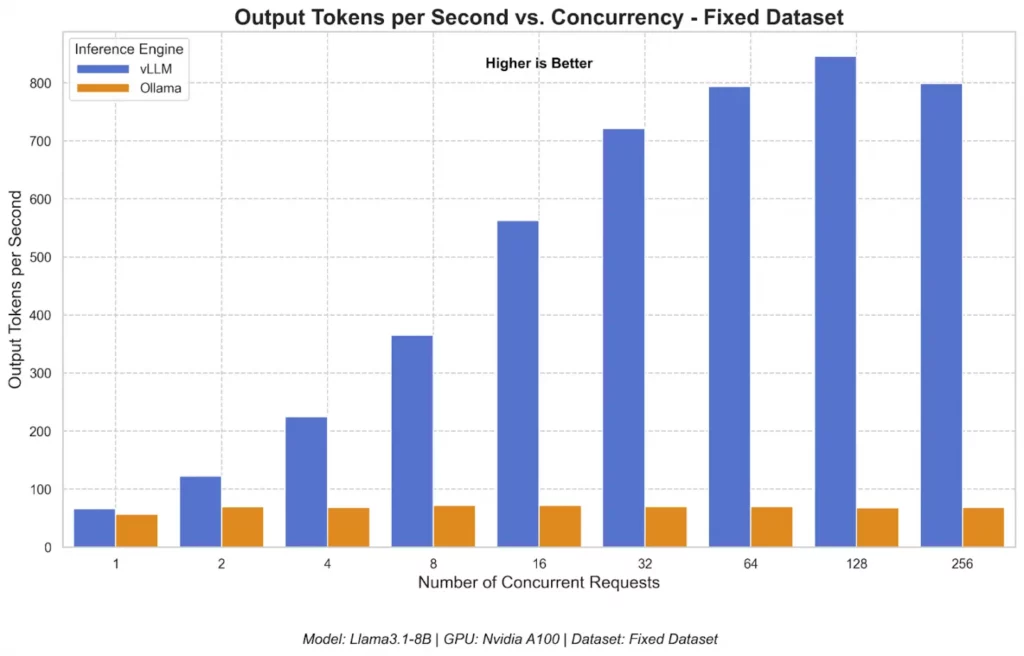
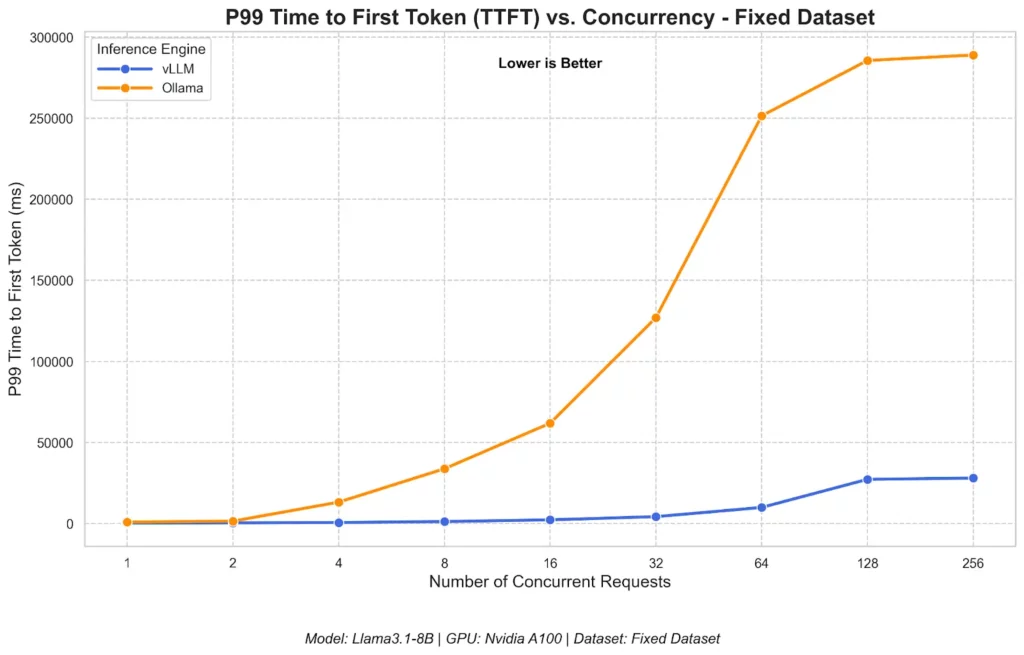
In a test with Ollama and vLLM on different performance benchmarks, the Red Hat AI team concluded that vLLM outperforms Ollama at scale. On a single NVIDIA GPU, vLLM offers significantly higher throughput and lower P99 latency when working with all concurrency levels.
- vLLM reached a peak of 793 TPS (Output Tokens Per Second), versus Ollama’s 41 TPS (for 128 concurrent users). The figure below shows vLLM’s throughput scaled significantly as the number of concurrent requests increased.
- vLLM consistently recorded a significantly lower TTFT (Time to First Token) than Ollama when concurrency increased. This means even under growing loads, vLLM still delivered faster responses to users.
- At high concurrency (> 16 requests), vLLM excels at processing many requests at once in one big batch to achieve the highest total throughput. This made vLLM’s Inter-Token Latency (which measures the average time between subsequent tokens in a response) go up. In contrast, Ollama limits how many requests are actively creating tokens simultaneously.

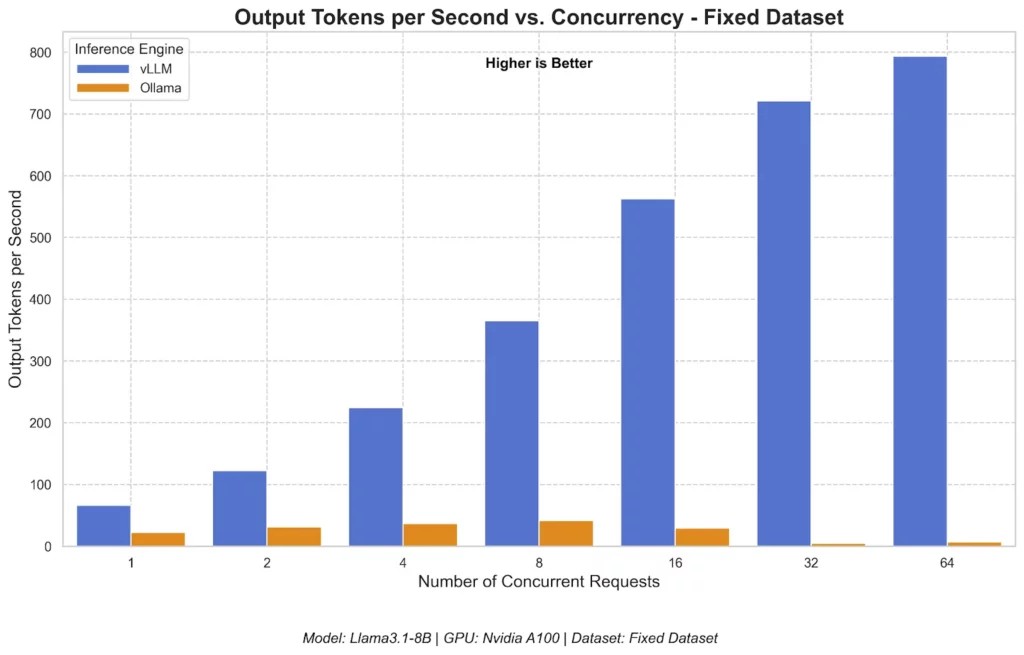
Surprisingly, even when Ollama was adjusted for parallelism, its throughput still underperformed vLLM. Typically, vLLM’s TPS increased almost linearly when concurrency scaled. Meanwhile, Ollama still witnessed its relatively flat performance.
Memory efficiency
vLLM offers a variety of optimization techniques for GPU memory, typically PagedAttention. This mechanism reduces memory fragmentation by dividing the attention key-value cache into small “pages” to consume little GPU memory.
With this core capability, vLLM can run models with large context windows and handle multiple simultaneous requests without worrying about running out of GPU memory. This mechanism also makes vLLM extremely memory-efficient for large-scale, multi-user inference on very large models.
Meanwhile, Ollama comes with simpler memory management. It works fine on consumer-grade machines and runs well on CPU-only setups. But it doesn’t have advanced GPU memory features. So, for very large models or high concurrency, Ollama proves less memory-efficient.
Scalability
vLLM comes with numerous features for seamless large, scalable deployments, including continuous batching, tensor/pipeline parallelism, etc. The experiment of the Red Head AI team also concluded that when concurrency increases, vLLM’s throughput scales well and delivers fast responses to requests.
In comparison, Ollama is built for local, single-machine use. It can serve many concurrent requests but limits the number of requests actively generating tokens at once to maintain low latency. This makes Ollama’s throughput limited. So, the inference framework doesn’t scale well with increasing concurrency levels.
Comparison table between Ollama and vLLM
Below is a comparison table summarizing the key differences between Ollama and vLLM:
| Feature | vLLM | Ollama |
| Key Innovation | Based on the core PagedAttention mechanism to optimize GPU memory | Based on the idea of democratizing access to LLMs on local machines |
| Ease of Use | Easy to install and deploy, but requires more technical expertise and setup | Easier to use and deploy with just a couple of commands; choose either CLI or external GUI tools to work with Ollama |
| Hardware Requirements | High-end GPUs | Mostly CPUs, consumer-grade GPUs |
| Inference Speed | Extremely fast (PagedAttention + other optimization techniques like continuous batching or distributed inference) | Fast but hardware-reliant; can’t keep up with vLLM’s inference speed even when being tuned for parallelism |
| Memory Efficiency | Excellent due to efficient GPU memory management | Good, but limited to very large models or high concurrency |
| Scalability | Scale well for large deployments and increasing concurrency levels | Limited |
| Main Use Cases | Production-ready, large-scale applications | Rapid prototyping, local experimentation |
When to Choose Between Ollama and vLLM?
With the mentioned differences in features and performance, when should you use Ollama and vLLM? Let’s take a deep look at real-world applications where Ollama and vLLM shine:
Choose Ollama when
- You’re new to LLMs and want to experiment with popular models without a steep learning curve.
- Your team prioritizes data privacy. Ollama’s local deployment capabilities keep private/sensitive data inside your local environment.
- Hardware is limited. Ollama is a good option if you don’t have multi-GPU servers, but modest computers to run large language models.
- You want fast prototyping. When you prioritize development speed over speed of LLM inference and serving, choose Ollama. This tool allows you to run the models without a complex setup.
- You work with completely isolated environments kept away from cloud services and the Internet. Ollama provides offline capabilities to run the models locally in a super-secure network.
Choose vLLM when
- You prioritize performance at scale. vLLM uses optimized architecture, memory-saving PagedAttention, and optimization techniques (e.g., continuous batching) to maximize throughput. So, it works best if you want production-ready applications that can handle various requests and users at once.
- You require minimal latency. vLLM enables fast token generation and speeds up response time. So, this tool is ideal for real-time applications where lower latency is paramount, like time-sensitive analytics or real-time customer support.
- You want advanced serving features to run LLMs as a service (e.g., allowing users to send requests and receive responses). vLLM offers more comprehensive API and optimization techniques to customize and control how you can deploy the models or how they respond to user queries.
- You work with very large models. vLLM’s built-in PagedAttention mechanism enables efficient memory usage and management. This allows large models (with more than 30 billion parameters) to be deployed well with vLLM.
- You need cloud-based LLM deployments on high-end GPUs. vLLM works well on NVIDIA GPUs, AMD GPUs, and other hardware options for the best performance.
Step-by-Step Guide for Getting Started With Each
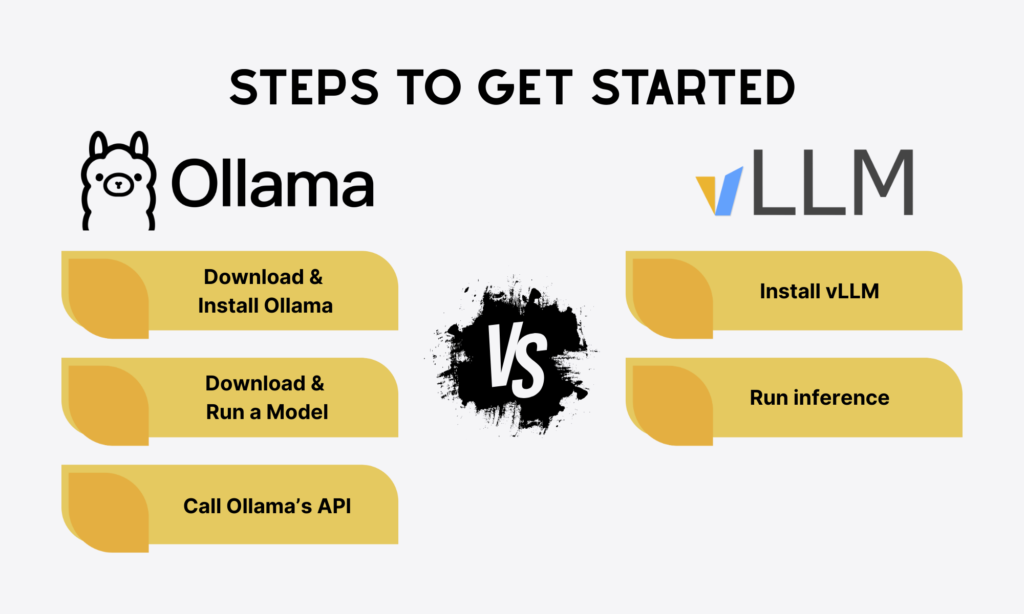
You’ve understood how Ollama and vLLM differ from each other in various aspects. So, how can you get started with each? This section will provide a step-by-step guide to installing and using each inference framework effectively.
Getting started with Ollama
To get started with Ollama, ensure you meet system requirements, from a supported operating system (Linux, macOS, Windows) to sufficient RAM (8 GB+ is commonly recommended for medium-sized models with 7B parameters). You can choose GPUs, but for quick prototyping and local AI experimentation, CPU setups are enough.
Download & install Ollama
Go to the official Ollama site and download Ollama for your chosen OS. For Linux systems, install with the following command:
curl -fsSL https://ollama.com/install.sh | sh
Linux allows you to rent a remote, always-on machine from providers like AWS, DigitalOcean, or Linode.
This machine is often known as a Virtual Private Server (VPS). So, when you run Ollama on a Linux VPS instead of a local Linux computer, you can authorize anyone (e.g., team members or apps) to connect with the VPS through the Internet and run the models 24/7 without the need to turn your computer on every day.
Download & run a model
In the Ollama CLI, pull a supported model you want to use via the general command like ollama pull <model-name> or ollama run <model-name>. For example:
ollama pull gpt-oss
ollama run gpt-oss
Note: Ollama enables developers to pull/download multiple LLMs simultaneously, but in separate command lines, because the ollama pull command does not accept the calling of multiple models. For example:
The tool can’t pull:
ollama pull gpt-oss llama-3.2 qwen-3
It can only pull:
ollama pull gpt-oss
ollama pull llama-3.2
ollama pull qwen-3
Call Ollama’s API
Upon installation, you can call Ollama’s API to start interacting with the model:
import requestsr = requests.post("http://localhost:11434/api/generate",json={"model": "gpt-oss","prompt": "Explain a liberty in the game of Go"})print(r.json())`Getting started with vLLM
Similar to Ollama, you need to make sure your system meets requirements before installation. Check vLLM documentation to stay updated with its prerequisites:
- OS: Linux
- Python version: 3.9 to 3.12
- GPU: compute capability 7.0 or higher (e.g., V100, T4, RTX20xx, A100, L4, H100, etc.)
Install vLLM
You can use pip or conda to install vLLM:
# Install vLLM with CUDA 12.1pip install vllm# Use conda to build and manage a Python environmentconda create -n myenv python=3.12 -yconda activate myenvRun inference
There are two ways to run vLLM: Offline batched inference and through OpenAI-Compatible Server.
For offline batched inference, you can import LLM and SamplingParams (sampling parameters for text generation), then identify a list of prompts, set sampling parameters, and call llm.generate(prompts, sampling_params).
vLLM by default downloads models from HuggingFace. But if you want to use models from ModelScope, you need to use the VLLM_USE_MODELSCOPE environment variable. Here’s an output returned from offline batched inference:
outputs = llm.generate(prompts, sampling_params)for output in outputs:prompt = output.promptgenerated_text = output.outputs[0].textprint(f"Prompt: {prompt!r}, Generated text: {generated_text!r}")You can also run vLLM as a service through the OpenAI API protocol. The framework starts the OpenAI-Compatible Server at http://localhost:8000, but you can change the address by using --host and --port arguments.
To start the vLLM server using the Qwen2.5-1.5B-Instruct model, use the following command:
vllm serve Qwen/Qwen2.5-1.5B-InstructOnce the server is activated, use the following prompts to query the model:
curl http://localhost:8000/v1/completions \-H "Content-Type: application/json" \-d '{"model": "Qwen/Qwen2.5-1.5B-Instruct","prompt": "San Francisco is a","max_tokens": 7,"temperature": 0}'Because the server is compatible with OpenAI API, you can query the server via the openai Python package:
from openai import OpenAI# Modify OpenAI's API key and API base to use vLLM's API server.openai_api_key = "EMPTY"openai_api_base = "http://localhost:8000/v1"client = OpenAI(api_key=openai_api_key,base_url=openai_api_base,)completion = client.completions.create(model="Qwen/Qwen2.5-1.5B-Instruct",prompt="San Francisco is a")print("Completion result:", completion)Conclusion
Ollama and vLLM are two popular frameworks for LLM inference and serving. When the demand for deploying the language models increases, these frameworks and other alternatives will become increasingly crucial.
This blog post details the key differences between Ollama and vLLM in various aspects, from inference speed and memory efficiency to ease of use and main use cases.
In short, vLLM is best suited for enterprise-grade, production-grade AI applications that prioritize high throughput and low latency. Meanwhile, Ollama works best if you aim at rapid prototyping on local deployments and prioritize full control over data.
Do you need a trusted, experienced partner to develop LLM-based applications using such frameworks? Contact Designveloper!
As the leading software and AI development company in Vietnam, we’ve had 12 years of developing simple to complex AI systems across industries. Our dedicated team of 100+ skilled professionals owns strong technical and UX capabilities to develop high-quality, scalable AI solutions in alignment with your specific use cases.
We’ve integrated LangChain, OpenAI, and other cutting-edge technologies to automate support ticket triage for customer service. Further, we built an e-commerce chatbot that offers product information, recommends suitable products, and automatically sends emails to users.
With our proven track record and Agile approaches, we’re confident in delivering on-time projects within budget. If you want to transform your existing software with AI integration, Designveloper is eager to help!
Also published on

Share post on










Related Articles



Enterprise AI Agents: Use Cases, Platforms, And Safe Deployment
Enterprise AI Agents: Use Cases, Platforms, And Safe Deployment Published September 25, 2026
Graph RAG Vs Traditional RAG: Choosing The Right AI Architecture
Graph RAG Vs Traditional RAG: Choosing The Right AI Architecture Published September 25, 2026
10 Best AI Agents in 2026 for Work, Coding, and Automation
10 Best AI Agents in 2026 for Work, Coding, and Automation Published September 24, 2026



















