
















How To Build An Android App: From MVP To Google Play

If you want to build an Android app, start by proving one valuable user problem before choosing a technology or writing code. A useful first release needs a clear user job, a build path that fits the product, and a plan for testing, release, and ongoing ownership.
A working core flow is only the starting point. An app earns repeat use when it solves a frequent problem, is easy to discover, builds trust, and gives the team evidence that users complete and return to the experience. This decision-and-delivery guide explains how to define an MVP, choose a delivery approach, plan the Android architecture, build in Android Studio, estimate time and cost, prepare for Google Play, and learn from production use.
Start With A Problem Worth Solving
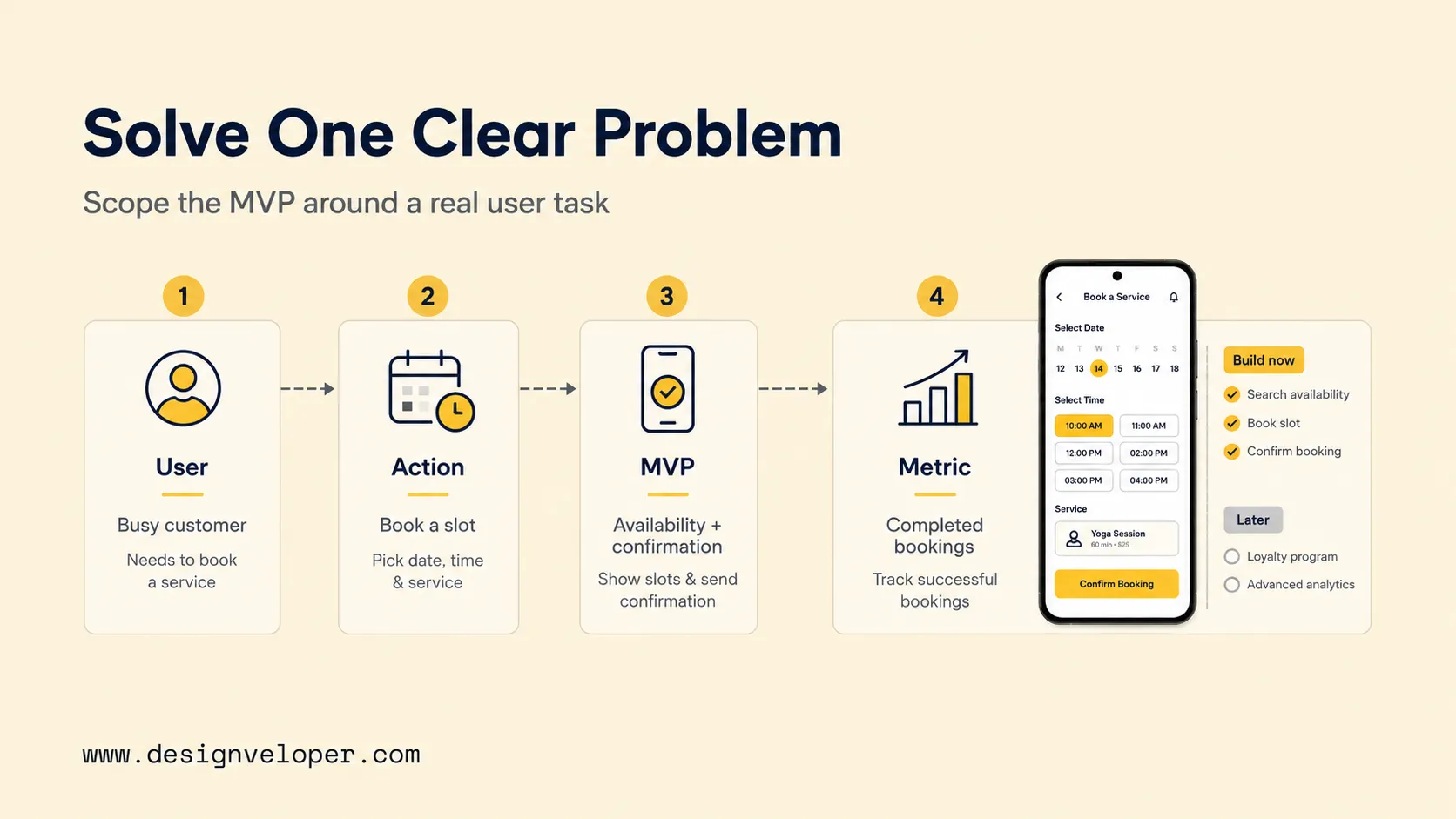
Define one target user and one job the app must make easier. A booking app, for example, may serve a customer who wants to see an available slot, reserve it, and receive a clear confirmation.
That job creates a testable product boundary. The team can ask whether each proposed feature helps the user complete the booking or only makes the first release larger.
Turn the job into a minimum viable product, or MVP. The MVP should prove that the core action works in the minimum context users need to complete it before the team invests in secondary features.
For a booking example, the first scope can be framed like this:
| User Problem | Core Action | MVP Feature | Success Metric |
|---|---|---|---|
| Users cannot see which times are available. | Choose a valid service and time. | Availability list with date and time selection. | Users reach an available slot without support help. |
| Users do not know whether the request succeeded. | Confirm the booking. | Confirmation screen with booking details. | One completed action creates one valid booking. |
| Users may enter incorrect details. | Review information before submission. | Review step before final confirmation. | Fewer avoidable corrections after booking. |
A useful scope filter helps the team decide faster than a long feature wishlist. Put every idea into one of three groups:
- Build now: anything required to find availability, submit the booking, and confirm the result.
- Build later: useful retention features such as favorites, loyalty tools, or richer history.
- Exclude for now: ideas with no clear effect on the first user job.
Before development starts, test the product assumption with representative users when possible. Ask whether the problem occurs often enough to matter, whether the proposed flow is understandable, and what users do today instead. End this stage with a written MVP boundary and one or two measurable outcomes. That boundary becomes the reference point for design, engineering, testing, and estimation.
Choose How You Will Build The App
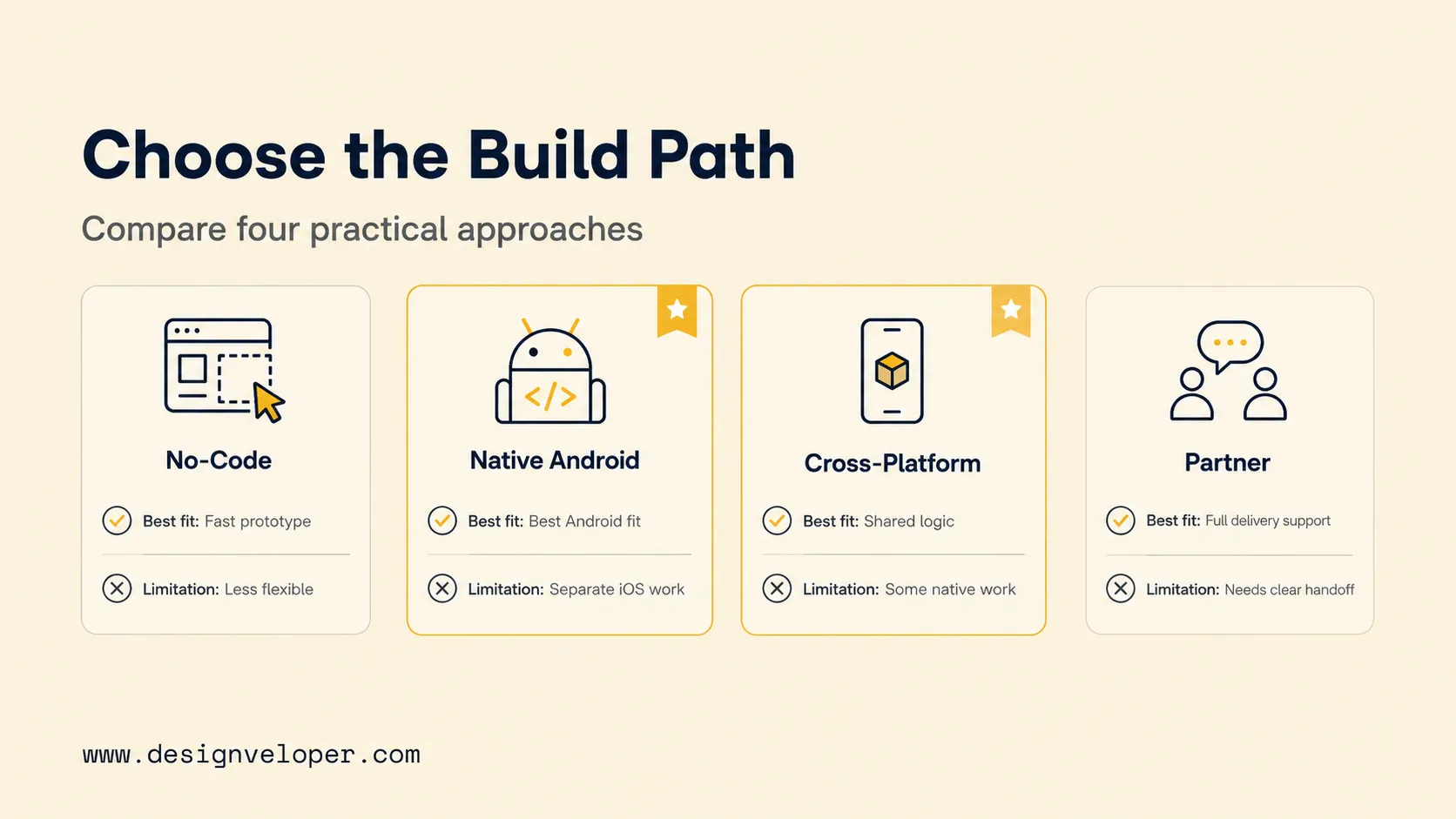
Make two decisions separately: choose the technical approach, then choose who will deliver it. A technology choice and a staffing choice solve different problems.
Technical approach
No-code, native Android, and cross-platform development fit different constraints. The decision should reflect the MVP, required device features, current team skills, integrations, testing scope, and the iOS roadmap.
| Approach | Best Fit | Main Limitation | Long-Term Ownership |
|---|---|---|---|
| No-code or low-code | Simple internal tools, prototypes, or workflows that fit existing platform components. | Custom device behavior, unusual integrations, or complex offline logic may exceed platform limits. | The product may depend on the platform’s supported features, export options, and pricing. |
| Native Android | Android-first products that need close platform integration or a dedicated Android roadmap. | A separate iOS product normally requires additional implementation work. | The team maintains Android-specific code and platform skills. |
| Cross-platform | Products that need Android and iOS with substantial shared product logic. | Some integrations and platform behavior still need native work. | The team maintains shared code plus platform-specific layers. |
For deeper comparisons, see our guides to native app development and cross-platform app development. They explain how platform choice affects device access, maintenance, and delivery.
For a new native Android product, Kotlin and Jetpack Compose are practical starting points. Existing apps may keep Java or Views-based XML when a rewrite would create more risk than value.
Delivery model
Once the technical approach is clear, decide whether the current team can own the work or needs outside capacity.
| Approach | Best Fit | Main Limitation | Long-Term Ownership |
|---|---|---|---|
| In-house team | The company already has product, Android, backend, and QA skills for the planned scope. | Hiring gaps or competing priorities can slow delivery. | The company directly owns technical knowledge, release access, and maintenance. |
| External development partner | The internal team needs added product, design, mobile, backend, QA, or release capacity. | Unclear responsibilities can create handover and maintenance problems. | The agreement should state who owns code, credentials, documentation, releases, and support. |
Ask which option removes the biggest delivery constraint without creating an ownership problem after launch. The answer may be different for an MVP, a mature product, and a regulated or integration-heavy system.
Plan The Android App Before Writing Code
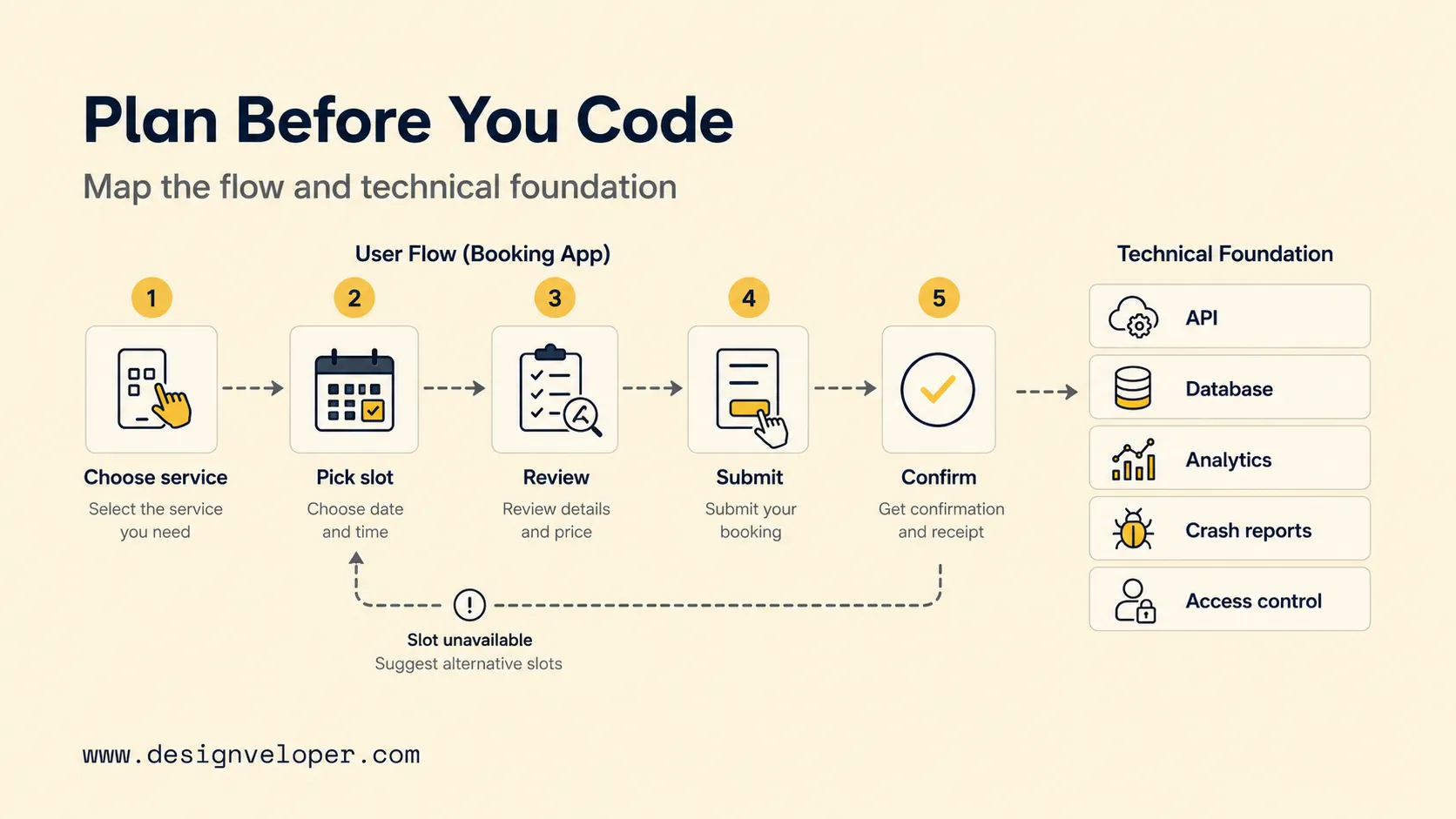
Planning should show what the user does and what the system must support at each step. This work exposes missing data, failure states, and integration needs before they become expensive changes.
Map The Core User Flow
Map the shortest path from entry to a useful result, then add the states that can interrupt it. For the booking app, the core journey can be expressed in five steps:
- Choose a service. Show only options the user can currently book.
- Pick a slot. Display current dates and available times.
- Review the details. Let the user correct the service, time, or personal information.
- Submit the request. Prevent duplicate actions while the request is processing.
- Confirm the result. Show whether the booking succeeded and what happens next.
The same journey needs exception states. If a slot disappears before submission, preserve the user’s other choices and offer another time. If the network fails, explain the problem and provide a safe retry.
Add authentication, notifications, payments, profile data, or offline access only when the use case requires them. Each addition creates more states to design, secure, test, and maintain.
Set The Technical Foundation
Decide where important data lives and which system is allowed to change it. A device-local app can stay simple when one device holds the useful data and no shared record is required.
A server-backed product becomes necessary when several users or devices depend on shared records, live availability, accounts, payments, or server-enforced rules. In that case, the backend may become the source of truth, meaning the authoritative record when two systems disagree.
Android’s architecture recommendations advise teams to separate UI and data responsibilities while adapting the pattern to the app instead of adding layers without a clear need.
Use this decision path to keep the technical foundation proportional to the MVP:
- Does one device hold all useful data? If the data never needs to be shared, device-local storage may be enough.
- Do several users or devices need one current record? Add a backend and API when they depend on shared or live data.
- Do users perform sensitive actions? Define authentication, authorization, validation, monitoring, and data-protection requirements before release.
For the booking example, an API is needed if the server owns live slot availability. The database stores the shared record, while analytics and crash reporting show whether the core flow runs and where it fails in production. They do not, by themselves, prove that users find the product valuable; user feedback and outcome metrics are needed for that decision.
Build The First Version In Android Studio
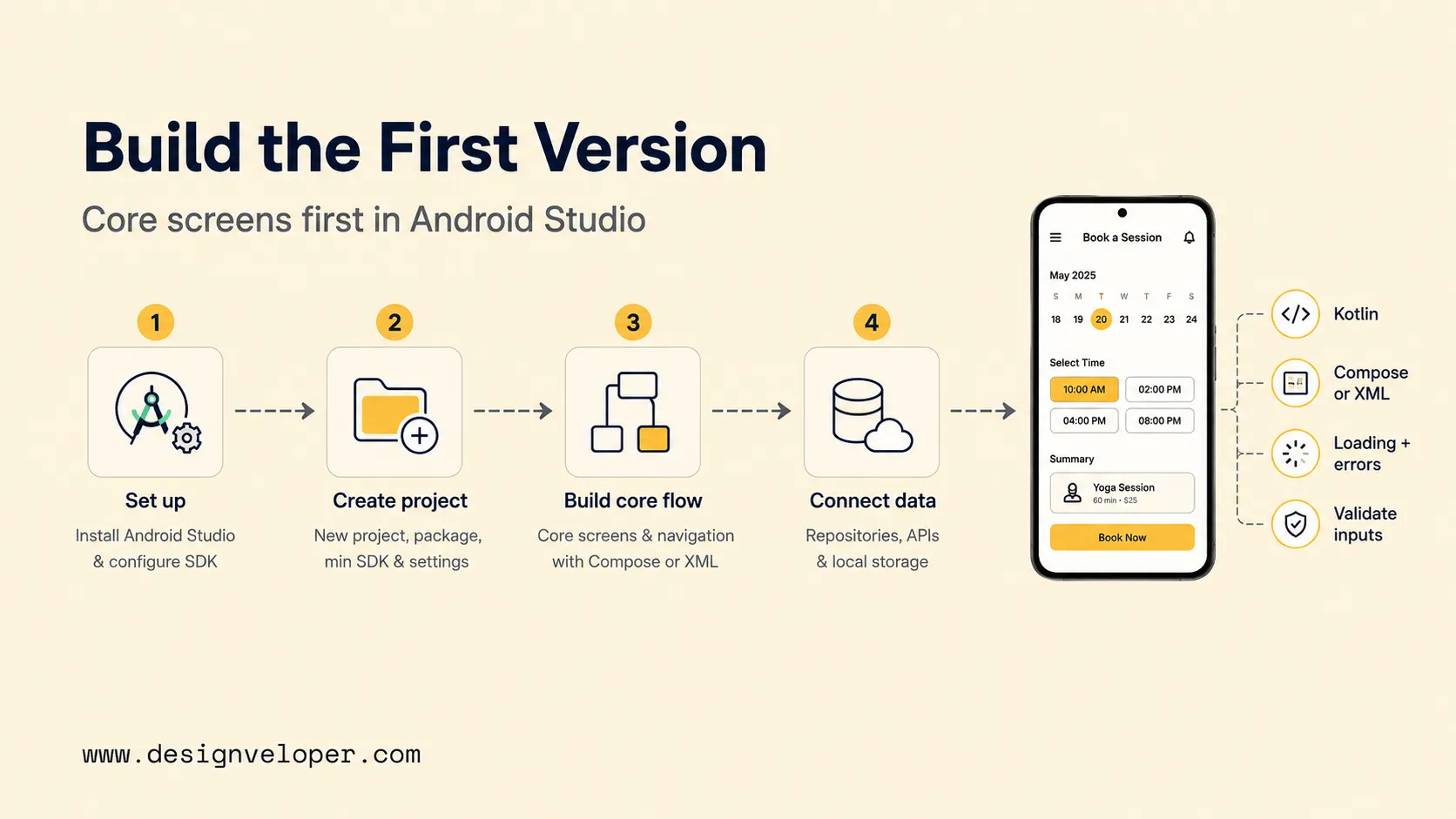
To build an Android app in Android Studio, implement the planned core flow before secondary settings or growth features. The development stage turns the user journey into screens, state changes, data requests, and recoverable errors.
Our broader Android app development guide covers the Android stack in more depth. For this decision guide, the important sequence is simpler:
- Set up the environment. Install Android Studio, configure the Android SDK, connect source control, prepare an emulator, and keep a representative physical device available.
- Create the project. Set the application package, supported Android versions, build configuration, and project structure before feature work spreads across the codebase.
- Choose the UI approach. Use Jetpack Compose for a new Compose-based interface, or an existing Views-based XML approach when extending an older app.
- Build the core journey. Implement service selection, slot selection, review, submission, and confirmation before secondary screens.
- Connect data. Show loading states during requests. Handle unavailable slots, network failures, and retries without forcing the user to restart.
- Validate inputs and responses. Catch obvious mistakes on the device, while the server still rejects invalid or stale actions when it owns shared data.
- Add production visibility. Track the few events and crashes that reveal whether the core journey runs, fails, or is abandoned.
The first build does not need every future feature. It needs a stable path that can be tested with realistic data and failure conditions.
Test The App Before Users Find The Problems
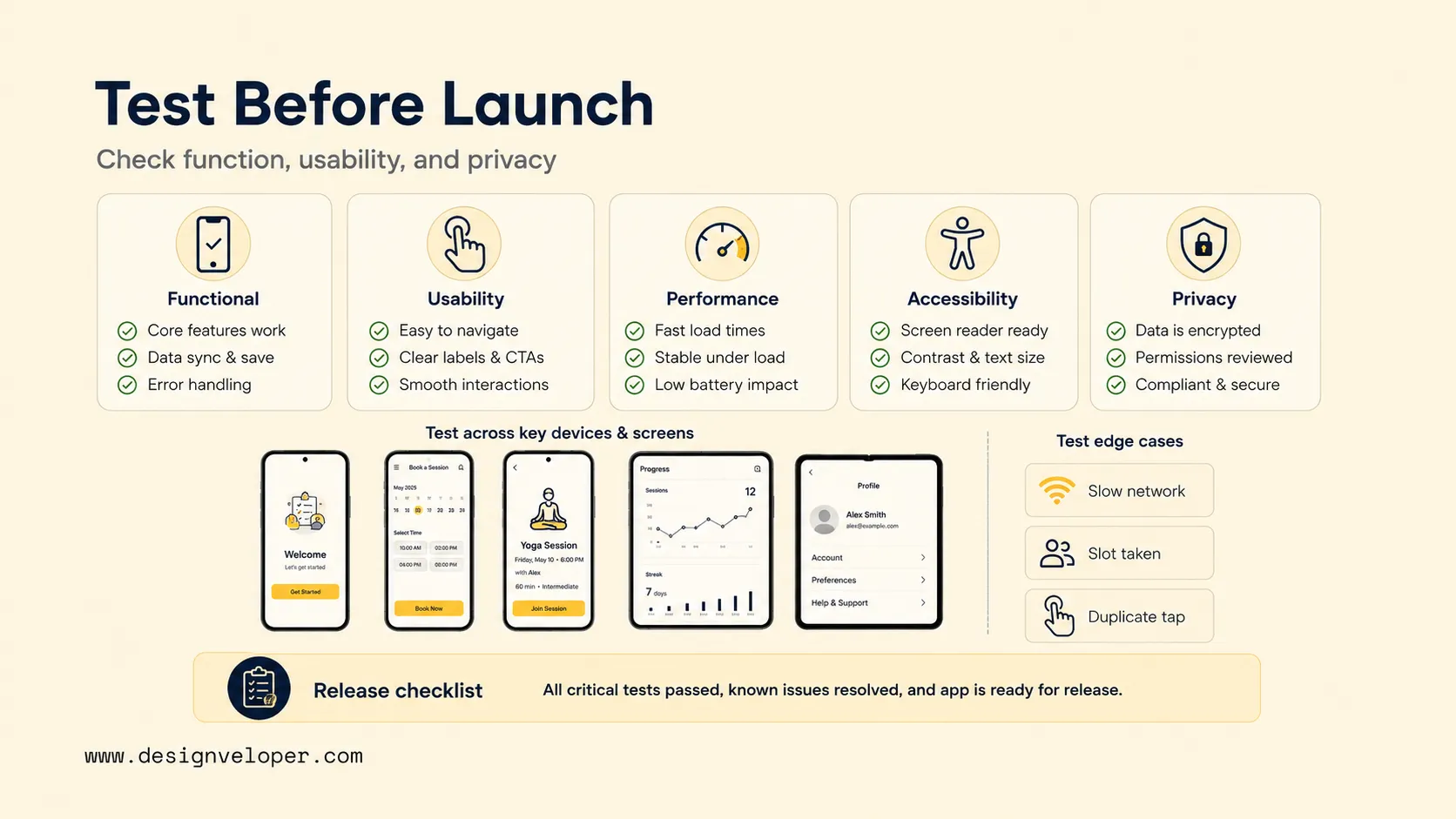
Test more than whether the app works on the happy path. Check whether people can understand the flow, recover from problems, and use the product safely on the devices and Android versions in scope.
Functional tests cover expected behavior, while usability testing checks whether people understand what to do. Release quality also includes performance, accessibility, privacy, device coverage, data accuracy, and recovery from failure. Android’s core app quality guidance provides a platform baseline across these areas.
For the booking example, test realistic edge cases rather than repeating only the happy path:
- The selected slot becomes unavailable before the user confirms it.
- The network drops after the user taps the confirmation action.
- The user taps submit twice while the first request is still processing.
- The user leaves the app and returns after the displayed availability becomes stale.
- The interface runs on a small phone, a larger display, and a device using larger text.
Privacy testing is part of release quality. Check that permissions appear only when a feature needs them, verify that analytics and logs do not expose data the team should not collect, and test the highest-risk data flows before release.
A useful release review separates three layers of risk:
- Layer 1 – Works: the critical flow produces the correct result on supported devices.
- Layer 2 – Recovers: loading, empty, error, retry, and duplicate-submit states are understandable.
- Layer 3 – Can be operated: crashes are visible, permissions and data handling are reviewed, and the team knows who responds after launch.
Before approving a production build, use a short signoff checklist:
- The critical flow passes on the supported devices and Android versions in scope.
- Permission requests are necessary, understandable, and tied to a user action.
- Loading, empty, error, retry, and duplicate-submit states have been checked.
- Analytics and crash reporting work in the release build without exposing sensitive data.
- The team knows how to stop further distribution of a bad release when the distribution path allows it.
- A named owner is responsible for production incidents, support feedback, and the next release decision.
Budget Time And Cost For Launch And Maintenance
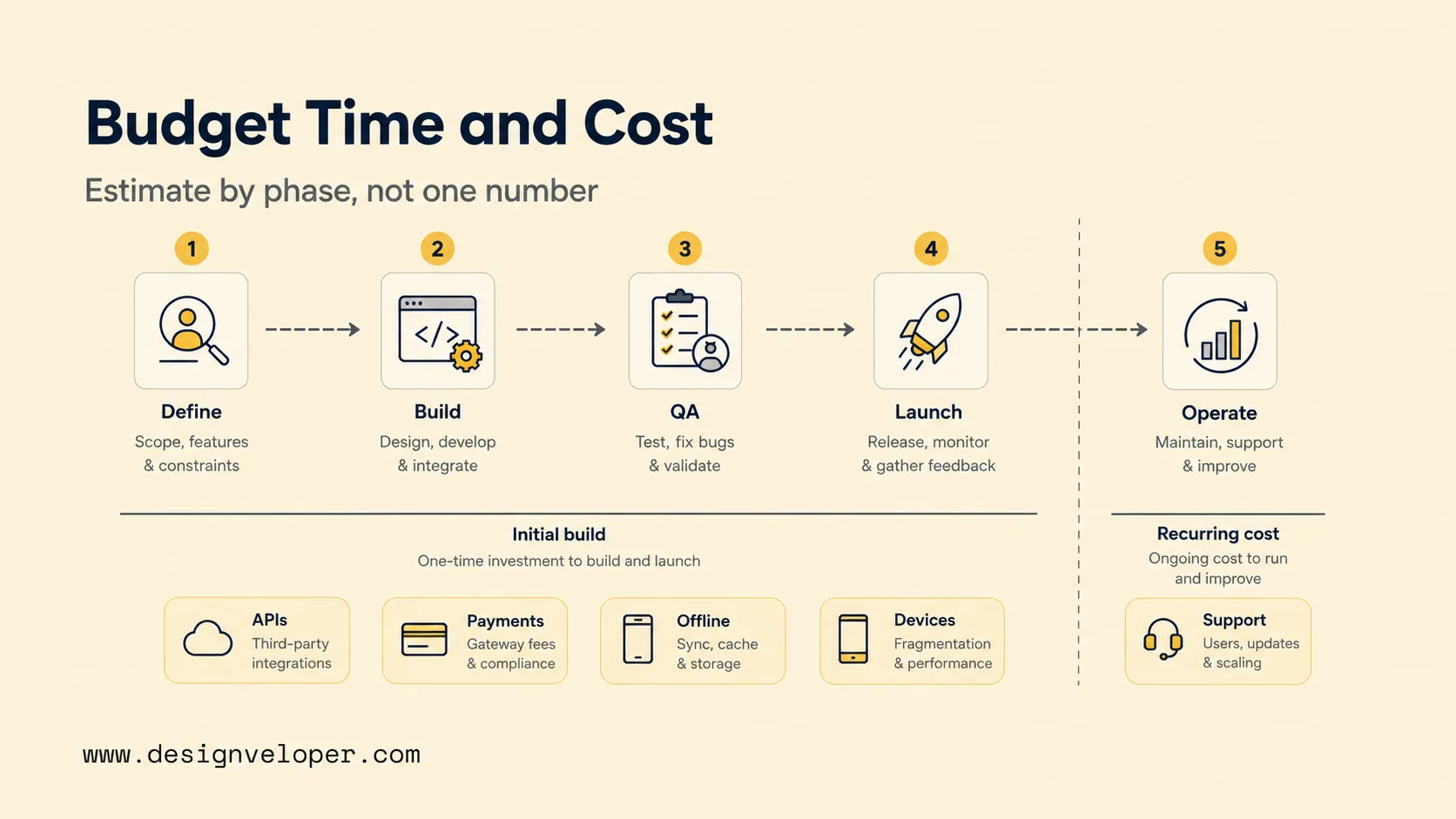
Use a range only when its assumptions are visible. App scope, team model, integrations, platform coverage, testing depth, and post-launch responsibility can move both time and cost substantially.
For planning, our 2026 app development cost guide uses the following broad benchmarks. They are not Android quotes; they are scope-based reference ranges for custom app projects.
| Scope | Planning Cost Benchmark (USD) | Typical Timeline | Assumption |
|---|---|---|---|
| Simple app | $10,000–$60,000 | 2–4 months | Focused workflow, limited integrations, standard product requirements. |
| Mid-complexity app | $60,000–$150,000 | 4–7 months | More workflows, backend work, and several product integrations. |
| Complex app | $150,000–$300,000 | 7–12 months | Custom logic, deeper integrations, wider testing, or stronger security needs. |
| Enterprise or highly customized app | $300,000–$400,000+ | 12+ months | Large scope, complex systems, multiple roles, or high operational requirements. |
These ranges depend on assumptions such as team location, delivery model, platform coverage, integration complexity, and what the team owns after launch. Use them for early planning, not as a promise of a final price.
For schedule planning alone, our app development timeline guide breaks work into discovery, design, development, QA, deployment, and ongoing maintenance. Use those phases to check whether a proposal hides work outside the quoted build window.
Estimate the delivery plan in order:
- Discovery: define users, product goals, scope boundaries, validation questions, and acceptance rules.
- UX/UI: map the journey, design key states, and validate the main interaction before engineering expands.
- Android development: build the interface, app logic, navigation, and device behavior.
- Backend and integration: build APIs and shared services that the launch scope requires.
- QA: test devices, failure states, accessibility, permissions, privacy, and production behavior.
- Release: prepare production builds, store assets, policy declarations, and release controls.
- Post-launch support: maintain the app, support users, fix bugs, and update dependencies or Android compatibility.
Separate initial delivery from recurring cost before choosing what to defer.
- Pay to make the first release usable: discovery, design, Android implementation, backend work, integrations, QA, and launch preparation.
- Pay to keep the released product working: hosting, third-party services, monitoring, support, maintenance, security work, and compatibility updates.
For the booking app, live availability and confirmation should survive budget cuts before loyalty points or advanced personalization. The first release still needs enough QA and operational support to protect its core promise.
Decision rule: defer optional features before deferring reliability, monitoring, security, or the support needed for the features already in scope.
Publish, Learn, And Improve After Launch
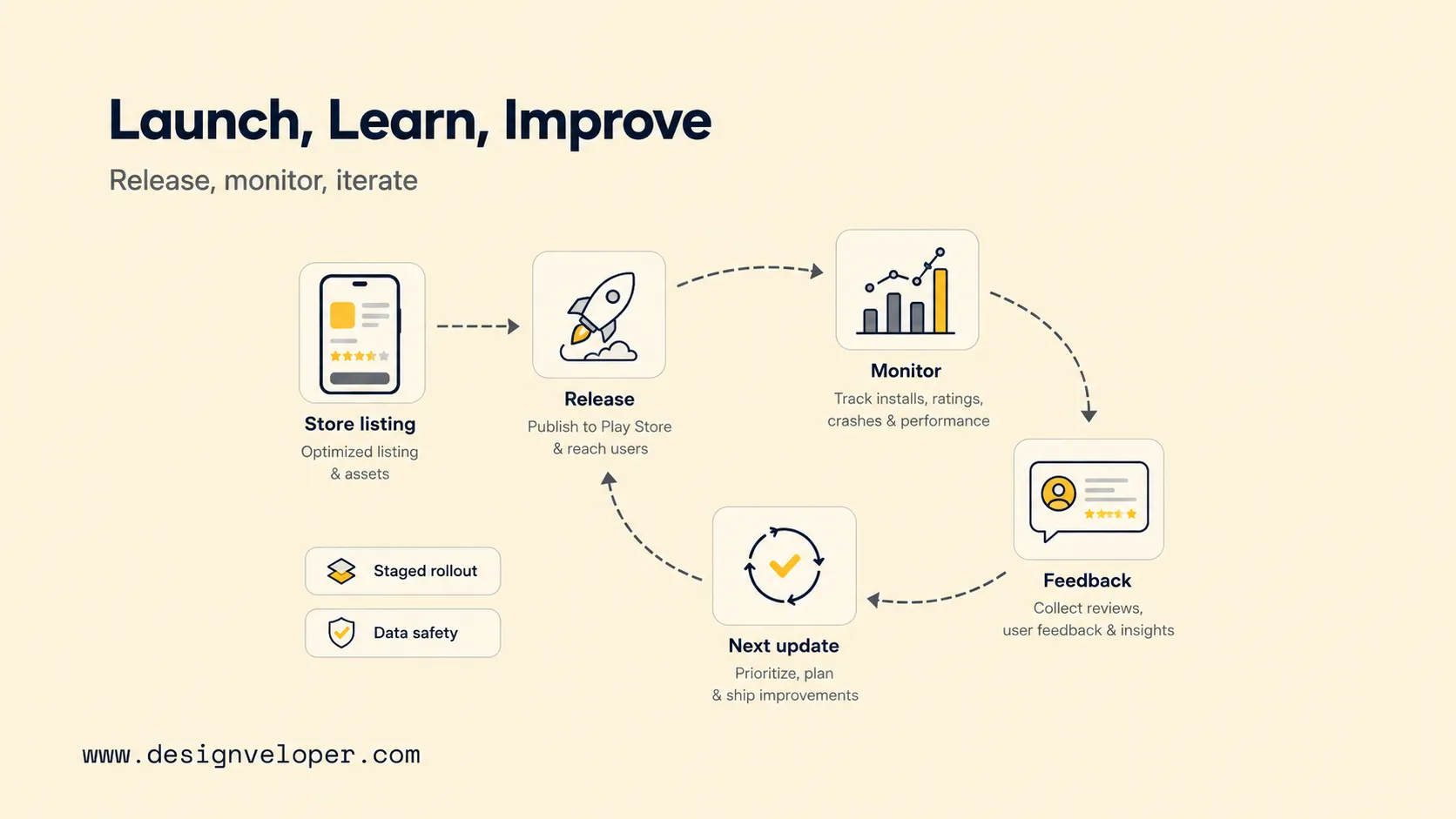
To publish an Android app on Google Play, prepare the release package before production traffic arrives. Publishing starts the operating phase rather than ending the product work.
A practical launch checklist should cover:
- Store listing copy and screenshots that match the released product.
- Privacy information and Data safety details based on actual app behavior.
- The correct testing track and account-specific production requirements.
- Release notes that tell users what changed.
- A support channel and named owner for production issues.
- Monitoring for crashes, core-flow completion, support requests, and meaningful user outcomes.
Google Play requirements depend on the developer account and release context. For personal developer accounts created after November 13, 2023, Google Play’s testing requirements currently require a closed test with at least 12 testers continuously opted in for 14 days before the developer can apply for production access. Verify the current requirement before submission.
Target API rules also change over time. Check Google Play’s target API requirements against the planned submission date and app category rather than copying an old release checklist.
For apps published on Google Play, complete the Data safety form even when the app collects no user data, subject to Google Play’s stated exceptions. The declaration must accurately reflect collection and sharing by the app and its third-party SDKs. Google Play’s Data safety guidance explains the current responsibilities.
Use staged rollout or halt-release controls where available. These controls can stop further distribution of an update, but they do not necessarily downgrade users who already received the affected version. Google Play’s staged rollout guidance explains the limitations and track-specific behavior.
After release, separate technical signals from product signals. Crash rates, failed requests, and ANRs show system health. Completion rate, repeat use, support requests, and user interviews help show whether the app solves the intended problem.
Choose the next release from a real production signal. If users abandon slot selection, investigate availability and usability before adding a referral feature.
When An App Needs More Than A Prototype
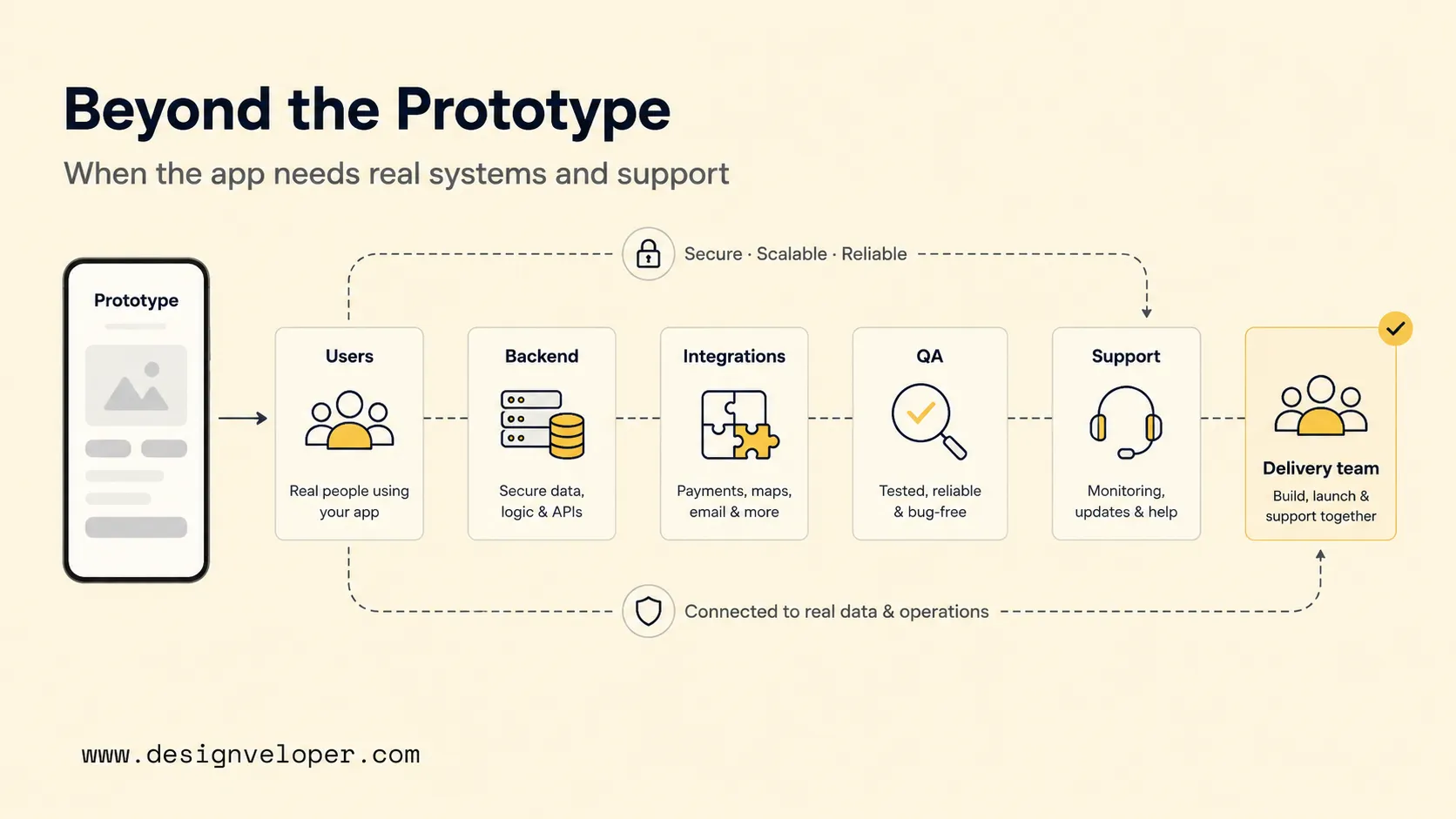
A prototype is enough when the goal is to test an idea, a user flow, or a technical assumption. Production engineering becomes necessary when real users depend on shared data, secure access, integrations, reliable releases, or ongoing support.
Look for observable triggers rather than vague ideas about scale. If a failed integration can lose a booking, someone must own retries and incident response. If several roles can change the same record, access rules and auditability become part of the product.
The same production-engineering need applies to cross-platform coordination. When Android, iOS, backend services, and operational teams must release together, the work needs shared acceptance criteria, environment access, test responsibility, and a clear production handoff.
Before expanding the team, ask who will approve production releases, replace a departing engineer, manage credentials, respond to crashes, and maintain integrations after launch. If no one can answer, the product is not operationally ready even if the demo works.
FAQs About How To Make An Android App
Can You Build An Android App Without Learning Kotlin?
Yes. No-code tools and cross-platform frameworks can create an Android app without using Kotlin for the whole product.
Kotlin is still a practical language to understand when a team needs native Android code, platform APIs, or deeper maintenance. A founder does not need to become a Kotlin developer to evaluate those delivery needs, but the technical team may need Kotlin for native features or platform-specific work.
Do You Need A Backend For Every Android App?
No. A calculator, simple reference tool, or offline utility can keep its useful data on the device.
A backend becomes necessary when several users or devices depend on shared records. Live inventory, accounts, server-verified payments, or centralized business rules are common triggers.
How Do You Protect User Data In An Android App?
Collect only what the product needs, request permissions in a clear user context, control access to private records, and avoid putting sensitive data in logs. Use encryption in transit and at rest where appropriate, keep secrets out of the app and source code, enforce authorization on the server, and define retention and deletion rules.
Review third-party SDK behavior before completing privacy disclosures. Do not assume an SDK is harmless because the app’s own code does not collect the same data.
What Should You Test On Before Releasing To Google Play?
Test the critical user flow on supported Android versions, representative physical devices, and emulator configurations that match the app’s target devices and users.
Also test weak networks, permission decisions, background-and-return behavior, accessibility, data protection, and release builds. Confirm the required Play testing track separately because the account type can change that requirement.
When Should You Build Android And iOS At The Same Time?
Build both together when the launch needs users on both platforms and the team can support one coordinated product scope. Build Android first when Android is the priority audience or the MVP needs faster validation.
The right choice depends on platform demand, shared product logic, native integrations, team capability, and the cost of maintaining two release paths.
If your team needs help turning this plan into production delivery, Designveloper can support product scoping, Android development, backend, QA, and handover. Define ownership for code, credentials, releases, support, and post-launch maintenance before development starts.
Also published on

Share post on










Related Articles


Top Mobile App Design Tools: 12 Picks For Different Workflows
Top Mobile App Design Tools: 12 Picks For Different Workflows Published September 30, 2026
Android Vs iPhone Users In 2026: Market Share And Survey Insights
Android Vs iPhone Users In 2026: Market Share And Survey Insights Published September 30, 2026
Helvetica Neue Font: Licensing, Styles, and Mobile UI Decisions
Helvetica Neue Font: Licensing, Styles, and Mobile UI Decisions Published September 30, 2026



















