















When Static Residential Proxies Fit Specific Business Workflows?

Static residential proxies fit business workflows that need the same public IP address across repeated, authorized requests. They are useful for IP allowlisting, recurring checks from a chosen market, and controlled website testing. If a task needs many changing IPs instead, rotating residential proxies are usually a better match.
The key decision is how long the workflow needs one source address. A fixed IP can make a permitted process easier to manage, but it does not guarantee anonymity, access, or a true household connection.
What Is A Static Residential Proxy?
A static residential proxy is an intermediary server that routes requests through a fixed public IP associated with an internet service provider (ISP) or residential address space. Providers often call it an ISP proxy. Unlike a rotating residential service, it aims to keep the same exit address available over an agreed rental period.
The word “residential” needs care. A static ISP proxy may run on servers in a data center rather than on a family’s home router. For example, Decodo describes its ISP proxy product as ISP-registered addresses hosted on data-center servers. An ISP-associated address therefore does not prove that requests originate from a person’s home device. For the broader difference between this model and other proxy types, see our guide to ISP proxies and their trade-offs.
Static does not always mean dedicated. A provider may sell exclusive use of one IP, share it among customers, or assign a stable address from a managed pool. These arrangements affect reputation and control. Ask which model you are buying rather than assuming an advertised “static” address belongs only to your team.
The address is also stable only within the provider’s terms and technical limits. A rental can expire, the provider can replace an unhealthy IP, or a network event can interrupt access. For an allowlisted integration, the important promise is not “permanent IP”; it is a clear period of assignment and a workable replacement process.
How Static Residential Proxies Route Traffic
A static residential proxy sits between your client and the destination website. The HTTP Semantics standard describes a proxy as an intermediary that forwards requests. Your application connects to the proxy endpoint, which sends the request using its assigned exit IP. The website normally sees that exit IP as the network source, not the public IP of your office or device.
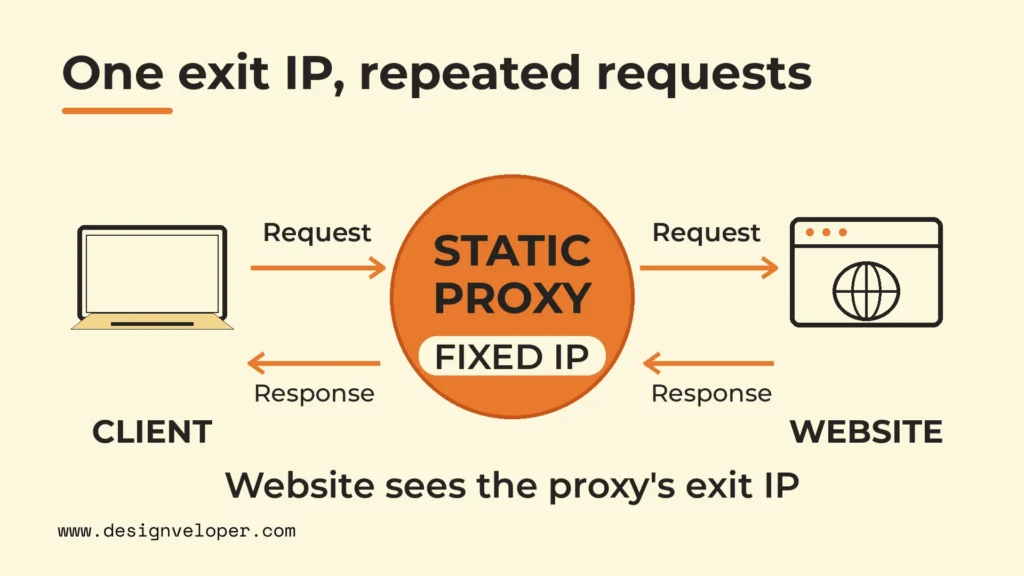
- Your browser, test runner, or approved application sends a request to the configured proxy endpoint.
- The endpoint authenticates the client, then sends the request onward through the assigned exit address.
- The destination responds to the proxy’s connection. The proxy returns that response to your client.
- Later requests use the same exit address while the assignment remains valid and the client uses the same configuration.
This is a network-level explanation, not a promise that a website cannot recognize the user. Logged-in accounts, cookies, browser settings, and information sent by the application can still link requests. A proxy also does not automatically route traffic from every app on a device. Configure and test each client that is meant to use it.
For example, a QA team testing its own storefront could send each scheduled browser check through one approved exit IP. The team would then confirm the source address in its server logs before evaluating the page. This separates a proxy configuration problem from a real storefront defect. Our proxy server selection guide for designers also explains why protocol and location needs matter when choosing an endpoint.
Static Residential Proxies, Rotating Proxies, And Sticky Sessions Compared
Choose among these options by the time span for which the website must see one IP. A static ISP proxy is suited to recurring work over days or weeks. Rotation suits separate requests that do not need one persistent address. A sticky session bridges the two for a shorter, connected task.
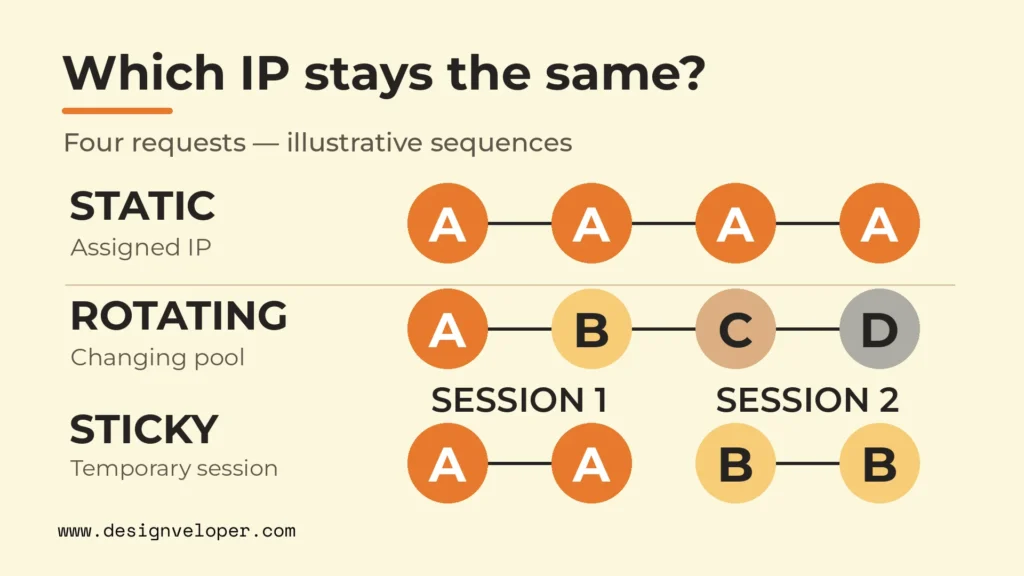
| Option | IP persistence | Assignment model | Typical pricing basis | Appropriate workflow |
|---|---|---|---|---|
| Static residential / ISP proxy | Same exit IP during the agreed assignment, subject to replacement | Fixed IP; dedicated or shared depending on the plan | Often per IP per rental period; some plans bill by traffic | Allowlisting and repeated authorized checks needing one source IP |
| Rotating residential proxy | Changes by request, connection, or provider rule | Exit selected from a changing residential pool | Often per GB of transferred data | Independent, permitted requests across multiple locations |
| Sticky residential session | One pool IP held temporarily, within provider limits | Session-based allocation from a rotating pool; not necessarily exclusive | Usually part of the underlying residential traffic plan | Short, multi-step checks that need one IP during the session |
A sticky residential proxy does not necessarily give you a dedicated static IP. It usually asks a rotating service to reuse the same pool address for a set session. That address can change when the session expires or the underlying connection disappears. The exact duration and reconnection rules depend on the vendor.
Also separate IP stability from speed. Data-center-hosted ISP proxies may offer consistent network paths, but their performance still depends on routing, congestion, target behavior, and the service plan. Neither a “static” label nor a shared IP guarantees better response time. Test the permitted destination you actually need.
If your approved task involves many independent public-data requests, begin with the data source’s official API when one exists. Where direct access is allowed, choose a proxy mode based on the request pattern, not on promises about evading controls. Our overview of web scraping project requirements explains why permissions, data quality, and monitoring matter alongside the connection method.
Business Use Cases For A Stable Residential IP
Static residential proxies are most valuable when changing the source address would add work or invalidate a legitimate test. It is not automatically necessary for every task involving a website. First establish whether an ordinary company connection or a dedicated data-center IP could meet the same requirement.
Consistent IP allowlisting: Suppose an external service you are authorized to use accepts connections only from preapproved IPs. A dedicated static address lets administrators register one source and avoid updating the list for every request. Confirm that the service permits proxy access, and arrange a notice period for IP replacement. If the application already has a stable corporate egress address, a new residential proxy may add no value.
Repeated QA from a chosen market: A product team may need to check its own website each morning from a consistent network location. Using the same address removes one source of variation between runs. The team can then compare changes in language, content, or routing with more confidence. It must still check the address’s observed location; an IP advertised for a city does not guarantee that every geolocation database agrees.
Our guide to agile methodology testing recommends defining observable acceptance criteria before running checks. Applied to a regional website test, that means recording the expected country, the actual source IP, the expected page behavior, and the test result. These checks reveal whether a failure comes from network setup or from the application. This is a recommended testing pattern, not a claim that a proxy alone proves regional correctness.
Authorized ad and website verification: A brand team may need to revisit its own campaign landing page from one approved market. Keeping the address fixed can make two observations more comparable. It cannot prove how all local users see the campaign, and it should not be used to misrepresent traffic or defeat a platform’s restrictions. Test accounts, publisher-provided preview tools, or approved regional test environments may be better options.
Account or integration continuity: Some permitted partner workflows record a known source address as one security signal. A stable proxy can help keep that signal consistent across scheduled requests. It does not replace normal authentication or guarantee that an account remains trusted. Use the partner’s documented integration method and security controls first.
These cases share one test: would changing the public IP disrupt a legitimate process or make its results harder to compare? If not, a static residential plan is unlikely to justify its extra configuration and recurring cost.
Limitations And Responsible Use Of Static Residential Proxies
A fixed ISP-associated IP solves address continuity, not identity, security, or permission. It can be replaced, become unavailable, or acquire a poor reputation. A destination may also restrict the request for reasons unrelated to IP rotation, including account policy or application behavior.
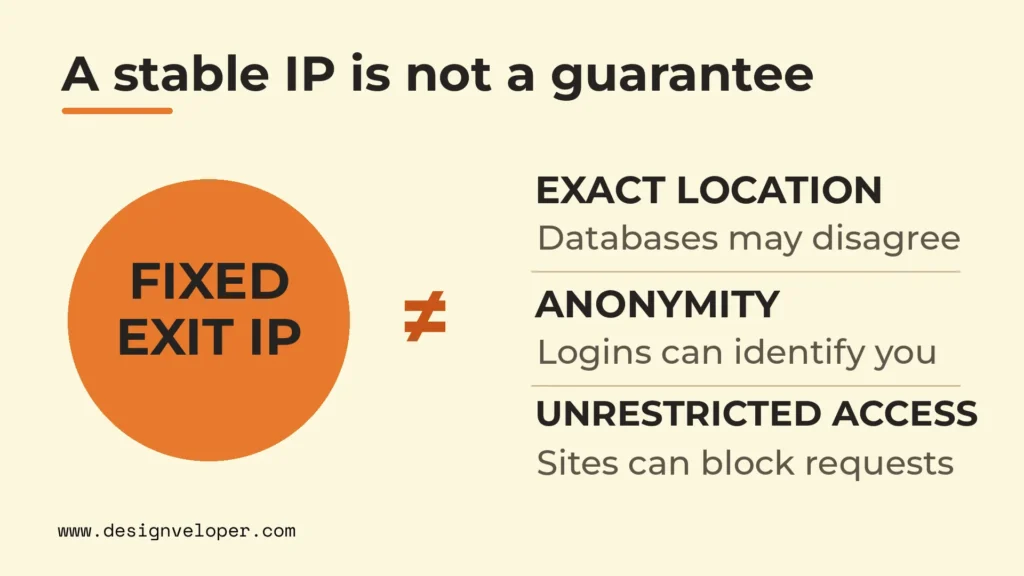
Location accuracy is another limit. MaxMind states in its IP geolocation accuracy guidance that results vary by country, connection type, and ISP practices. For business checks, verify how the actual destination treats the address. Do not treat a provider’s city label as proof of a precise physical location.
A shared static address may inherit traffic history from other customers. A dedicated IP reduces exposure to simultaneous third-party use, but it still may have a prior reputation. Ask how the provider handles abuse, whether it discloses sharing, and how it replaces an address that fails a legitimate allowlist or QA check.
Proxy sourcing deserves separate scrutiny. Research published at the University of Twente in 2024 examined eight user-installed residential proxy applications and found evidence of potentially abusive traffic. That study concerns user-installed residential networks, not every data-center-hosted static ISP service. Its practical lesson is to ask for evidence of sourcing rights and consent rather than treating the label “residential” as an ethics certificate. See the University of Twente research abstract.
For any automated access, follow applicable law, your contracts, and the destination’s terms. Obtain permission where required, respect rate limits, and use approved APIs when available. The Robots Exclusion Protocol standard also makes clear that robots.txt rules are not a form of access authorization. A proxy changes the network path; it does not create a right to access content.
What To Check Before Choosing A Static Residential Proxy Provider
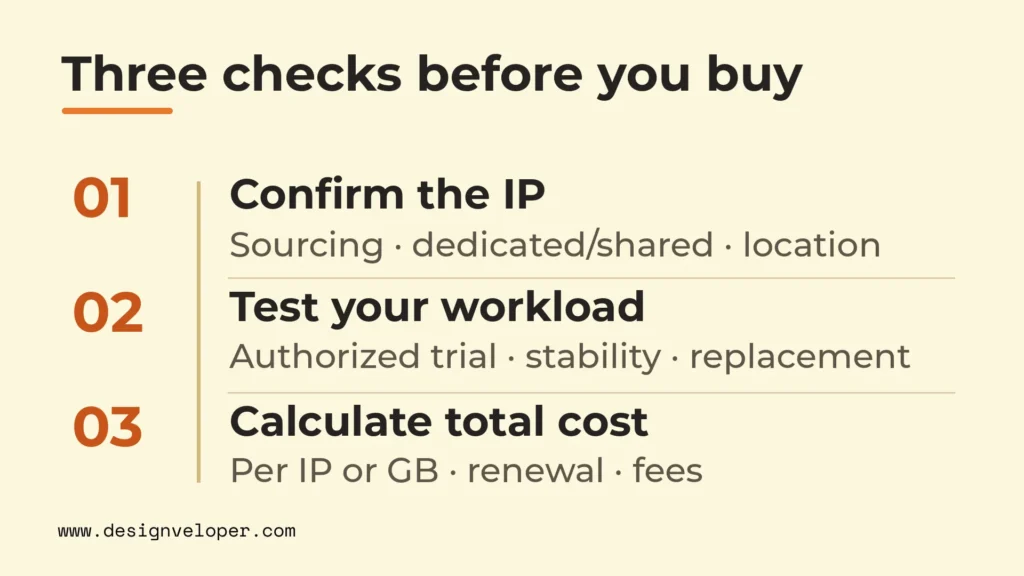
Choose a provider by checking whether its IP assignment, permitted locations, and contract match one real workflow. Do not start with an overall “best” ranking. Two plans with similar advertised prices may differ in sharing, data allowances, and replacement rights.
Verify IP Sourcing, Location, And Sharing
Ask whether the IP is dedicated to your organization, shared among customers, or assigned from a pool. Request the rental term and the conditions under which the address can change. For a strict allowlist, record the exact exit IP and confirm that the vendor will notify you before planned replacement where possible.
Check the countries and cities available at checkout, not just the provider’s advertised coverage. Then test the actual exit IP with the destination or validation tool used by your business. Geolocation databases can disagree, so a purchased “city” location may not satisfy a city-specific test. If the location is unavailable, do not assume a nearby market will produce equivalent results.
Ask the provider to explain who controls the IP range and what authorization permits its commercial use. If the offer involves residential devices or peer traffic, ask how users opt in and leave the network. These questions help distinguish documented supply arrangements from marketing claims. A provider’s own sourcing statement is useful evidence to inspect, but not independent proof of every address in its pool.
Compare Reliability, Replacement Policies, And Support
Run a small, authorized trial against your real destination before expanding the plan. Check that the observed public IP remains unchanged across sessions and that the requested location is recognized. Record connection failures and response times under the same test conditions. A generic uptime claim cannot substitute for results from your own permitted workload.
Plan for failure before buying multiple addresses. Find out whether an unusable IP can be replaced, whether replacements cost extra, and whether replacement changes your allowlist. Ask how quickly support responds when an address disappears. A replacement policy with unclear timing can be more disruptive than a slightly higher monthly price.
Finally, review authentication and access control. Check whether the provider offers account credentials or source-IP allowlisting and whether each team member needs separate access. Keep credentials out of shared documents and logs. Restrict proxy access to the systems that have a valid business need; a stable exit address should not become an unmanaged shared gateway.
Compare Per-IP And Per-GB Pricing
Calculate the full cost for the intended month, not just the headline price per IP or per GB. Per-IP plans make the number of reserved addresses the main cost driver. Per-GB plans make traffic volume central. Both can include minimum orders, renewal terms, location charges, fair-use rules, or fees for replacement.
For a concrete published example, Decodo’s static residential pricing page showed three dedicated IPs for $9.99 per month plus VAT when checked on November 17, 2026. Bright Data’s ISP proxy plans listed 10 shared IPs for $18 per month and 10 dedicated IPs for $35 per month. Those are different package sizes and assignment models, not a like-for-like price ranking. Prices and availability can change before checkout.
Ask what “unlimited traffic” means. Bright Data, for example, describes a 100 GB monthly fair-use allowance per IP on its unlimited ISP plans, with possible additional charges beyond that allowance. Confirm the current rule for the specific plan you intend to buy. Also ask whether unused traffic carries over and whether the price renews automatically at the advertised rate.
A simple buying decision follows from the workload. If one allowlisted IP must remain available for a month, price one dedicated address plus its replacement terms. If a short test only needs a consistent IP for one session, compare a sticky plan. And if requests are independent, compare permitted API access or rotating traffic plans. Start with the smallest compliant trial, verify the observed exit IP, and expand only when the setup meets your written acceptance criteria.
Also published on

Share post on










Related Articles



When Static Residential Proxies Fit Specific Business Workflows?
When Static Residential Proxies Fit Specific Business Workflows? Published November 19, 2026
What Is An IP Address? How It Works, Versions, And Privacy Risks
What Is An IP Address? How It Works, Versions, And Privacy Risks Published November 19, 2026
Is A .io Domain Right For Your Startup? Meaning, SEO, And Cost
Is A .io Domain Right For Your Startup? Meaning, SEO, And Cost Published November 18, 2026