
















What Is Ext JS? Features, Components, And Frontend Use Cases

Ext JS is Sencha’s comprehensive JavaScript framework for building data-intensive web applications with an integrated set of UI components, data tools, layouts, architecture patterns, and build tooling. It fits best when a team needs complex grids, forms, charts, dashboards, or workflow screens to behave consistently inside one enterprise-oriented frontend stack.
That makes Ext JS different from a lighter UI library. Instead of asking teams to assemble many independent packages, it provides a coordinated framework for the interface, application structure, data layer, and development workflow. The trade-off is that teams accept more framework conventions, licensing decisions, and product-specific knowledge in exchange for that integration.
What Is Ext JS?
Ext JS is Sencha’s JavaScript framework for building complex, data-heavy web applications. Sencha positions it as a comprehensive framework for cross-platform web and mobile applications, with UI components, a data package, layouts, and development tools that work together. The current Ext JS product page describes the framework around data-intensive applications.
Ext JS 8.0 is the current major release in Sencha’s documentation. Its Ext JS 8.0 release notes document broader ECMAScript support in the tooling, horizontal grid buffering in the Modern toolkit, accessibility improvements, QR-code support, and a signature pad. Some capabilities are toolkit- or edition-specific, so teams should check the current release notes and edition matrix before assuming every feature is available in their planned setup.
This scope is useful for admin systems, reporting products, operations portals, and other interfaces where users spend a long time viewing, filtering, editing, and exporting structured data. Our frontend frameworks guide places that integrated approach beside other frontend options and explains the broader product-fit trade-offs.
Ext JS is not the right level of framework for every website. A marketing site or small interactive page may not need a large enterprise JavaScript framework. It becomes more compelling when the product behaves like business software, with dense data tables, repeated workflows, rich data entry, or several coordinated controls on one screen.
Ext JS Components For Data-Heavy Applications
Ext JS provides a large component library, but its main value is how those components work together around application data. Depending on edition, the current product family includes grids, forms, trees, charts, pivot grids, calendars, menus, exporters, and other controls. The Sencha examples library lets teams inspect working interfaces instead of evaluating the framework from a component list alone.
Related reading:
- Best JavaScript Frameworks For Web Development In 2026
- What React Is: The Basics Of React
- What Is JavaScript? Definition, How It Works, Uses, And Learning Path
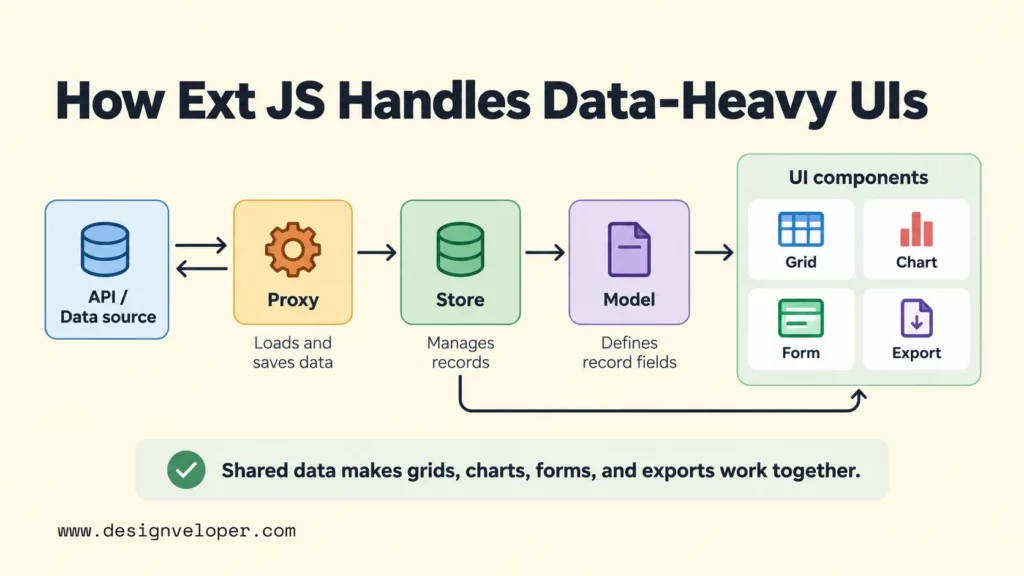
The Ext JS data grid is central to many enterprise use cases. A grid can present records while supporting operations such as sorting, filtering, grouping, editing, and selection. In Ext JS 8.0, the Modern toolkit can also use horizontal column buffering for very wide grids, so off-screen columns do not all need to render at once. Sencha documents that version-specific behavior in the 8.0 release notes.
Data reaches these components through the framework’s data package. A Model defines a record’s fields and behavior. A Store manages a collection of Model objects for components such as grids. A Proxy controls how the Store loads and saves data. The Ext JS 8.0 Store documentation shows Models and Proxies working together with Ajax-loaded data.
Consider a reporting dashboard. A Store can load sales records from an API, while a grid presents the detailed rows. Filters can change the visible records, a chart can summarize the same dataset, and export controls can produce a file for further analysis. The useful point is not that Ext JS has each widget. It is that the widgets can share the same data model and framework conventions instead of being integrated as unrelated packages.
For a concrete live example, open the Ext JS 8.0 Kitchen Sink and inspect its grid, chart, and pivot-grid examples. Sencha also exposes interactive Ext JS Grid demos for common grid operations. These examples make it easier to judge how several enterprise controls behave before designing a full application around them.
How Ext JS Applications Are Structured
Ext JS applications usually separate visual components, data, and interaction logic so a large interface does not become one tightly coupled file. The framework supports MVC and MVVM patterns. In Sencha’s architecture model, views are components, models represent application data, controllers handle view logic, and ViewModels provide data that views can bind to.
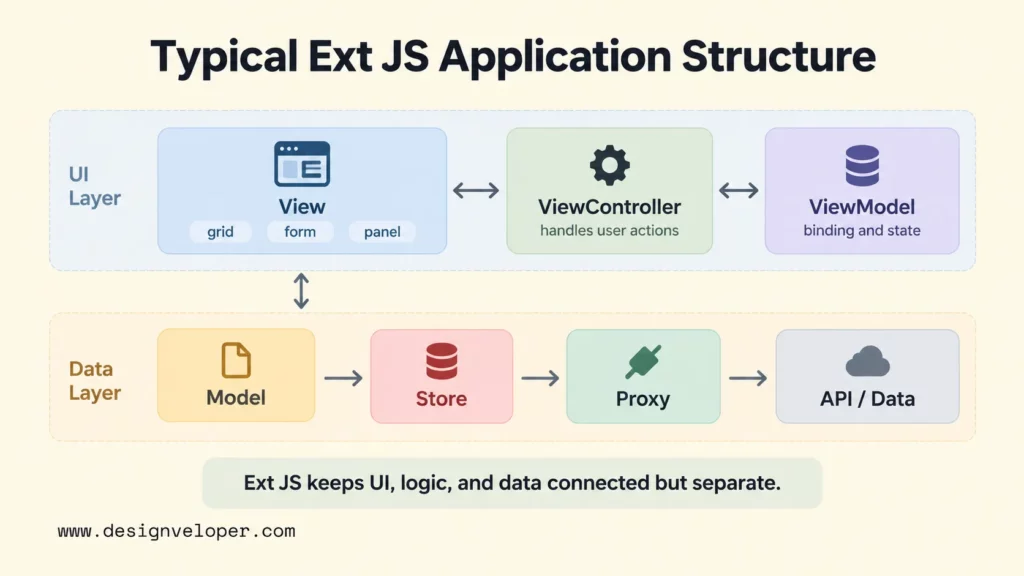
A typical screen starts with a view. The view contains components such as panels, grids, forms, buttons, and toolbars. Layouts determine how those components share the available space. Events then connect user actions to application behavior. For example, selecting a record can trigger a ViewController handler that opens a detail panel or starts an edit flow.
The data side follows the same separation. Models describe records, Stores hold collections, and Proxies connect those records to remote or local sources. A ViewModel can expose data to a view through binding, so a title, field, button state, or other bindable configuration can update when the underlying value changes. Sencha’s application architecture guide explains how these pieces fit into MVC and MVVM applications.
Classic and Modern toolkits matter when interface requirements differ by device. Sencha’s current documentation describes Modern as supporting modern browsers from desktop to phone. Classic focuses mainly on desktop browsers while also supporting tablets and touch-enabled laptops. A team should choose the toolkit from its target UI and component needs rather than treating the names as simple old-versus-new labels.
This structure is especially useful in a large web application because the same concepts repeat across screens. If the boundary between browser UI, server logic, databases, and infrastructure is still unclear, our guide to web application development explains where frontend architecture fits into the wider system.
How To Get Started With Ext JS
To get started with Ext JS, first confirm the edition and toolkit your project needs. Then install the framework with Sencha’s supported tooling, generate a small starter application, and build one vertical slice that connects a component to real data. Check licensing before production work because Community Edition eligibility and paid-edition features differ.
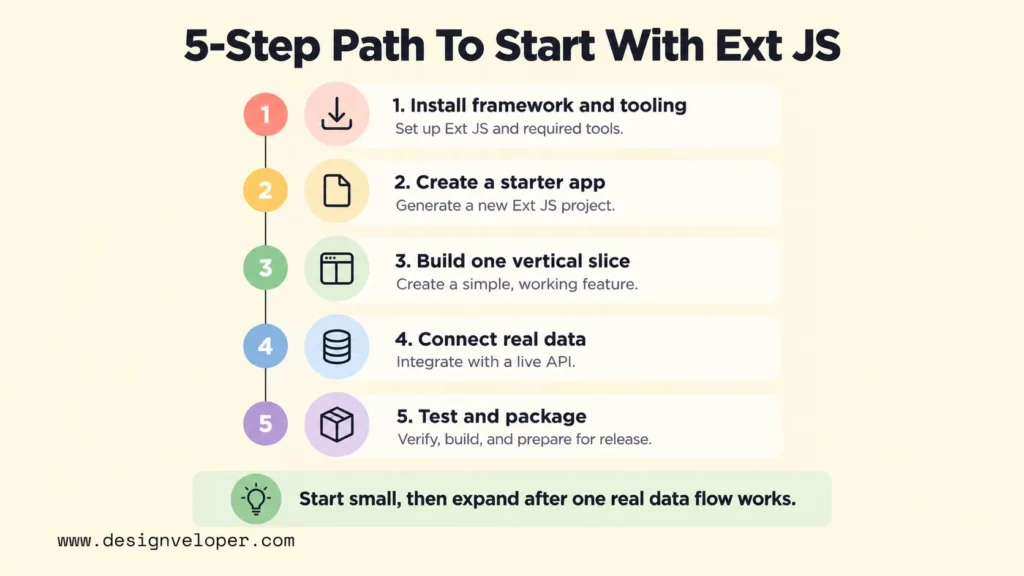
- Install the framework and tooling. Set up Ext JS with Sencha Cmd or the current npm/Open Tooling workflow documented for your edition. Sencha describes Cmd as a lifecycle tool for scaffolding, minification, builds, and related tasks.
- Create a starter application. Generate a small project and choose the toolkit that matches the target interface. A desktop-heavy operations system may have different requirements from an interface intended to work across phones and tablets.
- Build one vertical slice. Add a view, one useful component such as a grid, a Store that supplies its data, and one event handler. This shows how Ext JS connects interface, data, and interaction before you add more screens.
- Connect real data. Define a Model and Proxy for an API, then test loading, error states, edits, and saves. Do this early because data behavior often drives the complexity of an enterprise interface.
- Test and package the application. Use Sencha documentation, examples, browser developer tools, and build tasks to debug the app and produce a production build.
Sencha Cmd supports commands for generating and building applications. The current Sencha Cmd 8 application guide documents the application structure and build workflow, while the Cmd reference documents commands such as sencha generate app and sencha app build. Follow the documentation that matches the framework and tooling version your team actually uses.
Keep the first project intentionally small. A basic data screen with one grid, one form, one Store, and a simple event is enough to learn the main Ext JS relationships. Once that works, add more complex layouts, validation, binding, charts, or exports. This sequence reduces the risk of confusing framework concepts with application-specific complexity.
Ext JS Benefits And Limitations
Ext JS is most attractive when integration and consistency matter more than having the smallest or most flexible frontend stack. Its main strengths come from using one coordinated set of components, data tools, architecture conventions, and build tooling. Its main limitations come from the same decision: teams adopt a larger opinionated ecosystem and must account for licensing, training, customization, and long-term fit.
Why Teams Choose Ext JS
The first benefit is component depth for data-heavy screens. The current Ext JS product family goes beyond basic buttons and forms with grids, charts, calendars, pivoting, export features, and other business-interface controls, although availability varies by edition. A team that would otherwise assemble several UI packages can evaluate one coordinated component system instead.
The second benefit is architectural consistency. MVC, MVVM, Models, Stores, Proxies, ViewModels, and ViewControllers give developers common concepts for organizing large applications. That does not guarantee maintainable code, but it reduces the number of foundational architecture decisions each feature team has to invent independently.
Ext JS also includes adaptive layout and accessibility features. In Ext JS 8.0, Sencha documents accessibility improvements for Modern-toolkit form fields alongside grid and component updates in the official release notes. Built-in framework support can reduce integration work, but teams still need to test their own application against the accessibility requirements that apply to the product.
What To Check Before Choosing Ext JS
Licensing should be checked before technical commitment. As of 26/10/2026, the Sencha store lists Community Edition at $0, Pro at $1,499 per developer per year, and Enterprise at $1,899 per developer per year. Community Edition is not an unrestricted free production license. Sencha’s current eligibility page limits qualifying individuals to $10,000 or less in annual revenue. Startups or nonprofits also need no more than five developers and $10,000 or less in annual revenue. Verify current terms before procurement because prices and eligibility can change.
The learning curve is the next question. A developer must learn Ext JS component configuration, its class system, data package, event model, and chosen application architecture. That investment can pay off for a long-lived enterprise product. It may be unnecessary for a small interface that an experienced React or Vue team can build with its existing stack.
Customization and ecosystem fit also matter. A highly branded product may need substantial theme and component work. A company that already standardizes on another frontend architecture must consider how Ext JS will affect shared libraries, hiring, testing, build pipelines, and upgrades. Framework choice is therefore an operating decision as well as a component decision.
Finally, compare the cost of integration with the cost of commitment. Ext JS can reduce the work needed to assemble complex enterprise UI capabilities. A smaller or more flexible stack may suit products that need fewer specialized controls. It can also fit better when a team relies heavily on an existing JavaScript ecosystem or changes architecture frequently.
Ext JS Compared With Other JavaScript Frameworks
Ext JS differs from React, Angular, and Vue mainly in how much of the enterprise UI and data stack it brings together. React focuses on UI components and recommends a framework for complete applications. Angular is a broad web framework with first-party features such as routing, forms, and dependency injection. Vue is a progressive framework that can scale from embedded UI to full applications with its surrounding ecosystem. Ext JS goes further toward an integrated commercial component and data toolkit for complex application interfaces.
| Dimension | Ext JS | React | Angular | Vue |
|---|---|---|---|---|
| Framework scope | Comprehensive frontend framework with enterprise UI components, a data package, architecture patterns, and tooling | UI library; complete apps commonly add a React framework and other libraries | Broad web framework with many first-party application features | Progressive framework that can be adopted incrementally |
| Component strategy | Large pre-integrated commercial component set, including advanced data controls | Build or select components from a large ecosystem | Framework components plus third-party or custom UI libraries | Core component model plus third-party or custom UI libraries |
| Data handling | Models, Stores, Proxies, ViewModels, and binding are part of the Ext JS architecture | React manages UI state; routing and broader data strategy depend on the chosen stack | Built-in reactivity and dependency injection; application data patterns vary by project | Built-in reactivity; Pinia is the core team’s recommended state library for larger shared state |
| Flexibility | More conventions and integrated choices | High stack flexibility, with more architecture choices owned by the team | More application-level conventions and first-party structure | Flexible and incrementally adoptable |
| Typical fit | Data-heavy enterprise dashboards, admin systems, reporting, and workflow applications | Products that want a flexible component model and broad ecosystem | Large applications that value a full framework and shared conventions | Apps that value progressive adoption and a relatively flexible framework |
The decision should follow the product’s constraints, not a universal ranking. Ext JS is especially worth evaluating when an application needs advanced data controls under one supported system. React or Vue may fit better when a team wants to assemble its own stack or reuse existing ecosystem choices. Angular can be closer to Ext JS in framework scope, but it does not provide the same integrated commercial component suite. Our Angular vs React guide goes deeper on framework structure and stack ownership.
FAQs About Ext JS
Is Ext JS A JavaScript Framework?
Yes. Ext JS is a JavaScript framework for building web application interfaces, especially data-intensive ones. It includes UI components, layouts, a data package, application architecture features, and supporting development tools rather than acting only as a view library.
Is Ext JS Still Used For Enterprise Applications?
Yes, and it is still actively maintained. Sencha’s 2026 Ext JS 8.0 release materials document updates to grids, accessibility, modern JavaScript support, and other components. Sencha’s 2026-2027 roadmap also describes continued work on Ext JS 8 and a planned Ext JS 8.1 release.
Can Ext JS Work With Any Backend?
Ext JS is broadly backend-agnostic as long as the frontend can communicate with the backend through a usable interface. Its data package supports server proxies such as Ajax and REST, so an Ext JS application can work with many server technologies. The backend still needs to provide compatible endpoints, authentication, data formats, and error behavior.
Is Ext JS Suitable For Mobile App Development?
Ext JS can support browser-based interfaces that run across desktop, tablet, and phone screens, especially through the Modern toolkit. That does not make it a general replacement for native iOS or Android development. If a product depends heavily on native device APIs, app-store distribution, or platform-specific UI behavior, compare Ext JS with a mobile-focused stack before committing.
Is Ext JS Better Than React?
Neither is universally better. Ext JS can be a better fit when a team wants an integrated enterprise UI and data toolkit with advanced components such as grids. React can fit better when the team wants a UI library with freedom to choose the surrounding application stack. The right choice depends on component needs, existing skills, licensing, architecture ownership, and long-term maintenance.
Also published on

Share post on










Related Articles


What Is Ext JS? Features, Components, And Frontend Use Cases
What Is Ext JS? Features, Components, And Frontend Use Cases Published September 25, 2026
Difference Between HTML And CSS: Key Comparisons And Examples
Difference Between HTML And CSS: Key Comparisons And Examples Published September 23, 2026
Best Frontend Frameworks In 2026 : 8 Options, Tradeoffs, And Tips
Best Frontend Frameworks In 2026 : 8 Options, Tradeoffs, And Tips Published September 22, 2026


















