
















What Is ChromaDB? ChromaDB Vector Database Tutorial

ChromaDB is one of the most popular vector databases. The tool itself plays a crucial part in a complex system (like RAG) to store vector embeddings and speed up similarity search. What is ChromaDB, and how can you use the database with Python? This blog post from Designveloper will give you all the essentials about this vector database.
What is ChromaDB?
ChromaDB is a lightweight vector database developed by Jeff Huber and Anton Troynikov, who own a fast-growing startup in San Francisco. It’s open-source and works under the Apache 2.0 license for commercial use.
The main goal of ChromaDB is to store and search for vector embeddings to identify information relevant to a user query. Vector embeddings are numerical representations of any data type (e.g., text, images, or audio) that are converted using machine learning models (like CLIP, OpenAI’s text-embedding-3-small, or EmbeddingGemma). ChromaDB keeps these vectors and enables developers to extract its content for various real-world applications, especially in RAG (Retrieval-Augmented Generation) and recommendation systems.
Key Features of ChromaDB
ChromaDB is now the top 5% popular vector database, with 23,31K GitHub stars in 2025. It comes with the following powerful capabilities, making it a versatile and trustworthy tool for various projects:
Scalability
ChromaDB supports scalability through different deployment options. These deployment modes allow you to implement simple search tasks on single nodes or complex RAG workflows using managed cloud services:
- You can install and run ChromaDB on a single machine where it functions as a server for clients to interact with.
- Your development team can use a Docker container (a portable, lightweight method to run software) to package ChromaDB.
- You can install it on a virtual machine in public cloud platforms, like AWS, Azure, or Google Cloud Platform.
- You can set up the database in the Chroma Cloud if you don’t want to manage a server yourself. This fully managed hosting option runs on popular cloud platforms like AWS and covers maintenance and scaling on your behalf.
Optimized Indexing
ChromaDB uses optimized indexing based on its own high-performing storage written in Rust and Apache Arrow. While its proprietary Rust-based storage engine handles how data is saved or read, Apache Arrow is a format that organizes data in a column-oriented layout. This format helps the system read and find more easily, keep caches fresh, and support analytics tasks like clustering or deduplication.

Diverse Search Methods
ChromaDB supports vector search as the core. Besides, it allows you to add metadata filtering to narrow results. The database also enables full-text/keyword search with the $contains and $not_contains operators. Here’s an example of how this functionality works (extracted from the ChromaDB documentation):
collection.get( where_document={"$contains": "search string"} )
Multimodal Support
ChromaDB offers multimodal support, but this functionality is currently available in Python. Accordingly, this database allows you to create multimodal collections that keep different types of multimodal data (text and images).
It also comes with built-in embedding functions (like OpenCLIPEmbeddingFunction) to convert any multimodal data into vectors that stay in the same vector space. This enables similarity search across multimodal data. It means that when you send a text-based query (”Christmas cards”), the system can return you a corresponding image that has similar vectors to your query.
ChromaDB doesn’t store the entire multimodal files, but their URLs. Through the URLs, ChromaDB uses a data loader (e.g., ImageLoader) to access the raw files kept in external storage.
When working with ChromaDB, you can set up a multimodal collection with a multimodal embedding function and a data loader. Then, you can feed the collection with the content by sending raw data or its URLs. Once the collection is ready, you can send multimodal queries by sending a text, uploading an image, or providing a URL. ChromaDB then embeds the queries and searches for similar items, whether they’re text, images, or both.
How does ChromaDB work?
Once the raw data is chunked and embedded into numerical formats, ChromaDB will store these embeddings, coupled with their original data and corresponding metadata (e.g., unique IDs), in a machine’s main memory first. In case you want to store the data persistently, you can connect ChromaDB with external databases (e.g., SQLite or PostgreSQL) for later use when the server is restarted.
When a user sends a query, ChromaDB also transforms it into embeddings and uses indexing structures (mostly HNSW) to perform similarity search. By comparing how close the embeddings of both the query and the stored data are, ChromaDB can retrieve appropriate data or documents.
ChromaDB is easy to use, even for beginners. This is because it allows developers to use a few commands (add, update, delete, and search) without extensive coding skills or complex requirements.
What is ChromaDB Hierarchy?
ChromaDB hierarchy is the way data is organized in a simple multi-level structure to facilitate similarity search. This data organization is different from a folder-style structure of SQL databases that organizes data in rows, tables, or schemas.
The practical ChromaDB hierarchy looks like:
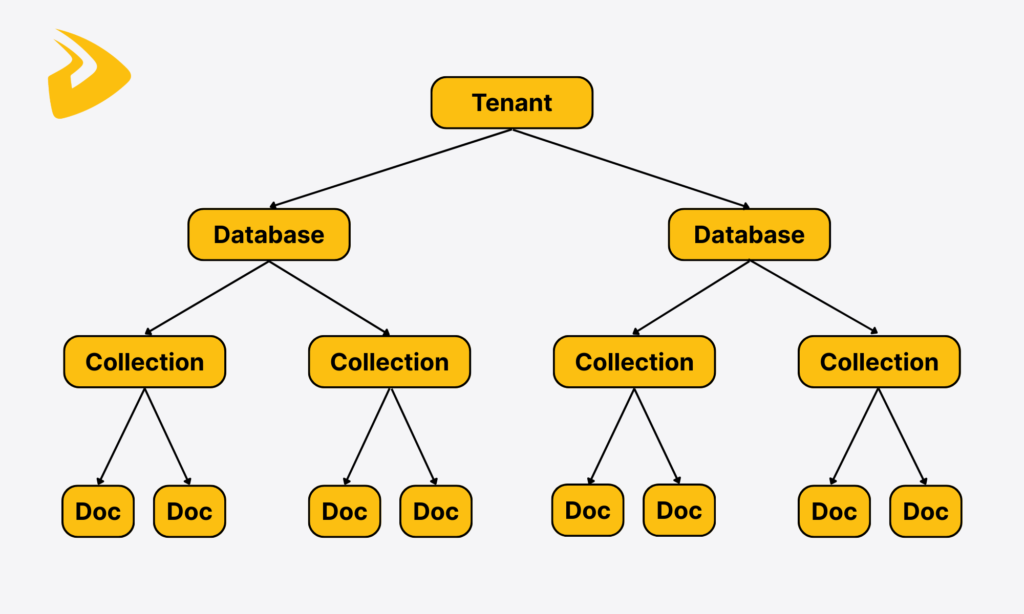
On the top level are tenants that represent Chroma users, whether individuals or organizations. Instead of keeping all data in one large database, ChromaDB will logically cluster some databases under each tenant, and these databases are kept isolated from the data of other tenants. This structure helps the system serve many users while still maintaining their data privacy.
The lower layer contains databases. Each database can house collections and be created for a specific task or project.
Navigating down, you’ll see collections, which act as smart folders. They organize embeddings, their original files, and metadata, which all share the same characteristics. ChromaDB collections allow you to add data directly to them without the need to set up strict table structures. This makes ChromaDB flexible and highly adaptable to various use cases like information retrieval, image & video search, or recommendation systems in e-commerce.
The final layer is records. These records contain the raw chunks of documents, their vectors, unique IDs, and metadata options (like title, timestamps, or tags). When a user query arrives, ChromaDB will search for the closest embeddings and documents and may narrow the results down based on metadata filtering.
What algorithm does ChromaDB use?
With the data structure we described above, it’s no wonder that ChromaDB uses HNSW as its default indexing technique.
HNSW stands for Hierarchical Navigable Small World. This indexing method is graph-based, aiming to perform ANN (Approximate Nearest Neighbor) searches effectively. In other words, it finds vectors most relevant to a user query by organizing them in a multi-layered structure (“graph”).
The top layer helps you navigate closer to the most similar embeddings in the lower layers. Meanwhile, the bottom layer fine-tunes the ANN search to identify the top-K results. HNSW is the default and mostly used algorithm in ChromaDB as it’s high-speed and memory-efficient, and scales well with your growing data volumes.
With HNSW, ChromaDB helps developers search for semantically similar vectors quickly, but at a cost of less accuracy than brute-force searches. However, you can adjust parameters to balance speed, memory usage, and precision.
Although HNSW is the main algorithm, it’s not the only indexing option. ChromaDB still allows you to integrate with other techniques. Typically, you can combine ChromaDB with FAISS (Facebook AI Similarity Search). This open-source search library supports multiple vector search algorithms, from flat and HNSW to Inverted Files (IVF) and Product Quantization (PQ). You can choose or execute alternative algorithms depending on your specific use cases.
Tutorial on Using ChromaDB Vector Database for Beginners and Example
As a beginner, you may feel curious about how to install and use the ChromaDB vector database for similarity search. If so, keep reading this section and follow the fundamental steps to start with ChromaDB:
System Requirements
Before diving into ChromaDB installation, you need to prepare a system with sufficient resources to set this database up seamlessly:
- Operating System: ChromaDB can run on any operating system, whether it’s Linux, macOS, or Windows. So, just take any device you have.
- CPU: ChromaDB uses your computer’s CPU memory to create a vector index and search through it. We recommend you use a multi-core processor as it enables quicker searches and responses even when handling concurrent requests.
- RAM: As we said, ChromaDB works mainly on in-memory storage, which keeps its search index for fast search and retrieval. The RAM size depends greatly on your data volume. For instance, larger or higher-dimensional vectors require more memory for smoother and quicker searches. So, consider your specific use cases and data size to ensure consistently good performance.
- Disk Space: All data, including the vector index, metadata, a small system database, and a write-ahead log (WAL), is saved to disk (“the hard drive”). So, we advise you to prepare a disk space whose size is 2-4 times bigger than your RAM. For example, 8 GB of RAM should come with 16-32 GB of free disk space.
- GPU (Optional): ChromaDB doesn’t necessarily require a GPU. But a GPU can speed up the embedding process if you convert vectors using machine learning models.
- Python & SQLite Version: If you use Python for ChromaDB installation, use Python 3.8 or later and ensure your Python environment is correctly set up before installation to avoid any conflicts. You can also consider setting up SQLite, a small database engine for long-term storage and later use. Our recommended SQLite version is 3.35 or later.
How to install ChromaDB?
To install ChromaDB with Python, you need to write the following command line with pip:
pip install chromadbTo identify whether your installation is successful and to use ChromaDB in your Python environment, write the following command:
import chromadb
How to use ChromaDB?
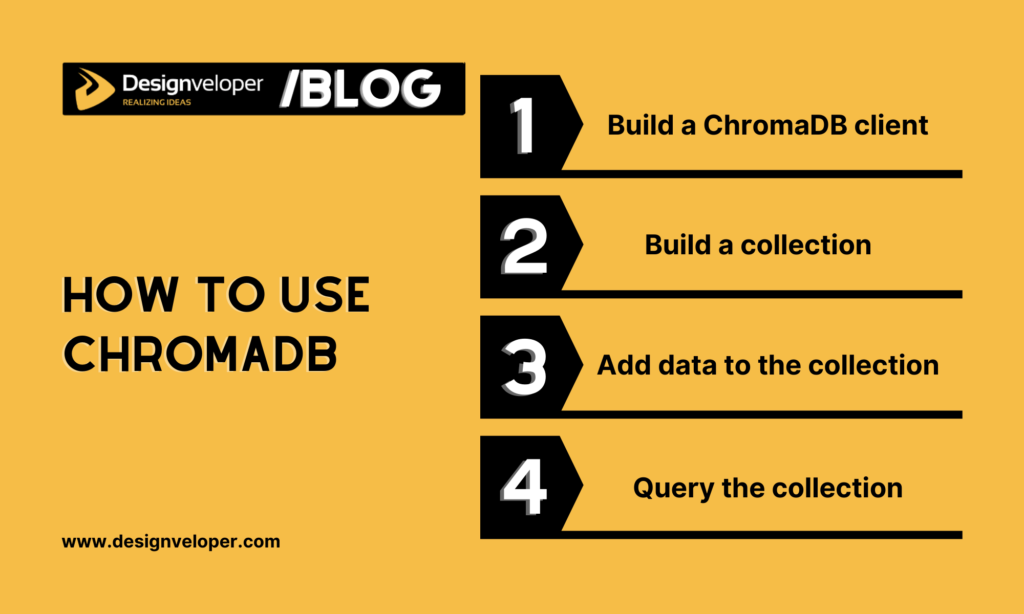
Once your installation is successful, start using ChromaDB to perform similarity searches. This process covers several steps: building a client, creating collections, adding data, and implementing similarity searches.
Step 1: Build a ChromaDB client
The client here is not a human, but a controller that can interact with ChromaDB and send your requests (like uploading data or querying). You can build in-memory or persistent clients, depending on your ultimate goals with the database.
- In-Memory Client
If you want to do experiments with ChromaDB, test your search idea, or don’t want to keep data after restarting your code, the in-memory client is enough. This client type allows you to run ChromaDB in memory and accelerate searches.
import chromadb
client = chromadb.Client()
- Persistent Client
If you want to store your data persistently after program restarts, just link ChromaDB to the persistent client and save its data there. In the following command, /path/to/save/to is a directory or folder where ChromaDB keeps its data. If you don’t specify the path, the system by default sends the data to something like ./.chroma in your working directory.
import chromadb
client = chromadb.PersistentClient(path="/path/to/save/to")
- Client/Server (HTTP) Mode
Normally, you can run ChromaDB inside the same program that uses it. However, you can also operate the database as a separate service and let the main program connect to the database through HTTP instead of running everything in one place. This is useful if you have many apps that all require the same database, want to restart/update your app without turning off the database, or want the database on a different machine for security or performance.
import chromadb
chroma_client = chromadb.HttpClient(host='localhost', port=8000)
This command assumes that there’s a ChromaDB server listening on localhost:8000.
Step 2: Build a collection
As we mentioned, a ChromaDB collection includes embeddings, their original documents, and metadata. To create a collection, build a place called "my_collection" to store all data.
collection = client.create_collection(name="my_collection")
Step 3: Add data to the collection
Once your collection is ready, upload documents and vector embeddings to the collection.
documents = ["Document 1 text", "Document 2 text", "Document 3 text"] # your raw text
ids = ["doc1", "doc2", "doc3"] # unique identifiers for each document, so you can refer back to them
collection.add(documents=documents, ids=ids)
You can integrate ChromaDB with other embedding models to convert those documents automatically. Otherwise, you can transform them externally and add vectors later. However, all these embeddings need to have the same size.
Note: When adding documents and embeddings, you can attach metadata. When querying happens, you can use metadata filtering to search for the most similar vectors.
Step 4: Query the collection
You already have the stored embeddings of documents. Now, you can implement the querying process.
results = collection.query(query_texts=["Sample query text"], n_results=2)
print(results)
In this command line:
query_textsis the new embedding (text-based) you want to search withn_resultsrefers to the number of results you want. If you don’t clarifyn_results, ChromaDB will return a default number of results (often 10). The results will offer documents or IDs that are most relevant to your query.
What Are Use Cases for ChromaDB?
As a vector database, ChromaDB is highly applicable in various use cases, typically in RAG (Retrieval-Augmented Generation) chatbots and assistance systems. Throughout this article, we explained how ChromaDB stores vector embeddings and uses algorithms like HNSW to identify vectors most semantically similar to a user query. This capability, coupled with its flexible integration with various AI tools, allows ChromaDB to empower AI-powered chatbots across industries.
Typically, in e-commerce, ChromaDB spots relevant content or products based on a user’s preferences or browsing habits to generate recommendations. Further, a smart financial assistant integrated with ChromaDB can identify anomalies in transaction data by comparing these abnormal signals with its stored embeddings. ChromaDB also supports searching for similar disease patterns in medical images. This helps healthcare professionals accelerate their diagnosis.
With ChromaDB, LLM-based systems don’t rely only on the LLM’s core knowledge base, which may have a cutoff date. Instead, the database plays a crucial role in helping these applications store up-to-date information in the form of vectors and extract the most relevant data to a user’s query when needed.
Transforming AI Experiences with Designveloper

ChromaDB is only a crucial component in a much larger, more complex system. To build such a system, you may need a reliable partner who has hands-on experience and deep technical skills. If so, Designveloper is a good option for long-term partnerships.
Our team of 100+ skilled developers, designers, and other specialists has mastered modern technologies to build a high-quality, scalable solution. We don’t just focus on the latest technologies, but also pay attention to the right combination of tools like LangChain, AutoGen, ChromaDB, etc. to create the best deliverables.
Our proven Agile frameworks, good communication skills, and extensive skills have contributed to the success of more than 200 projects across industries. Among them, we’ve built AI solutions that streamline workflows and increase user experiences. We’ve developed Rasa-powered chatbots to prioritize data privacy, customer service systems using LangChain and OpenAI, as well as integrate AI features into enterprise software using Microsoft’s Semantic Kernel. Our solutions and quality received positive feedback from clients on Clutch (with a 4.9 rating).
If you want to revolutionize AI experiences, don’t hesitate to contact us for further discussions!
What Are The Advantages and Limitations of ChromaDB?
Pros
ChromaDB brings a lot of benefits for users. Below are some of them:
- ChromaDB is lightweight and can run on a laptop for quick prototyping.
- The database contains collections, vectors, and their metadata to perform semantic search and return the most relevant results.
- ChromaDB is developer-friendly. Developers can interact with the database through several core features, like building collections, adding vectors, and querying. This keeps its learning curve short for even novices.
- ChromaDB supports integration with a variety of embedding models (OpenAI, Hugging Face) and AI tools (Streamlit, LangChain, LlamaIndex, Braintrust). Further, developers can use many programming languages like Python, JavaScript, Java, Ruby, Go, C#, Elixir, and Rust to work with this vector database.
- ChromaDB enables low-latency searches and fast queries even when the system has to deal with multiple users and requests at the same time. It does so by keeping essential embeddings directly in memory to serve queries.
- ChromaDB can automatically move data between storage tiers based on how frequently it’s used. Particularly, frequently queried data stays on faster storage, while rarely used data moves to cheaper, slower storage. This tiering reduces costs while maintaining the system’s fast search performance.
- ChromaDB has an active developer community with lots of contributors and users. Developers can answer questions, share code, and build plugins. Besides, its documentation and tutorials are easy to understand for even beginners. It offers everything, from ChromaDB installation to advanced functions like hybrid search.
Cons
Despite its massive benefits, ChromaDB still presents some limitations you should consider:
- ChromaDB mainly runs on a single server. Developers can still run various instances manually, but fully automatic multi-node clustering and built-in failover are still under development.
- ChromaDB works well with small or medium-sized datasets. But for large-scale workloads that either handle billions of vectors or perform heavy concurrent writes, you need extra setup with careful tuning and sharding.
- ChromaDB is by default in-memory. So if you want persistent storage (SQLite or PostgreSQL) for reliable backups and consistent performance under heavy writes, it’s essential to add extra configuration.
- ChromaDB has a smaller ecosystem and fewer tools (e.g., third-party integrations) than Pinecone or Milvus.
- ChromaDB supports fewer indexing structures (including HNSW) than other vector databases.
FAQs:
Is ChromaDB free to use?
Yes, ChromaDB is open-source under the Apache 2.0 license. You can download, install, and customize the vector database at no cost.
Can Chroma handle both structured and unstructured data?
ChromaDB doesn’t involve the processing of structured and unstructured data. Its main goal, as we mentioned, is to store, index, and find high-dimensional vectors. Therefore, as long as vectors are converted from any data types to the right format, the database can read and interpret them easily.
Is ChromaDB in memory?
Yes, but it’s not strictly in-memory. Depending on your configuration settings, the vector database can keep its embeddings and collections on disk or store its vectors and metadata only in RAM. Choose the in-memory mode for testing or temporary workloads, while the disk-backed persistence mode is a good option for production use.
Also published on

Share post on










Related Articles



What Are Vertical AI Agents? Use Cases, Benefits, And Examples
What Are Vertical AI Agents? Use Cases, Benefits, And Examples Published October 16, 2026
Types Of AI Agents: 5 Core Types, Examples, And When To Use Them
Types Of AI Agents: 5 Core Types, Examples, And When To Use Them Published October 16, 2026
Generative AI Vs. Discriminative AI: Key Differences and Use Cases
Generative AI Vs. Discriminative AI: Key Differences and Use Cases Published October 15, 2026


















