
















20 Best Small Business Applications In 2026: Tools For Every Team

KEY TAKEWAYS:
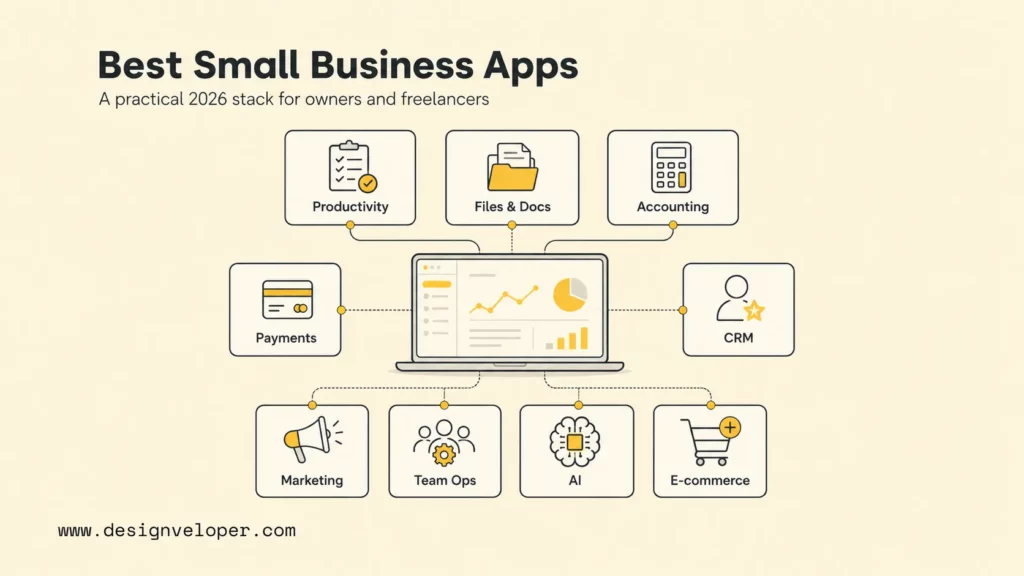
- Small business applications should match the workflow first: start with productivity, files, accounting, payments, CRM, marketing, communication, project management, HR, AI support, and e-commerce only where the business truly needs them.
- The best stack is usually a connected stack, not the longest app list; integrations, data ownership, user permissions, and reporting matter as much as monthly price.
- Free plans can help early teams, but growing businesses need to watch storage limits, automation limits, security controls, support quality, and migration costs before work becomes locked into scattered tools.
- AI tools are useful for writing, research, support, and automation ideas, but they still need human review, privacy rules, and clear boundaries around customer or financial data.
- A custom application becomes worthwhile when off-the-shelf tools create duplicate data entry, manual approvals, disconnected dashboards, role-specific workarounds, or compliance risks.
The best small business applications in 2026 help owners and freelancers control cash flow, communicate with customers, deliver work on time, and sell without hiring a large operations team. A practical stack usually starts with accounting, payments, documents, and communication, then adds CRM, marketing, project management, payroll, AI support, and e-commerce when the business model needs them.
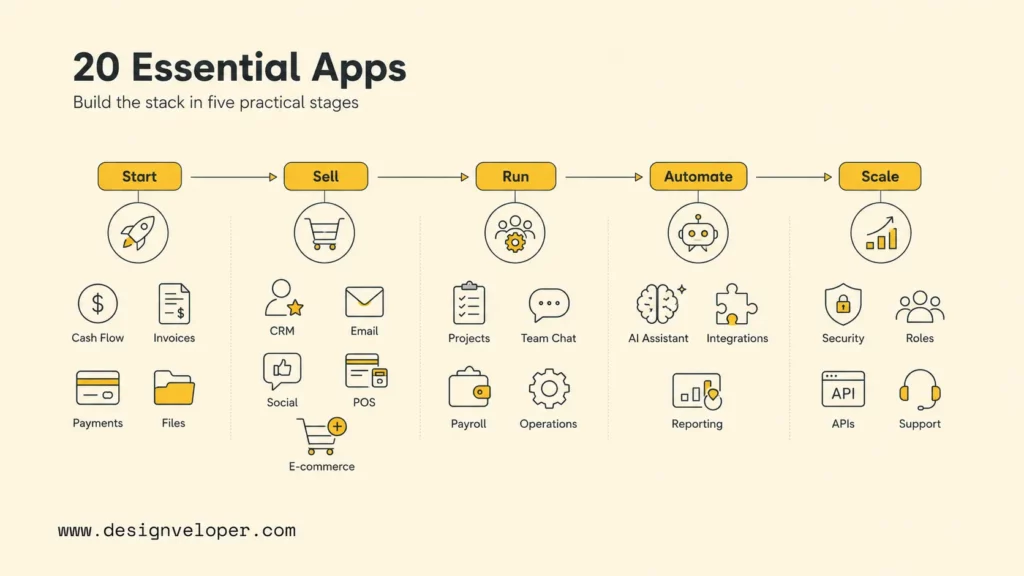
Small teams should not buy every popular app at once. The better move is to choose one tool for the biggest operational bottleneck, confirm that it integrates with the existing workflow, and upgrade only when usage, security, or collaboration limits become visible. This guide compares 20 well-known apps across productivity, documents, accounting, payments, CRM, marketing, collaboration, HR, AI, and online selling.
Quick decision guide: freelancers should usually start with Google Workspace or Notion, Wave or QuickBooks, PayPal or Square, and one task board such as Trello. Service businesses should add HubSpot, Mailchimp, SocialPilot, Slack, Asana, and Gusto when leads, campaigns, team work, and payroll become regular. Product sellers should evaluate Shopify and Square earlier because checkout, inventory, and payment data shape the rest of the workflow.
| Business need | Best first apps to compare | Decision trigger |
|---|---|---|
| Daily productivity | Google Workspace, Notion, Dropbox | The business needs shared email, files, notes, and meeting records. |
| Documents | Dropbox, Lumin, Google Drive | Contracts, proposals, PDFs, or approvals are slowing down delivery. |
| Money management | QuickBooks, Wave, Xero | Invoices, expenses, taxes, and reports are taking too much manual time. |
| Sales and marketing | HubSpot, OnePageCRM, Mailchimp, SocialPilot, Canva | The business needs repeatable lead follow-up and customer communication. |
| Team operations | Slack, Asana, Trello, Gusto | Work is moving through people, projects, payroll, and approvals. |
| Digital growth | ChatGPT, Shopify, custom integrations | The business needs AI help, online selling, automation, or a custom portal. |
Recommended for you:
- How To Build And Use AI Business Process Automation Effectively
- What Is AI Automation? How It Works, Benefits, Tools, and Use Cases
- How AI Automates Routine Tasks: What To Automate First?
20 Must-Have Small Business Applications For 2026
The 20 must-have small business applications for 2026 should cover the full operating system of a small company: productivity, file sharing, documents, accounting, payments, CRM, marketing, design, communication, project management, payroll, AI assistance, and e-commerce. The right list depends on the business model, but the categories below give owners and freelancers a reliable starting point.
The selection matrix below turns the list into a practical adoption path. Start where the business feels the most friction, then add connected tools only when the next workflow needs them.
Read the list as a toolkit, not a shopping cart. A solo consultant may need only six of these applications. A growing retail, agency, or services team may need most categories, plus custom integrations when the work becomes too specific for off-the-shelf software.
1. Google Workspace: Productivity Suite For Email, Docs, Meetings, And Cloud Storage
Google Workspace is a strong first productivity suite for owners and freelancers who need business email, shared calendars, documents, spreadsheets, video meetings, and cloud storage in one familiar environment.
The official Google Workspace pricing page lists Business Starter, Business Standard, Business Plus, and Enterprise options, so teams can begin with a basic plan and move up when storage, meetings, or security needs grow.
Best fit: Choose Google Workspace when email identity, document collaboration, and shared Drive folders are core to daily work.
2. Notion: All-In-One Workspace For Docs, Notes, And Planning
Notion works well for owners who want notes, simple databases, project plans, SOPs, meeting records, and lightweight wikis in one workspace.
The Notion pricing page shows free, Plus, Business, and Enterprise tiers, which makes Notion useful for solo freelancers as well as small teams that need permissions and admin controls.
Best fit: Choose Notion when the business needs a flexible operating handbook before it needs a heavier project-management system.
3. Dropbox: Secure File Sharing And Cloud Collaboration App
Dropbox is useful when a business handles large files, client folders, creative assets, contracts, or external collaboration that must be easier than long email threads.
The Dropbox plans page separates personal, professional, and team options, so small teams can compare storage, file recovery, signing, and admin needs before committing.
Best fit: Choose Dropbox when file organization, external sharing, and client delivery matter more than building a full document workspace.
4. Lumin: PDF Editing And Document Collaboration Tool
Lumin is a practical option for PDF editing, document markup, sharing, and collaborative review workflows. Small businesses often need that layer for proposals, agreements, forms, and customer documents that arrive as PDFs.
The official Lumin PDF platform presents PDF editing and collaboration features for teams that need to work directly with documents. Designveloper’s public Lumin project page is also a useful example of document-workflow product experience.
Best fit: Choose Lumin when PDF review, signing preparation, or document collaboration is a recurring part of operations.
5. QuickBooks: Small Business Accounting Software For Invoicing And Reports
QuickBooks is one of the most established accounting apps for small businesses that need invoicing, expense tracking, reporting, receipt capture, and accountant-friendly workflows.
The official QuickBooks pricing page shows multiple plans, so owners should compare invoicing, bill management, inventory, payroll add-ons, and reporting requirements before choosing.
Best fit: Choose QuickBooks when the business needs structured accounting, reports, and accountant collaboration.
6. Wave: Free Accounting And Invoicing App For Small Businesses
Wave is attractive for freelancers and very small businesses that want free accounting and invoicing basics before paying for a broader finance stack.
The Wave accounting platform emphasizes accounting, invoicing, and payments for small businesses, with paid services available around payments, payroll, and advisory support.
Best fit: Choose Wave when the business needs a low-cost start for invoices, income, expenses, and basic bookkeeping.
7. Xero: Cloud Accounting Software For Growing Small Businesses
Xero suits growing small businesses that need cloud accounting, bank reconciliation, invoicing, bills, reporting, and an ecosystem of app integrations.
The Xero pricing plans show tiered options, which makes Xero easier to evaluate against transaction volume, bill workflows, and team needs.
Best fit: Choose Xero when the business wants accounting software that can support a larger app ecosystem as operations mature.
8. PayPal: Online Payment App For Small Business Transactions
PayPal is useful for online payments, invoices, international transactions, and customers who already trust PayPal checkout.
The PayPal business payments page covers payment acceptance, invoicing, checkout, and business-account tools for merchants and service providers.
Best fit: Choose PayPal when the business sells across borders, invoices clients online, or wants a familiar payment option quickly.
9. Square: POS And Payment Processing App For Retail And Service Businesses
Square is a strong fit for retailers, cafes, pop-up sellers, appointment businesses, and service providers that need point-of-sale hardware, payments, inventory, and customer management.
The official Square pricing page is the right place to compare payments, POS software, hardware, and add-on services.
Best fit: Choose Square when in-person selling, POS, inventory, and payment processing sit at the center of the workflow.
10. HubSpot: CRM And Marketing Platform For Small Business Growth
HubSpot gives small businesses a CRM foundation for contacts, deals, forms, email marketing, landing pages, automation, and reporting.
The HubSpot pricing page separates free tools and paid hubs, so teams should start with the CRM use case before buying broader marketing or sales suites.
Best fit: Choose HubSpot when lead capture, contact history, sales follow-up, and marketing campaigns need one shared source of truth.
11. OnePageCRM: Sales CRM For Action-Focused Follow-Ups
OnePageCRM is useful for owners and freelancers who want a sales CRM built around next actions rather than complex enterprise pipeline administration.
The OnePageCRM pricing page makes it easy to compare per-user CRM costs against simple follow-up, pipeline, and contact-management needs.
Best fit: Choose OnePageCRM when the sales problem is simple but important: every lead needs a next action and a clear follow-up date.
12. Mailchimp: Email Marketing App For Newsletters And Automation
Mailchimp is a familiar email marketing app for newsletters, audience segmentation, landing pages, forms, and basic customer journeys.
The official Mailchimp marketing pricing page shows contact and feature limits, which owners should review carefully because email tools often become more expensive as lists grow.
Best fit: Choose Mailchimp when the business needs repeatable newsletters, welcome sequences, promotions, or simple lifecycle emails.
13. SocialPilot: Social Media Scheduling And Analytics Platform
SocialPilot helps owners plan, schedule, publish, and analyze social content across multiple profiles without logging into every channel manually.
The SocialPilot pricing page is useful for comparing the number of social accounts, users, approvals, and analytics features needed by a small team.
Best fit: Choose SocialPilot when social publishing is consistent enough that a content calendar and approval workflow save time.
14. Canva: Graphic Design App For Marketing Assets And Social Posts
Canva helps non-designers create social graphics, presentations, flyers, simple ads, proposals, and brand assets with templates and collaboration features.
The Canva pricing page lists Free, Pro, Teams, and Enterprise options, so owners can compare brand kits, premium assets, AI features, and team controls.
Best fit: Choose Canva when the business needs consistent marketing visuals without hiring a designer for every small asset.
15. Slack: Team Communication App For Small Business Collaboration
Slack is a practical communication app for small teams that need channels, quick decisions, customer-project rooms, and integrations with everyday tools.
The Slack pricing page lets teams compare free history limits, huddles, external collaboration, app integrations, and admin controls.
Best fit: Choose Slack when internal communication is scattered across email, texts, and private chats.
16. Asana: Project Management App For Team Collaboration
Asana is useful for teams that need project timelines, task ownership, dependencies, templates, dashboards, approvals, and cross-functional visibility.
The official Asana pricing page helps owners compare personal, starter, advanced, and larger team options around reporting, automation, and portfolio needs.
Best fit: Choose Asana when work involves multiple people, deadlines, dependencies, and repeatable project templates.
17. Trello: Visual Task Management App For Small Business Projects
Trello is a simpler visual task-management app built around boards, lists, and cards. It works well for freelancers, small agencies, content calendars, client pipelines, and lightweight operations.
The Trello pricing page shows free and paid tiers, which makes Trello easy to test before moving to more advanced project-management software.
Best fit: Choose Trello when visual clarity and low setup effort matter more than complex reporting.
18. Gusto: Payroll, Benefits, And HR App For Small Businesses
Gusto supports payroll, tax filing, benefits, onboarding, time tracking, and HR workflows for small businesses with employees or contractors.
The Gusto pricing page helps owners compare payroll and HR features by company stage, employee count, and compliance needs.
Best fit: Choose Gusto when payroll and contractor payments are becoming too sensitive or time-consuming for manual spreadsheets.
19. ChatGPT: AI Business Assistant For Writing, Research, And Automation Ideas
ChatGPT can help owners draft emails, summarize research, brainstorm marketing ideas, outline SOPs, analyze pasted text, and explore automation ideas. It should support judgment, not replace legal, financial, or customer-facing review.
OpenAI’s ChatGPT business page describes business-focused plans and collaboration features, while the ChatGPT pricing page is the current place to compare plan options.
Best fit: Choose ChatGPT when the business needs faster drafting, research support, process thinking, or AI-assisted content work with human review.
20. Shopify: E-Commerce Platform For Selling Products Online
Shopify is a strong e-commerce platform for businesses that sell products online and need product pages, checkout, payments, inventory, apps, analytics, and marketing integrations.
The Shopify pricing page should be checked before launch because plan features, transaction fees, and selling channels affect margin and operations.
Best fit: Choose Shopify when product catalog, checkout, inventory, and online storefront operations are central to the business.
The best small-business app stack is the one that removes the next bottleneck without creating three new admin chores.
Further reading:
- 15 Best AI Coding Assistant Tools For Developers
- HR Workflow Automation: Benefits, Software, and AI Use Cases
- What Is AI Integration? How to integrate AI successfully?
How To Choose The Right Small Business Applications
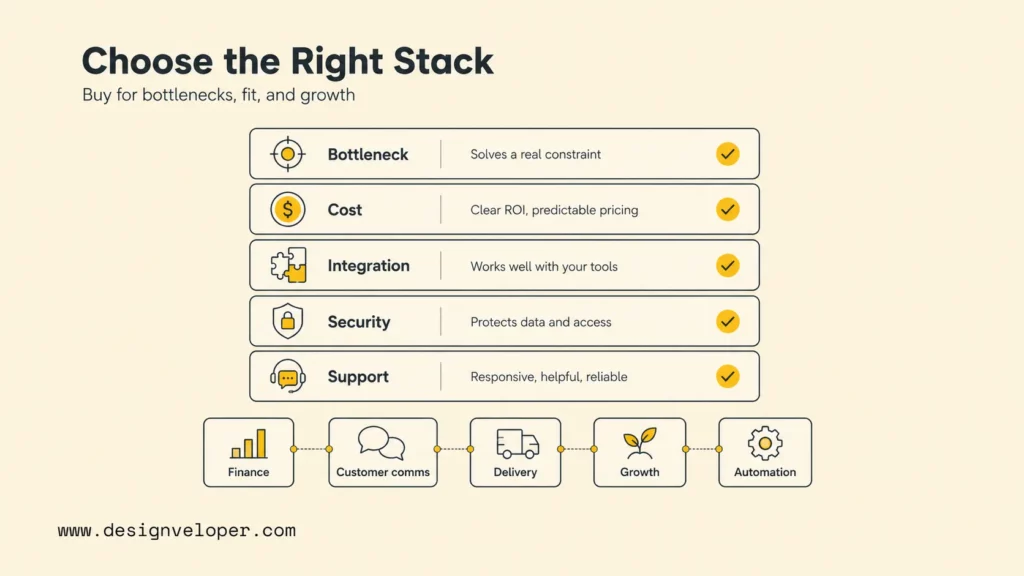
Choosing the right small business applications starts with workflow pressure, not brand popularity. Owners should map the work that happens every week, identify the slowest handoff, and select the app that removes that bottleneck with the least disruption. A simple rule works well: buy tools for current workflows, not imagined future complexity.
- Start with the biggest operational bottleneck. If invoices are late, prioritize accounting and payments. If leads are missed, prioritize CRM. If work is unclear, prioritize project management.
- Compare free plans, paid limits, and upgrade costs. Free plans are useful for testing, but storage, users, contacts, invoices, automation, and support limits can change the real cost.
- Review integrations with your current tools. A good app should connect cleanly with email, files, accounting, CRM, payments, analytics, or the website.
- Prioritize security, scalability, and support. Check role permissions, data export, two-factor authentication, admin controls, uptime history, and customer support before using an app for sensitive work.
- Avoid buying too many tools before defining the workflow. More software can create more manual copying if the business has not defined ownership, naming rules, and handoffs.
The practical buying order is usually finance first, then customer communication, then delivery operations, then growth tools, then automation. A freelance designer may start with Google Workspace, Dropbox, Wave, PayPal, Trello, Canva, and ChatGPT. A retail shop may start with Square, Shopify, QuickBooks, Mailchimp, Canva, and Google Workspace. A service agency may start with Google Workspace, HubSpot, OnePageCRM, Asana, Slack, Gusto, and Mailchimp.
| Score | Question to ask | What a strong answer looks like |
|---|---|---|
| Workflow fit | Does the app match the way work is actually done? | The app removes a named bottleneck without forcing unnecessary process changes. |
| Cost fit | Will the price still make sense after growth? | The team understands user, contact, storage, transaction, and automation limits. |
| Integration fit | Can the app connect to current systems? | Data can move between email, website, CRM, accounting, payments, or project tools. |
| Security fit | Can the business control access? | The app supports roles, admin controls, 2FA, exports, and sensible permission boundaries. |
| Support fit | Can the owner get help when something breaks? | Documentation, chat, email, phone, community, or partner support matches business risk. |
Related reading:
- How Cross Platform App Development Can Reduce Costs?
- Software Development Life Cycle (SDLC): Guide for Business
- What Is Software Architecture? Benefits, Characteristics and Examples
When Off-The-Shelf Apps Stop Fitting The Workflow
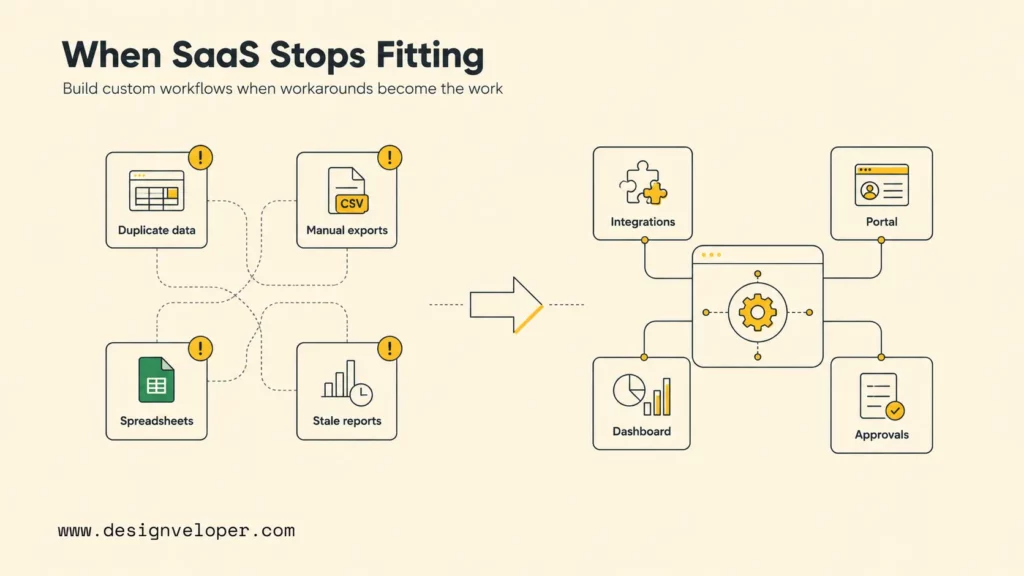
Off-the-shelf apps stop fitting when the business workflow becomes too specific for standard templates. That usually happens when data must move across several tools, approvals require custom rules, customers need a branded portal, or internal teams need a dashboard that no single SaaS app provides.
Common warning signs include duplicate data entry, manual exports every week, staff working around the tool in spreadsheets, customers asking for status updates that should be self-service, and managers making decisions from stale reports. At that point, the question is no longer which small business application to buy. The question is whether the business needs an integration layer, custom web app, workflow system, or customer portal.
Designveloper helps businesses move from scattered applications to practical digital products. Our software development services cover web apps, mobile apps, UI/UX design, custom software, and support, while our AI development services help teams add AI assistants, automation, document intelligence, and workflow support where off-the-shelf apps no longer fit.
For document-heavy teams, Designveloper’s public Lumin project experience shows how document viewing, editing, sharing, cloud collaboration, and digital signatures can become a real product workflow. Small businesses do not always need a custom app on day one, but a custom workflow becomes worth considering when documents, approvals, portals, integrations, or reporting start limiting growth.
A good custom-app conversation should begin with the existing app stack, the data each tool owns, the manual steps employees repeat, and the customer experience the business wants to improve. That keeps the build grounded in measurable workflow value instead of replacing useful SaaS tools too early.
Buy software for repeatable work; build software when the workflow itself becomes the advantage.
For practical examples, check out:
FAQs About Small Business Applications
What Apps Does A Small Business Need First?
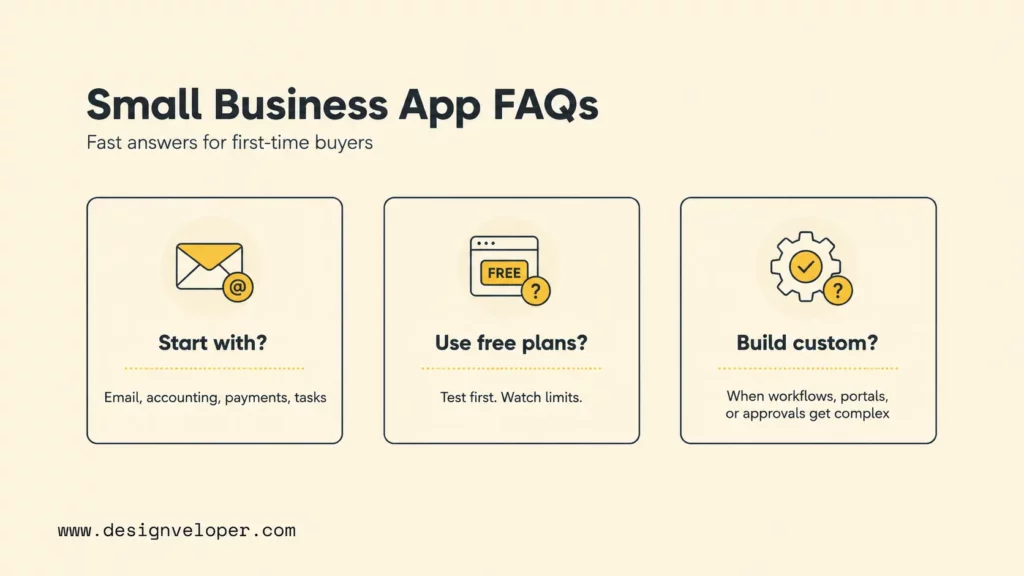
A small business usually needs productivity, accounting, payments, file storage, and task management first. A practical starter stack is Google Workspace or Notion for productivity, Wave or QuickBooks for money management, PayPal or Square for payments, Dropbox or Google Drive for files, and Trello or Asana for task tracking. Add CRM, marketing, payroll, AI, and e-commerce tools when the business has real demand for those workflows.
Are Free Small Business Apps Worth Using?
Free small business apps are worth using for testing workflows, solo operations, and early-stage businesses with simple needs. Owners should still check limits on users, storage, invoices, contacts, transaction fees, automation, history, integrations, and support. A free tool is not really free if it creates manual work, data loss, or a painful migration later.
Can Small Business Applications Scale As The Business Grows?
Many small business applications can scale as the business grows, but only when the app supports the next stage of users, permissions, integrations, reporting, and support. A tool that works for one freelancer may not work for a 20-person service team. Review upgrade plans, data export, API access, admin controls, and ecosystem integrations before making an app central to operations.
When Should A Small Business Build A Custom Application?
A small business should consider building a custom application when off-the-shelf tools create repeated workarounds, duplicate data entry, fragmented customer experience, weak reporting, or workflow limits that affect revenue or service quality. Custom software is most useful when the business has a clear process, stable demand, and a workflow that creates competitive value.
The best small business applications in 2026 are not the longest list of subscriptions. They are the tools that help owners and freelancers get paid, deliver work, communicate clearly, protect data, and grow without drowning in administration. Start with the bottleneck, test the workflow, and move toward custom integrations or custom apps only when standard software stops matching the way the business creates value.
Also published on

Share post on










Related Articles


How To Create A Financial App: Steps, Features, And Costs
How To Create A Financial App: Steps, Features, And Costs Published September 21, 2026
Android App Development: Stack, Process, Cost, And Best Practices
Android App Development: Stack, Process, Cost, And Best Practices Published September 17, 2026
Flutter vs React Native: Which Fits Your Mobile App?
Flutter vs React Native: Which Fits Your Mobile App? Published September 17, 2026



















