
















10 Ecommerce Best Practices For Better UX, SEO, And Sales

The most useful ecommerce best practices remove friction across the whole buying journey: they help shoppers find the right product, understand it, trust the purchase, complete checkout, and come back. A store does not improve by adding every possible feature. It improves by fixing the points where customers or operations are most likely to break down.
The ten priorities below connect UX, SEO, performance, checkout, retention, and measurement. They were selected because they affect product discovery, purchase confidence, checkout completion, retention, or the operating work behind the store. This is a practical prioritization model, not a universal ranking. The right sequence depends on the store’s customers, catalog, operations, and data. Together, these online store best practices form a practical ecommerce website optimization loop rather than a one-off redesign checklist.
Ecommerce Website Best Practices For A Strong Foundation
A strong ecommerce foundation starts with the customer and operating model, then turns those needs into site structure and technology choices. Our ecommerce website development guide covers the broader build process, including requirements, architecture, integrations, testing, and continuous optimization.
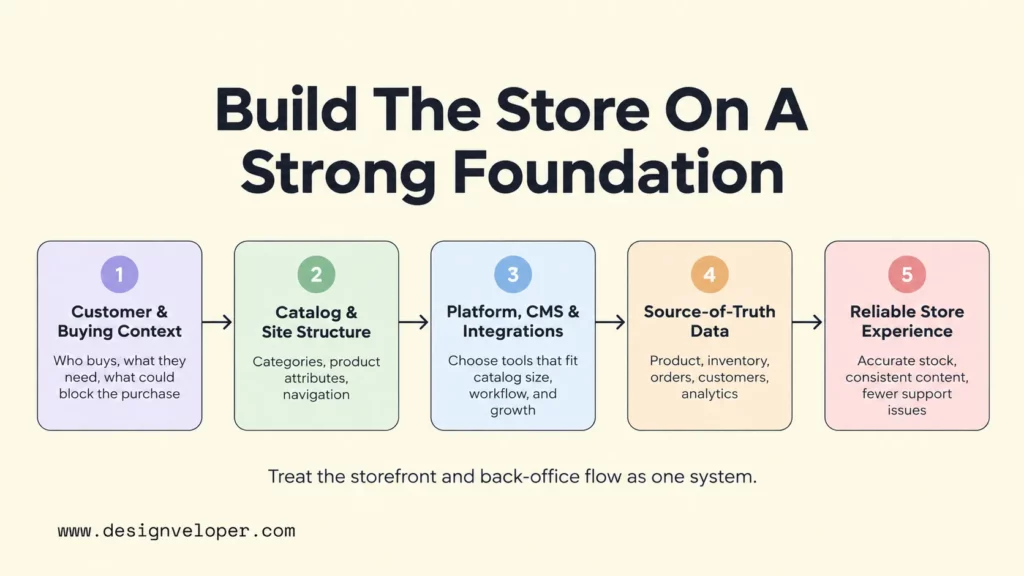
- Define the target customer, product value, and buying context. Start with what the buyer is trying to accomplish and what could stop the purchase. A consumer buying one item on a phone needs different information from a procurement team comparing bulk quantities, account pricing, and delivery terms. Use that context to decide which product details, policies, comparison tools, support options, and checkout steps deserve priority. This keeps the store focused on a real buying job instead of a generic feature checklist.
- Build the store structure and stack around real operations. Organize categories so buyers can move from broad needs to specific products without guessing. Then choose the platform, theme, CMS, and integrations based on catalog size, merchandising workflow, order complexity, expected growth, and the systems that already hold product, inventory, customer, and fulfillment data. If platform selection is still open, our guide to choosing an ecommerce platform explains the trade-offs in more detail.
The key is to treat the storefront and back-office flow as one system. Inventory, product content, orders, customer records, and analytics should have clear sources of truth and clear handoffs. Otherwise, a polished interface can still show stale stock, inconsistent product data, or order states that support teams cannot explain.
Our public Aha ecommerce project provides a bounded example of the CMS side of that foundation. The public project record documents reusable web components that staff can manage through the CMS and dynamic conditions for flexible content control. The documented takeaway here is limited to CMS flexibility and reusable content operations. It does not imply a measured conversion result.
Ecommerce UX Best Practices For Product Discovery
Product discovery should reduce the effort between “I need something” and “this is the right option.” Navigation, onsite search, filters, sorting, category pages, and product cards should work together rather than behave like separate features.
- Make products easy to find, compare, and understand. Use category names that match how customers describe the catalog. Give filters only to attributes that help narrow a decision, such as size, compatibility, price, availability, or material. Search should handle common product names, identifiers, and likely query variations. Product cards should surface the few details needed to decide whether to open the product page. The product page can then clarify variants, price, stock, shipping, returns, and the main call to action.
Consistency matters because shoppers build a mental model as they browse. Keep image treatment, product-card structure, variant labels, pricing presentation, and CTA placement predictable across categories and devices. Our guide to ecommerce UI and UX design gives more context on how those interface decisions affect the shopping journey.
A category page also works better when product images, card labels, filter names, and CMS-managed fields use the same product attributes and terminology. That consistency reduces the need to reinterpret information as shoppers move from a category page to a product page.
Design discovery for both first-time and returning shoppers. New visitors often need orientation and comparison, while returning visitors may want to resume a category, repeat an order, or search for a known item. Useful UX supports both paths without forcing every person through the same sequence.
Ecommerce SEO Best Practices For Product Visibility
Ecommerce SEO should make important product and category pages understandable and reachable to search engines without creating duplicate or low-value URL sprawl. Onsite search helps people find products after they arrive; SEO helps search engines discover, interpret, and surface the pages before that visit.
- Make product content crawlable, distinct, and useful. Give important categories and products unique titles, descriptions, indexable URLs, and enough original information to answer buyer questions. Link from navigation to categories, then to subcategories and product pages so products are not discoverable only through a search box. Use descriptive image alt text for meaningful product images, and add relevant Product structured data when the page qualifies. Google’s ecommerce SEO documentation covers site structure, product data, structured data, URLs, and ecommerce crawling.
Filters and variants need extra care because they can produce many URL combinations with very similar content. Decide which filtered pages are valuable search landing pages and which should not consume crawl attention. Google’s faceted navigation guidance warns that filters can create very large URL spaces and slow discovery of useful pages. Set URL rules, canonicalization, internal links, and crawl controls around the store’s actual catalog behavior rather than a blanket template.
Product feeds and structured data complement the website; they do not replace useful product pages. Google’s Product structured data documentation explains how markup can describe details such as price, availability, shipping, and returns. Keep those values consistent with what the customer sees, because conflicting product information creates both search and trust problems.
Mobile, Accessibility, And Performance Best Practices
Mobile usability, accessibility, and performance are different disciplines, but shoppers experience them at the same time. A page can load quickly and still be hard to operate, or it can be accessible in markup but frustrating because interactions lag or the layout shifts.
- Design for small screens and accessible interaction from the start. Keep text readable, controls large enough to use comfortably, forms clearly labeled, and key actions reachable without precision tapping. Make menus, filters, dialogs, product options, and checkout controls usable from a keyboard, with visible focus states and sufficient contrast. WCAG 2.2 includes requirements for keyboard access, focus visibility, contrast, labels, and other interaction needs that are relevant to ecommerce interfaces.
- Protect real-world performance on the pages that make money. Optimize product images, scripts, fonts, third-party tags, caching, and rendering behavior. Measure product, cart, and checkout pages rather than assuming a fast homepage represents the store. As checked on September 18, 2026, Google’s current Web Vitals guidance lists LCP at 2.5 seconds or less and INP at 200 milliseconds or less as good thresholds. It lists CLS at 0.1 or less. Google recommends assessing those thresholds at the 75th percentile of page loads. The metrics can evolve, so teams should verify the current guidance before publication or a major performance review.
Performance work is usually a prioritization problem, not a one-time compression task. Large media can delay the main product content, excessive JavaScript can slow interactions, and late-loading banners can move the Add to Cart button after a shopper tries to use it. Our overview of ecommerce infrastructure helps connect frontend speed with hosting, APIs, payment systems, databases, and the services behind the storefront.
The Aha project gives a different kind of evidence here: it shows performance and operating-cost decisions, not conversion results. We used multiple cache layers across the browser, CDN, and server while also tracking infrastructure resources. This project context shows why performance should be considered with architecture and operating cost. Faster delivery matters, but the design also needs to stay maintainable as traffic, catalog data, and integrations change.
Checkout, Payment, And Trust Best Practices
Checkout should remove uncertainty at the moment a shopper is ready to buy. The main risks are extra work, surprise costs, limited payment choices, unclear delivery, and doubts about what happens after payment.
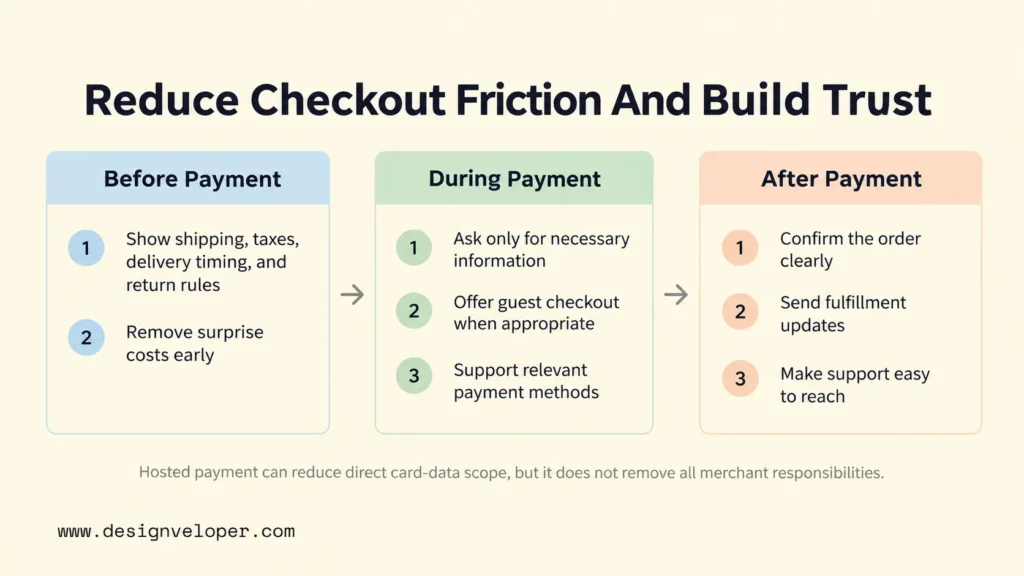
- Remove unnecessary checkout friction. Ask only for information needed to complete the order, choose fulfillment, prevent fraud, or meet a real business requirement. Offer guest checkout when an account is not essential, preserve entered data when errors occur, and make the path through shipping and payment easy to understand. Baymard’s current cart-abandonment research reports unexpected extra costs and forced account creation as major stated reasons for abandonment. Treat those findings as research evidence, not as a prediction of any one store’s abandonment rate.
- Make cost, payment, delivery, returns, and security expectations clear. Show shipping charges, taxes or estimates, delivery timing, return conditions, and refund expectations before the final order action whenever possible. Offer payment methods that fit the markets you actually serve rather than adding options without evidence of demand. Use familiar trust signals where they answer a real concern, not as decorative badges that interrupt the flow.
Payment security is part of the checkout design, not a footer promise. Teams that handle payment-card data should understand which systems are in scope and work with payment providers, acquirers, and security specialists on the applicable responsibilities. As checked on September 18, 2026, the PCI Security Standards Council lists PCI DSS v4.0.1 in its document library. A hosted or redirected payment flow may reduce the card-data functions handled by a merchant’s own systems when the implementation meets the applicable PCI criteria. It does not remove all merchant security responsibilities. Remaining scripts, integrations, access controls, and customer data still require protection.
After payment, trust continues through order confirmation and fulfillment updates. Tell the customer what was ordered, what they paid, what happens next, and where to get help. That closes the purchase loop and reduces avoidable support questions.
Marketing, Retention, And Ecommerce Conversion Best Practices
Conversion work should make the offer more relevant, not simply create more messages. Helpful content, social proof, promotions, email, and product recommendations work best when they answer a real buyer need at the right stage.
- Use relevant marketing and retention, then measure the result. Match promotions to products, margin, inventory, and customer context instead of discounting by default. After purchase, use order communication, replenishment reminders, loyalty benefits, or related-product suggestions only when they are useful for that product and supported by appropriate data and user consent. Track conversion rate, average order value, customer acquisition cost, repeat purchase rate, and cart abandonment together so a gain in one metric does not hide a loss somewhere else.
For example, a generic “20% off everything” message may create short-term demand but teach customers to wait for discounts. A post-purchase recommendation for a refill, compatible accessory, or replacement part can be more relevant because it follows from what the customer already bought. The right choice depends on margin, buying cycle, inventory, and whether the recommendation genuinely helps.
Run tests that can produce a clear decision. Change one meaningful element or tightly related group at a time. Define the primary metric before launch, then watch guardrail metrics such as refund rate, support contacts, or margin when they matter. A test that increases clicks but creates more cancellations is not a clean improvement.
How To Prioritize Ecommerce Improvements
Prioritize the largest measurable drop-off that you can plausibly influence, then diagnose the cause before choosing the fix. Do not assume every weak conversion metric is a design problem. Pricing, stock, traffic quality, shipping, product-market fit, and fulfillment can create the same symptom.
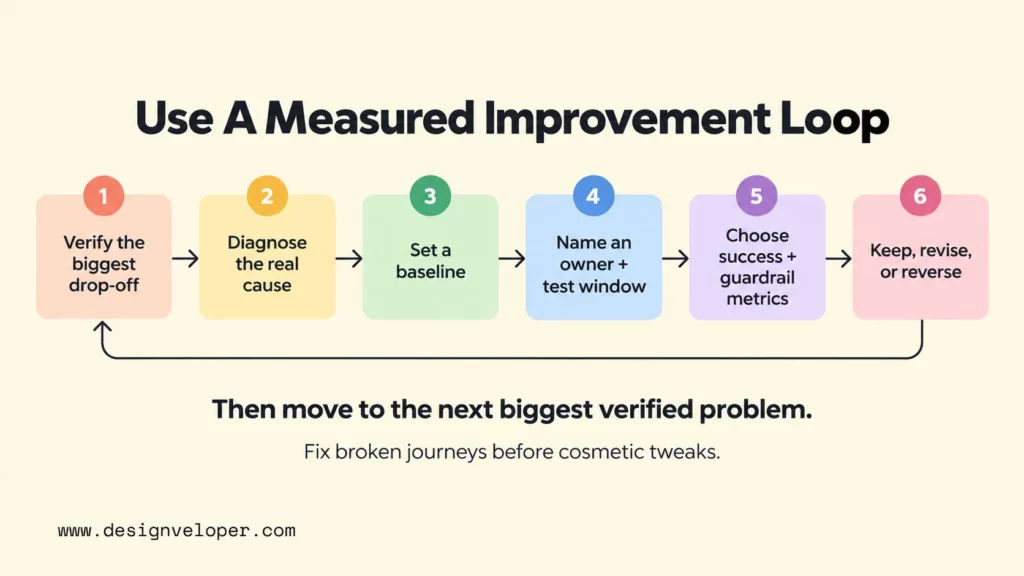
- Turn optimization into a measured operating loop. Set a baseline, name an owner, choose a test or implementation window, and define the success metric before work begins. Separate technical failures from product, pricing, trust, and fulfillment issues. After release, compare results with the baseline and decide whether to keep, revise, or reverse the change. Then move to the next largest verified problem instead of treating optimization as a one-time redesign.
A practical sequence is to start with broken journeys before polishing already functional ones. Fix errors, unusable mobile controls, missing product data, failed payments, or inaccurate stock first. Next address high-friction steps with measurable abandonment. Only then spend time on lower-impact refinements such as cosmetic experiments that do not solve a known obstacle.
Our public Aha case study adds project context to this prioritization model. It shows that performance, infrastructure cost, CMS flexibility, reusable components, and ecommerce management can appear as connected operational concerns in one project. It does not establish a universal sequence or a measured conversion benchmark. The broader lesson is to improve the customer journey without creating more operational friction behind the scenes.
FAQs About Ecommerce Best Practices
How Do Ecommerce Best Practices Differ For B2B And B2C Stores?
B2C stores usually optimize for fast individual decisions, while B2B stores often need account roles, negotiated pricing, bulk quantities, repeat ordering, approvals, purchase orders, or more complex fulfillment. The same principles still apply, but the buying context changes which details and workflows matter most. Our guide to B2B ecommerce explains the model and its operational differences in more depth.
What Should An Ecommerce Business Fix First When Sales Are Low?
Fix the biggest verified obstacle in the buying journey, not the most visible page. Check traffic quality, product availability, pricing, search and category behavior, product-page engagement, cart creation, checkout completion, payment failures, and fulfillment issues. If many qualified shoppers reach checkout but abandon when shipping appears, a homepage redesign is unlikely to be the first priority.
How Often Should An Ecommerce Store Review Its SEO And UX?
Monitor key metrics continuously where your analytics allow it, and review SEO and UX after meaningful releases, catalog changes, migrations, or sudden performance shifts. For a stable store, a monthly metric review plus a deeper quarterly review is a practical operating cadence, not a universal benchmark. High-change stores may need shorter cycles.
Which Ecommerce Metrics Should A Business Track?
Track metrics that connect acquisition, shopping behavior, purchase value, and retention. A useful core set includes qualified traffic, conversion rate, cart and checkout abandonment, average order value, customer acquisition cost, repeat purchase rate, refunds, and payment or fulfillment failures. Add search zero-result rate, filter usage, inventory accuracy, or support contacts when those signals help explain a specific problem.
Also published on

Share post on










Related Articles



10 Ecommerce Best Practices For Better UX, SEO, And Sales
10 Ecommerce Best Practices For Better UX, SEO, And Sales Published September 21, 2026
B2C Ecommerce Model: Types, Examples, and How to Choose One
B2C Ecommerce Model: Types, Examples, and How to Choose One Published September 18, 2026
What Is B2B Ecommerce? Types, Models, Platform Features, Examples
What Is B2B Ecommerce? Types, Models, Platform Features, Examples Published September 18, 2026



















