
















CMMS Meaning: What It Is, How It Works, And Why It Matters

CMMS stands for Computerized Maintenance Management System. It centralizes maintenance data so teams can manage assets, work orders, preventive maintenance, spare parts, and service records in one workflow. The system helps teams move from scattered notes and reactive repairs to shared, traceable maintenance work. This article explains how a CMMS works and what to check before choosing one.
What Does CMMS Stand For?
CMMS stands for Computerized Maintenance Management System. “Computerized” means the maintenance process is managed in software rather than only on paper or spreadsheets. “Maintenance” is the work of keeping physical assets available and safe to use. “Management system” refers to the shared records and workflows used to plan, assign, document, and review that work.
A CMMS is an operations tool for maintenance teams, not a general system for every business function. IBM describes a CMMS as software that helps organizations automate and improve core maintenance operations, document activity, and improve workflows in its CMMS definition and guide. That boundary matters because companies may also use broader enterprise applications for finance, sales, HR, or supply chain work.
How Does A CMMS Work?
A CMMS turns maintenance information into a repeatable workflow: record assets, create a request, assign and prioritize the work, record completion details, and use the history to plan future maintenance.
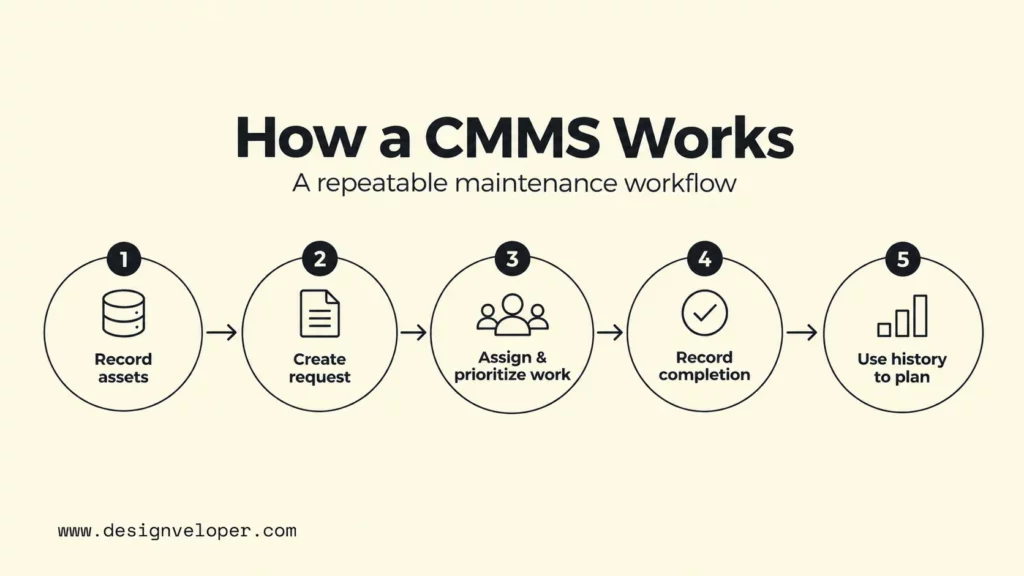
Centralize Asset And Maintenance Records
The asset register gives each machine, vehicle, facility component, or other maintainable item a consistent record. Depending on the system, that record may hold an asset ID, location, model, warranty information, manuals, service history, and links to related work. A technician can then see the asset’s context before starting a repair.
Maintenance history makes that asset record useful over time. If a pump has failed several times for the same reason, the team can review those earlier events instead of treating each repair as unrelated. The record can then support repair-versus-replace decisions, warranty checks, and recurring failure analysis.
Create And Track Work Orders
Work orders turn maintenance requests into structured, trackable tasks. A request can identify the affected asset, describe the problem, set priority, assign a technician, and list required parts or instructions. As work progresses, the status can move from requested to assigned, in progress, and complete.
This workflow creates accountability without relying on memory or private messages. Supervisors can see open work and overdue tasks, while technicians can document what they found and what they changed. The completed order then becomes part of the asset’s maintenance history.
Schedule Preventive Maintenance
A CMMS can schedule preventive work at fixed intervals, meter readings, runtime thresholds, or other supported triggers. For example, a generator inspection might be due every month, while a vehicle service may depend on mileage. These triggers help teams schedule or generate work orders before routine maintenance is due.
Condition-based and predictive maintenance use a different basis for timing work. Condition-based maintenance responds to monitored asset condition. Predictive maintenance analyzes condition and operational data to estimate when failure is likely. A CMMS may support more than one strategy, so teams should define which trigger belongs to each maintenance plan.
Manage Parts And Maintenance History
Parts records connect maintenance planning with the materials needed to finish a job. A CMMS can show stock on hand, parts linked to specific assets, usage history, and reorder information. This helps a planner check whether a critical component is available before scheduling work.
Maintenance history makes parts data more useful. If one component is being replaced unusually often, the team can investigate the asset, operating conditions, or maintenance procedure. The value comes from linking parts usage to a real maintenance question instead of collecting transactions without context.
Core CMMS Features
Core CMMS features support the full maintenance loop: identify the asset, plan the work, execute it, record the result, and learn from the history. A useful system should cover the parts of that loop that your team actually performs rather than offering a long feature list that no one uses.
- Work order management: create, assign, prioritize, update, and close maintenance tasks.
- Asset and equipment tracking: maintain records for physical assets, locations, condition, and service history.
- Preventive maintenance scheduling: trigger recurring maintenance based on time, usage, or other supported rules.
- Spare parts and inventory control: track stock, usage, part-to-asset relationships, and reorder needs.
- Mobile access for field teams: let technicians receive tasks and update records near the equipment instead of waiting to return to a desk.
- Maintenance reports and dashboards: summarize work order status, downtime, costs, recurring failures, and other maintenance measures supported by the data.
- User permissions and audit records: control who can view or change information and preserve traceability for important actions.
Not every product implements these features in the same way. Mobile offline support, workflow configuration, reporting depth, integrations, and permission models can differ widely. Buyers should test the workflows that matter most instead of assuming two products with the same feature label are equivalent.
What Does A CMMS Help Businesses Do?
A CMMS helps businesses make maintenance more planned, visible, and measurable. It can support lower unplanned downtime, better maintenance planning, longer useful asset life, better cost control, more traceable inspection records, and clearer team communication. These are possible outcomes, not automatic results.
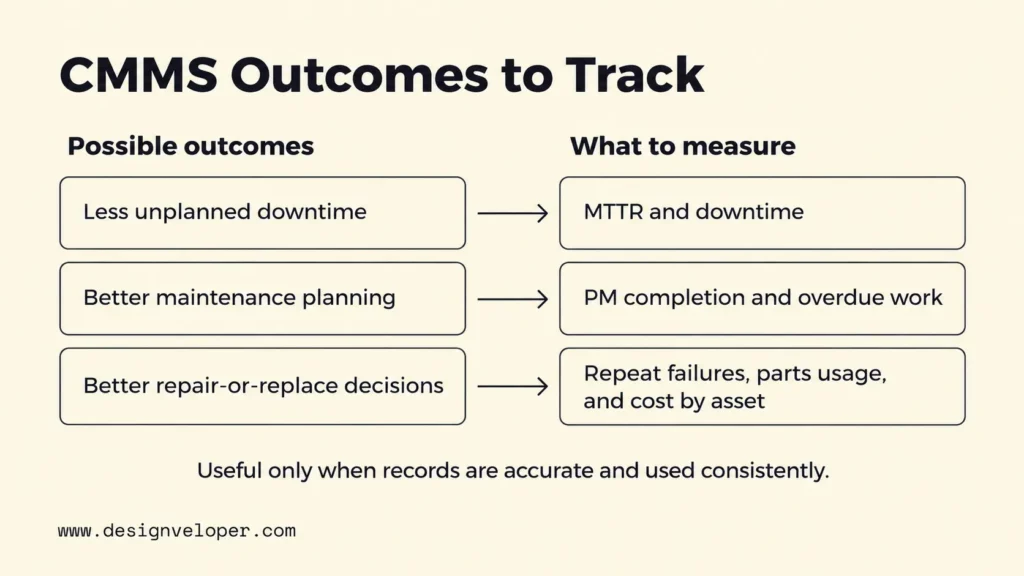
Downtime can fall when teams find recurring problems earlier and complete planned work before avoidable failures. Planning can improve because supervisors can see open tasks, asset history, parts needs, and technician assignments in one workflow. That shared view also reduces the need to rebuild context every time work changes hands.
Asset life and maintenance cost are linked, but keeping an asset longer is not always the cheaper option. Reliable history can show whether an asset needs repeated repairs, consumes unusual amounts of parts, or requires more labor than expected. That evidence can support a better repair-versus-replace discussion.
Compliance support comes from traceable records rather than from the software label itself. A CMMS can help document inspections, completed tasks, approvals, and maintenance history when those workflows are configured correctly. The organization still has to know which rules apply and make sure its procedures and records meet them.
Teams can also measure whether maintenance execution is improving. Depending on the CMMS and the data captured, useful measures can include preventive-maintenance completion, overdue work orders, and mean time to repair. Teams can also track repeat failures, parts below minimum stock, and maintenance cost by asset. MaintainX’s reporting documentation shows examples such as MTTR, on-time completion, asset reliability, downtime, labor usage, and costs.
Those measures are only useful when the underlying records are reliable. Accurate asset data, consistent use by the people doing the work, and well-defined maintenance processes determine whether reports reflect reality. A poorly maintained database can digitize confusion instead of improving maintenance decisions.
CMMS Vs. EAM, ERP, And CRM
The main difference is scope. A CMMS centers on maintenance operations. EAM covers the wider lifecycle of physical assets. ERP coordinates broader business processes such as finance and procurement. CRM focuses on customer and sales relationships. These systems can overlap and integrate, so the choice is not always one system instead of another.
| System | Primary focus | Typical business use | Relationship to CMMS |
|---|---|---|---|
| CMMS | Maintenance operations | Work orders, preventive maintenance, asset records, parts, maintenance history | Core system for maintenance planning and execution |
| EAM | Whole asset lifecycle | Planning, acquisition, operation, maintenance, performance, and retirement of assets | Broader than CMMS and may include CMMS-like maintenance capabilities |
| ERP | Enterprise business processes | Finance, procurement, HR, manufacturing, supply chain, and related operations | May exchange purchasing, labor, cost, and inventory data with a CMMS |
| CRM | Customer relationship management | Sales, marketing, customer service, and account interactions | Usually separate from maintenance, though service businesses may connect customer and field-service workflows |
The boundaries are not absolute. EAM may include CMMS capabilities, while ERP and CRM can exchange selected asset, purchasing, cost, service, or customer data with a CMMS. The integration design should follow the business process and define which system owns each important record.
Who Should Use A CMMS?
A CMMS is most useful for organizations that manage enough physical assets and maintenance work that informal tracking becomes unreliable. The key signal is operational complexity, not company size alone. A small plant with critical machines may benefit more than a larger office business with few maintainable assets.
- Manufacturing and industrial facilities can use a CMMS to coordinate maintenance for production equipment, utilities, and plant assets.
- Property and facility management teams can track building systems, inspections, service requests, and recurring maintenance across one or many sites.
- Healthcare organizations can use maintenance records for facilities and equipment where availability, inspection history, and controlled procedures matter.
- Utilities and energy companies can coordinate maintenance across distributed physical infrastructure and field teams.
- Schools, campuses, and public facilities can manage recurring work for buildings, grounds, vehicles, and shared equipment.
- Any business managing many physical assets can consider a CMMS when work orders, service history, and parts information become difficult to control with email or spreadsheets.
A CMMS is less compelling when maintenance volume is very low, assets are simple, and a lightweight process remains reliable. Software adds administration as well as structure. The decision should compare that effort with the cost of missed work, poor records, preventable downtime, and weak visibility.
How To Choose The Right CMMS
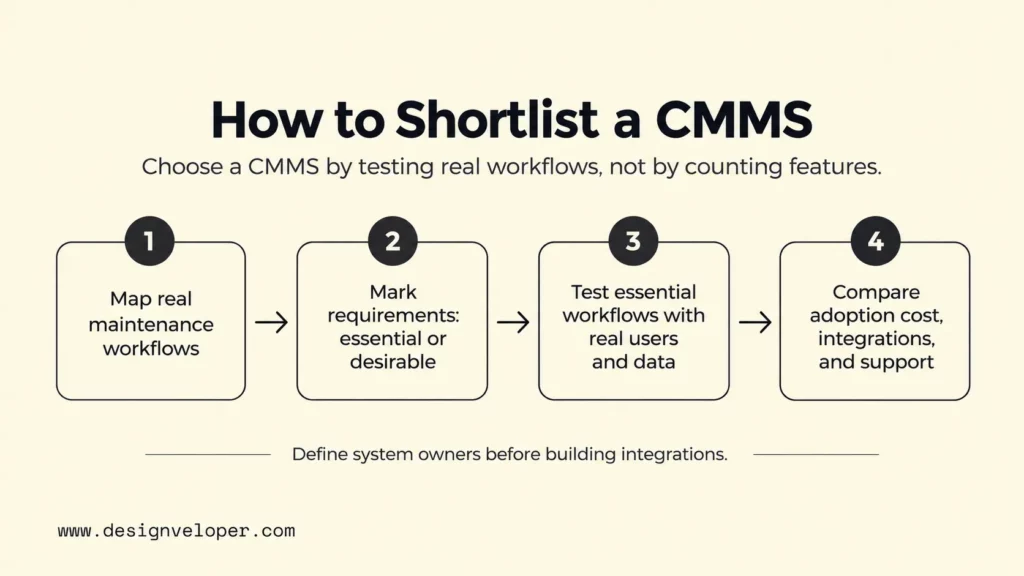
Choose a CMMS by testing your real maintenance workflows against the product, not by counting features. Define the workflows the system must support and classify each requirement as essential or desirable. Then test the essential workflows with planners and technicians using realistic data. Compare the full cost of adoption, including configuration, data preparation, integration, training, support, and licensing or subscription fees.
- Asset and work order requirements: confirm that the system can represent your asset hierarchy, locations, priorities, approvals, and task types without awkward workarounds.
- Preventive maintenance support: check whether schedules can use the triggers, frequencies, meters, or inspection rules your maintenance plan actually needs.
- Mobile access: test the technician experience on the devices and network conditions used in the field. Offline capability may matter at remote or signal-poor sites.
- Inventory and purchasing integrations: decide whether the CMMS must only track maintenance parts or also exchange purchasing and stock information with an ERP or procurement system.
- Reporting and compliance needs: identify the records, approvals, retention rules, audit trails, and reports your organization must produce before you compare dashboards.
- Ease of adoption: involve planners and technicians in realistic trials. A powerful workflow is not useful if frontline users avoid updating it.
- Scalability and total cost: consider users, sites, storage, integrations, implementation, data preparation, training, support, and future modules rather than only the subscription price.
Integration deserves special attention when maintenance data must move between a CMMS and ERP, procurement, identity, IoT, or reporting systems. Define which system owns each important record before building connections. An off-the-shelf CMMS may still fail to fit a required workflow or connect deeply with existing systems. If that gap requires custom software, we can build the supporting application or integration layer through our software development services. Before coding, document data owners, user roles, required handoffs, and failure cases.
FAQs About CMMS
Is CMMS The Same As SAP?
No. CMMS is a category of maintenance software, while SAP is a software company with a broad portfolio of enterprise products. SAP offers asset-management and maintenance capabilities, but the terms “CMMS” and “SAP” are not interchangeable.
Is CMMS A CRM?
No. A CMMS manages maintenance operations around physical assets. A CRM manages relationships and interactions with customers and prospects. They may connect in a service business, but they solve different primary problems and usually hold different core records.
What Are Examples Of CMMS Software?
Examples include MaintainX and Accruent Maintenance Connection, both of which cover CMMS functions and also describe broader asset-management or EAM capabilities. IBM Maximo Application Suite and SAP S/4HANA Asset Management are broader EAM offerings with maintenance capabilities. Product scope varies, so compare the maintenance workflows, deployment model, integrations, permissions, support model, and commercial terms you actually need.
Also published on

Share post on










Related Articles



What Are Enterprise Applications? How They Support Business Operations
What Are Enterprise Applications? How They Support Business Operations Published September 21, 2026
10 Best CRM Software Options For Small Businesses In 2026
10 Best CRM Software Options For Small Businesses In 2026 Published September 18, 2026
CMMS Meaning: What It Is, How It Works, And Why It Matters
CMMS Meaning: What It Is, How It Works, And Why It Matters Published September 16, 2026



















