
















On-Device AI For Mobile Apps And When A Hybrid Setup Fits Best

On-device AI for mobile apps runs a model directly on a phone or tablet, so supported features can respond without sending each request to a server. It fits focused tasks that need quick responses, offline access, or tighter control over sensitive input. A hybrid setup fits better when some devices cannot run the local model or some requests need stronger cloud processing.
The right design is rarely a choice between keeping everything local and moving everything online. Start with the user task, then decide which inputs may leave the device, which devices you must support, and what should happen when the preferred model is unavailable.
What Is On-Device AI For Mobile Apps?
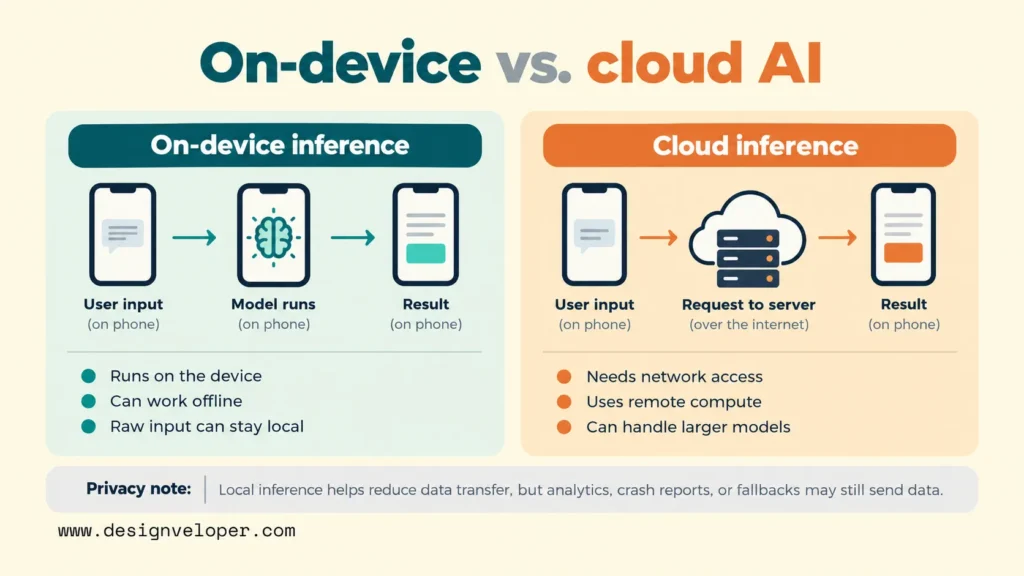
On-device AI means the app performs inference on the user’s device. Inference is the step where an existing model takes new input and produces an answer or prediction. For example, an app can analyze a photo or shorten a note on the phone itself, instead of sending the input to an online model.
Inference is different from training. Training creates or adjusts a model using examples. Teams usually train or prepare the model before shipping it, then optimize it for mobile hardware. Some tools also support training or fine-tuning on a device, but that is a separate design choice. Local inference does not mean the phone must train the model.
Cloud inference sends the request to a model running on a remote server. The server sends a result back to the app. This can give the product access to larger models and centralized updates, but the feature depends on a network connection and an approved path for transferring its data.
A mobile app can use both methods. It might recognize text on a receipt locally, let the user correct the extracted fields, and send only an approved expense total to a business system. For a broader explanation of how AI fits into existing products, our guide to AI integration in mobile and web apps explains the surrounding product decisions.
Local processing can reduce the exposure created by transmitting raw inputs, but it does not make an app private by itself. Uploads for backup, analytics events, crash reports, or a cloud fallback can still send data elsewhere. Privacy depends on the full data path, not only where the model runs.
On-Device AI Use Cases In Mobile Apps
The strongest on-device AI use cases are narrow tasks with clear inputs and outputs. A team can test these tasks against real examples and give users a way to correct mistakes. Three useful patterns are short-text summarization, receipt parsing, and voice-note transcription.
Short-text summarization helps users understand information already inside the app. A travel app might turn a day’s itinerary into a few practical reminders. The source text is short, the result is easy to inspect, and a failed summary need not block the main feature. Show the original itinerary beside the summary so a user can check names, times, and places.
Receipt parsing saves manual entry by extracting a merchant, total, or expense category from a photo. That task needs image understanding or text recognition before the app can create usable fields. The app should display those fields for confirmation, especially when a mistaken amount would change a reimbursement or financial record. Keeping the image local may also avoid an unnecessary upload of addresses or payment details printed on the receipt.
Voice-note transcription changes spoken notes into text that users can review, search, or attach to a task. A second local step can classify the note or match it to an activity. Recording still requires the right microphone permissions and a clear indication that audio is being captured. Supported languages and recognition quality must be checked on the devices users actually carry.
Google’s Jetpacker on-device inference walkthrough demonstrates all three patterns in a travel app: itinerary summaries, receipt-based expenses, and voice notes linked to trip activities. It is a developer example, not evidence that these features will work with the same quality or device coverage in every production app. Its receipt example also uses a specific Gemini Nano model configuration, so model availability matters.
These examples suggest a useful rule: start with an assistive action that a user can verify. If an AI result would approve a payment, change a medical instruction, or make another high-impact decision, add stronger validation and human review. A local model’s location does not guarantee its answer is correct.
For teams planning a first test, our guide to integrating AI into an app explains use-case selection, model preparation, and testing. An on-device feature adds another check: whether the chosen model runs well on the target phones.
On-Device Vs Cloud Vs Hybrid AI For Mobile Apps
On-device AI is strongest when a supported phone can handle the task within an acceptable delay. Cloud AI is often a better fit for requests that exceed the phone’s model or memory limits. Hybrid AI lets an app choose between them, but it adds decisions about consent, connection failures, and consistent results.
| Decision factor | On-device AI | Cloud AI | Hybrid AI |
|---|---|---|---|
| Where inference runs | On the phone or tablet | On a remote server | Locally or remotely, based on routing rules |
| Connectivity | Can work offline once the model and inputs are available | Needs a usable connection | Offline only for tasks the local model supports |
| Response time | Avoids network travel, but depends on device speed and model startup | Adds network travel; server processing may suit larger tasks | Varies by the selected path and fallback |
| Data handling | Raw inputs can stay local if the rest of the app also keeps them local | Selected inputs must be sent to a service | Needs explicit rules about what may be uploaded |
| Model capability and reach | Bound by the model, OS, memory, and supported hardware | Can use larger centrally managed models | Broader reach, with possible differences between results |
| Lifecycle costs | Model optimization, delivery, device testing, updates, and support | Inference usage, hosting, networking, security, and operations | Costs of both paths plus routing, testing, and monitoring |
The latency trade-off is less simple than saying local always means faster. A small model on a recent phone may respond quickly with no network. A larger model on an older phone may start slowly, heat the device, or use too much memory. Measure the complete user action, including first-run model download and initialization, rather than comparing inference time alone.
Costs also move rather than disappear. Local inference avoids a cloud charge for each successful local request, but the team still pays to prepare models, test device families, distribute updates, and handle failures. Cloud costs rise with usage, but its central model can be easier to replace. Hybrid products carry both sets of work, so they need a reason beyond having more architecture options.
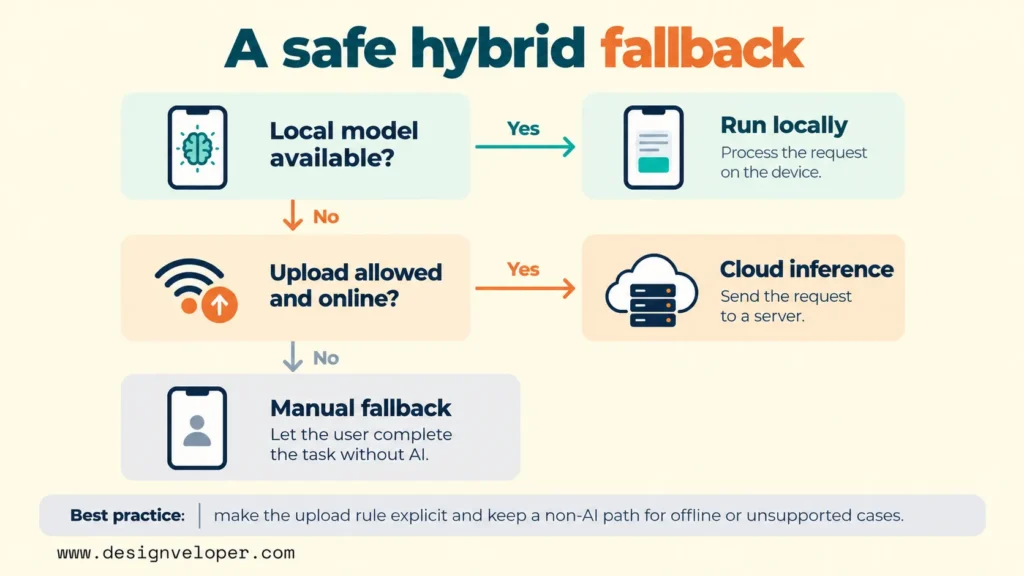
A hybrid fallback must be a product policy, not just an invisible technical switch. For example, a travel app could summarize saved notes locally. If the device lacks the model, it could offer a cloud summary only after explaining that the note will be uploaded. If the user declines or is offline, the app can keep the original note readable instead of failing the entire screen.
Firebase AI Logic documents hybrid inference for Android and hybrid inference for Apple apps. Its Android path is experimental, and its local capabilities depend on supported devices and APIs. Do not assume that a fallback works for every input type, or that the same model behavior applies on both platforms.
The decision rule is straightforward: choose local execution when the task is small enough, privacy or offline use matters, and your target devices support it. Choose cloud execution when the task needs greater capability or uniform server control. Choose hybrid when both sets of users matter and you can define safe upload rules, support checks, and a useful no-network fallback.
On-Device AI Frameworks For iOS And Android
The right framework depends on whether you use a platform-managed model or bring your own. It also depends on what each phone supports. A framework being available in an SDK does not prove that its model will run on every device that can install the app.
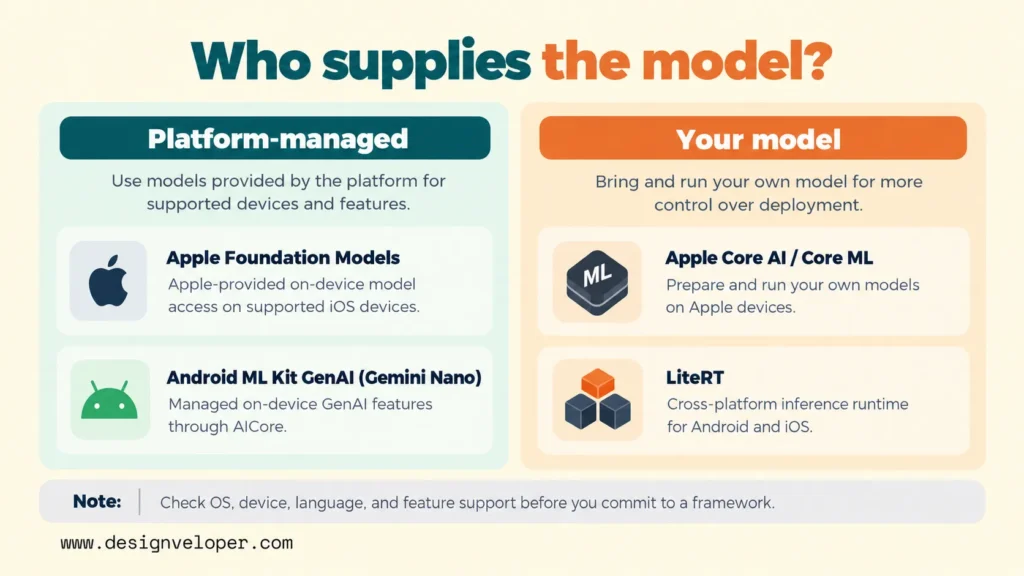
Apple Core AI is designed to prepare and run your own AI models on Apple silicon. Apple’s Core AI documentation describes model conversion, local execution, and performance controls. It is relevant when you need a specific model or more control over its deployment. The team is then responsible for validating that model’s memory use, performance, and supported devices.
Core ML remains useful for integrating trained models that make predictions, such as image classification or other focused machine learning tasks. Apple’s Core ML documentation covers model integration and device-side prediction. For apps that want Apple’s available foundation model rather than supplying their own, the separate Foundation Models framework offers an API. The app must still check model availability at runtime.
Android ML Kit GenAI provides higher-level APIs for tasks such as summarization, rewriting, image description, and speech recognition. Google’s ML Kit GenAI overview explains that these APIs use Gemini Nano through AICore. Device and language support differs by feature and model version. An Android phone that supports one API may not support another, so a feature needs its own availability check.
Gemini Nano is the on-device model family behind those managed Android capabilities, rather than a guarantee that an app can run any prompt on any Android phone. Teams that need a customized model or wider control over deployment can instead assess LiteRT. Google’s LiteRT documentation describes a cross-platform inference runtime with model conversion and hardware acceleration. It can serve Android and iOS projects, but each chosen model still needs device testing.
Before committing to any framework, build a support matrix for the devices in your audience. Record the operating system, required API, model version, language, hardware capacity, and download state. Distinguish a supported device from a device where the model is installed and ready. This small check can prevent a feature from appearing available in the design but failing on its first use.
How To Build On-Device AI Into A Mobile App
Build an on-device feature by proving one useful task on representative phones before expanding coverage. The workflow below treats the model as one part of a mobile product. Quality, fallback behavior, model updates, and user trust all need owners.
- Choose a focused task and a quality threshold. Define one action, such as turning a short receipt into an editable expense entry. Collect permitted, representative examples, including blurry images and unusual formats. Decide what must be correct before the feature is useful. For a receipt, the amount and currency may matter more than a generated category. Compare outputs against reviewed examples, and decide which mistakes require user confirmation or prevent submission.
- Select the model and runtime for the real device mix. Try the platform-managed API first if it supports the task and audience. Test a custom model when you need different behavior or more control. Check model licenses, languages, package size, and platform requirements. Use optimizations such as quantization only after comparing both speed and answer quality. A smaller model is not a win if it fails the cases users care about.
- Design the local and cloud boundaries. Mark which inputs are sensitive and whether they may leave the phone. Check model availability before starting work. Decide when to use local inference, when to request consent for cloud processing, and what offline users see. Keep a non-AI path for essential tasks. A user should still be able to read a note or type an expense when a model cannot run.
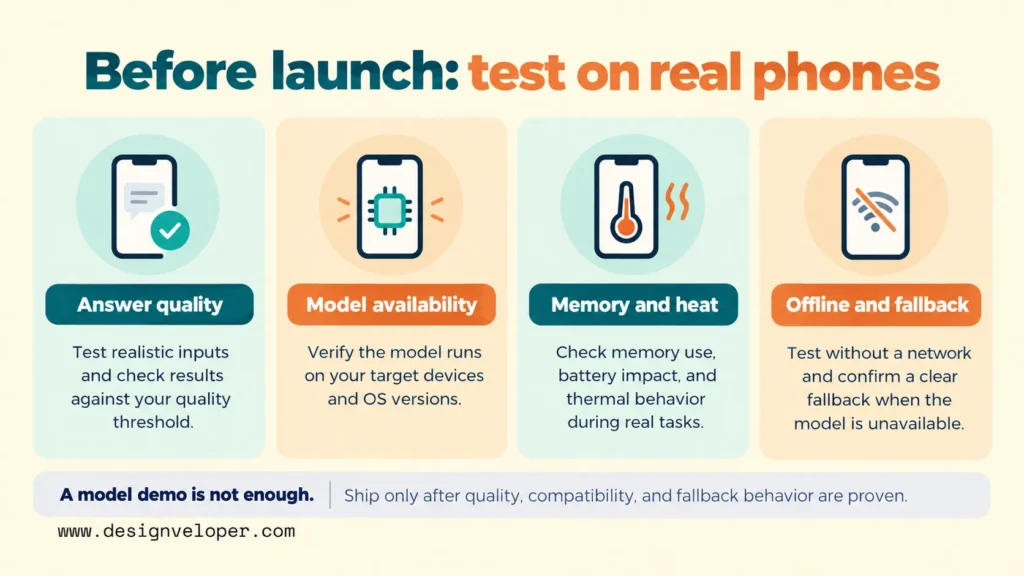
- Test performance and failures on representative devices. Include older supported phones, low-memory conditions, different operating system versions, and poor connections. Measure first response time, repeated response time, battery use, memory pressure, and sustained thermal behavior. Try denied permissions, model download failures, and interrupted requests. Check that the app can recover without losing user input or silently uploading it.
- Plan model delivery, updates, and monitoring. Decide whether to bundle a model or download it after installation. Account for storage, version compatibility, rollback, and the user’s network limits. Monitor errors and timing without collecting raw prompts by default. When a cloud path exists, track its usage separately from local inference. Review quality against a stable test set whenever a model, prompt, or runtime changes.
Testing should also cover the app around the model. Camera and microphone permissions must match the feature’s purpose. Logs should avoid sensitive payloads, and stored inputs should follow a clear deletion policy. Where a cloud fallback exists, the app should tell users which data leaves the device. A promise that the model runs locally is not enough to describe the product’s privacy behavior.
Our custom mobile app development process covers the broader stages of defining, testing, releasing, and supporting an app. For an AI feature, we recommend one added acceptance checkpoint. Demonstrate the task on the least capable supported phone, with the network disabled and the fallback visible. This is our editorial recommendation, not evidence of a shipped on-device AI project.
If your team needs an iOS or Android release plan, our mobile app development services offer a starting point for scoping the work. Bring the task, target devices, privacy rule, and desired fallback. These inputs make the technical discussion more specific than a general request for on-device AI.
The final choice should follow the test results. Ship local-only AI when supported devices deliver the required quality and the offline path covers user needs. Add a cloud option only when it solves a real capability or coverage gap and users understand the data transfer. If neither path meets the task’s quality threshold, keep the ordinary app workflow and revise the AI feature before launch.
Also published on

Share post on










Related Articles


On-Device AI For Mobile Apps And When A Hybrid Setup Fits Best
On-Device AI For Mobile Apps And When A Hybrid Setup Fits Best Published October 23, 2026
How To Make The Build Vs Buy Software Decision With Confidence
How To Make The Build Vs Buy Software Decision With Confidence Published October 23, 2026
AI Implementation Roadmap For SMEs: From Pilot To Business Value
AI Implementation Roadmap For SMEs: From Pilot To Business Value Published October 23, 2026


















