
















User Stories In Agile: Examples, Template, And Practical Writing Tips

KEY TAKEAWAYS:
- User stories are short, user-centered descriptions of product value that help Agile teams turn broad ideas into clear, testable work items.
- A strong user story connects who the user is, what they want, and why it matters, then backs that up with practical acceptance criteria.
- Good user stories improve backlog refinement, sprint planning, and cross-team collaboration because everyone can discuss the same unit of value in plain language.
- The most effective stories stay small, specific, and user-focused instead of becoming vague feature requests or technical implementation notes.
User stories are something teams can’t ignore when implementing Agile. They help product teams understand real user demands and decide which features or functionality actually deserve to be built into a digital product.
If the team still struggles to write effective stories, this guide breaks the process down with practical Agile software development context, clear templates, and real examples of user stories in Agile development.
- The essentials of Agile user stories, including their definition, benefits, and core components
- Practical examples of user stories in Agile teams
- Step-by-step guidance and best practices for writing effective user stories
What Are Agile User Stories?
Agile user stories are short descriptions of something a user wants from the user’s perspective. The common format looks like this:
Related articles:
- What Is An Agile Framework? Definition, Types And Examples
- What Is SCRUM And How Does It Work?
- The 12 Agile Principles and 4 Agile Values of the Agile Manifesto
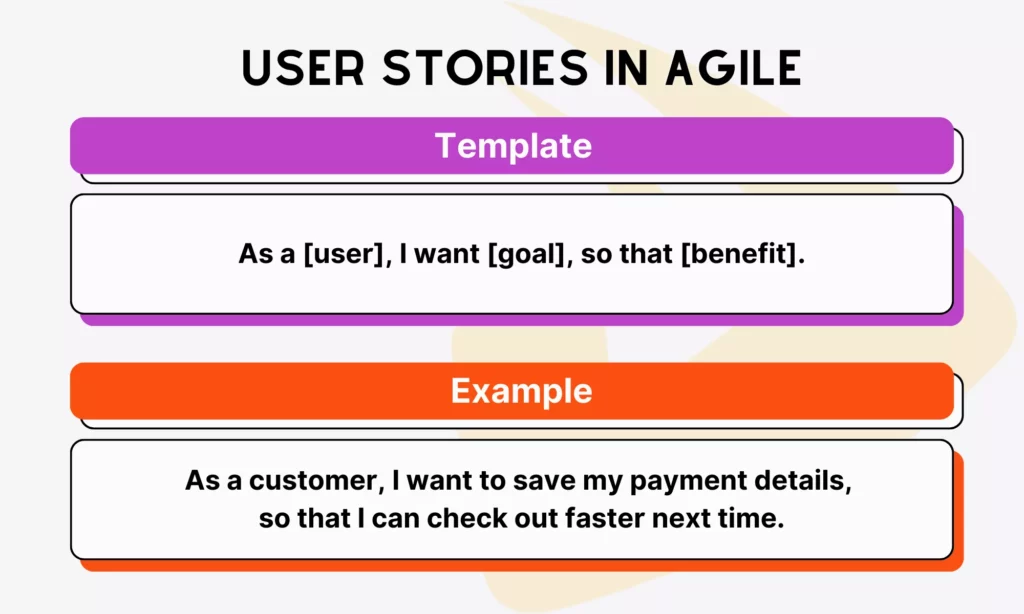
“As a [user], I want [goal], so that [benefit].”
For example: As a customer, I want to save my payment details so that I can check out faster next time.
From the perspective of Agile teams, user stories are small units of work that help teams build products in a way that actually delivers value to target users. Instead of writing long, rigid requirements, teams focus on what the product should do and why it matters.
A story should answer three basic questions. Who benefits from this feature? What does that person want to do? Why is that outcome important? If a story cannot answer those questions clearly, it is usually not ready for development yet.
Why User Stories Are Important in Agile Development
User stories may be short, but they shape how development teams plan, discuss, and deliver work. They help teams stay aligned and reduce the risk of building the wrong thing.
That value becomes easier to see when teams look at the broader delivery context. According to Digital.ai, 71% of survey respondents said they use Agile in their software development lifecycle. At the same time, PMI has highlighted how poor requirements management can directly contribute to project failure. Clear user stories help teams reduce that ambiguity early.
Below are some visible benefits of writing Agile user stories:
- Breaking down large features into manageable tasks
A big idea like “build an ecommerce platform” cannot be completed in one motion or in one sprint. Teams need to break it into smaller, workable pieces and build those incrementally.
User stories help with that decomposition. They turn broad ideas into small units the team can estimate, assign, and complete without losing sight of the larger feature.
User story: “As a shopper, I want to check out without creating an account so that I can place my order faster.”
Task: Develop the guest checkout flow
- Keeping development focused on user value
User stories constantly remind the team who they are building for and why. Instead of getting lost in technical detail, developers can keep asking whether a feature really helps the user.
- Encouraging collaboration between stakeholders and teams
Because user stories are simple and readable, they create a shared language between product owners, developers, designers, and stakeholders. That makes discussions clearer and reduces misunderstandings later.
- Supporting sprint planning and backlog refinement
User stories also give structure to the backlog. Since everything is broken into consistent units, the team can prioritize, estimate, and refine work more effectively during Agile sprint cycles and planning sessions.
See more:
- Agile Vs Scrum: What’s the Difference and When to Use Each?
- Story Points in Agile and How to Estimate Them Effectively
- Jira And Agile: How To Use Jira For Agile Project Management
Key Components Of A User Story
To write useful stories, teams need to understand the structure behind them. A good user story is simple on the surface, but each part plays a specific role in keeping work clear and actionable.
Role (“As a [user]”)
This part identifies who the story is for. It could be a customer, an admin, a guest user, or another clear persona. The more specific the role, the easier it is for the team to understand context. “As a returning customer” usually gives better direction than simply “As a user.”
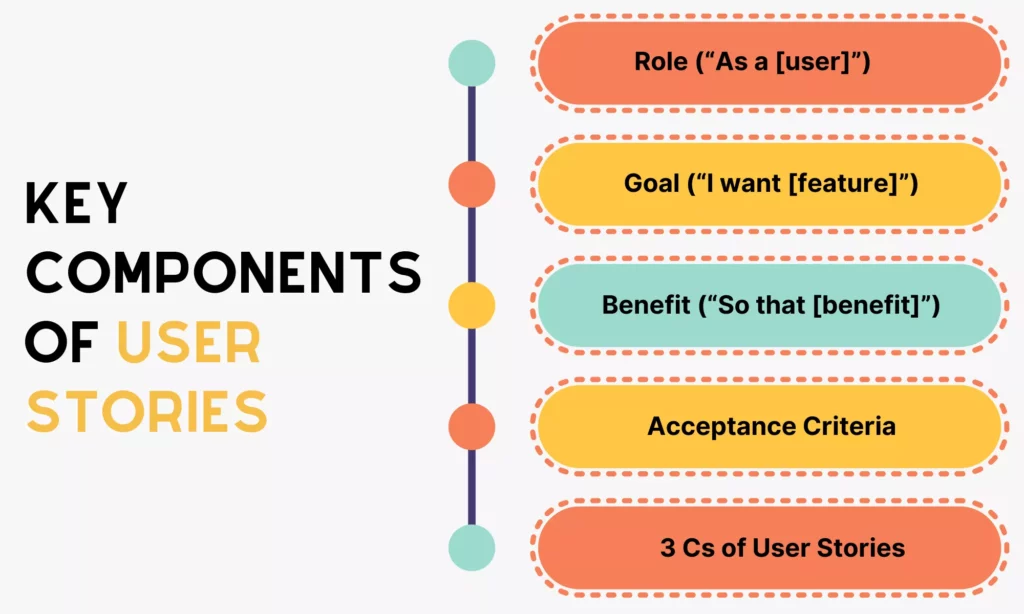
Together, these components turn a broad request into a story the team can discuss, build, and test.
Goal (“I want [feature]”)
This is where the story describes what the user wants to do. It should stay focused on one action, capability, or feature rather than covering many different things at once.
Benefit (“So that [benefit]”)
This part explains why the feature matters. It connects the request to a real outcome, which keeps the whole team aligned on value instead of just output.
Acceptance Criteria
While the user story captures the idea, acceptance criteria define the conditions that must be met before the story is considered complete. These conditions reduce ambiguity and help everyone interpret the same story in the same way.
For example, below are some acceptance criteria for the story: “As a shopper, I want to check out without creating an account so that I can place my order faster.”
- Shoppers can proceed to checkout without creating an account.
- Shoppers can enter required information such as name, shipping address, email, and payment details during checkout.
- The system validates all required fields before allowing the user to place an order.
- Shoppers can successfully complete payment without creating an account.
- An order confirmation message appears after successful checkout.
The 3 Cs of User Stories
Teams also often use the “3 Cs” framework when discussing user stories. It helps them remember that a story is more than one sentence in the backlog.
- Card: The written story itself, kept short and simple.
- Conversation: The discussion around the story, where the team clarifies details, risks, and assumptions.
- Confirmation: The acceptance criteria or tests that confirm the story has been implemented correctly.
Together, these three elements show that a user story is not something the team writes once and forgets. It is an ongoing process of understanding, building, and validating through collaboration.
Further reading:
- What Is an Epic in Agile? How to Write It (Guide & Examples)
- What Is Agile Acceptance Criteria? Definition, Examples
- Agile Methodology Sample: Real Examples & Success Stories
How To Write User Stories In Agile
The basic template looks easy enough: As a [who], I want [what], so that [why]. But writing a good user story still takes practice. Strong stories are clear and actionable. Weak stories are vague, technical, or written from the wrong perspective.
The comparison below makes that difference easier to spot.
| ✅ Good User Story | ❌ Poor User Story |
| As a shopper, I want pages to load within 2 seconds so that I can browse products without frustration | As a user, I want better performance. |
| As an admin, I want reports to generate quickly so that I can make timely decisions | As a product owner, I want the app to process data faster |
| As a user, I want to log in using my email and password so that I can access my account securely | Add a login feature |
| As a new user, I want a simple onboarding screen so that I can understand how to use the app quickly | Improve UI |
The weaker examples are too unclear or come from the wrong viewpoint. The stronger ones are specific, user-focused, and outcome-driven.
Best Practices For Writing Effective User Stories
Knowing the format helps teams start. Writing better stories requires a few practical habits that keep the backlog clean and usable.
- Start from the user’s perspective

User stories should not be written from the angle of the developer or product owner. Their job is to clarify who the product serves and what that person gains from the feature.
❌ As a developer, I want to refactor the codebase
✅ As a user, I want the app to load faster so that I can complete tasks without delays
- Keep stories small and focused
One story should aim at one clear goal. Smaller stories are easier to estimate, test, and complete within a sprint. If a story contains too many actions or outcomes, it should be split.
- Avoid technical implementation details
User stories should describe what the user needs, not how the team will build it. Frameworks, APIs, and database structures belong in technical discussions, not in the story itself.
- Collaborate with stakeholders and developers
Stories are stronger when product owners, developers, designers, and stakeholders shape them together. That collaboration exposes gaps, edge cases, and better approaches earlier.
- Continuously refine stories during backlog grooming
User stories are not static. During backlog refinement, teams revisit them, clarify details, and adjust priorities so the backlog stays relevant and ready for upcoming work.
Examples Of User Stories In Agile Development
To make the format more concrete, imagine a team that wants to improve the online shopping checkout experience of an ecommerce platform. In that case, the broader initiative can be framed as an epic, and the actual deliverable work appears as user stories underneath it.
Below is the checkout epic, along with corresponding user stories and acceptance-style task details:
Epic: Build a seamless and fast checkout process for an ecommerce platform.
| User Story | Corresponding Tasks |
| As a shopper, I want to check out without creating an account so that I can place my order faster. | – A “Guest Checkout” option is visible on the cart or checkout page – Users can proceed without logging in or creating an account – Required fields including name, email, shipping address, and payment details must be completed before placing an order – An order confirmation page is displayed after successful payment – A confirmation email is sent to the provided email address |
| As a returning customer, I want to save my payment details so that I can check out faster next time. | – Users can choose to save payment details during checkout – Payment information is stored securely, not as plain text – Saved payment methods are shown for selection in future checkouts – Users can update or delete saved payment methods – The system requires authentication before showing saved payment details |
| As a shopper, I want to review my order before payment so that I can make sure everything is correct. | – The order summary displays items, quantities, prices, and total cost – Shipping fees and final total are clearly calculated and shown – Users can edit quantities or remove items from the summary page – The total price updates automatically when changes are made |
| As a shopper, I want to apply a discount code so that I can reduce my total purchase cost. | – Users can enter a discount code during checkout – The system validates the code and applies the discount if valid – The updated total reflects the applied discount – An error message appears for invalid or expired codes |
User Stories vs. Use Cases: Key Differences
At this point, some teams start wondering whether user stories are basically the same as use cases. They overlap in some ways, but they serve different purposes and use different levels of detail.
| Aspect | User Stories | Use Cases |
| Purpose | Capture user needs in a simple, value-focused way | Describe detailed interactions between a user and the system |
| Format | Short and concise Example: “As a shopper, I want to save my cart so that I can check out later.” | More structured and detailed Example: Actor: Shopper Flow: User adds item → system updates cart → user proceeds to checkout |
| Who writes them | Typically product owners, business analysts, or Agile teams collaboratively | Usually business analysts or system analysts |
| When to use them in Agile projects | Used throughout Agile development for backlog creation, sprint planning, and iteration | Used when more detail is needed for complex features or edge cases |
Tools And Automation For Managing User Stories
Small teams can manage user stories in simple documents or spreadsheets. But once the backlog grows, most teams need dedicated tools to organize stories, track refinement, and keep sprint work visible.
Some popular options include Atlassian Jira, Microsoft Azure DevOps, and ClickUp. Each helps teams connect stories to boards, refinement, planning, and reporting in slightly different ways.
FAQs About User Stories In Agile
Who Writes User Stories?
Product owners often write user stories, but they rarely do it alone. In Agile teams, writing user stories is usually a collaborative effort that includes developers, designers, QA engineers, and sometimes business stakeholders.
Does The Product Owner Write User Stories?
Yes, but not alone. The product owner is typically responsible for ensuring stories exist, are clear, and are prioritized in the backlog, but the team often co-creates them during refinement sessions.
When Are User Stories Written?
User stories can be written at several stages of Agile development.
- Sprint Planning: Before each sprint, teams break larger work into smaller, actionable user stories and check whether those stories are ready for the sprint backlog.
- Backlog Refinement Sessions: Throughout the project, Agile teams regularly revisit and refine stories.
- On-Demand: New stories can emerge later when stakeholders give feedback, new requirements appear, or testing uncovers product gaps.
What Are Acceptance Criteria In User Stories?
Acceptance criteria are the conditions that a user story must meet before it is considered complete. They act as a checklist of clear, specific, and testable expectations so the team can agree on what “done” actually means.
How Do User Stories Connect To Epics?
User stories are usually the smaller, deliverable pieces inside a broader epic. The epic captures the larger product objective, while individual stories describe the specific user-facing outcomes needed to move that objective forward.
Conclusion
User stories help Agile teams turn product ideas into small, understandable units of value. When written well, they improve planning, reduce ambiguity, and keep teams focused on what actually helps users.
That matters even more in broader custom software development work, where backlog clarity and delivery rhythm directly affect product quality. A team that writes cleaner stories usually makes better sprint decisions and creates stronger product momentum over time.
At Designveloper, that planning discipline is part of how product delivery stays practical and user-focused across web, mobile, and AI-powered software work. If your team needs a stronger bridge between product thinking and implementation, our software development services can help turn requirements into a delivery flow that is easier to refine, estimate, and ship.
Also published on

Share post on










Related Articles



Android App Development: Stack, Process, Cost, And Best Practices
Android App Development: Stack, Process, Cost, And Best Practices Published September 17, 2026
Cloud Application Development: Architecture, Process, And Cost
Cloud Application Development: Architecture, Process, And Cost Published September 14, 2026
How Gitignore Works: Rules, Patterns, Examples, And Debugging Tips
How Gitignore Works: Rules, Patterns, Examples, And Debugging Tips Published August 05, 2026



















