
















What Are Enterprise Applications? How They Support Business Operations

Enterprise applications are software systems that help an organization run complex, shared business processes across teams, data sources, and workflows. They connect work that would otherwise sit in separate tools, such as finance, customer management, supply chain, human resources, and analytics, so people can act on consistent information.
The important point is scale of coordination, not company size. A growing midsize business can need enterprise application software when approvals, permissions, integrations, reporting, or data control become too complex for spreadsheets and disconnected apps.
What Is An Enterprise Application?
An enterprise application is software that supports a business process across multiple users, roles, or departments and usually connects to other systems. IBM’s enterprise applications overview describes large-scale software used to streamline and automate organizational processes. Red Hat’s enterprise application guide also emphasizes shared information, coordinated tasks, security, and scale.
What makes an application “enterprise” is the operating burden it must handle. The system may need role-based access for many user types, integrations with databases and third-party services, reliable workflows, audit history, reporting, and controls for sensitive data. It also needs to keep working as users, transactions, and connected systems increase.
Enterprise applications are therefore not limited to global corporations. An organization can be relatively small and still need enterprise-grade behavior if one failure can stop payroll, block order fulfillment, expose sensitive records, or break a critical approval process. Here, “enterprise-grade” means support for the required users, controls, integrations, reliability, auditability, and workflow complexity. It is not a certification or fixed standard.
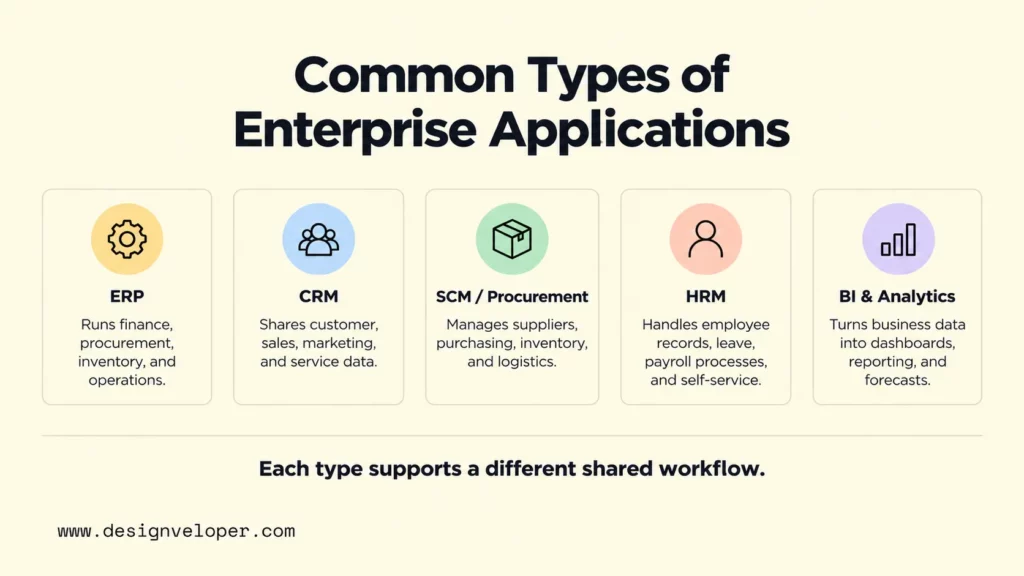
Common categories include enterprise resource planning (ERP), customer relationship management (CRM), supply chain management (SCM), human resources management (HRM), and business intelligence (BI). Some organizations use one broad suite. Others combine specialized applications and integrate them through APIs, data pipelines, or middleware.
Common Types Of Enterprise Applications
The main types of enterprise applications differ by the business process they coordinate. The useful question is not which category sounds most advanced, but which shared workflow and data problem the organization needs to control.
Enterprise Resource Planning Applications
ERP applications connect core operational and financial processes in one coordinated system. They commonly cover finance, accounting, procurement, inventory, manufacturing or operations, and related planning. SAP’s ERP guide describes ERP as a system that streamlines core processes and gives the organization a unified view of activity.
Examples include SAP ERP products, Oracle Fusion Cloud ERP, and NetSuite ERP. Their exact modules differ, so a buyer should compare the workflows that matter rather than treating all ERP suites as interchangeable. For example, a company with complex procurement may care more about approval, supplier, and inventory integration than a long feature list.
Customer Relationship Management Applications
CRM applications organize customer and prospect data so sales, marketing, service, and related teams can work from a shared record. Salesforce’s CRM explanation covers customer interactions across the lifecycle, including sales, marketing, commerce, and service.
Salesforce, HubSpot, and Microsoft Dynamics 365 are current CRM examples. Their product scope differs, but the core business problem is similar: keep customer information and activity usable across teams instead of scattering it across inboxes, spreadsheets, and local tools. Our guide to customer relationship management explains the category in more detail for readers comparing CRM use cases and selection factors.
Supply Chain And Procurement Applications
Supply chain and procurement applications coordinate how an organization plans demand, buys goods or services, manages suppliers, tracks inventory, and moves products through logistics. They reduce the gap between a purchasing decision and its downstream effects on stock, production, delivery, and cost.
Oracle Fusion Cloud Supply Chain and Manufacturing, for example, includes supply planning, procurement, manufacturing, inventory, order management, warehouse management, and transportation capabilities. A manufacturer may use that breadth to connect demand planning with production and fulfillment. A services company may need a much narrower procurement workflow.
Human Resources Management Applications
HRM applications manage employee information and the workflows around employment. Typical functions include employee records, onboarding, payroll or payroll integration, time and leave, performance management, and employee self-service.
An HR system becomes especially valuable when one change must propagate across several processes. A new hire, for example, may trigger account creation, policy acknowledgements, payroll setup, leave rules, and manager approvals. A shared application reduces repeated entry and gives each role controlled access to the same underlying record.
One example from our public portfolio is our HRM application project. We describe employee self-service for leave and remote-work requests, timesheets, work logs, calendars, and project resource allocation. The useful lesson is that HRM value comes from connecting employee actions with HR administration, not simply digitizing a paper form.
Business Intelligence And Analytics Applications
Business intelligence and analytics applications turn operational data into reports, dashboards, forecasts, and decision support. Their job is not to replace ERP, CRM, or other systems of record. Instead, they help people interpret data from those systems and compare performance across time, teams, products, or locations.
Microsoft Power BI is one current example of an enterprise BI platform that connects governed data and interactive insights. Readers who want practical scenarios can also use our business intelligence examples as a starting point for thinking about where analytics can support operations.
How Enterprise Applications Support Business Operations
Enterprise applications support operations by giving shared processes a consistent system for data, rules, and handoffs. That changes how work moves through the organization. Instead of each department keeping its own version of a customer, order, employee, or supplier record, connected applications can pass the right data to the next step.
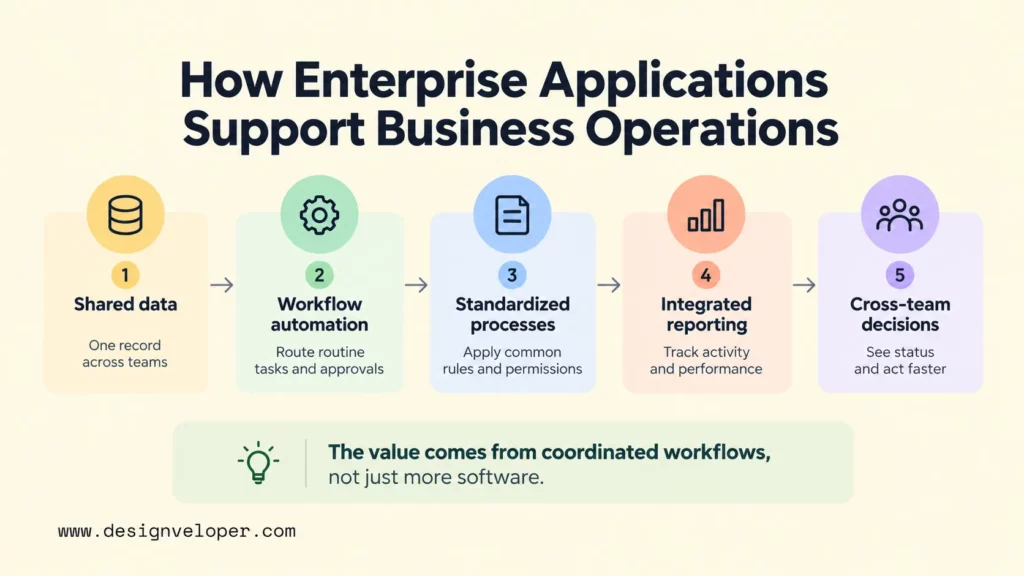
Automation is one part of that support. Repetitive work such as routing an approval, creating a task after a status change, validating required fields, or notifying another team can move through a defined workflow. The goal is not to remove every human decision. It is to reserve human attention for exceptions and judgment while the system handles predictable steps.
Standardization is another benefit. When a process runs through one controlled application, the organization can define required fields, approval levels, calculation rules, and audit events once. That makes it easier to compare results and identify where a process actually breaks, because teams are no longer using entirely different procedures for the same task.
Integrated reporting then turns operational activity into a management signal. A finance team can see purchasing commitments before invoices arrive. A customer service team can view account history without asking sales for a separate export. An operations manager can compare inventory, orders, and fulfillment status without reconciling several spreadsheets first.
The strongest enterprise architecture does not require every function to live in one product. A business can use specialized applications as long as data ownership, integration rules, identifiers, permissions, and failure handling are clear. A smaller, well-integrated system landscape can be more useful than a large suite that teams bypass with manual workarounds.
Benefits And Challenges Of Enterprise Applications
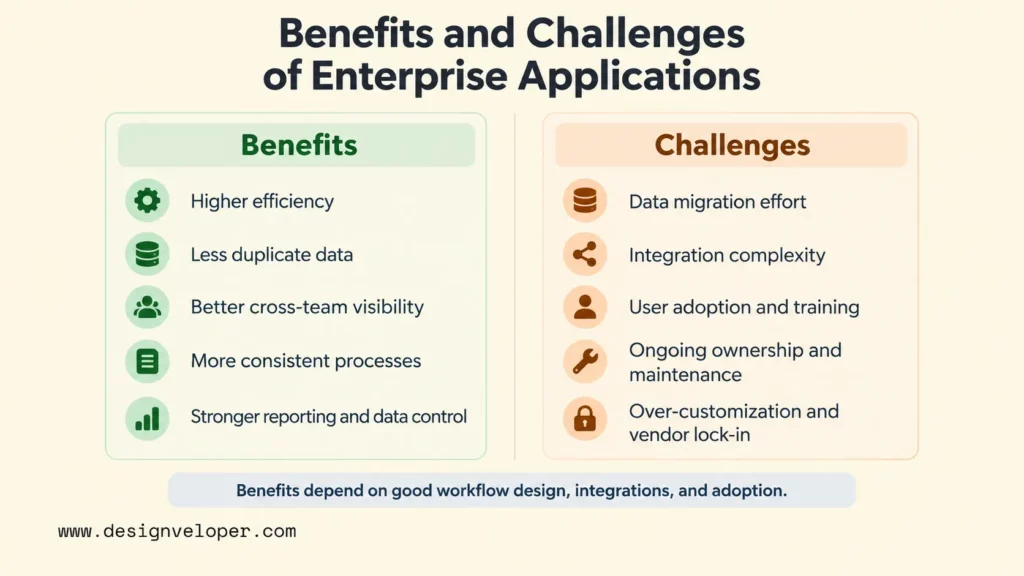
Enterprise applications can improve control and coordination, but they also concentrate important business dependencies. Their value depends on how well the chosen system fits real workflows and how carefully the organization handles migration, integration, adoption, and ongoing ownership.
Benefits Of Enterprise Application Software
Enterprise applications can improve efficiency and visibility when workflows, data ownership, integrations, and adoption are designed and maintained well. The gains come from reducing duplicated work and making process rules and data easier to share across teams.
- Higher operational efficiency: defined workflows can reduce repeated entry, manual routing, and reconciliation between teams.
- Less duplicate data: shared records and integrations can reduce the number of disconnected copies that people must update.
- Better cross-team visibility: authorized users can see the status and context needed for the next step instead of waiting for a separate report.
- More consistent processes: common rules, fields, and approval logic make work easier to audit and compare.
- Stronger reporting and data control: centralized or governed data gives analytics a clearer foundation and makes ownership easier to define.
These benefits reinforce one another. For example, reducing duplicate customer records does more than save data-entry time. It also makes service history more complete, improves reporting, and reduces the chance that two teams act on conflicting information.
Challenges Of Enterprise Application Implementation
The hardest enterprise application problems usually appear at the boundaries between software and the existing business. Data may be incomplete or inconsistent. Legacy systems may expose weak integration options. Teams may depend on old exceptions that were never documented. A technically correct replacement can still fail if users cannot complete their daily work.
Implementation also creates cost beyond the software license or development budget. Organizations need time for process discovery, configuration, migration, integration, testing, training, support, and post-launch improvement. Vendor dependency can add another constraint if critical data models, workflows, or extensions are difficult to move later.
Over-customization is a related risk. Customizing every old process can preserve complexity that the new system was meant to remove. A better test is whether a workflow creates real business differentiation, satisfies a necessary control, or protects an important user need. If not, adopting the platform’s standard process may reduce long-term maintenance.
Security also needs explicit verification. Enterprise applications often hold sensitive customer, employee, financial, or operational data. For web-based systems, the OWASP Application Security Verification Standard provides a structured basis for testing technical security controls and defining security verification requirements. It should complement, not replace, threat modeling, access design, privacy work, and operational monitoring.
How To Choose And Implement An Enterprise Application
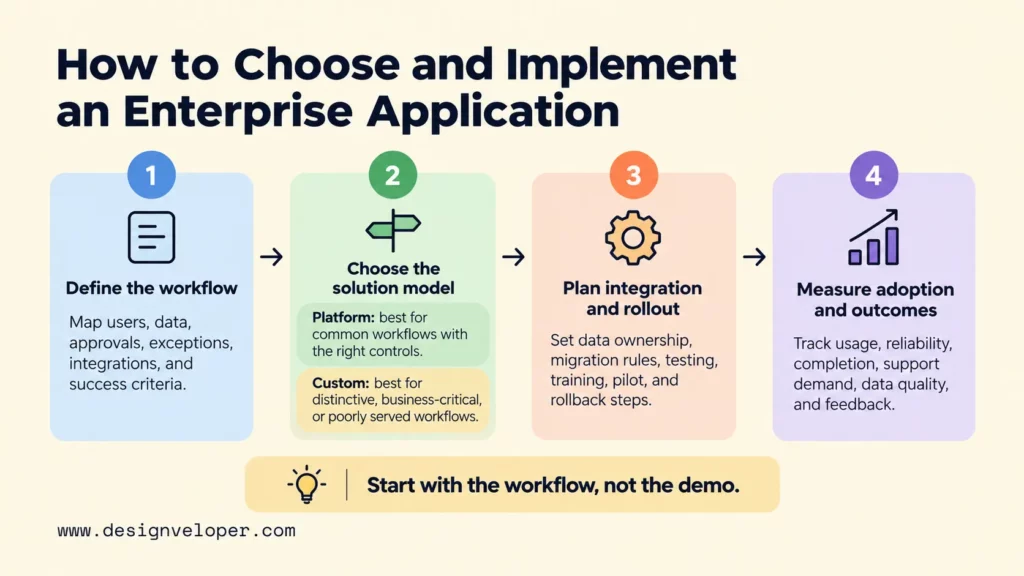
Choose an enterprise application by starting with the business process and measurable outcome, then testing platform fit, integration, migration, security, and adoption before committing to a broad rollout. A product demo is useful, but it cannot prove that the system will handle your data, exceptions, users, and operating constraints.
Define Business Processes And Requirements
Start with one workflow that needs improvement and map how it works today. Identify the people involved, the data they create or consume, approvals, exceptions, connected systems, reports, and security boundaries. This prevents a requirements list from becoming a catalogue of features with no link to the real process.
Then set success criteria that can be checked after launch. Useful measures depend on the workflow. They may include completion time, error rate, manual handoffs, adoption, support volume, data quality, system reliability, or operating cost. A requirement is stronger when the team can explain what better performance will look like.
Compare Existing Platforms And Custom Development
Use this decision rule: choose an existing platform when the workflow is common and the product supports the required controls. Consider custom development when the workflow is distinctive, business-critical, or poorly served by existing products. Use it only when the organization can own long-term maintenance.
An existing platform can reduce the amount of software the organization must build and maintain. ERP, CRM, HCM, and procurement suites may already provide mature workflows, administration, integrations, and vendor support. Configuration is usually the better fit when the standard process meets the real requirement.
Custom enterprise application development gives the organization more control over a specific workflow, but it also creates a longer ownership commitment. Compare cost, timeline, flexibility, integration effort, maintenance, internal skills, upgrade path, and vendor dependency. Our custom software development cost guide explains how project complexity, features, technology, timeline, customization, and scalability shape budgeting. Choose the model that fits the workflow, controls, integration boundaries, skills, and ownership horizon.
If your organization needs a custom workflow or legacy modernization, our web application development services cover custom application work and legacy backend modernization. We recommend treating integrations across enterprise systems as explicit requirements before architecture and build decisions, so data ownership and system boundaries are clear from the start.
Plan Integration, Migration, And Rollout
Integration and migration should be planned as product work, not treated as a final technical task. Decide which system owns each important record, how identifiers match, how data will be cleaned, what happens when an integration fails, and how teams will reconcile mismatches. Test with representative production-like data before the cutover.
Rollout should also protect business continuity. Pilot the highest-risk workflows with a controlled group, test permissions and edge cases, train users on the changed process, and define rollback or contingency steps. Our software migration lessons discuss readiness, phased deployment, integration testing, user acceptance testing, and data validation as separate workstreams rather than one launch-day event.
Measure Adoption And Business Outcomes
Launch is the start of measurement, not the end of implementation. Track whether people use the intended workflow, whether the system stays reliable, and whether the process outcome improves. Usage alone is not enough. A heavily used application can still add unnecessary steps or shift work into support queues.
Assign an owner who can review technical and business signals together. That owner should combine user feedback with measures such as workflow completion, failure rate, support demand, operating cost, data quality, and reliability. Review the results after each rollout phase and decide whether to simplify the process, improve training, fix integration issues, or change the product.
FAQs About Enterprise Applications
Can Small And Midsize Businesses Use Enterprise Applications?
Yes. Small and midsize businesses can use enterprise applications when they need shared workflows, controlled data, integrations, or reliable reporting across several roles. They do not need the largest suite. A focused CRM, payroll system, ERP module, or custom internal application may solve the real coordination problem with less cost and complexity.
Should Enterprise Applications Be Cloud-Based, On-Premises, Or Hybrid?
The deployment model should follow the organization’s constraints. Cloud-based software can reduce infrastructure ownership and speed access to managed services. On-premises deployment can remain appropriate where existing systems, data location, latency, or operational control make it necessary. Hybrid architecture connects both when a complete move is not practical.
The decision should compare data requirements, integration dependencies, reliability, internal skills, security responsibilities, upgrade needs, and total operating cost. Our cloud application development guide explains cloud-based, cloud-native, migrated legacy, and hybrid models in more detail.
How Do Enterprise Applications Integrate With Legacy Systems?
Enterprise applications usually integrate with legacy systems through APIs, middleware or integration platforms, event or message interfaces, and controlled file or batch transfers. The safest choice depends on what the legacy system exposes and how quickly data must move. Oracle’s ERP integration guidance, for example, documents adapters for connecting on-premises and third-party SaaS applications with Oracle Fusion Cloud ERP. The integration should define ownership, validation, retry behavior, monitoring, and reconciliation rather than only moving fields from one system to another.
A phased approach is often easier to control than replacing every legacy component at once. Teams can keep a stable system of record, expose selected functions through an interface, move one workflow, and retire old components only after the new path is proven. This reduces the number of unknowns in each migration step.
When Should A Company Build A Custom Enterprise Application?
A company should consider a custom enterprise application when a critical workflow is genuinely distinctive or existing products require excessive workarounds. It can also fit when configuration cannot safely meet important integration or control needs. The case becomes stronger when the workflow itself creates business advantage and the organization is prepared to fund long-term maintenance.
Do not build custom software only because current tools feel inconvenient. First test whether process simplification, better configuration, or a smaller integration can solve the problem. Build when the added control or differentiation justifies the cost of owning the software lifecycle.
Also published on

Share post on










Related Articles


What Are Enterprise Applications? How They Support Business Operations
What Are Enterprise Applications? How They Support Business Operations Published September 21, 2026
10 Best CRM Software Options For Small Businesses In 2026
10 Best CRM Software Options For Small Businesses In 2026 Published September 18, 2026
CMMS Meaning: What It Is, How It Works, And Why It Matters
CMMS Meaning: What It Is, How It Works, And Why It Matters Published September 16, 2026



















